<?xml version="1.0" encoding="utf-8"?>

<feed xmlns="http://www.w3.org/2005/Atom">
  <title>托码特人</title>
  <icon>https://tomartisan.com/favicon.svg</icon>
  <subtitle>分享技术与人文的科技博客</subtitle>
  <link href="https://tomartisan.com/atom.xml" rel="self"/>
  
  <link href="https://tomartisan.com/"/>
  <updated>2026-03-31T11:19:29.496Z</updated>
  <id>https://tomartisan.com/</id>
  
  <author>
    <name>托码斯(@tomartisan)</name>
    
  </author>
  
  <generator uri="https://hexo.io/">Hexo</generator>
  
  <entry>
    <title>AI不是万能的</title>
    <link href="https://tomartisan.com/ditech/ai-is-not-everything/"/>
    <id>https://tomartisan.com/ditech/ai-is-not-everything/</id>
    <published>2024-10-31T05:03:08.000Z</published>
    <updated>2026-03-31T11:19:29.496Z</updated>
    
    <content type="html"><![CDATA[<p>前两天跟朋友闲聊，发现除了日常工作外，生活中也处处离不开 AI 了。举两个例子吧：</p><ol><li>讲故事：家里有俩小爱音响，小孩喜欢睡前听故事，不过当前版本的小爱童鞋说实话挺不聪明，几乎不具备瞎扯编故事的能力。所以只能打开如豆包之类的 APP 满足此需求；</li><li>查资料：以前啊，找个信息基本上只能靠搜索引擎的框框，人肉提取总结其反馈的结果。现在呢，有事问 AI…尽管结果可能不那么准确，但大多数时候还是靠谱的；</li></ol><p><strong>而且问 AI 还能有效避免广告的干扰，这要比百度一下体验好太多</strong>。没有广告影响，恐怕主要也是现阶段 AI 工具变现手段厂商们还没怎么想明白。不过这并不重要，能白嫖就赶紧用起来…</p><h2 id="但，AI-并不是万能的"><a href="#但，AI-并不是万能的" class="headerlink" title="但，AI 并不是万能的"></a>但，AI 并不是万能的</h2><p>至少现阶段、乃至未来 3、5 年内，这并非只是技术上的瓶颈所致。我认为在 AI 完全取代人力之前，“伦理”问题一定要先解决掉，这可能就涉及到立法层面了，尤其是对于特殊的地区。</p><p>当然，本文并不打算扯这些有的没的。我想从编程这块，聊聊我认为<a href="https://tomartisan.com/ditech/ai-is-not-everything/">为什么 AI 不是万能的</a>。如你正好高度依赖 AI 工具去写码，这或许值得探讨…</p><p>前两天，我把一工程的<code>gulp</code>由 v4.x 升级到了 v5.x，然后你猜怎么着？在处理图片压缩的任务时，<code>gulp-imagemin</code>扔出了：<code>Minified 0 images (gulp-imagemin 9.1.0)</code>的提示…严格来说，这并不是错误！<br>起初，我以为是<code>gulp-cache</code>这货所致，于是各种排查。甚至清理了缓存，不过依旧没什么卵用…</p><pre><code class="hljs typescript"><span class="hljs-keyword">import</span> gulp <span class="hljs-keyword">from</span> <span class="hljs-string">&quot;gulp&quot;</span>;<span class="hljs-keyword">import</span> cache <span class="hljs-keyword">from</span> <span class="hljs-string">&quot;gulp-cache&quot;</span>;gulp.<span class="hljs-title function_">task</span>(<span class="hljs-string">&quot;clear&quot;</span>, <span class="hljs-function">() =&gt;</span>  cache.<span class="hljs-title function_">clearAll</span>(<span class="hljs-function">(<span class="hljs-params">error</span>) =&gt;</span> &#123;    <span class="hljs-variable language_">console</span>.<span class="hljs-title function_">warn</span>(<span class="hljs-string">&quot;clearCache error&quot;</span>, error);  &#125;),);</code></pre><p>然后，我就开始问<code>claude.ai</code>和<code>Cursor</code>（自带对撩）。反正吧，它们就是不承认自己真的不知道，就各种猜测，然后呢我根据线索逐个排查，都快把人整崩溃了还是不行。放弃问 AI 后，我去该项目的<a href="https://github.com/imagemin/imagemin/issues/418">github issues</a>顺利找到了解法…</p><p><strong>通过这个小 Case，我意识到对于代码查错而言，先问 AI 并不是最优解，甚至可能是最差的</strong>。毕竟市面上新发布的工具都充满各种噱头，总让人误以为那是最优途径，于是真遇到问题，就顺势“偷懒”掉坑里了…<u>这些工具能发挥的威力，跟正确提问和其训练的数据密不可分。</u></p><p>这里没有调侃的意思，只是说对于特定场景，AI 并不是万能的。<strong>如果在项目遇到问题后，第一时间 Google 一下可能更合适</strong>，当然如果用的开源内裤，直接去根上找也是极好的选择…</p><p>对此，我在<a href="https://tomartisan.com/prodev/debugging-nextjs-api-endpoints-using-cursor/">这篇文章</a>里也提到这个观点</p><h2 id="如何发挥-AI-的效用"><a href="#如何发挥-AI-的效用" class="headerlink" title="如何发挥 AI 的效用"></a>如何发挥 AI 的效用</h2><blockquote><p>对于具体的编程问题，尤其是纠错方面，AI 很可能会给出干扰结果。这主要是因为训练数据更新不会那么及时，当它不知道时，也并不会谦虚的跟你讲！</p></blockquote><p>而在以下这些场景，我认为能够非常有效的发挥 AI 效用，并能让人获益匪浅：</p><ul><li>1、<strong>总结提效</strong>：这没什么好说的，现在是个 AI 主打的应用，都具备这方面能力。当然不同的大模型训练重点不同，最终效果也会不同！对于普通用户而言，只需用对、用好足矣；</li><li>2、<strong>寻求意见</strong>：当你有一个模糊的想法，但自己不太能捋清楚，此时可以尝试跟 AI 聊下。就想象力这块而言，AI 还是比普通人强太多，毕竟主流大模型的阅读量都是超出常人的；</li><li>3、<strong>探索新知</strong>：这是我今年以来，最常用的点。面对未知，AI 总能从已知中找到合适的途径和信息，从而避免人肉学习走弯路，这在快速入门一项技能或学习一个新的领域非常有效。</li></ul><h2 id="不同领域-场景下的姿势"><a href="#不同领域-场景下的姿势" class="headerlink" title="不同领域&#x2F;场景下的姿势"></a>不同领域&#x2F;场景下的姿势</h2><blockquote><p>👇 以下内容分享自一段先前看到的干货：AI 降本增效，一开始最好简单粗暴</p></blockquote><p>差生文具多，如果要做优等生，先得抛弃对工具无休止的追逐。<br>哪怕是 AI 博主，也应该回归基本，主动熵减，把日常使用的 AI 工具控制在 20 个以内。<br>我的工作场景主要围绕 AI 职场办公，智能体开发和媒体制作。如果按付费意愿，真正会坚持用的会有以下几个：（无广）</p><h3 id="1-主力-AI-模型"><a href="#1-主力-AI-模型" class="headerlink" title="1. 主力 AI 模型"></a>1. 主力 AI 模型</h3><blockquote><p>GPT+Claude</p></blockquote><p>平替：豆包+文小言（移动版）+kimi</p><p>GPT 越来越有被 Claude 替代的趋势，尤其是代码。但是 GPTs 还是增强了我的使用粘性。豆包的 TTS 语音国内无法被替代。文小言有一些我喜欢的功能，比如信息聚合订阅。</p><h3 id="2-主力-IM"><a href="#2-主力-IM" class="headerlink" title="2. 主力 IM"></a>2. 主力 IM</h3><blockquote><p>飞书</p></blockquote><p>平替：Notion+企微</p><p>我知道 Notion 很强。但是鉴于复杂的操作+国内网络不稳定+数据安全是真不太喜欢用。<br>创业以来我觉得最值得投入学习时间的并不是任何一款 AI 软件，而是飞书本身。好的 SaaS 就是最佳实践的产品化。企微是出于私域+客户对公不得不用。</p><h3 id="3-数据分析"><a href="#3-数据分析" class="headerlink" title="3. 数据分析"></a>3. 数据分析</h3><blockquote><p>Excel+GPT+各平台数据看板</p></blockquote><p>平替：飞书多维表单</p><p>Excel 没有平替。AI 只是帮我解锁高阶功能，比如 VBA 和宏。多维表单的插件生态值得投入时间学习。</p><h3 id="4-设计"><a href="#4-设计" class="headerlink" title="4. 设计"></a>4. 设计</h3><blockquote><p>Midjourney+ideagram</p></blockquote><p>平替：Canvas+稿定设计+佐糖</p><p>比起 Mj，Ideagram 的出图更具场景感，配合简单工具出海报+商图+封面+运营位都很方便。</p><h3 id="5-PPT"><a href="#5-PPT" class="headerlink" title="5. PPT"></a>5. PPT</h3><blockquote><p>PPT+islide 插件+彩璇 PPT</p></blockquote><p>平替：Gamma，aippt</p><p>目前没有同时满足不要钱、支持定制模板、不科学上网、智能还可控性强的方案。但是 PPT+islide 已经增效超过 50%。Gamma 是应急神器。彩璇 PPT 比较小众，是一个方便做课件分享+编辑的平台，对咨询师&#x2F;老师有刚需。</p><h3 id="6-剪辑"><a href="#6-剪辑" class="headerlink" title="6. 剪辑"></a>6. 剪辑</h3><blockquote><p>剪映（含 AI）+即梦 AI</p></blockquote><p>初学者够用，为了省事就用字节系的。</p><h3 id="7-文本创作"><a href="#7-文本创作" class="headerlink" title="7. 文本创作"></a>7. 文本创作</h3><blockquote><p>飞书文档+flomo+GPT</p></blockquote><p>平替：记事本</p><p>简单点好。如果开发一个支持 flomo api 导出直接 AI 生成标题&#x2F;思路&#x2F;文章大纲的工作流会不会有需求？</p><h3 id="8-智能体开发"><a href="#8-智能体开发" class="headerlink" title="8. 智能体开发"></a>8. 智能体开发</h3><blockquote><p>Coze&#x2F;Dify</p></blockquote><p>平替：百度智能体</p><p>目前还在钻研工作流场景。已经做了 20 多个 Bot。Coze&#x2F;Dify 各有千秋，百度则是打通了支付环节和数字人形象的交互。待继续钻研好和大家分享。</p><h3 id="9-代码辅助"><a href="#9-代码辅助" class="headerlink" title="9. 代码辅助"></a>9. 代码辅助</h3><blockquote><p>Cursor+Claude</p></blockquote><p>平替：字节豆包 Marscode</p><h3 id="10-工作流编排"><a href="#10-工作流编排" class="headerlink" title="10. 工作流编排"></a>10. 工作流编排</h3><blockquote><p>Coze+飞书+各类 Github（开源项目）</p></blockquote><p>通过飞书机器人平台把各类 BOT 接入到飞书群里。实现在 IM 办公软件中使用自己调试过的 AI 数字员工。</p>]]></content>
    
    
    <summary type="html">结合近一年来高频的各种AI工具使用体验，谈谈现阶段我对AI的看法，以及面对特定场景问题的一些解题思路。这不是一篇专门针对技术领域的文章，如你对AI使用存有疑惑，推荐一读。</summary>


    <category term="数智科技" scheme="https://tomartisan.com/categories/ditech/"/>
    
    
    <category term="随笔" scheme="https://tomartisan.com/tags/essay/"/>
    
    <category term="干货" scheme="https://tomartisan.com/tags/practicals/"/>
    
    <category term="人工智能" scheme="https://tomartisan.com/tags/ai/"/>
    
  </entry>
  
  <entry>
    <title>在Cursor中调试Nextjs的API</title>
    <link href="https://tomartisan.com/prodev/debugging-nextjs-api-endpoints-using-cursor/"/>
    <id>https://tomartisan.com/prodev/debugging-nextjs-api-endpoints-using-cursor/</id>
    <published>2024-09-24T00:31:04.000Z</published>
    <updated>2026-03-31T11:19:29.496Z</updated>
    
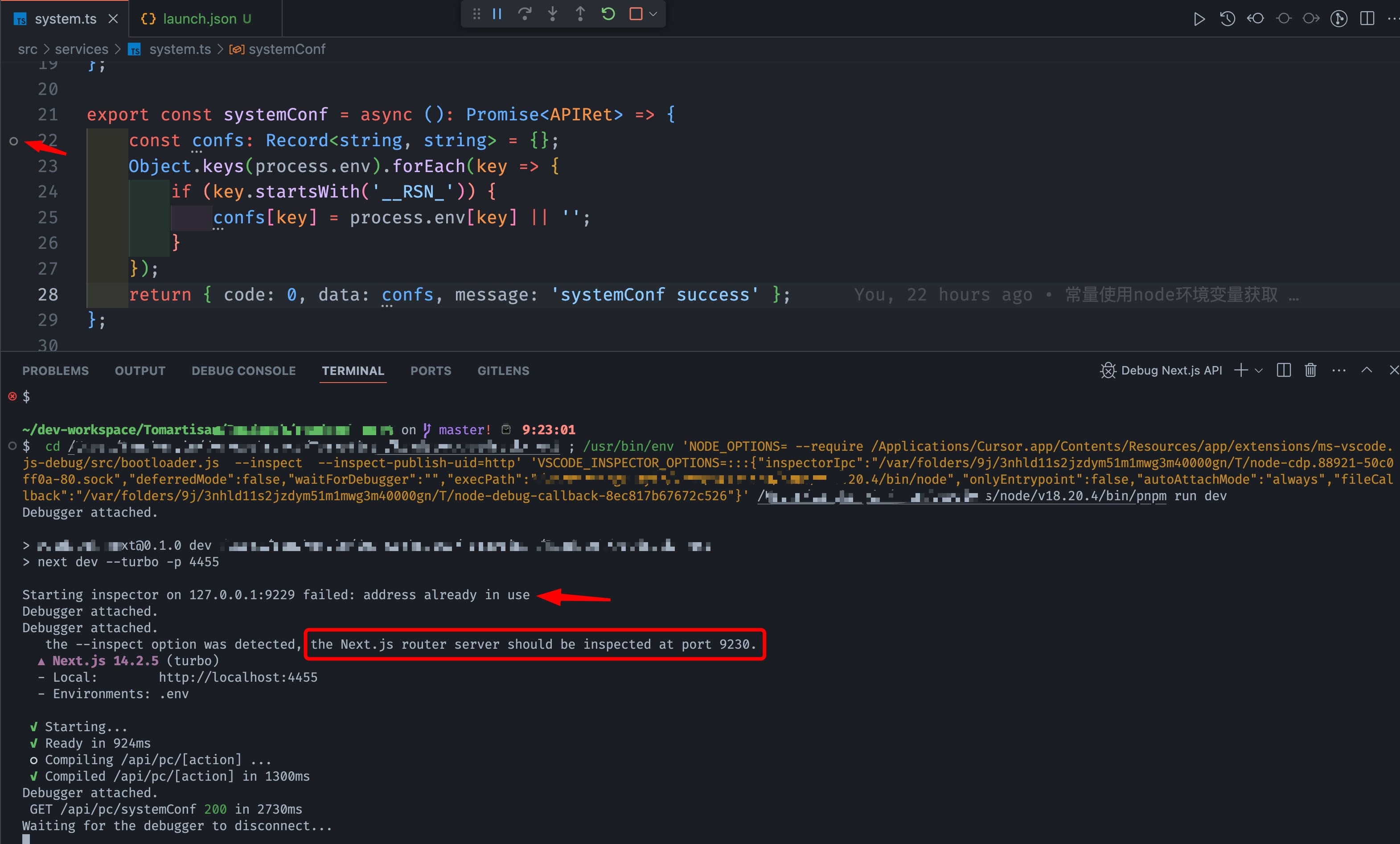
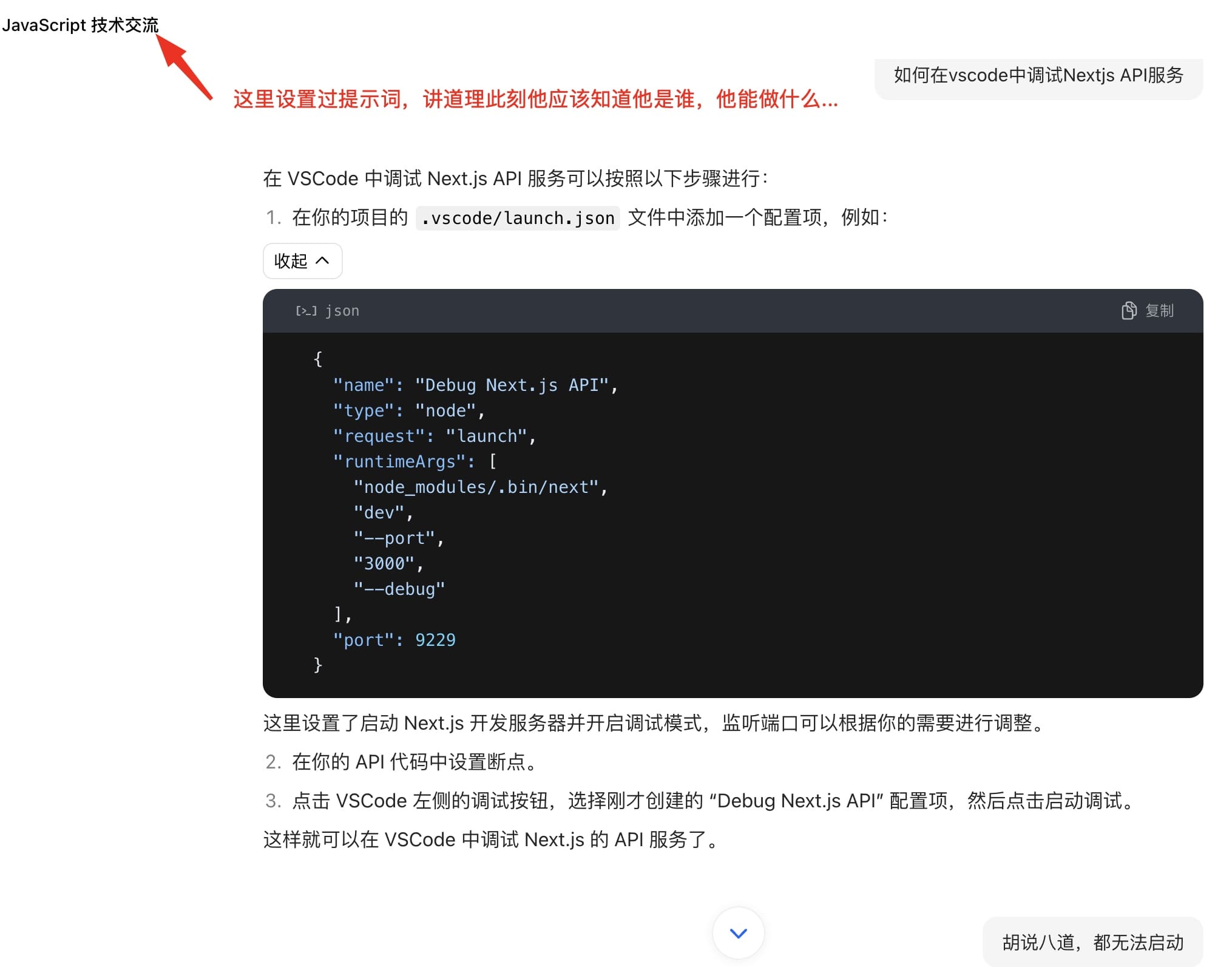
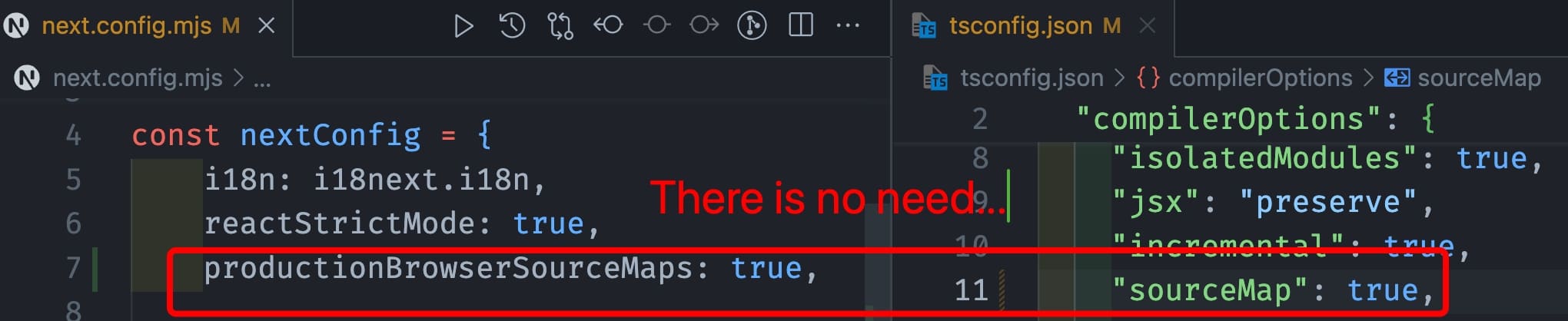
    <content type="html"><![CDATA[<p>近期在基于<code>Nextjs</code>做大模型的本地调试，由于<code>Hoppscotch</code>(原来叫：postwoman)一轮请求下来时间要好几秒、又不想到处丢日志信息，所以想着通过断点来调试关键语句…</p><p>自从<code>Cursor</code>出来之后，就逐渐从<code>VSCode</code>迁移过来了。本质上这俩工具就是一个玩意，只是前者针对 AI 编程全链路进行了深度优化…感兴趣的小伙伴可以看下<a href="https://docs.cursor.com/get-started/migrate-from-vscode">这篇文章</a></p><p>之前简单写过一篇<a href="https://tomartisan.com/prodev/debug-nodets-in-vscode/">vscode 中调试 node.ts</a>的文章，有需要可以结合起来看。</p><h2 id="问题和排查经过"><a href="#问题和排查经过" class="headerlink" title="问题和排查经过"></a>问题和排查经过</h2><p>当我按<code>claude</code>的建议添加了配置后：</p><pre><code class="hljs json"><span class="hljs-punctuation">&#123;</span>  <span class="hljs-attr">&quot;version&quot;</span><span class="hljs-punctuation">:</span> <span class="hljs-string">&quot;0.2.0&quot;</span><span class="hljs-punctuation">,</span>  <span class="hljs-attr">&quot;configurations&quot;</span><span class="hljs-punctuation">:</span> <span class="hljs-punctuation">[</span>    <span class="hljs-punctuation">&#123;</span>      <span class="hljs-attr">&quot;type&quot;</span><span class="hljs-punctuation">:</span> <span class="hljs-string">&quot;node&quot;</span><span class="hljs-punctuation">,</span>      <span class="hljs-attr">&quot;request&quot;</span><span class="hljs-punctuation">:</span> <span class="hljs-string">&quot;launch&quot;</span><span class="hljs-punctuation">,</span>      <span class="hljs-attr">&quot;name&quot;</span><span class="hljs-punctuation">:</span> <span class="hljs-string">&quot;Debug Next.js API&quot;</span><span class="hljs-punctuation">,</span>      <span class="hljs-attr">&quot;runtimeExecutable&quot;</span><span class="hljs-punctuation">:</span> <span class="hljs-string">&quot;pnpm&quot;</span><span class="hljs-punctuation">,</span>      <span class="hljs-attr">&quot;runtimeArgs&quot;</span><span class="hljs-punctuation">:</span> <span class="hljs-punctuation">[</span><span class="hljs-string">&quot;run&quot;</span><span class="hljs-punctuation">,</span> <span class="hljs-string">&quot;dev&quot;</span><span class="hljs-punctuation">]</span><span class="hljs-punctuation">,</span>      <span class="hljs-attr">&quot;env&quot;</span><span class="hljs-punctuation">:</span> <span class="hljs-punctuation">&#123;</span>        <span class="hljs-attr">&quot;NODE_OPTIONS&quot;</span><span class="hljs-punctuation">:</span> <span class="hljs-string">&quot;--inspect&quot;</span>      <span class="hljs-punctuation">&#125;</span><span class="hljs-punctuation">,</span>      <span class="hljs-attr">&quot;console&quot;</span><span class="hljs-punctuation">:</span> <span class="hljs-string">&quot;integratedTerminal&quot;</span>    <span class="hljs-punctuation">&#125;</span>  <span class="hljs-punctuation">]</span><span class="hljs-punctuation">&#125;</span></code></pre><p>我发现控制台启动时有一条显眼的提示：<strong>Starting inspector on 127.0.0.1:9229 failed: address already in use</strong></p><p><img src="/img/2024/17271411988584.jpg" alt="Next.js router server should be inspected at port 9230"></p><p>另外，编辑器添加断点的地方还有：<strong>Unbound breakpoint：Some of your breakpoints could not be set. If you’re having an issue, you can troubleshoot your launch configuration.</strong></p><p><img src="/img/2024/17271412881358.jpg" alt="Unbound breakpoint"></p><p>话说<a href="https://claude.ai/">claude</a>不是号称现阶段最聪明、最好用的 AI 编程大模型吗，难道连这点小事都搞不定！？于是我又分别问了<code>chatGPT</code>和<code>豆包</code></p><blockquote><p>豆包的回答倒是干脆利落，不过结果却是一本正经的胡说八道…</p></blockquote><p><img src="/img/2024/17271524885127.jpg" alt="问豆包：如何在vscode中调试Nextjs API服务"></p><p>我又多给了它几次机会，也试图把我的问题再描述清楚，直到它开始让我安装<code>npm</code>包去解决，我就不忍再直视了！<br>然后同样的话又再次问了<code>chatGPT</code>，不过同样没有正确的答案…</p><p>我突然意识到，<u>对于大模型第一时间不能给出的正确响应，再继续追问，能问到正确答案的概率也不高（因为往往给出一个不正确的回答之后，再继续问就是针对那个不正确的点，然后各种发散就远离了最初的目的）。特别是越到最后，其幻觉就越明显，就像人一样要承认自己不知道对 AI 来说也挺难呢。</u></p><p>后来，我把同样的关键词组合扔给了谷歌，也确实找到了一些更相关的帖子，特别是在<code>stackoverflow</code>上。我本以为事情就完了，没想到还没这么容易…</p><p>一方面不同<code>Nextjs</code>版本可能配置不同，另外提问者起码都是 6 个月之前的情况，看了半天<code>inspector</code>被占用端口的问题算是搞明白了，但是仍然不能 Debug。最终在全球最大的同性交友网站找到了正确姿势：<a href="https://github.com/vercel/next.js/issues/62008">Debugger not binding breakpoints in VSCode</a></p><h3 id="关于-Nextjs-Debug-的相关资料"><a href="#关于-Nextjs-Debug-的相关资料" class="headerlink" title="关于 Nextjs Debug 的相关资料"></a>关于 Nextjs Debug 的相关资料</h3><ul><li><a href="https://nextjs.org/docs/pages/building-your-application/configuring/debugging#debugging-with-vs-code">https://nextjs.org/docs/pages/building-your-application/configuring/debugging#debugging-with-vs-code</a></li><li><a href="https://stackoverflow.com/questions/69513546/debugging-nextjs-api-endpoints-using-vscode">https://stackoverflow.com/questions/69513546/debugging-nextjs-api-endpoints-using-vscode</a></li><li><a href="https://github.com/vercel/next.js/issues?q=Unbound+breakpoints">https://github.com/vercel/next.js/issues?q=Unbound+breakpoints</a></li><li><a href="https://code.visualstudio.com/docs/nodejs/nodejs-debugging#_breakpoints">https://code.visualstudio.com/docs/nodejs/nodejs-debugging#_breakpoints</a></li></ul><h2 id="正确有效的配置"><a href="#正确有效的配置" class="headerlink" title="正确有效的配置"></a>正确有效的配置</h2><pre><code class="hljs json"><span class="hljs-punctuation">&#123;</span>  <span class="hljs-attr">&quot;version&quot;</span><span class="hljs-punctuation">:</span> <span class="hljs-string">&quot;0.2.0&quot;</span><span class="hljs-punctuation">,</span>  <span class="hljs-attr">&quot;configurations&quot;</span><span class="hljs-punctuation">:</span> <span class="hljs-punctuation">[</span>    <span class="hljs-punctuation">&#123;</span>      <span class="hljs-attr">&quot;name&quot;</span><span class="hljs-punctuation">:</span> <span class="hljs-string">&quot;Next.js: debug server-side&quot;</span><span class="hljs-punctuation">,</span>      <span class="hljs-attr">&quot;type&quot;</span><span class="hljs-punctuation">:</span> <span class="hljs-string">&quot;node-terminal&quot;</span><span class="hljs-punctuation">,</span>      <span class="hljs-attr">&quot;request&quot;</span><span class="hljs-punctuation">:</span> <span class="hljs-string">&quot;launch&quot;</span><span class="hljs-punctuation">,</span>      <span class="hljs-attr">&quot;command&quot;</span><span class="hljs-punctuation">:</span> <span class="hljs-string">&quot;npm run dev&quot;</span><span class="hljs-punctuation">,</span>      <span class="hljs-attr">&quot;sourceMaps&quot;</span><span class="hljs-punctuation">:</span> <span class="hljs-literal"><span class="hljs-keyword">true</span></span><span class="hljs-punctuation">,</span>      <span class="hljs-attr">&quot;sourceMapPathOverrides&quot;</span><span class="hljs-punctuation">:</span> <span class="hljs-punctuation">&#123;</span>        <span class="hljs-attr">&quot;/turbopack/[project]/*&quot;</span><span class="hljs-punctuation">:</span> <span class="hljs-string">&quot;$&#123;webRoot&#125;/*&quot;</span>      <span class="hljs-punctuation">&#125;</span>    <span class="hljs-punctuation">&#125;</span><span class="hljs-punctuation">,</span>    <span class="hljs-punctuation">&#123;</span>      <span class="hljs-attr">&quot;name&quot;</span><span class="hljs-punctuation">:</span> <span class="hljs-string">&quot;Next.js: debug client-side&quot;</span><span class="hljs-punctuation">,</span>      <span class="hljs-attr">&quot;type&quot;</span><span class="hljs-punctuation">:</span> <span class="hljs-string">&quot;chrome&quot;</span><span class="hljs-punctuation">,</span>      <span class="hljs-attr">&quot;request&quot;</span><span class="hljs-punctuation">:</span> <span class="hljs-string">&quot;launch&quot;</span><span class="hljs-punctuation">,</span>      <span class="hljs-attr">&quot;url&quot;</span><span class="hljs-punctuation">:</span> <span class="hljs-string">&quot;http://localhost:4455&quot;</span><span class="hljs-punctuation">,</span>      <span class="hljs-attr">&quot;webRoot&quot;</span><span class="hljs-punctuation">:</span> <span class="hljs-string">&quot;$&#123;workspaceFolder&#125;&quot;</span><span class="hljs-punctuation">,</span>      <span class="hljs-attr">&quot;sourceMaps&quot;</span><span class="hljs-punctuation">:</span> <span class="hljs-literal"><span class="hljs-keyword">true</span></span><span class="hljs-punctuation">,</span>      <span class="hljs-attr">&quot;sourceMapPathOverrides&quot;</span><span class="hljs-punctuation">:</span> <span class="hljs-punctuation">&#123;</span>        <span class="hljs-attr">&quot;/turbopack/[project]/*&quot;</span><span class="hljs-punctuation">:</span> <span class="hljs-string">&quot;$&#123;webRoot&#125;/*&quot;</span>      <span class="hljs-punctuation">&#125;</span>    <span class="hljs-punctuation">&#125;</span>  <span class="hljs-punctuation">]</span><span class="hljs-punctuation">&#125;</span></code></pre><p>并且，没有折腾 TypeScript 以及 Next Config 的必要。</p><p><img src="/img/2024/17271501630514.jpg" alt="no need to set sourceMap to both tsconfig and nextconfig"></p><p>所有靠玄学可以起作用的，到我这都不好使。最终有效的只有一句：</p><pre><code class="hljs json"><span class="hljs-comment">// 通过 --turbo 启动，精准验证必须加这句</span><span class="hljs-attr">&quot;sourceMapPathOverrides&quot;</span><span class="hljs-punctuation">:</span> <span class="hljs-punctuation">&#123;</span>    <span class="hljs-attr">&quot;/turbopack/[project]/*&quot;</span><span class="hljs-punctuation">:</span> <span class="hljs-string">&quot;$&#123;webRoot&#125;/*&quot;</span><span class="hljs-punctuation">&#125;</span><span class="hljs-comment">// 通过 webpack 启动(注意：此处笔者并没有试验其有效性，仅照搬github某comment)</span><span class="hljs-attr">&quot;sourceMapPathOverrides&quot;</span><span class="hljs-punctuation">:</span> <span class="hljs-punctuation">&#123;</span>  <span class="hljs-attr">&quot;webpack://_N_E/*&quot;</span><span class="hljs-punctuation">:</span> <span class="hljs-string">&quot;$&#123;webRoot&#125;/*&quot;</span><span class="hljs-punctuation">&#125;</span></code></pre><h2 id="关于如何有效解题"><a href="#关于如何有效解题" class="headerlink" title="关于如何有效解题"></a>关于如何有效解题</h2><ol><li>用对工具：专业的事情，用专业的工具解决，如果没有那就造一个；</li><li>用对语言：中文不行，换英文试试。特别是对于编程这个领域，毕竟全球码仔都用这门语言干活，这没啥好说的；</li><li>经验判断：这个很考验工程师的“道行”，当然也没有特别的捷径。只有多看、多实践、多积累才能形成精准治疗的能力；</li><li>及时放手：如果花了很多时间仍然没有答案，不妨暂时放手，这能立刻缓解身心健康。然后尝试去专业论坛提问，相信时间的力量；</li></ol><p>最后，我想分享一段跟编程强有关的话，来自 AI 大模型爆🔥的这段时间。大意是说<strong>未来最好的编程语言，是英语，而不是什么 PHP、Rust 等</strong>，与其花时间追风，不如再把英语提升一下。闭上眼镜，用心体会，是不是很有道理呢～</p>]]></content>
    
    
    <summary type="html">一篇在Cursor中调试Nextjs API的辛路历程，如果遇到在Nextjs14里断点调试出现“Unbound breakpoint”错误、怎么都捕获不到断点请求，这篇文章将给你一些解决方法和查错思路。</summary>


    <category term="产品研发" scheme="https://tomartisan.com/categories/prodev/"/>
    
    
    <category term="框架" scheme="https://tomartisan.com/tags/frameworks/"/>
    
    <category term="姿势" scheme="https://tomartisan.com/tags/how-to/"/>
    
    <category term="后端" scheme="https://tomartisan.com/tags/backend/"/>
    
  </entry>
  
  <entry>
    <title>对SmartDNS本地应用的一点补充</title>
    <link href="https://tomartisan.com/groceries/smartdns-additional-notes/"/>
    <id>https://tomartisan.com/groceries/smartdns-additional-notes/</id>
    <published>2024-08-25T04:08:11.000Z</published>
    <updated>2026-03-31T11:19:29.496Z</updated>
    
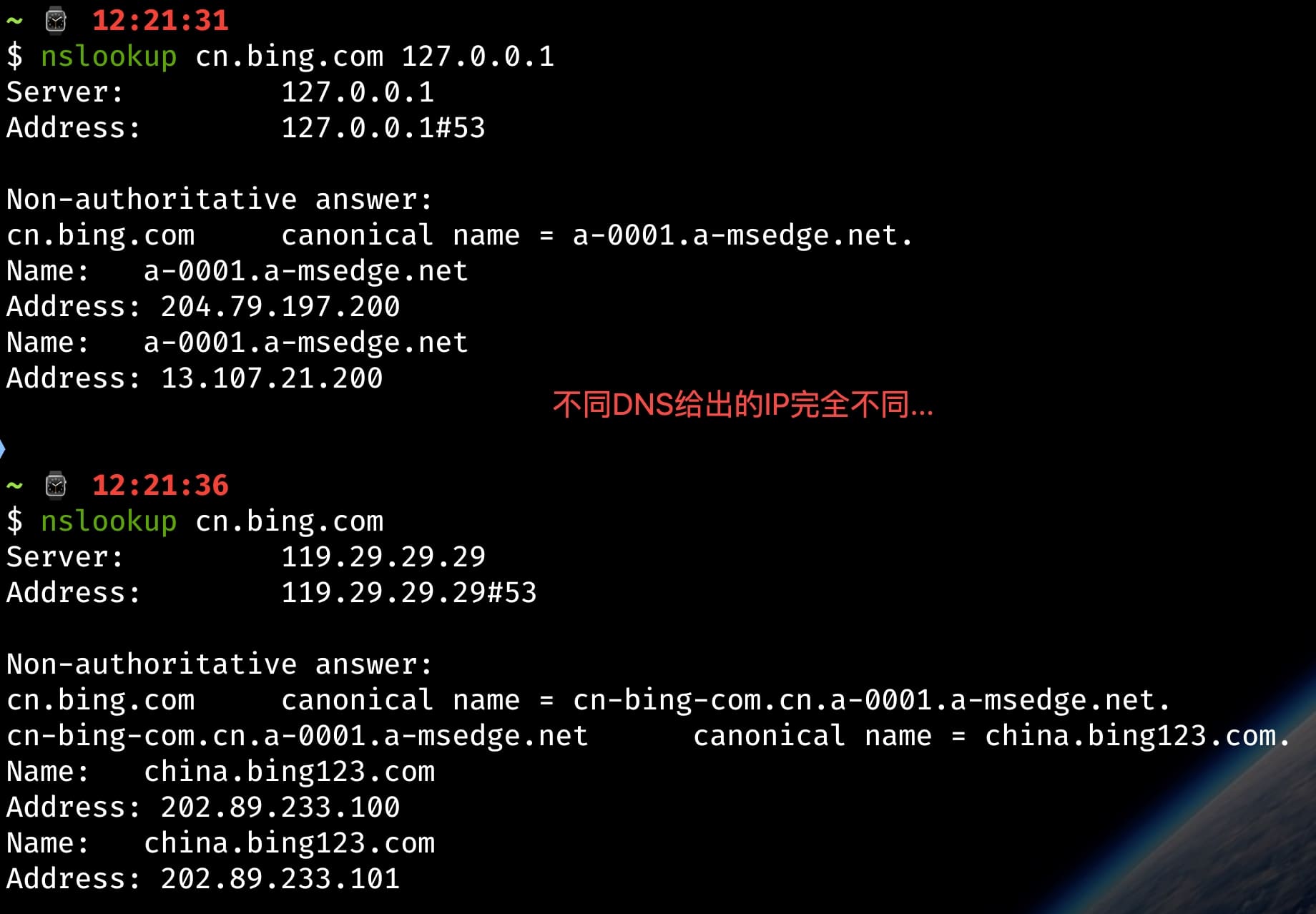
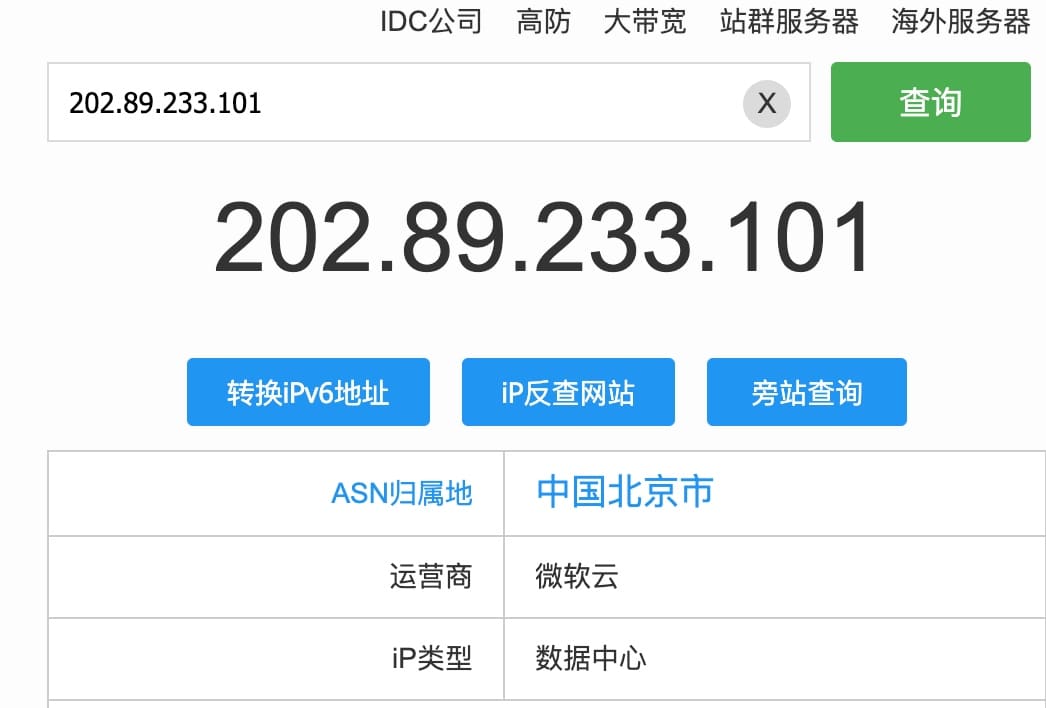
    <content type="html"><![CDATA[<blockquote><p>如果你之前看过本站《<a href="https://tomartisan.com/groceries/how-many-dns-skills-do-you-know/">DNS 玩法知多少</a>》这篇文章，也正常搭建了本地 DNS 服务，但是遇到国内某些网站访问速度变慢的问题，那本文可能会给你一些解决思路。</p></blockquote><p>最近发现针对<strong>京东</strong>、<strong>淘宝</strong>、<strong>阿里云</strong>乃至<strong>必应搜索</strong>使用本地 DNS 服务访问非常的慢，于是简单做了下背调：<strong>发现 SmartDNS 对于拥有国际业务的站点返回的都是国际 IP</strong>。比如下图的<a href="https://cn.bing.com/">必应</a>，可以看到通过 SmartDNS 返回的是<code>13.107.21.200</code>，而这个 IP 通过<strong>ip138</strong>查到归属地在美国华盛顿的微软云那里，因此国内正常访问这个 IP，能快才怪了…</p><p><img src="/img/2024/17245597810211.jpg" alt="不同DNS下解析Bing的结果"></p><p>而类似的情况也在前一阵发生，只是当时没有意识到会是这个问题：正常访问<code>www.aliyun.com</code>，总是会跳到<code>www.alibabacloud.com</code><br>由于没有全局代理、浏览器也都正常，所以当时觉得很奇怪。但毕竟不是经常用阿里云，所以就没纠结。直到最近一直<strong>用必应老出问题</strong>才回过神来思考这个问题，后来改成<code>DNSPod</code>后，立马正常了，查了下结果发现指向了北京…</p><p><img src="/img/2024/17245607651995.jpg" alt="DNSPod下的Bing地址"></p><h2 id="一些补充说明和设置更新"><a href="#一些补充说明和设置更新" class="headerlink" title="一些补充说明和设置更新"></a>一些补充说明和设置更新</h2><h3 id="声明"><a href="#声明" class="headerlink" title="声明"></a>声明</h3><p>假设默认情况下，不会一直开着全局代理，也没有精妙的所谓规则设定，因为这种情况不会出现访问延迟的现象，除非代理本身有问题。<br>因此，如果读者习惯开全局或者配置了针对性的进出口规则，那以下内容就不用看了！</p><h3 id="macOS-关于-53-端口的问题"><a href="#macOS-关于-53-端口的问题" class="headerlink" title="macOS 关于 53 端口的问题"></a>macOS 关于 53 端口的问题</h3><p>如果通过 docker 启动，发现因为 53 端口占用，无法启动，请移步<a href="https://github.com/pymumu/smartdns/discussions/1794">这里</a></p><h3 id="调整姿势"><a href="#调整姿势" class="headerlink" title="调整姿势"></a>调整姿势</h3><p>因为直接使用 SmartDNS 作为本地 DNS 服务，一定程度上必然会出现上文所述的问题！<br>尽管在<a href="https://tomartisan.com/groceries/how-many-dns-skills-do-you-know/">之前那篇文章</a>有提到通过<a href="https://github.com/felixonmars/dnsmasq-china-list">dnsmasq-china-list</a>进行内外分离，但由于当时配置不当造成查询错误…</p><p>如果不想太麻烦，最简单快捷的方法就是，<strong>默认情况一律走国内大厂的公共 DNS 解析服务</strong>。但需要注意的是<strong>阿里公共 DNS 将在 2024 年 9 月末进行限速</strong>，这是先前刷<a href="https://github.com/pymumu/smartdns/issues/1781">smartdns issues</a>发现的，所以如果严重依赖阿里家的这项服务，需要注意一下！</p><h3 id="smartdns-配置"><a href="#smartdns-配置" class="headerlink" title="smartdns 配置"></a>smartdns 配置</h3><p>在<a href="https://tomartisan.com/groceries/how-many-dns-skills-do-you-know/#%E9%85%8D%E7%BD%AE%E5%8F%82%E8%80%83">原来那份配置</a>下，通过分析 docker logs 发现针对内外分离的规则没有生效…</p><pre><code class="hljs log">result: cn.bing.com, client: 192.168.10.1, qtype: 1, id: 51332, group: default, time: 0msrequest: cn.bing.com, qtype: 1, id: 46522, group: defaultresult: cn.bing.com, id: 0, index: 1, rtt: -0.1 ms, 204.79.197.200result: cn.bing.com, id: 0, index: 2, rtt: -0.1 ms, 13.107.21.200</code></pre><p><strong>经过分析和实测，整理出以下核心配置</strong> 👇</p><h3 id="smartdns-与-dnsmasq-china-list-最终整合配置"><a href="#smartdns-与-dnsmasq-china-list-最终整合配置" class="headerlink" title="smartdns 与 dnsmasq-china-list 最终整合配置"></a><a href="https://tomartisan.com/groceries/smartdns-additional-notes/#smartdns%E4%B8%8Ednsmasq-china-list%E6%9C%80%E7%BB%88%E6%95%B4%E5%90%88%E9%85%8D%E7%BD%AE">smartdns 与 dnsmasq-china-list 最终整合配置</a></h3><pre><code class="hljs conf">bind [::]:53server-name smartdnslog-num 5log-size 2Mlog-level warnlog-console yesspeed-check-mode none# 启用双栈优选dualstack-ip-selection yes# 域名预先获取功能prefetch-domain yescache-size 8192# ----- Default Group（解析国外） -----server 1.0.0.1server 8.8.4.4server 9.9.9.9server-tls 1.1.1.1 -bootstrap-dnsserver-tls 8.8.8.8 -bootstrap-dns# ----- Domestic Group（解析国内） -----## DNSPodserver 119.29.29.29 -group domestic -exclude-default-group## 阿里server 223.5.5.5 -group domestic -exclude-default-groupserver 223.6.6.6 -group domestic -exclude-default-group## 114 DNS、使用 TCP 查询server-tcp 114.114.114.114 -group domestic -exclude-default-groupserver-tcp 114.114.115.115 -group domestic -exclude-default-group## 腾讯 DNSPod IP DoTserver-tls 1.12.12.12:853 -group domestic -exclude-default-groupserver-tls 120.53.53.53:853 -group domestic -exclude-default-group# 分流配置conf-file /etc/smartdns/domestic/accelerated-domains.china.domain.smartdns.confconf-file /etc/smartdns/domestic/apple.china.domain.smartdns.conf</code></pre><p>配置文件通过<code>make SERVER=domestic SMARTDNS_SPEEDTEST_MODE=tcp:80 smartdns-domain-rules</code>生成，可以考虑把<strong>dnsmasq-china-list</strong>全部下载到本地维护，定期 pull-make</p><p>注意：<strong>config-file 后不能加<code>-group domestic</code>，否则规则无效</strong>，这在上一篇文章中记录有误，此处特别提醒！</p><p>好了，以上就是<strong>SmartDNS 本地应用的一些使用体验和更新说明</strong>，祝大家玩的开心 🏄</p>]]></content>
    
    
    <summary type="html">关于SmartDNS本地应用的一点补充说明，如果你之前看过本站《DNS玩法知多少》这篇文章，也正常搭建了本地DNS服务，但是遇到国内某些网站访问速度变慢的问题，那本文可能会给你一些解决思路。</summary>


    <category term="杂货铺" scheme="https://tomartisan.com/categories/groceries/"/>
    
    
    <category term="姿势" scheme="https://tomartisan.com/tags/how-to/"/>
    
  </entry>
  
  <entry>
    <title>本地知识库搭建</title>
    <link href="https://tomartisan.com/groceries/build-local-knowlege-repository/"/>
    <id>https://tomartisan.com/groceries/build-local-knowlege-repository/</id>
    <published>2024-08-19T06:24:22.000Z</published>
    <updated>2026-03-31T11:19:29.496Z</updated>
    
    <content type="html"><![CDATA[<p>说起知识库这个东西，很多读者第一时间就会想到<a href="https://www.yuque.com/">语雀</a>或<a href="https://www.notion.so/">notion</a>这种公有云平台。</p><p>当然，如果只是为了图省事，亦或需要在任何地方都能编辑或访问，那公有云方案确实是比较合适的选择。<br>但是，如果仅仅是为了记录自己的日常、并且有较高的私密性要求，那<a href="https://tomartisan.com/groceries/build-local-knowlege-repository/">本地知识库搭建</a>你绝对有必要了解一下。</p><p><u>先说结论吧：</u></p><ul><li><strong>优势</strong>：<ul><li>绝对私密且没有账户密码管理负担；🍐</li><li>不用担心平台跑路或者不维护了（实际上很多公有云平台都不保险，特别是国内的互联网环境下）；🏃</li><li>自由创作，写啥都可以，不用担心说了不恰当的话被封号；🙊</li><li>自由定制（需要一些技术能力），需要啥功能自己自足，不需要办卡充会员；🙅</li></ul></li><li><strong>劣势</strong><ul><li>只能自己电脑或私服访问，是否需要 Everywhere 取决你自己；</li><li>有一定技术门槛，但非常有限；</li></ul></li></ul><h2 id="缘起"><a href="#缘起" class="headerlink" title="缘起"></a>缘起</h2><p>大概 10 年前吧，我第一次接触<code>Markdonw</code>这种玩意，然后瞬间被以这种形式记录工作、日常的姿势深深吸引。包括后来搭建独立站，内容的载体都是一个个<code>.md</code>文件，乃至你现在看到的这篇文章，原始内容仍然是…后来由于工作和生活需要，我基于 <a href="https://github.com/vuejs/vuepress">vuepress 1.x</a> 在本地搭建了一个知识库，通过<code>Github</code>托管内容。</p><p>这期间，由于 <code>Vue3</code> 的发布，很多基于 V2 版本的类库都出现了问题，比如当<code>nodejs</code>升级了，就发现原来本地的服务就跪了。再后来，官方搞了个 <a href="https://vitepress.dev/">vitepress</a> ，然后就没有然后了（<del>vuepress 被正式晾在了一边，尽管现在有社区维护，但已经不好再作为第一选择了</del>）！</p><p>由于本人技术出身，所以对于这类问题基本上都能处理，然而对于框架的新特性或者想要扩展一些额外的功能，就略显尴尬了…特别是到了今年，问题尤为明显。直到前两天，因为 <code>tailwindcss</code>库导致和<code>vuepress</code>某个依赖发生冲突然后直接启动不了了，所以就怒换了：<a href="https://docusaurus.io/">Docusaurus</a></p><p>因为实在不想再继续为这老古董消耗时间和精力去折腾了，<strong>docusaurus</strong> 提供知识库基础能力的同时，还额外提供了比其他方案<a href="https://docusaurus.io/docs#comparison-with-other-tools">更多的优势</a></p><h2 id="知识库套件"><a href="#知识库套件" class="headerlink" title="知识库套件"></a>知识库套件</h2><p>在换<strong>docusaurus</strong>之前，我想过升级成<strong>vitepress</strong>，因为在这种事情上，越少折腾越好。但后来发现：<strong>把 vuepress 迁移到 vitepress 并不容易</strong></p><p>同样是体力活，索性一把换到位。于是最终选择了<code>React</code>解决方案</p><h2 id="Docusaurus-指南"><a href="#Docusaurus-指南" class="headerlink" title="Docusaurus 指南"></a>Docusaurus 指南</h2><p><img src="/img/2024/17240544178842.jpg"></p><blockquote><p>抱歉，没有这趴！毕竟<a href="https://docusaurus.io/docs">官方文档</a>已经写的很详细了，这里确实没必要再做搬运工…😏</p></blockquote><h2 id="从-Vuepress-的迁移"><a href="#从-Vuepress-的迁移" class="headerlink" title="从 Vuepress 的迁移"></a>从 Vuepress 的迁移</h2><h3 id="1、通过-create-docusaurus-生成目标站点"><a href="#1、通过-create-docusaurus-生成目标站点" class="headerlink" title="1、通过 create-docusaurus 生成目标站点"></a>1、通过 create-docusaurus 生成目标站点</h3><pre><code class="hljs bash">nlx create-docusaurus@latest MarsNotes classic --typescript</code></pre><p>注意：这里的<code>nlx</code>是全局<a href="https://github.com/antfu-collective/ni">antfu ni</a>的命令，没有装<strong>ni</strong>的可以根据自己需要换其他的，比如：<code>yarn create xxx</code>效果是一样的。当然这一步官方有详细的指北</p><p><strong>额外的依赖，建议都安装一下</strong>：</p><pre><code class="hljs bash">ni @docusaurus/plugin-ideal-image @easyops-cn/docusaurus-search-local docusaurus-plugin-image-zoom</code></pre><p>插件的配置和作用，对应到 github 的 readme 都有，请自行取用…</p><h3 id="2、配置说明"><a href="#2、配置说明" class="headerlink" title="2、配置说明"></a>2、配置说明</h3><p><strong>把 vuepress 迁移到 docusaurus 比我想像中要容易的多</strong>，因为原来的知识库目录层级较多，有好几个大的分类。在 vuepress 托管时，愣是写了一大托<code>node-fs</code>操作代码，用来生成目录树结构：</p><pre><code class="hljs typescript"><span class="hljs-keyword">import</span> fs <span class="hljs-keyword">from</span> <span class="hljs-string">&quot;node:fs&quot;</span>;<span class="hljs-keyword">import</span> path <span class="hljs-keyword">from</span> <span class="hljs-string">&quot;node:path&quot;</span>;<span class="hljs-comment">/**</span><span class="hljs-comment"> * 返回边栏数据结构体</span><span class="hljs-comment"> * <span class="hljs-doctag">@param</span> group 组标题</span><span class="hljs-comment"> * <span class="hljs-doctag">@param</span> collapsable 是否折叠</span><span class="hljs-comment"> * <span class="hljs-doctag">@param</span> children 文章标题集</span><span class="hljs-comment"> */</span><span class="hljs-keyword">export</span> <span class="hljs-keyword">const</span> <span class="hljs-title function_">SidebarGroupItem</span> = (<span class="hljs-params"><span class="hljs-attr">group</span>: <span class="hljs-built_in">string</span>, <span class="hljs-attr">collapsable</span>: <span class="hljs-built_in">boolean</span> = <span class="hljs-literal">true</span>, <span class="hljs-attr">children</span>: <span class="hljs-built_in">any</span>[] = []</span>) =&gt; &#123;  <span class="hljs-keyword">return</span> &#123;    <span class="hljs-attr">title</span>: group,    <span class="hljs-attr">collapsable</span>: collapsable,    <span class="hljs-attr">children</span>: children,  &#125;;&#125;;<span class="hljs-comment">/**</span><span class="hljs-comment"> * 根据本地文件层级及文件名，动态生成树状边栏数据</span><span class="hljs-comment"> * <span class="hljs-doctag">@param</span> category 分类名称</span><span class="hljs-comment"> * <span class="hljs-doctag">@param</span> catePath 分类文件根目录</span><span class="hljs-comment"> * <span class="hljs-doctag">@param</span> group 分组</span><span class="hljs-comment"> * <span class="hljs-doctag">@returns</span></span><span class="hljs-comment"> */</span><span class="hljs-keyword">export</span> <span class="hljs-keyword">const</span> <span class="hljs-title function_">genSiderbarGroups</span> = (<span class="hljs-params"><span class="hljs-attr">category</span>: <span class="hljs-built_in">string</span>, <span class="hljs-attr">catePath</span>: <span class="hljs-built_in">string</span>, <span class="hljs-attr">group</span>: <span class="hljs-built_in">any</span>[] = []</span>) =&gt; &#123;  <span class="hljs-keyword">if</span> (!fs.<span class="hljs-title function_">existsSync</span>(catePath)) &#123;    <span class="hljs-variable language_">console</span>.<span class="hljs-title function_">error</span>(<span class="hljs-string">&quot;catePath not exists:&quot;</span>, catePath);    <span class="hljs-keyword">return</span> <span class="hljs-literal">null</span>;  &#125;  <span class="hljs-keyword">return</span> fs.<span class="hljs-title function_">readdirSync</span>(catePath).<span class="hljs-title function_">reduce</span>(    <span class="hljs-function">(<span class="hljs-params">bars, file</span>) =&gt;</span> &#123;      <span class="hljs-keyword">const</span> currentFile = path.<span class="hljs-title function_">join</span>(catePath, file);      <span class="hljs-keyword">const</span> urlPath = currentFile.<span class="hljs-title function_">split</span>(category + <span class="hljs-string">&quot;/&quot;</span>)[<span class="hljs-number">1</span>];      <span class="hljs-keyword">if</span> (fs.<span class="hljs-title function_">statSync</span>(currentFile).<span class="hljs-title function_">isFile</span>() &amp;&amp; path.<span class="hljs-title function_">parse</span>(currentFile).<span class="hljs-property">ext</span> === <span class="hljs-string">&quot;.md&quot;</span>) &#123;        <span class="hljs-keyword">const</span> file = urlPath.<span class="hljs-title function_">slice</span>(<span class="hljs-number">0</span>, -<span class="hljs-number">3</span>).<span class="hljs-title function_">replace</span>(<span class="hljs-regexp">/README$/g</span>, <span class="hljs-string">&quot;&quot;</span>);        path.<span class="hljs-title function_">parse</span>(currentFile).<span class="hljs-property">dir</span>.<span class="hljs-title function_">endsWith</span>(category) ? bars[<span class="hljs-number">0</span>].<span class="hljs-property">children</span>.<span class="hljs-title function_">push</span>(file) : group.<span class="hljs-title function_">push</span>(file);      &#125;      <span class="hljs-keyword">if</span> (fs.<span class="hljs-title function_">statSync</span>(currentFile).<span class="hljs-title function_">isDirectory</span>()) &#123;        <span class="hljs-keyword">const</span> pathName = path.<span class="hljs-title function_">parse</span>(currentFile).<span class="hljs-property">name</span>;        <span class="hljs-keyword">const</span> curGroup = <span class="hljs-title class_">SidebarGroupItem</span>(pathName);        urlPath.<span class="hljs-title function_">split</span>(<span class="hljs-string">&quot;/&quot;</span>).<span class="hljs-title function_">findIndex</span>(<span class="hljs-function">(<span class="hljs-params">item</span>) =&gt;</span> item === pathName) &gt; <span class="hljs-number">0</span> ? group.<span class="hljs-title function_">push</span>(curGroup) : bars.<span class="hljs-title function_">push</span>(curGroup);        <span class="hljs-title function_">genSiderbarGroups</span>(category, currentFile, curGroup.<span class="hljs-property">children</span>);      &#125;      <span class="hljs-keyword">return</span> bars;    &#125;,    [<span class="hljs-title class_">SidebarGroupItem</span>(<span class="hljs-string">&quot;概述&quot;</span>, <span class="hljs-literal">false</span>)],  );&#125;;</code></pre><p><strong>vuepress 1.x 动态目录树构建</strong></p><pre><code class="hljs typescript"><span class="hljs-keyword">import</span> path <span class="hljs-keyword">from</span> <span class="hljs-string">&quot;node:path&quot;</span>;<span class="hljs-keyword">import</span> &#123; <span class="hljs-title class_">SidebarConfig4Multiple</span> &#125; <span class="hljs-keyword">from</span> <span class="hljs-string">&quot;vuepress/config&quot;</span>;<span class="hljs-keyword">import</span> &#123; genSiderbarGroups &#125; <span class="hljs-keyword">from</span> <span class="hljs-string">&quot;./shared&quot;</span>;<span class="hljs-keyword">const</span> <span class="hljs-title class_">Categories</span> = [<span class="hljs-string">&quot;cate1&quot;</span>, <span class="hljs-string">&quot;cate2&quot;</span>, <span class="hljs-string">&quot;cate3&quot;</span>, <span class="hljs-string">&quot;cate4&quot;</span>, <span class="hljs-string">&quot;cate5&quot;</span>];<span class="hljs-keyword">export</span> <span class="hljs-keyword">const</span> <span class="hljs-title class_">Sidebar4ZH</span>: <span class="hljs-title class_">SidebarConfig4Multiple</span> = <span class="hljs-title class_">Categories</span>.<span class="hljs-title function_">reduce</span>(<span class="hljs-function">(<span class="hljs-params">bars, category</span>) =&gt;</span> &#123;  <span class="hljs-keyword">const</span> categoryRootPath = path.<span class="hljs-title function_">resolve</span>(__dirname, <span class="hljs-string">`../../../<span class="hljs-subst">$&#123;category&#125;</span>`</span>);  bars[<span class="hljs-string">`/<span class="hljs-subst">$&#123;category&#125;</span>/`</span>] = <span class="hljs-title function_">genSiderbarGroups</span>(category, categoryRootPath);  <span class="hljs-keyword">return</span> bars;&#125;, &#123;&#125;);</code></pre><p>但发现<strong>docusaurus 对动态目录树是原生支持的</strong>，它的<code>sidebars.ts</code>里有一段注释：”By default, Docusaurus generates a sidebar from the docs folder structure”</p><p>这就不要太爽好吧，所以<u>在 docusaurus 配置知识库的目录树就异常简单了</u></p><pre><code class="hljs typescript"><span class="hljs-keyword">import</span> <span class="hljs-keyword">type</span> &#123; <span class="hljs-title class_">SidebarsConfig</span> &#125; <span class="hljs-keyword">from</span> <span class="hljs-string">&quot;@docusaurus/plugin-content-docs&quot;</span>;<span class="hljs-keyword">const</span> <span class="hljs-attr">sidebars</span>: <span class="hljs-title class_">SidebarsConfig</span> = &#123;  <span class="hljs-attr">cate1Sidebar</span>: [&#123; <span class="hljs-attr">type</span>: <span class="hljs-string">&quot;autogenerated&quot;</span>, <span class="hljs-attr">dirName</span>: <span class="hljs-string">&quot;cate1&quot;</span> &#125;],  <span class="hljs-attr">cate2Sidebar</span>: [&#123; <span class="hljs-attr">type</span>: <span class="hljs-string">&quot;autogenerated&quot;</span>, <span class="hljs-attr">dirName</span>: <span class="hljs-string">&quot;cate2&quot;</span> &#125;],  <span class="hljs-attr">cate3Sidebar</span>: [&#123; <span class="hljs-attr">type</span>: <span class="hljs-string">&quot;autogenerated&quot;</span>, <span class="hljs-attr">dirName</span>: <span class="hljs-string">&quot;cate3&quot;</span> &#125;],&#125;;<span class="hljs-keyword">export</span> <span class="hljs-keyword">default</span> sidebars;</code></pre><p>其中，<strong>cate1、cate2…这些，对应 docs 目录中的其他大类目录名称</strong><br>个别细节部分，比如知识库首页就需要自己根据需要定制了，入口：<code>src/pages/index.tsx</code></p><p>如此，就基本完成迁移后的配置了！</p><h3 id="3、一点优化"><a href="#3、一点优化" class="headerlink" title="3、一点优化"></a>3、一点优化</h3><p>如果你打算通过以上方式构建本地知识库，通常情况下你应该并不希望一直开个黑窗口。所以此时可以再做些小优化：</p><ul><li>后台运行：通过<code>pm2</code>把<code>docusaurus start</code>放在后台；</li><li>反向代理：选个你喜欢的域名，改本地 hosts，使其支持通过这个域名访问到 docusaurus 服务，这一步可以通过<code>nginx</code>搞定</li></ul><p><strong>pm2 的应用启动配置</strong></p><pre><code class="hljs json"><span class="hljs-punctuation">&#123;</span>  <span class="hljs-attr">&quot;name&quot;</span><span class="hljs-punctuation">:</span> <span class="hljs-string">&quot;my-wiki&quot;</span><span class="hljs-punctuation">,</span>  <span class="hljs-attr">&quot;script&quot;</span><span class="hljs-punctuation">:</span> <span class="hljs-string">&quot;pnpm run build &amp;&amp; pnpm run serve&quot;</span><span class="hljs-punctuation">,</span>  <span class="hljs-attr">&quot;cwd&quot;</span><span class="hljs-punctuation">:</span> <span class="hljs-string">&quot;./my-wiki&quot;</span><span class="hljs-punctuation">&#125;</span></code></pre><p><u>注意这里启动命令是<code>run serve</code>而非<code>run start</code>。是因为通过构建后运行，docusaurus 会做服务端渲染。不过有个问题就是当你再新建或改动旧 MD 文件后，站点并不会更新，当然这个很好理解啦。所以如果需要时时更新，主要需要通过<code>run start</code>启动（docusaurus start）</u></p><h2 id="上-Git"><a href="#上-Git" class="headerlink" title="上 Git"></a>上 Git</h2><blockquote><p>这点非常重要！</p></blockquote><p>原因也很简单，因为你并不希望可能某天由于电脑进水了，然后资料丢失吧～<br>所以，选个你喜欢的 git 托管服务，创建一个<code>private</code>仓库，把本地知识库保存在云端就完事了。</p><p><strong>通过 git 托管，还有一个好处，就是你能看到自己的创作记录</strong>，当然这个实际效果取决于自己的<code>commit</code>习惯。</p><p>对于技术人来说，这简直不要太滋润。如果是企业内部服务，也是可以考虑这么搞，正真的降本增效…<br>如果啊，有机会，试试这种<a href="https://tomartisan.com/groceries/build-local-knowlege-repository/">本地知识库</a>服务吧</p>]]></content>
    
    
    <summary type="html">基于git版本控制和docusaurus搭建本地知识库，构建你的私密知识空间。如果你想持续记录并且保持内容的完整性、安全性和持久性，这篇文章将会给你一些参考。</summary>


    <category term="杂货铺" scheme="https://tomartisan.com/categories/groceries/"/>
    
    
    <category term="姿势" scheme="https://tomartisan.com/tags/how-to/"/>
    
    <category term="干货" scheme="https://tomartisan.com/tags/practicals/"/>
    
  </entry>
  
  <entry>
    <title>为什么总感觉时间不够用</title>
    <link href="https://tomartisan.com/hulife/why-feel-have-no-enough-time/"/>
    <id>https://tomartisan.com/hulife/why-feel-have-no-enough-time/</id>
    <published>2024-08-10T11:16:41.000Z</published>
    <updated>2026-03-31T11:19:29.496Z</updated>
    
    <content type="html"><![CDATA[<p>不知道你有没有这样的幻觉：就是总感觉一天没干些什么，一天又过去了…<br>为什么我们总感觉时间不够用呢？本文尝试来分析一下这个问题，以及如何更科学的规划自己有限的精力！</p><h2 id="有关于时间的快和慢"><a href="#有关于时间的快和慢" class="headerlink" title="有关于时间的快和慢"></a>有关于时间的快和慢</h2><p>通常而言，让我们能感觉时间过的快，有这么几种情况：</p><ul><li><strong>专注于感兴趣的事情</strong>：比如打电游这种，会让你神不知鬼不觉的花费很多时间而不自知；</li><li><strong>和亲朋好友愉快相处</strong>：和亲密的人在一起，分享快乐、交流情感，愉快的氛围会让时间在不知不觉中飞逝；</li><li><strong>处于紧张刺激的状态</strong>：像是参加一场激烈的比赛、进行冒险活动或者面临紧急的任务；</li><li><strong>旅行和探索新地方</strong>：在陌生的环境中，充满新奇的事物吸引着我们的注意力，使得时间迅速过去；</li></ul><p>而，慢的感觉主要有以下这么几种情况：</p><ul><li><strong>处在不适的环境中</strong>：比如被迫参加自己不喜欢的活动，又或者身处恶劣的外部环境之中（冷&#x2F;热&#x2F;酸&#x2F;臭）；</li><li><strong>身体不适或空虚无聊</strong>：生病、受伤、孤独时，身心均承受着不同等级的痛苦，比如牙疼发作时，每一秒都让人难以忍受；</li><li><strong>等待重要结果</strong>：对待不确定性，通常内心会产生焦虑，不同程度的期待会让每一分钟都显得格外漫长；</li><li><strong>重复单调的任务</strong>：长时间进行简单重复的工作、劳动等，会让人产生烦躁的感觉；</li><li><strong>分离和思念时</strong>：与亲人、爱人分离，满心的思念会让每一天都显得格外漫长；</li></ul><p><u>不知道你有没有发现，这俩之间有什么共性和关联？</u></p><p>先聊聊<strong>我的结论：</strong></p><ul><li>快：核心在于足够聚焦，这种情况下通常没有心力去想别的东西；</li><li>慢：与快正好相反，这种身在一方心在另一方的作用，会让人过度关注到了时间本身；</li></ul><h2 id="贤者时间"><a href="#贤者时间" class="headerlink" title="贤者时间"></a>贤者时间</h2><p>通过以上分析可以有个基本结论，时间不够用的原因在于：<strong>我们往往在有限的时间内做了“快感”操作</strong>。而这种操作，通常是被认为对感兴趣的话题吸走了注意力，导致神不知鬼不觉的消耗了原来本该做事情的时间。</p><p>另外，会有感觉不够用这种想法，说明自己对时间有珍惜意识。便于理解，我这里用<strong>贤者时间</strong>来比喻这一现象。比如刷短视频：</p><p><u>一个接一个，爽是真的爽，只是回过神才发现，手机没电了，时间也没了，最后自觉悔不当初，于是愤愤卸掉 APP</u></p><p><strong><code>奶头乐</code>的事情做太多，外加一番贤者思考，就容易产生：<a href="https://tomartisan.com/hulife/why-feel-have-no-enough-time/">为什么总感觉时间不够用</a></strong> 这个问题。</p><h2 id="科学的规划"><a href="#科学的规划" class="headerlink" title="科学的规划"></a>科学的规划</h2><blockquote><p>感觉时间过得快与慢的本质区别在于个人的心理状态和所从事活动的性质。</p></blockquote><ul><li>当感觉时间过得快时，通常是因为我们全身心投入到了能带来愉悦、满足或具有高度吸引力的活动中，我们的注意力高度集中，大脑处于活跃但享受的状态。</li><li>而感觉时间过得慢，往往是由于我们处于焦虑、无聊、痛苦、不舒适或者被迫从事不喜欢的事情等负面或低刺激的情境中，大脑对时间的感知变得更为敏感和漫长。</li></ul><p><strong>要科学地规划自己有限的精力，可以考虑以下几点：</strong></p><ol><li>明确目标：确定长期和短期的目标，这能为行动提供方向；</li><li>任务分类：将任务分为重要紧急、重要不紧急、不重要紧急和不重要不紧急四类。<strong>优先处理重要紧急的任务，合理安排重要不紧急的任务，尽量减少不重要紧急和不重要不紧急任务对精力的消耗</strong>。比如，工作中的重要项目是重要紧急的，自我提升的学习计划可能是重要不紧急的；</li><li>合理安排休息：不要连续长时间工作或学习，适当的休息能恢复精力，提高效率；</li><li>结合自身生物钟：了解自己在一天中不同时间段的精力状态，<strong>将重要和复杂的任务安排在精力充沛的时段</strong>；</li><li>保持健康的生活方式：包括充足的睡眠、合理的饮食和适度的运动，这有助于维持良好的身体和精神状态，为精力提供基础保障；</li><li>避免多任务并行：<strong>专注于一项任务</strong>，完成后再进行下一项，这样能提高效率，减少精力的分散；</li><li>定期反思和调整：回顾自己的精力分配情况，总结经验教训，根据实际情况调整规划；</li></ol><p><img src="/img/2024/17232904017400.jpg" alt="时间管理大师"></p><p>人生的长度有限，然宽度无限，但也大可不必宽的太厉害，享受必要的过程才是核心。最后，祝愿读者都能在<code>预算一定</code>的情况下，成为优秀的<strong>时间管理大师</strong>。</p>]]></content>
    
    
    <summary type="html">不知道你有没有这样的幻觉，就是总感觉一天没干些什么、一天又过去了...为什么我们总感觉时间不够用呢？本文试图来分析一下这个问题，以及如何更科学的规划自己有限的精力。</summary>


    <category term="人文生活" scheme="https://tomartisan.com/categories/hulife/"/>
    
    
    <category term="随笔" scheme="https://tomartisan.com/tags/essay/"/>
    
    <category term="生活" scheme="https://tomartisan.com/tags/life/"/>
    
  </entry>
  
  <entry>
    <title>DNS玩法知多少</title>
    <link href="https://tomartisan.com/groceries/how-many-dns-skills-do-you-know/"/>
    <id>https://tomartisan.com/groceries/how-many-dns-skills-do-you-know/</id>
    <published>2024-08-08T06:15:52.000Z</published>
    <updated>2024-09-12T06:44:39.822Z</updated>
    
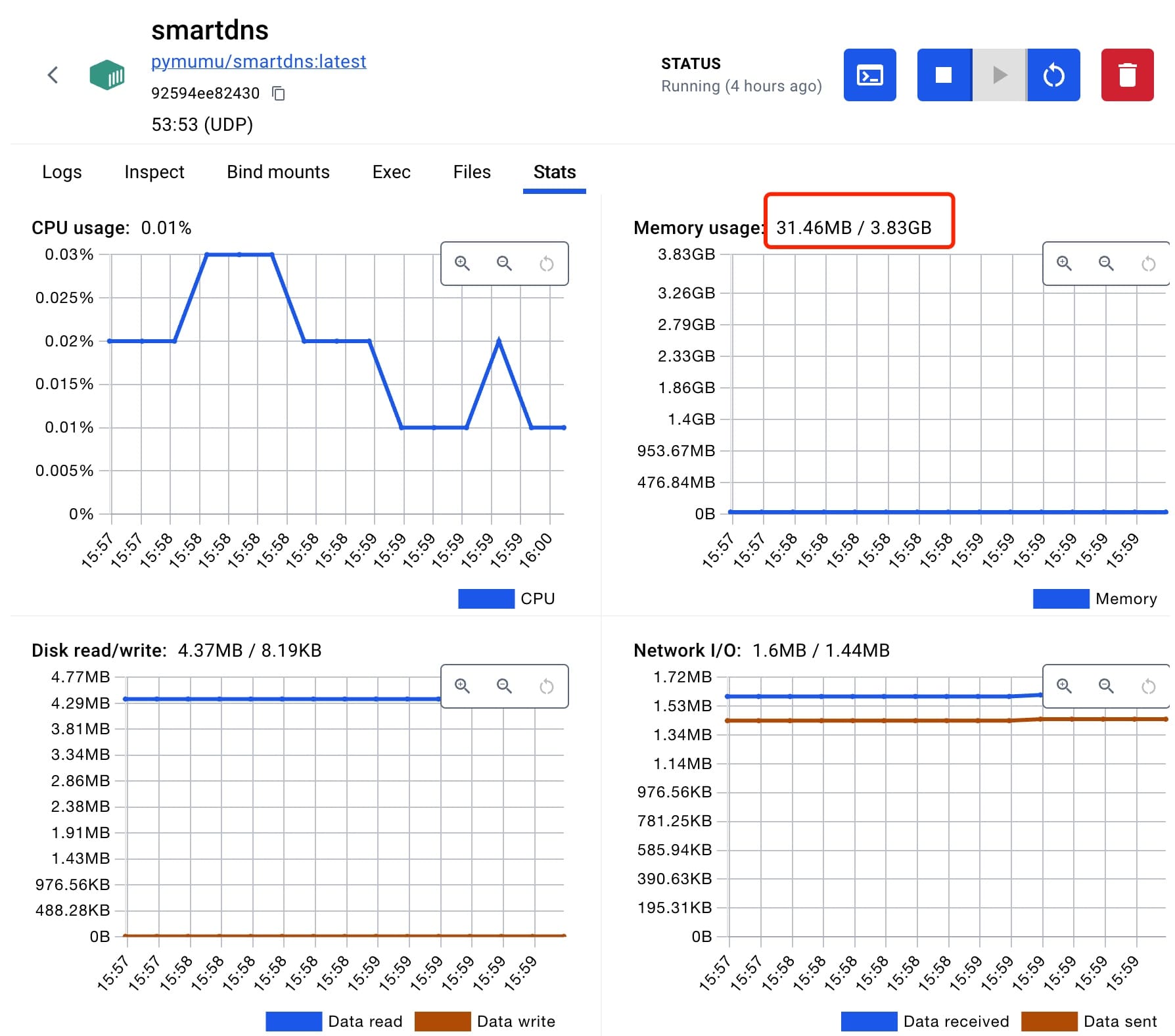
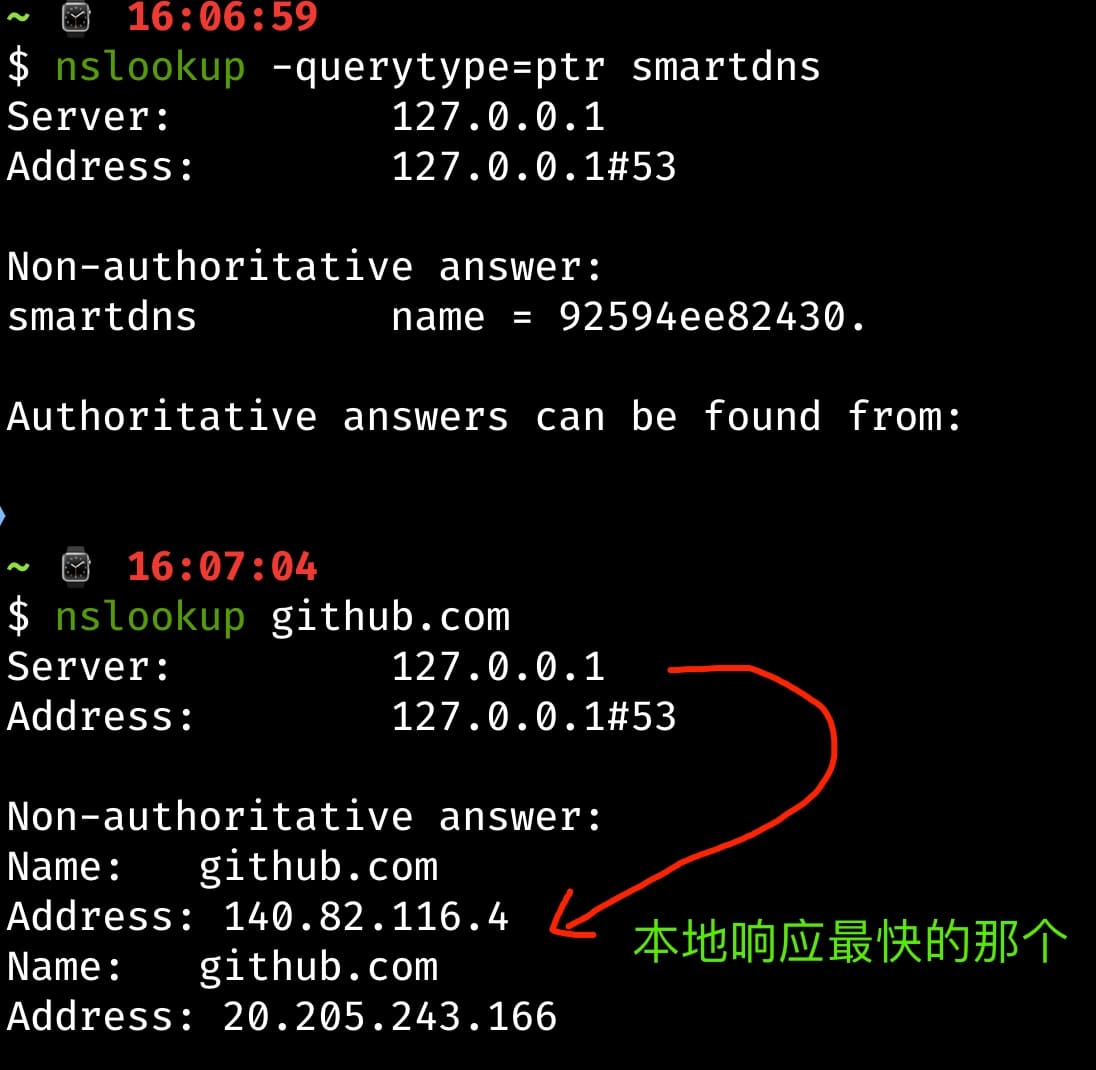
    <content type="html"><![CDATA[<p>对于网络加速，有很多种办法。<u>最简单直接的莫过于通过钞能力实现</u>，然而如果不额外花费（比如：提升宽带&#x2F;加私服&#x2F;换硬件等）想要达到提升效果，<strong>优化 DNS</strong>算是一种很有效的手段…</p><p>对于我来说，任何时候更换路由器，第一件事就是进入路由器管理后台手动更换运营商提供的 DNS 服务，原因很简单：</p><ol><li>上网较慢：通常运营商提供的 DNS 都是某个地区特定线路的节点，效果嘛只能说可以用；</li><li>安全性差：如果说网慢一点（在忍耐范围内）也还能接受，但时不时被劫持、投放广告就过份了，当然还不仅限于此；</li></ol><p>一般来说，我们可以在路由器后台或者自己电脑上手动指定适合自己的 DNS 服务，目前国内比较知名的有 <a href="https://www.alidns.com/">阿里</a>、<a href="https://www.dnspod.cn/">腾讯</a>、<a href="https://www.114dns.com/">114</a>这么几个，读者可以根据自己的情况自行选择。具体姿势如下：</p><pre><code class="hljs bash"><span class="hljs-comment"># 以阿里DNS解析为例，获取离我最近的京东官网IP节点</span>nslookup www.jd.com 223.5.5.5<span class="hljs-comment"># 拿到上个命令的最终结果，PING下连通性能（选最合适你的那个）</span>ping 27.36.125.193 -c 2</code></pre><p><strong>本文将分享另一种更为极客范的姿势，即：通过<a href="https://pymumu.github.io/smartdns">SmartDNS</a>搭建本地 DNS 服务，特别适用于希望获得全球特定加速的人群。</strong></p><blockquote><p>PS：如果浏览器面前的你，对开发工具配置不是太熟练，以下内容可能会有难度。正常上网冲浪，并不需要这么折腾！</p></blockquote><h2 id="SmartDNS"><a href="#SmartDNS" class="headerlink" title="SmartDNS"></a>SmartDNS</h2><p><strong>SmartDNS</strong>，一个开源、高性能的本地 DNS 服务器工具，支持树莓派、OpenWrt、华硕路由器原生固件和 Windows 系统等。</p><p>更多详情，读者可以移步到他们的官网：<a href="https://pymumu.github.io/smartdns">https://pymumu.github.io/smartdns</a></p><h2 id="基于-macOS-的本地化"><a href="#基于-macOS-的本地化" class="headerlink" title="基于 macOS 的本地化"></a>基于 macOS 的本地化</h2><p><code>smartdns</code>工具本身是用 C 语言写的，目前该工具并不能直接跑在<code>macOS</code>下。有两种方式可以完成 mac 本地化</p><ul><li>rust 版：热心网友基于 C 移植了一份跨平台的，用法移步：<a href="https://github.com/mokeyish/smartdns-rs">https://github.com/mokeyish/smartdns-rs</a></li><li>docker 版：官方容器化方案，相对更方便一些</li></ul><p><strong>特别提示</strong>：由于<code>rust</code>版的目前<strong>仍在开发阶段</strong>，我试了通过<code>brew install smartdns</code>安装，不过有一些问题。刚好我本地有<code>Docker</code>环境，所以就换成容器方案了。</p><h3 id="工具依赖说明"><a href="#工具依赖说明" class="headerlink" title="工具依赖说明"></a>工具依赖说明</h3><ol><li><strong>Docker</strong>：下载和运行容器，具体移步：<a href="https://hub.docker.com/r/pymumu/smartdns">https://hub.docker.com/r/pymumu/smartdns</a></li><li><strong>Git</strong>：用于<a href="https://github.com/felixonmars/dnsmasq-china-list">dnsmasq-china-list</a>源码下载；</li><li><strong>Make</strong>：用于构建基于本地 DNS 服务的 list，如果 mac 有安装过 XCode，则认为<code>make</code>命令默认有效；</li></ol><h3 id="基于规则分流"><a href="#基于规则分流" class="headerlink" title="基于规则分流"></a>基于规则分流</h3><p>由于某些众所周知的原因，国内公共 DNS 服务对海外网站解析是有限的。如果想要实现内外有别，推荐基于<strong>dnsmasq-china-list</strong>构建自己的清单。否则，仅 Docker 化就可以了</p><p>如果你已经准备好了上述工程源码，那现在可以开始构建了</p><pre><code class="hljs bash">make SERVER=domestic smartdns</code></pre><p>这句命令的意思是，把国内节点解析交给<code>smartdns</code>。<br>成功后，会生成几个以<code>smartdns.conf</code>结尾的配置文件，然后再把它复制到系统目录：<code>/et/smartdns/domestic</code></p><p>注意使用<code>sudo</code>操作，如果对应目录不存在，则手动创建。最后赋予文件可读权限…</p><h3 id="配置参考"><a href="#配置参考" class="headerlink" title="配置参考"></a>配置参考</h3><p>以下是<strong>smartdns.conf</strong>的配置参考，该文件位于：<code>/etc/smartdns</code>。如果没有，需要手动创建它</p><pre><code class="hljs conf"># Listen on local port 53, both ipv4 and ipv6bind [::]:53# 日志信息log-num 5log-size 2Mlog-level warnlog-console yes# 禁用全局测速speed-check-mode none# 启用双栈优选dualstack-ip-selection yes# 域名预先获取功能，开启会提高系统资源占用率prefetch-domain yescache-size 4096# 配置 bootstrap-dns，如不配置则调用系统的，建议配置server-https https://cloudflare-dns.com/dns-query -bootstrap-dns -exclude-default-group# ----- Default Group（解析海外） -----server 1.0.0.1server 8.8.4.4server 9.9.9.9server-tls 1.1.1.1server-tls 8.8.8.8# ----- Domestic Group（解析国内） -----## 腾讯 DNSPod IP DoTserver-tls 1.12.12.12:853 -group domestic -exclude-default-groupserver-tls 120.53.53.53:853 -group domestic -exclude-default-group## 阿里 IP DoTserver-tls 223.5.5.5:853 -group domestic -exclude-default-groupserver-tls 223.6.6.6:853 -group domestic -exclude-default-group## 114 DNS、使用 TCP 查询server-tcp 114.114.114.114 -group domestic -exclude-default-groupserver-tcp 114.114.115.115 -group domestic -exclude-default-group## DNSPod 兜底server 119.29.29.29 -group domestic -exclude-default-group# ----- Office Group（解析办公区内网） -----# Configure the Office(Home) upstream serverserver 192.168.1.1 -group office -exclude-default-group# Domain names ending with work are forwarded to the office group for resolutionnameserver /work/office# ----- 其他个性化配置 -----# Set static IP for domain nameaddress /x.tangkunyin.com/127.0.0.1# Block Domains (Ad Blocking)address /ads.baidu.com/## 加载由 dnsmasq-china-list 生成的 domain-rules 配置文件，使得国内的解析走 domestic 组conf-file /etc/smartdns/domestic/*.conf -group domestic</code></pre><p>以上就是全球均衡的一个配置参考，各项参数的用途参考官方：<a href="https://pymumu.github.io/smartdns/configuration">https://pymumu.github.io/smartdns/configuration</a></p><h3 id="运行和测试"><a href="#运行和测试" class="headerlink" title="运行和测试"></a>运行和测试</h3><p>配置文件和容器环境准备妥当后，执行以下命令：</p><pre><code class="hljs bash">docker run -d --name smartdns --restart=always -p 53:53/udp -v /etc/smartdns:/etc/smartdns pymumu/smartdns:latest</code></pre><p>然后，你可能会运行失败！因为<strong>53 端口</strong>被系统服务占用了，你可以通过<code>lsof -i:53</code>或<code>sudo lsof -i:53</code>看下是哪个进程占用了，然后杀掉、重启容器</p><p><img src="/img/2024/17231040408709.jpg"></p><p>容器运行后，可以看到它的状态如上，可以清晰的看到事实上它并没有占用过多的系统资源。<strong>接着把本机的 DNS 改成：127.0.0.1</strong></p><h4 id="nslookup-一把"><a href="#nslookup-一把" class="headerlink" title="nslookup 一把"></a>nslookup 一把</h4><p><img src="/img/2024/17231044849339.jpg"></p><h2 id="小结"><a href="#小结" class="headerlink" title="小结"></a>小结</h2><p>DNS 之于网络的重要性不言而喻！<strong>构建一个合适的 DNS 服务，对每个网民都非常重要</strong>，希望本文能对读者带来一些启发和有用的参考。</p><p>更多有料有趣的知识，可以看这篇文章：<a href="https://blog.skk.moe/post/i-have-my-unique-dns-setup">我有特别的 DNS 配置和使用技巧</a></p><p>在此，感谢所有作者的奉献，以上！</p>]]></content>
    
    
    <summary type="html">如何在不额外花费的情况下，尽可能加快网络访问速度？或许你可以试试SmartDNS，本文将以此为核心，来向读者演示如何在macOS下搭建基于本地的DNS服务器。</summary>


    <category term="杂货铺" scheme="https://tomartisan.com/categories/groceries/"/>
    
    
    <category term="生产力" scheme="https://tomartisan.com/tags/productivity/"/>
    
    <category term="姿势" scheme="https://tomartisan.com/tags/how-to/"/>
    
    <category term="干货" scheme="https://tomartisan.com/tags/practicals/"/>
    
  </entry>
  
  <entry>
    <title>初识向量数据库</title>
    <link href="https://tomartisan.com/prodev/getting-to-know-vector-databases/"/>
    <id>https://tomartisan.com/prodev/getting-to-know-vector-databases/</id>
    <published>2024-07-29T06:30:51.000Z</published>
    <updated>2024-09-12T06:44:40.487Z</updated>
    
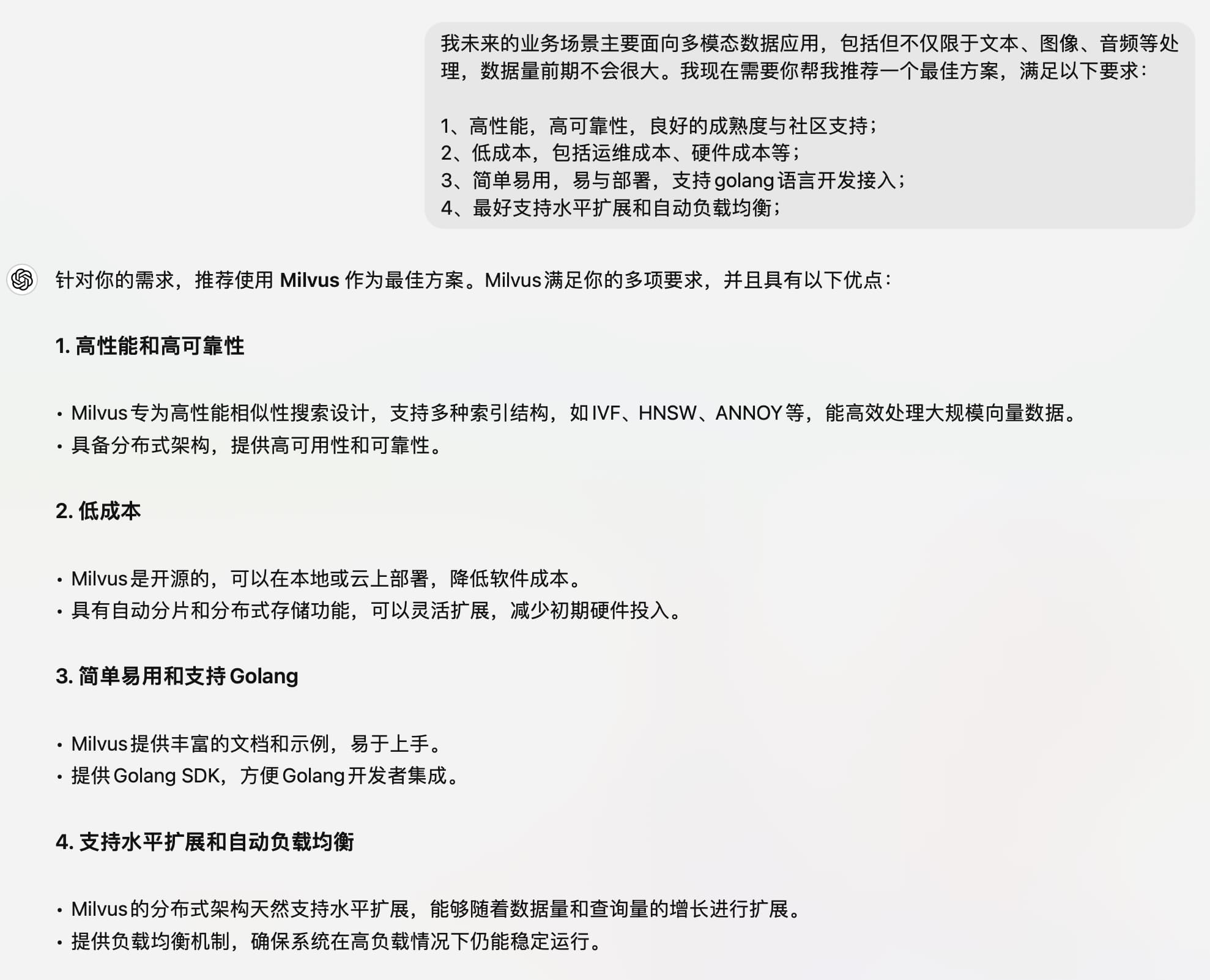
    <content type="html"><![CDATA[<p>对于数据库本身，做技术的朋友一定不会陌生。从后端到前端再到移动端，端端业务都离不开。小到<code>SQLite</code>，大到<code>MySQL</code>和<code>MongoDB</code>，任何与查询相关的事情基本上都需要接入这种玩意…</p><p>然而<a href="https://en.wikipedia.org/wiki/Vector_database">向量数据库</a>（又称矢量数据库），却不是人人都接触过，光看这名字，就充满高级与神秘感！</p><p>接下来，本文将从三个方面，来向读者介绍什么是向量数据库，以及它适用的业务场景和当前业界的主流方案。</p><h2 id="基本概念"><a href="#基本概念" class="headerlink" title="基本概念"></a>基本概念</h2><h3 id="什么是向量数据库"><a href="#什么是向量数据库" class="headerlink" title="什么是向量数据库"></a>什么是向量数据库</h3><p>标准解释：以数学形式存储的数据集合。翻译成人话，就是<strong>把人类看得懂的信息转换成机器容易理解的数据，并能有效建立关联关系</strong>，比如文字&#x2F;音频&#x2F;图片等转换成类似<code>[[1],[22],[333]]</code>这种高维度数据，主要应用于<strong>语义化相似度检索</strong>。</p><p>举个例子，在传统的数据库检索中，一般都是根据关键词做模糊匹配。比如简单粗暴的<code>LIKE</code>语句，然而这些本质上都是基于文本在做匹配查找，一旦关键词不对，结果就查不出来了。</p><h3 id="诞生背景"><a href="#诞生背景" class="headerlink" title="诞生背景"></a>诞生背景</h3><ul><li>传统数据库面向语义化查询明显存在短板，除非人为用代码去解决。但如果业务逻辑复杂或者面向文档类查询，基本上就没招了；</li><li>人工智能的发展需要，现阶段大模型都有一定 TOKEN 的限制，能够高效理解上下文、读懂用户意图决定了 AI 的基本素质；</li></ul><p>如果没有向量数据库，单独查询机器学习模型速度会很慢，而且每次消耗大量 TOKEN 也得不偿失。通过向量化数据，可以有效整合并精准上下文信息关联，省时省钱、还提高了模型调用的精度。</p><h3 id="与一般数据库的区别"><a href="#与一般数据库的区别" class="headerlink" title="与一般数据库的区别"></a>与一般数据库的区别</h3><blockquote><p>这里列举一些主要的差异，体现在数据类型、查询方式、应用场景等方面：</p></blockquote><h4 id="数据类型"><a href="#数据类型" class="headerlink" title="数据类型"></a>数据类型</h4><ul><li><strong>传统数据库</strong>：主要处理结构化的数据，如数字、字符串、日期等。数据通常以表格的形式组织，每一列对应一种数据类型。通常采用关系模型或键值、文档、图形等 NoSQL 模型，RDBMS 通常对应二维表结构，NoSQL 对应树状结构。</li><li><strong>向量数据库</strong>：专门处理高维向量数据，如来自深度学习模型的输出向量。这些向量可以代表文本、图像、音频等各种类型的数据。通常不关心数据的具体含义，而是侧重于向量本身及其相似度。</li></ul><h4 id="存储和索引"><a href="#存储和索引" class="headerlink" title="存储和索引"></a>存储和索引</h4><ul><li><strong>传统数据库</strong>：使用 B 树、哈希索引等数据结构来优化查询效率。</li><li><strong>向量数据库</strong>：使用特殊的数据结构（如 HNSW、PQ 等）来加速向量相似度查询。</li></ul><h4 id="查询方式"><a href="#查询方式" class="headerlink" title="查询方式"></a>查询方式</h4><ul><li><strong>传统数据库</strong>：使用 SQL 查询语言或特定的查询 API 来检索数据，支持复杂的条件筛选、聚合操作等。</li><li><strong>向量数据库</strong>：主要通过计算向量之间的相似度来检索数据，通常使用距离度量（如欧几里得距离、余弦相似度等）来查找最近邻或相似向量。</li></ul><h4 id="应用场景"><a href="#应用场景" class="headerlink" title="应用场景"></a>应用场景</h4><ul><li><strong>传统数据库</strong>：广泛应用于事务处理、报表分析、数据仓库等领域。</li><li><strong>向量数据库</strong>：适用于推荐系统、图像和视频检索、语义搜索、自然语言处理等需要处理非结构化数据的应用场景。</li></ul><p><u>当然，截止目前，有的传统数据库也是可以通过扩展的方式支持向量查询的功能。这里就不再具体展开讲，有兴趣移步到文章末尾：参考资料的第一篇</u></p><h2 id="业务场景"><a href="#业务场景" class="headerlink" title="业务场景"></a>业务场景</h2><p>对于向量数据库，目前业界主要应用在以下场景：</p><ul><li><strong>相似度和语义搜索</strong>：<ul><li>电商领域：比如经典功能之一的：猜你喜欢</li><li>影音娱乐：推荐歌曲&#x2F;电影等</li><li>聊天机器人</li></ul></li><li><strong>机器学习和深度学习</strong>：将信息的相关性连接起来，构建完成复杂认知任务的学习和模型训练</li><li><strong>大语言模型（LLM）和生成式 AI</strong>：依赖向量数据库对文本&#x2F;语音等进行上下文分析，通过将单词、句子和观点相互关联，LLM 可以理解人类的自然语言，甚至可以生成文本</li></ul><h2 id="主流方案"><a href="#主流方案" class="headerlink" title="主流方案"></a>主流方案</h2><ul><li><strong>Milvus</strong>：Zilliz 开发的开源向量数据库，支持分布式部署和多种索引结构。支持<code>Go</code>,<code>Python</code>,<code>Java</code>，文档和社区完善；</li><li><strong>Faiss</strong>：Faiss 是 Facebook AI Research 开发的一个高效相似性搜索库，支持 CPU 和 GPU 加速。主要面向<code>C++</code>开发者，数据规模大、需要高性能要求的首选；</li><li><strong>Annoy</strong>：Spotify 开发的用于近似最近邻搜索的库，适用于大规模、只读数据集。简单易用，适合快读原型开发，编程语言支持<code>Python</code>和<code>C++</code>；</li><li><strong>Qdrant</strong>：一个高性能、可扩展的向量搜索引擎，支持多种索引结构，如 Flat、HNSW 和 PQ (Product Quantization)，中大型业务和云原生应用；</li><li><strong>Weaviate</strong>：一个开源的向量数据库，支持图数据库的特性，可以存储和查询带有关系的向量数据。提供 RESTful API 和多种语言的客户端 SDK，适合构建语义化理解系统的团队；</li></ul><h3 id="简易排名"><a href="#简易排名" class="headerlink" title="简易排名"></a>简易排名</h3><ol><li>Milvus：提供了多种语言的 SDK，文档丰富，社区活跃。</li><li>Faiss：虽然主要支持 C++和 Python，但在性能方面非常优秀，有广泛的社区支持。</li><li>Qdrant：通过 RESTful API 支持多种语言，易于集成，社区活跃度良好。</li><li>Weaviate：同样通过 RESTful API 支持多种语言，社区支持也不错。</li><li>Annoy：支持较少的语言，但简单易用，适合快速原型开发。</li></ol><h3 id="最后，让机器来做个选择"><a href="#最后，让机器来做个选择" class="headerlink" title="最后，让机器来做个选择"></a>最后，让机器来做个选择</h3><p><img src="/img/2024/17222553053925.jpg" alt="向量数据库最佳落地方案"></p><h2 id="参考资料"><a href="#参考资料" class="headerlink" title="参考资料"></a>参考资料</h2><ul><li><a href="https://guangzhengli.com/blog/zh/vector-database">https://guangzhengli.com/blog/zh/vector-database</a></li><li><a href="https://www.bilibili.com/video/BV11a4y1c7SW">https://www.bilibili.com/video/BV11a4y1c7SW</a></li><li><a href="https://www.bilibili.com/video/BV1BM4y177Dk">https://www.bilibili.com/video/BV1BM4y177Dk</a></li></ul>]]></content>
    
    
    <summary type="html">什么是向量数据库？它与传统关系型(RDBMS)和非关系型(NoSQL)数据库的区别在哪，适用于什么业务场景...本文将试着揭晓这些答案。让我们一起来学习向量数据库的基础知识吧！</summary>


    <category term="产品研发" scheme="https://tomartisan.com/categories/prodev/"/>
    
    
    <category term="人工智能" scheme="https://tomartisan.com/tags/ai/"/>
    
  </entry>
  
  <entry>
    <title>Cloudflare的WAF规则优化</title>
    <link href="https://tomartisan.com/ditech/cloudflare-waf-rules-optimize/"/>
    <id>https://tomartisan.com/ditech/cloudflare-waf-rules-optimize/</id>
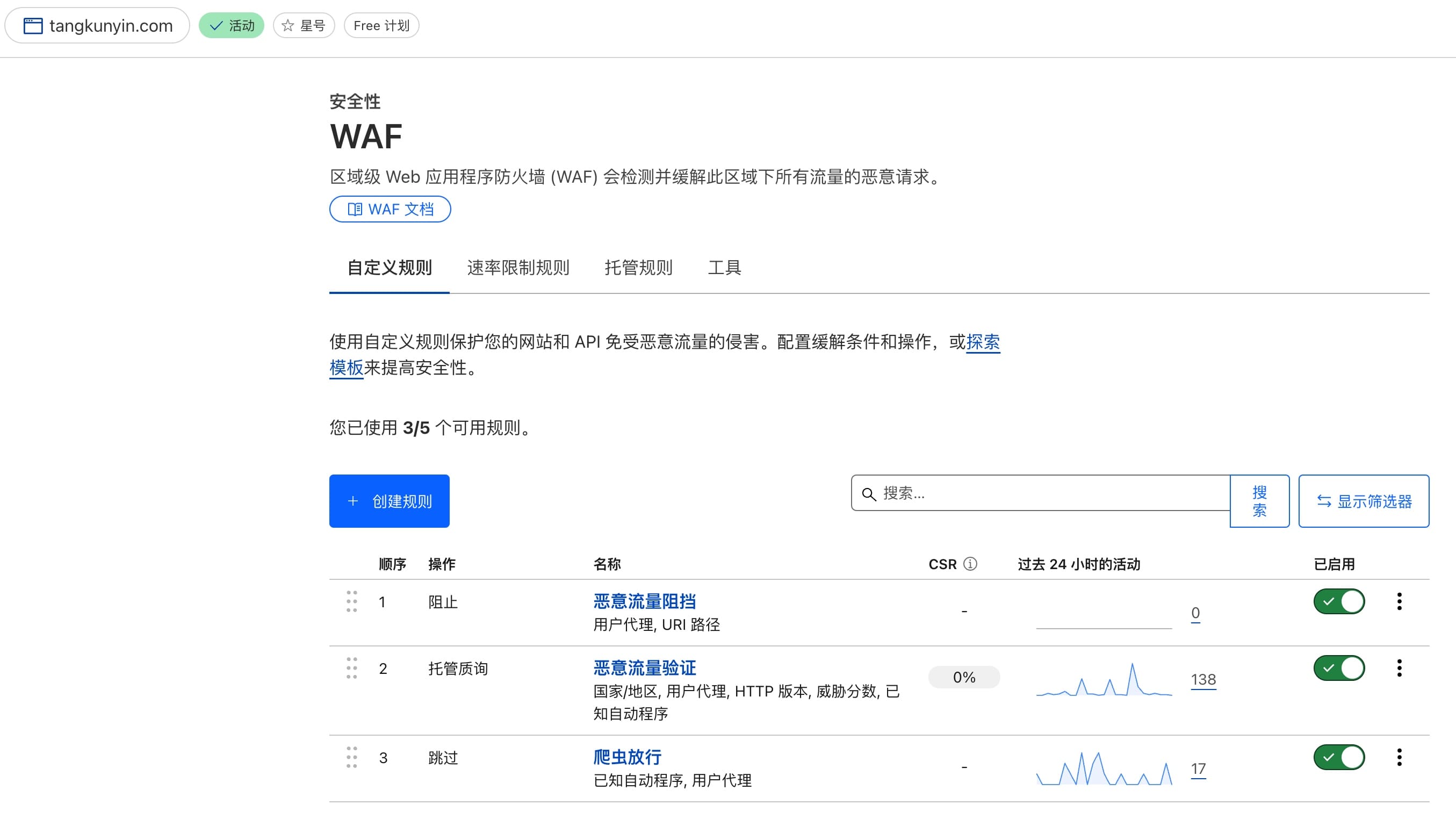
    <published>2024-07-06T03:52:25.000Z</published>
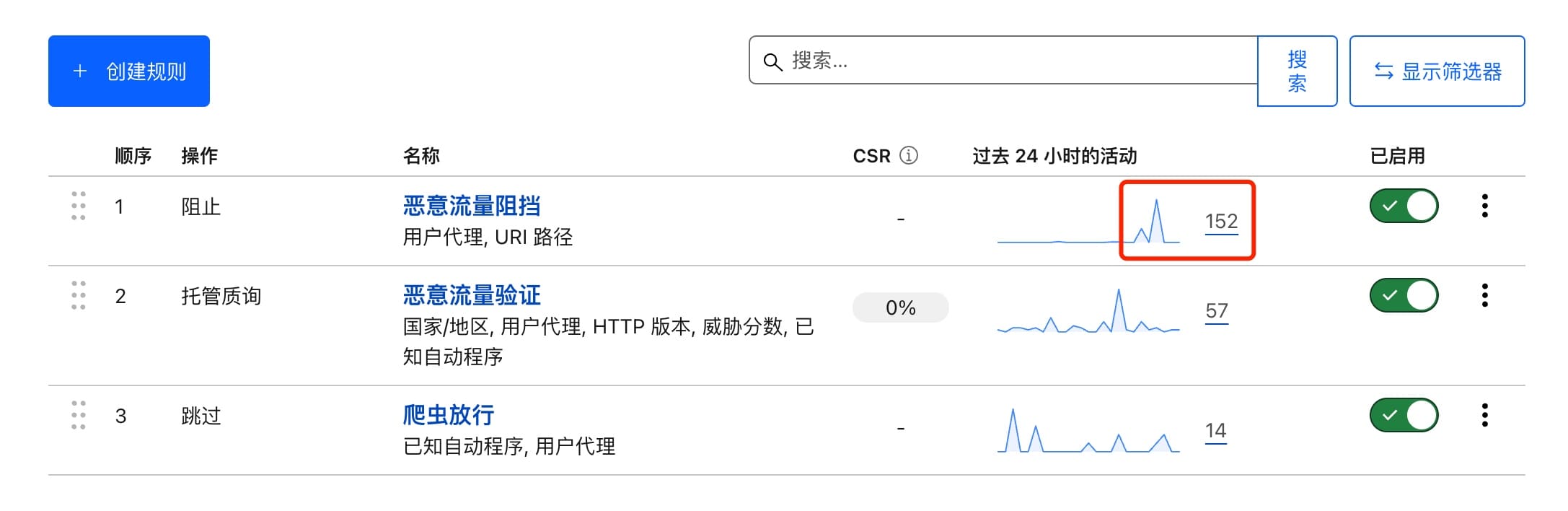
    <updated>2026-03-31T11:19:29.496Z</updated>
    
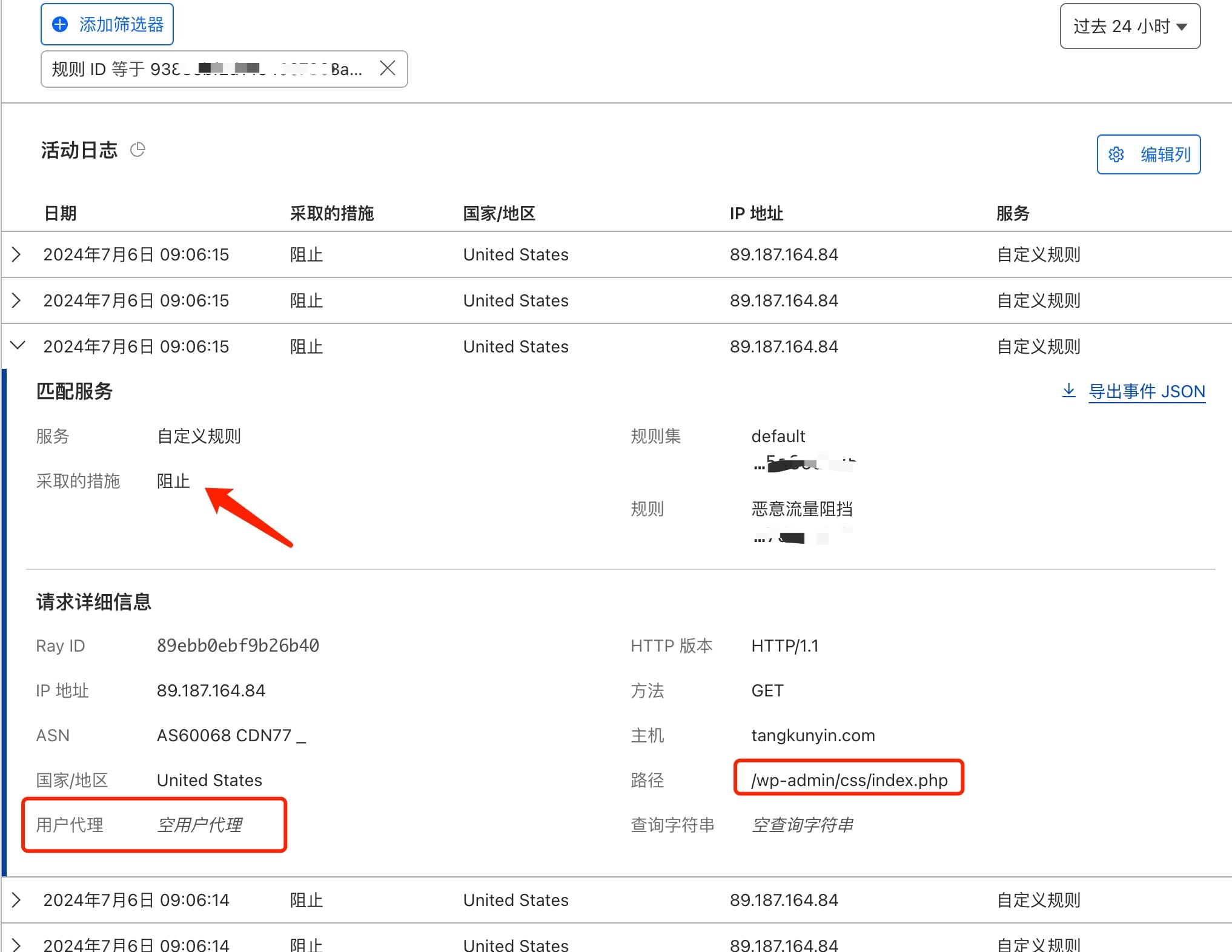
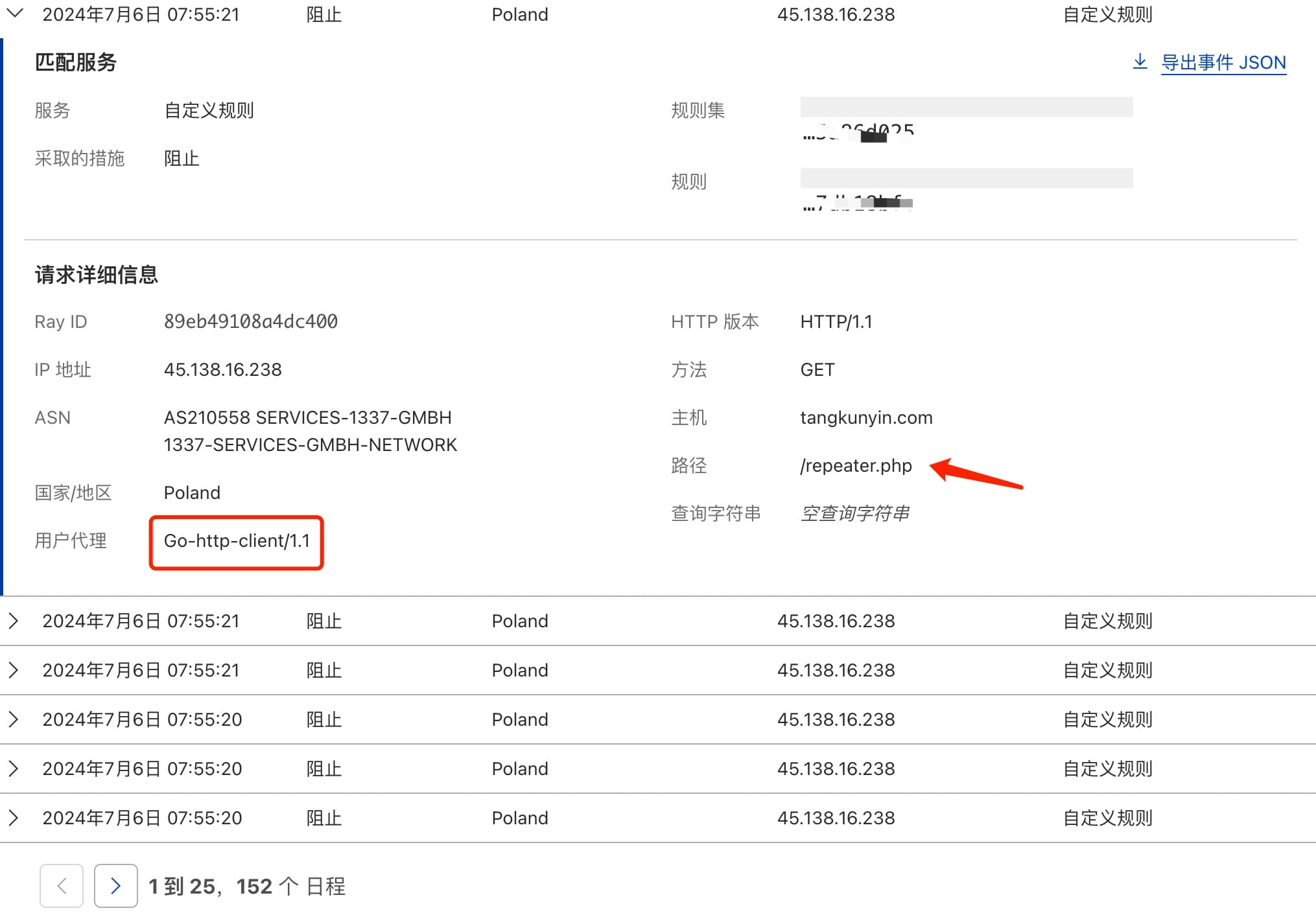
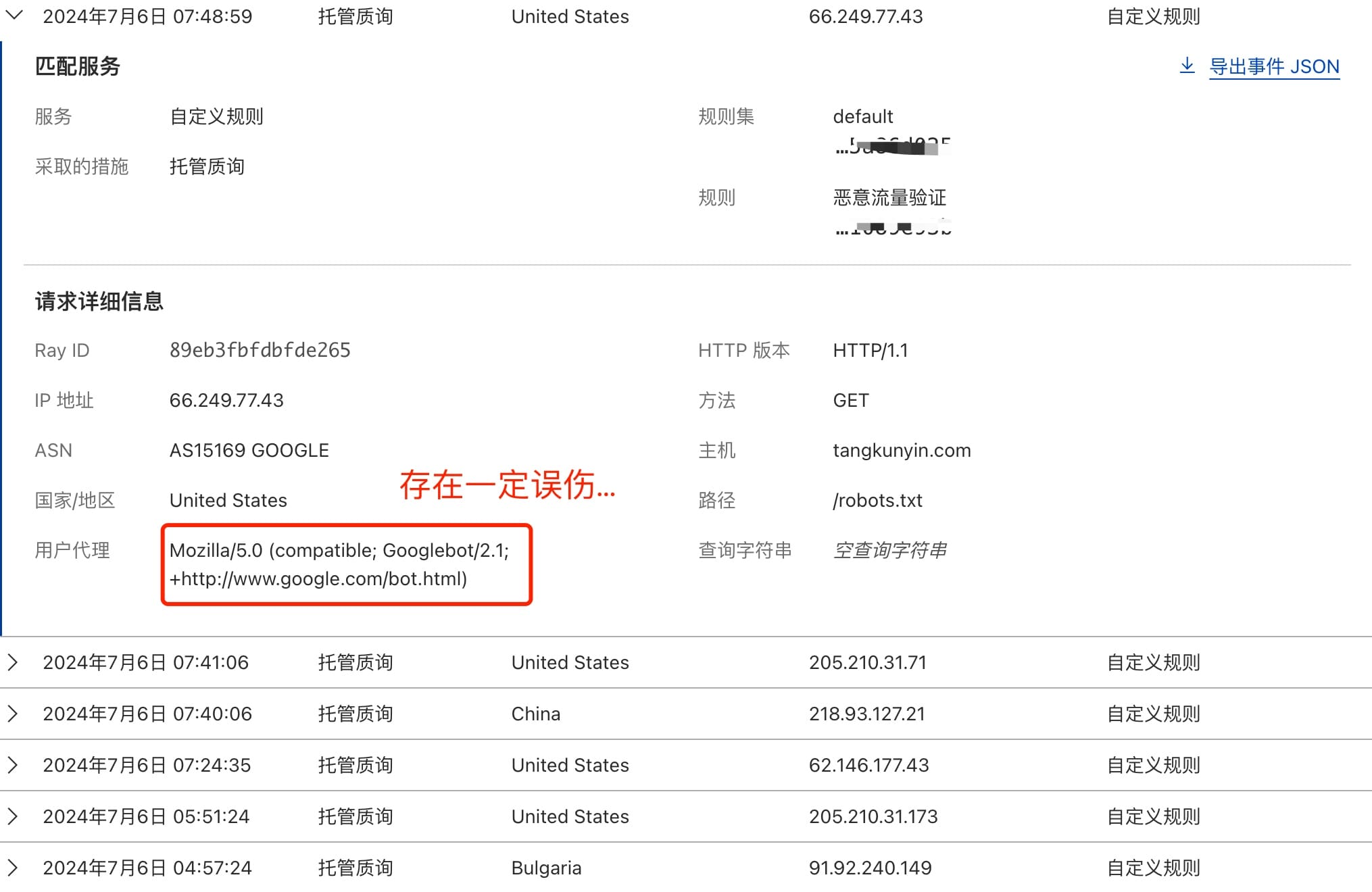
    <content type="html"><![CDATA[<p>前一阵写过一篇关于 <a href="https://tomartisan.com/ditech/cloudflare-waf-rules-configuration/">Cloudflare 安全性规则设置</a> 的文章，那里介绍了一些基本的防洪配置，然而对于我的实际情况看，其防御效果还有些小问题</p><p>因为我发现，几乎所有恶意请求都被拦截到<code>托管质询</code>这个规则里了，比如：<code>/admin-post.php</code>这种明显是恶搞的流量。所以我想了一下，把规则顺序做了调整</p><h2 id="WAF-规则顺序调整"><a href="#WAF-规则顺序调整" class="headerlink" title="WAF 规则顺序调整"></a>WAF 规则顺序调整</h2><p>基于上文提到的问题，我把之前配置的规则做了如下的调整。<strong>主要是阻止访问的规则直接放在了首位</strong></p><p><img src="/img/2024/17202383274103.jpg"></p><p>过了一天后，看下结果</p><p><img src="/img/2024/17202389775791.jpg"></p><p>可以明显看到，恶搞的请求被档在最外层了，而<strong>托管质询</strong>也被很好缓解了。接着点进去看看这个规则下，到底阻止了那些请求</p><p><img src="/img/2024/17202391376301.jpg"><br><img src="/img/2024/17202393015942.jpg"></p><p>本来呢，<a href="https://tangkunyin.com/">THOMAS TANG</a> 这个站点就<strong>仅仅是一个类似 readme 的介绍</strong>而已，用<code>hexo</code>生成的纯静态站，没啥多余的东西。</p><p><u>但纳闷的就是，不知道哪来这么些闲的蛋疼的人，时不时恶搞一下（伤害倒没有，但挑衅意识极强）</u>。有这兴趣，去干百度不更有成就感么…</p><h2 id="再次优化"><a href="#再次优化" class="headerlink" title="再次优化"></a>再次优化</h2><p>在分析<code>托管质询</code>这条规则日志时，我发现上头那种顺序，会误伤爬虫，比如这个记录</p><p><img src="/img/2024/17202400694201.jpg"></p><p><strong>所以我想，最优的解法应该是：</strong></p><ol><li>阻止：禁止恶意请求访问，比如代码脚本的恶意攻击，特殊的路径访问等；</li><li>跳过：针对主流搜索引擎的爬虫进行放行，毕竟网站放到互联网，基本上都希望别人可以了解和访问到，因此爬虫能检索到很重要；</li><li>托管质询：针对非常规的请求进行验证，这项就根据个人情况自己配了；</li></ol><p>以上看法并非业内的最佳实践，但有了这几项配置和优化。对于绝大多数的站点我觉得都相当够用了。最终我的配置如下，供有需要的参考：</p><p><img src="/img/2024/17202407746717.jpg"></p><p>当然，识别到爬虫要尽量放开其他规则限制。不然容易被<code>托管质询</code>这里拦截。这块我在文章开头提到的那篇<strong>Cloudflare 安全性规则设置</strong>有提及。</p><h2 id="关于-Cloudflare"><a href="#关于-Cloudflare" class="headerlink" title="关于 Cloudflare"></a>关于 Cloudflare</h2><p>再多说几句，关于<a href="https://www.cloudflare.com/zh-cn/what-is-cloudflare/">Cloudflare</a>，业内对 Ta 有个很高的评价，说是<code>活菩萨</code>还是<code>铁观音</code>来着。具体突然想不起来了，这个称号还蛮有意思，对标到国内这些厂商，还真是讽刺呢</p><p>总之，如果业务允许，试试 <strong>Cloudflare</strong> 一定不会让你失望。起码像<code>HTTPS</code>这种，不会像某云那样问你要钱…当然更多“白嫖玩法”就各位自己研究啦！</p>]]></content>
    
    
    <summary type="html">关于Cloudflare的WAF规则优化实践，可有效解决恶意请求拦截、爬虫放行和非正常请求验证。</summary>


    <category term="数智科技" scheme="https://tomartisan.com/categories/ditech/"/>
    
    
    <category term="科技" scheme="https://tomartisan.com/tags/technology/"/>
    
    <category term="干货" scheme="https://tomartisan.com/tags/practicals/"/>
    
    <category term="建站" scheme="https://tomartisan.com/tags/webmaster/"/>
    
  </entry>
  
  <entry>
    <title>一个直播业务死活不出画面的问题排查</title>
    <link href="https://tomartisan.com/prodev/live-streaming-picture-issue-troubleshooting/"/>
    <id>https://tomartisan.com/prodev/live-streaming-picture-issue-troubleshooting/</id>
    <published>2024-07-04T04:08:41.000Z</published>
    <updated>2024-09-12T06:44:40.383Z</updated>
    
    <content type="html"><![CDATA[<p>前段时间，基于<a href="https://docs.expo.dev/modules/third-party-library/">Expo Module</a>开发了一个跨平台的直播组件，基于<a href="https://cloud.tencent.com/document/product/1131/102758">腾讯云 IoT</a>。</p><p>在安卓端，因为有一个现成的 demo 供参考，所以图省事就大量复制了原来的<code>Java</code>代码。本来弄完后可以播放（应付差事），但是腾讯的<code>XP2P</code>很耗时导致进入<code>PlayerView</code>时要卡差不多 2 秒！</p><p>这让我如何能忍？！ 😂</p><p>于是就用<code>Kotlin</code>的协程改造了一番，结果一顿操作猛如虎，改完一看，画面没了，然而 logcat 没有明显报错。这就让人抓狂了…于是有了这篇文档。</p><h2 id="果与因"><a href="#果与因" class="headerlink" title="果与因"></a>果与因</h2><h3 id="一、画布变量申明修饰符错误"><a href="#一、画布变量申明修饰符错误" class="headerlink" title="一、画布变量申明修饰符错误"></a>一、画布变量申明修饰符错误</h3><p><img src="/img/2024/17200681929015.jpg"></p><p>在优化过程中，试图使用类似<code>lateinit</code>、<code>lazy</code>的关键词去声明可能有大消耗的变量，结果某个环节翻车了。以下是通过<code>GPT</code>学到的姿势：</p><h4 id="使用-lateinit-的注意事项"><a href="#使用-lateinit-的注意事项" class="headerlink" title="使用 lateinit 的注意事项"></a>使用 lateinit 的注意事项</h4><ol><li>初始化保证：<code>lateinit</code> 变量必须在访问前被初始化，否则会抛出 <code>UninitializedPropertyAccessException</code>。确保在使用变量前它已经被初始化。</li><li>线程安全：初始化 <code>lateinit</code> 变量的操作应该是线程安全的。如果你在一个多线程环境中使用 <code>lateinit</code>，确保只有一个线程负责初始化。</li><li>可变性：<code>lateinit</code> 只能修饰 <code>var</code> 类型的属性，因为属性初始化后可能需要更改引用。如果你想要一个只读的延迟初始化属性，应该使用 <code>lazy</code>。</li><li>非空类型：<code>lateinit</code> 只能用于非空引用类型，不能用于基本类型（如 <code>Int</code>、<code>Double</code> 等）。</li><li>反射：使用反射初始化 <code>lateinit</code> 属性时，需要特别小心，因为反射操作可能绕过 <code>Kotlin</code> 的空安全检查。</li><li>调试困难：由于 <code>lateinit</code> 绕过了 <code>Kotlin</code> 的空安全检查，它可能使得调试更难，因为你不能依赖于编译器来捕获未初始化的引用错误。</li></ol><h4 id="不应该使用-lateinit-的情况"><a href="#不应该使用-lateinit-的情况" class="headerlink" title="不应该使用 lateinit 的情况"></a>不应该使用 lateinit 的情况</h4><ol><li>可提前初始化的属性：如果一个属性可以在构造函数或初始化块中被安全地初始化，那么不应该使用 <code>lateinit</code>。</li><li>可选或可能为 <code>null</code> 的属性：<code>lateinit</code> 不应该用于可选的或可能为 <code>null</code> 的属性，因为 <code>lateinit</code> 要求属性非空。</li><li>只读属性：对于只读属性，应该使用 <code>lazy</code> 而不是 <code>lateinit</code>，因为 <code>lazy</code> 提供了一次性、线程安全的延迟初始化。</li><li>性能关键路径：在性能关键的代码中，如果延迟初始化不是必要的，应该避免使用 <code>lateinit</code>，因为它可能引入额外的运行时检查。</li><li>多线程环境：在多线程环境下，如果多个线程可能同时尝试初始化同一个 <code>lateinit</code> 属性，可能会导致竞态条件或异常。</li></ol><p>总之，<code>lateinit</code> 应该谨慎使用，主要用于那些在对象构造后才能安全初始化的属性，并且这些属性在初始化前不会被访问。在设计类时，优先考虑在构造函数或初始化块中初始化属性，只有在确实需要延迟初始化时才使用 <code>lateinit</code></p><h3 id="二、多线程异步不播放"><a href="#二、多线程异步不播放" class="headerlink" title="二、多线程异步不播放"></a>二、多线程异步不播放</h3><blockquote><p>截止 7.5 日的实际情况来看，并非播放不能在多线程异步条件下进行。前期播不了的根本原因在于多线程下 SDK 初始化和画布初始化存在时间差，即：SDK 初始化好了，但画布还没准备好。所以从 logcat 上看，有大把 ijkplayer 日志输出，但始终没有画面</p></blockquote><p>后来，通过事件的方式，在完成画布初始化后通知 SDK 播放，此时整个流程如丝般顺滑…</p><p>1、把画布初始化时就设置上监听回调，原来是在播放那一刻才做这个动作。所以<code>surfaceTextureListener</code>时机很关键</p><pre><code class="hljs kotlin"><span class="hljs-keyword">private</span> <span class="hljs-keyword">val</span> playerView = LiveTextureView(context).also &#123;    it.layoutParams = LayoutParams(LayoutParams.MATCH_PARENT, LayoutParams.MATCH_PARENT)    it.isOpaque = <span class="hljs-literal">false</span>    it.surfaceTextureListener = it    addView(it)    Log.i(TAG, <span class="hljs-string">&quot;playerView added to MainView. called ============ 🏅&quot;</span>)&#125;</code></pre><p>2、画布初始化完成后，通过消息通知，让 SDK 开始异步初始化</p><pre><code class="hljs kotlin"><span class="hljs-keyword">internal</span> <span class="hljs-keyword">lateinit</span> <span class="hljs-keyword">var</span> surface: Surface<span class="hljs-keyword">override</span> <span class="hljs-function"><span class="hljs-keyword">fun</span> <span class="hljs-title">onSurfaceTextureAvailable</span><span class="hljs-params">(surface: <span class="hljs-type">SurfaceTexture</span>, width: <span class="hljs-type">Int</span>, height: <span class="hljs-type">Int</span>)</span></span> &#123;    <span class="hljs-keyword">try</span> &#123;        <span class="hljs-keyword">this</span>.surface = Surface(surface)        Log.d(TAG, <span class="hljs-string">&quot;surface初始化完成，即将进行播放... &quot;</span>)        EventBus.getDefault().post(AppEventKey.OnSurfaceTextureAvailable)    &#125; <span class="hljs-keyword">catch</span> (e: Exception) &#123;        Log.e(TAG, e.message!!)    &#125;&#125;</code></pre><p>3、收到通知，异步开干！这里用到了<code>androidx.lifecycle.ViewModel</code></p><pre><code class="hljs kotlin"><span class="hljs-meta">@Subscribe(threadMode = ThreadMode.MAIN)</span><span class="hljs-keyword">internal</span> <span class="hljs-function"><span class="hljs-keyword">fun</span> <span class="hljs-title">calledOnAppEvent</span><span class="hljs-params">(event: <span class="hljs-type">AppEventKey</span>)</span></span> &#123;    <span class="hljs-keyword">when</span> (event) &#123;        AppEventKey.OnSurfaceTextureAvailable -&gt; &#123;            initPlayerService()        &#125;    &#125;&#125;<span class="hljs-keyword">private</span> <span class="hljs-function"><span class="hljs-keyword">fun</span> <span class="hljs-title">initPlayerService</span><span class="hljs-params">()</span></span>  &#123;    viewModelScope.launch(Dispatchers.IO) &#123;        xp2PService.start(ctx)    &#125;&#125;</code></pre><h3 id="三、data-class-定义"><a href="#三、data-class-定义" class="headerlink" title="三、data class 定义"></a>三、data class 定义</h3><p>对于<code>Kotlin</code>这门语言，之前其实用到的并不多，可以说是小白用户。在优化过程中没有注意到一些的细节，然后导致<code>RN</code>那边的变量传过来是错的，而且竟然一直没有发现这个问题。直到一行行的分析 logcat 时，才偶然发现一个简短的 Warn：<code>p2p error message</code></p><p><img src="/img/2024/17200691141286.jpg" alt="kotlin datClass"></p><h2 id="一点想法"><a href="#一点想法" class="headerlink" title="一点想法"></a>一点想法</h2><ul><li>日志的重要性：擅于分析日志的重要性不用多说，然而对于开源类库作者，<strong>输出有效的、合适等级的日志信息更重要</strong>。这直接影响业务对接的效率和体验；</li><li>文档的重要性：任何情况下，提供完尽、有条理的业务文档都很重要，然而对于大多数开发者而言，<strong>写文档没有直接写代码更有快感。这就导致了对接过程中要深入源码去看</strong>，如果能进入倒好。像 iOS 那种<code>.a</code>只提供头文件的，就当场吐血了；</li><li>对于编程语言的选择：这次算是对<code>Kotlin</code>有了更全面的体验，从个人码历而言，其快乐体验吊打一众别的大前端语言，如：<code>Objc</code>、<code>JavaScript</code>，甚至我个人觉得比<code>Swift</code>感受还要好。我觉得吧如果有得选，试试现代编程语言还是不错的选择。</li></ul><h2 id="写在最后"><a href="#写在最后" class="headerlink" title="写在最后"></a>写在最后</h2><p>由于该播放器组件受保密协议约束，所以不能直接发<code>github</code>地址。当然作为<code>expo module</code>本身，也并不见得有多大的通用性。所以呢本文仅针对本人研发过程中遇到的问题做一个整理，如果你也恰好遇到类似的问题或需求，可以直接留言交流。</p>]]></content>
    
    
    <summary type="html">安卓端，基于Expo模块对接腾讯云IoT SDK中遇到直播不出画面的问题的一些经验和整理。分享出来希望能对遇到相关问题的朋友一些参考。</summary>


    <category term="产品研发" scheme="https://tomartisan.com/categories/prodev/"/>
    
    
    <category term="编程语言" scheme="https://tomartisan.com/tags/programming-lang/"/>
    
    <category term="安卓" scheme="https://tomartisan.com/tags/android/"/>
    
  </entry>
  
  <entry>
    <title>Cloudflare安全性规则设置</title>
    <link href="https://tomartisan.com/ditech/cloudflare-waf-rules-configuration/"/>
    <id>https://tomartisan.com/ditech/cloudflare-waf-rules-configuration/</id>
    <published>2024-06-26T04:21:23.000Z</published>
    <updated>2024-09-12T06:44:39.709Z</updated>
    
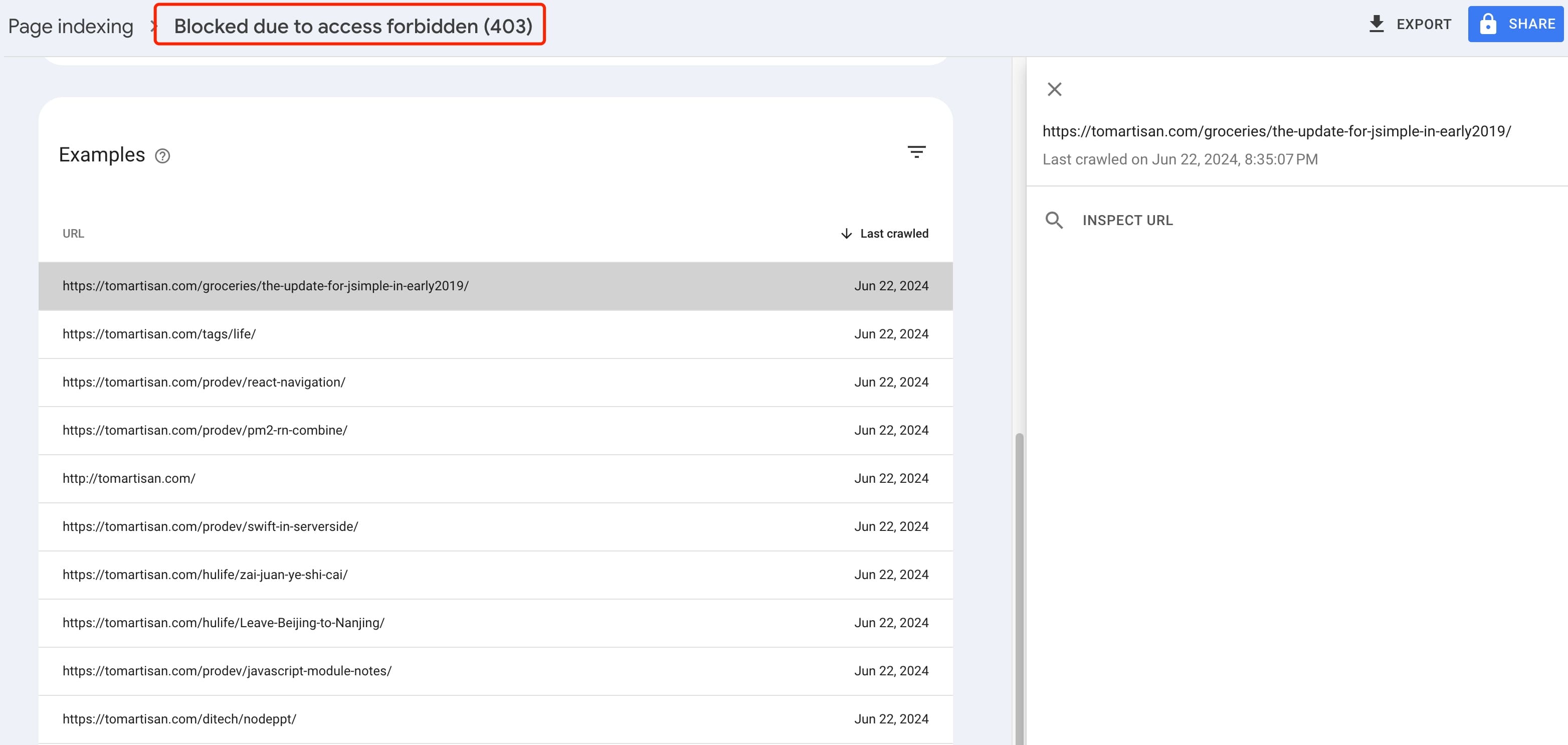
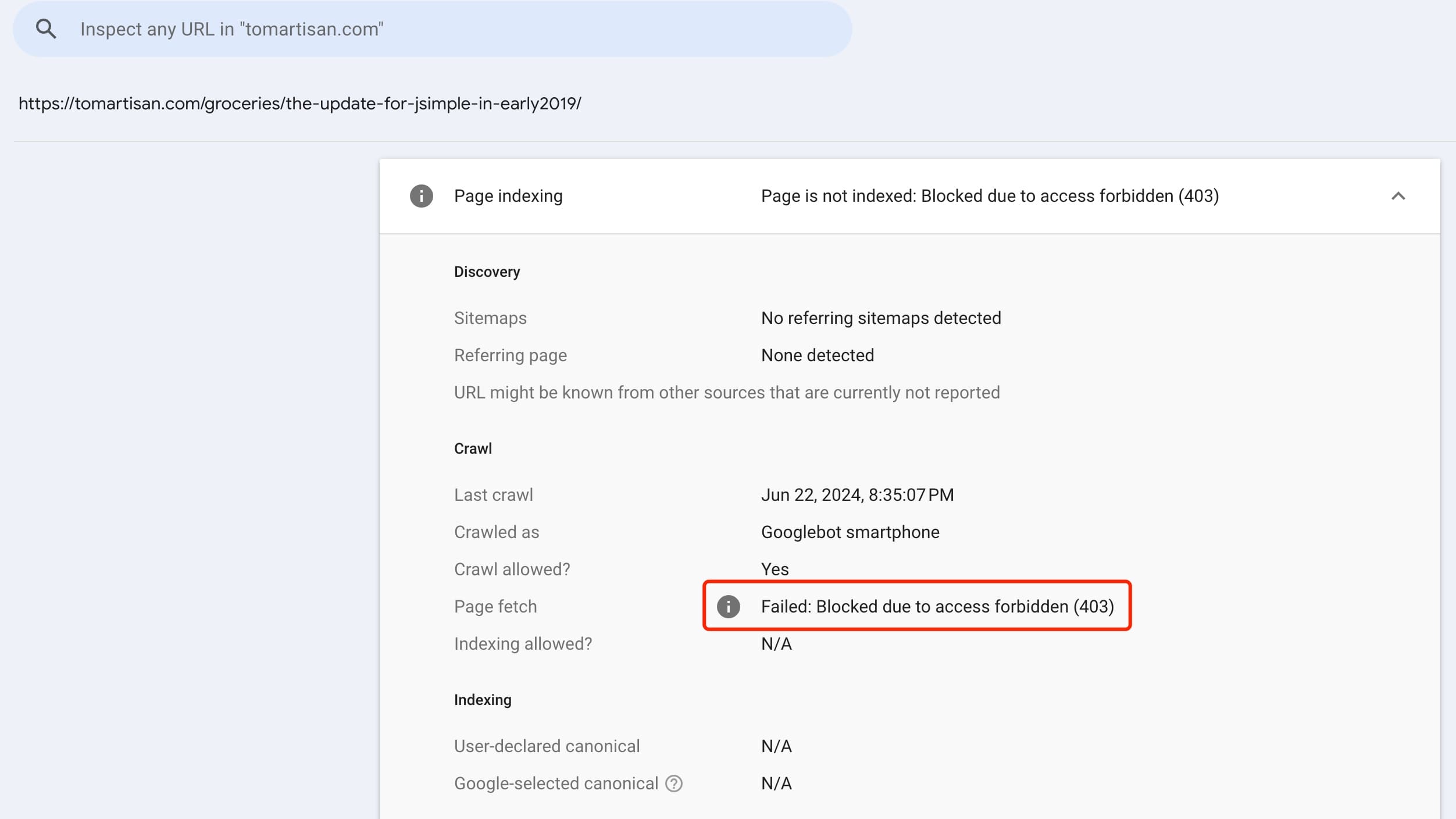
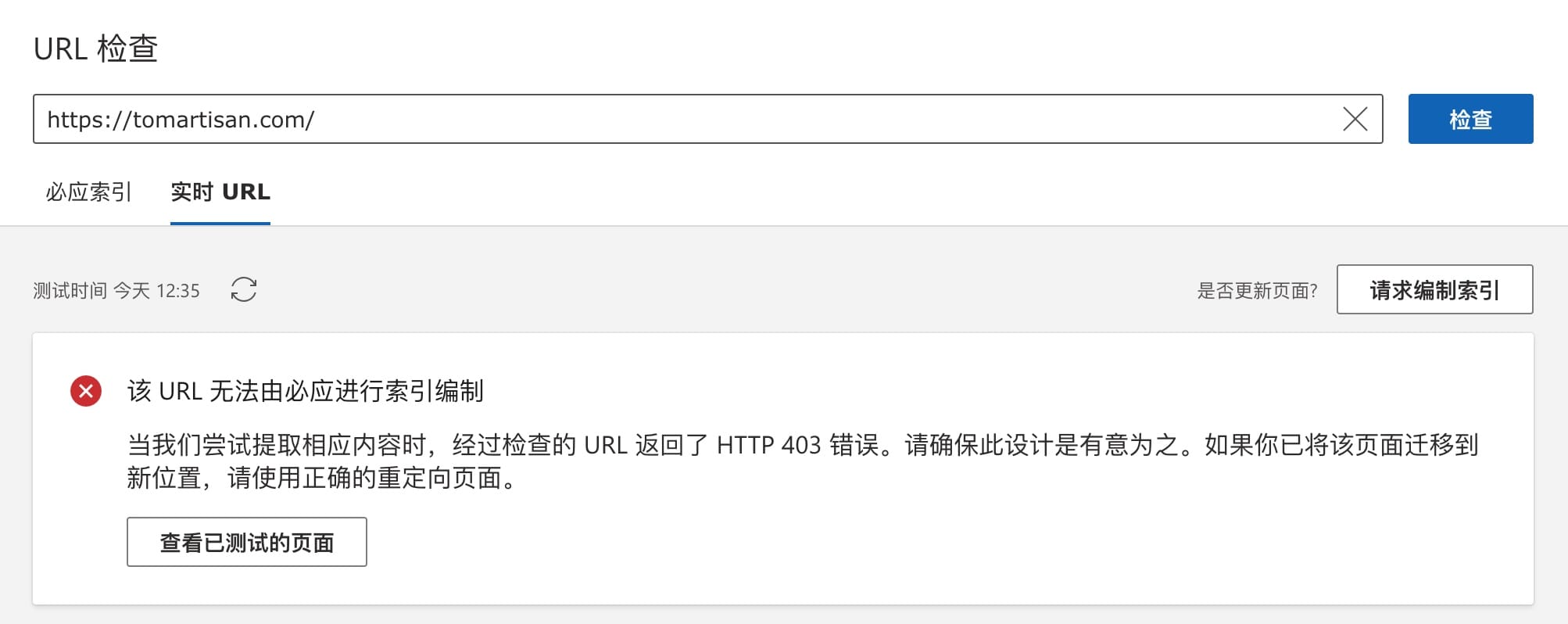
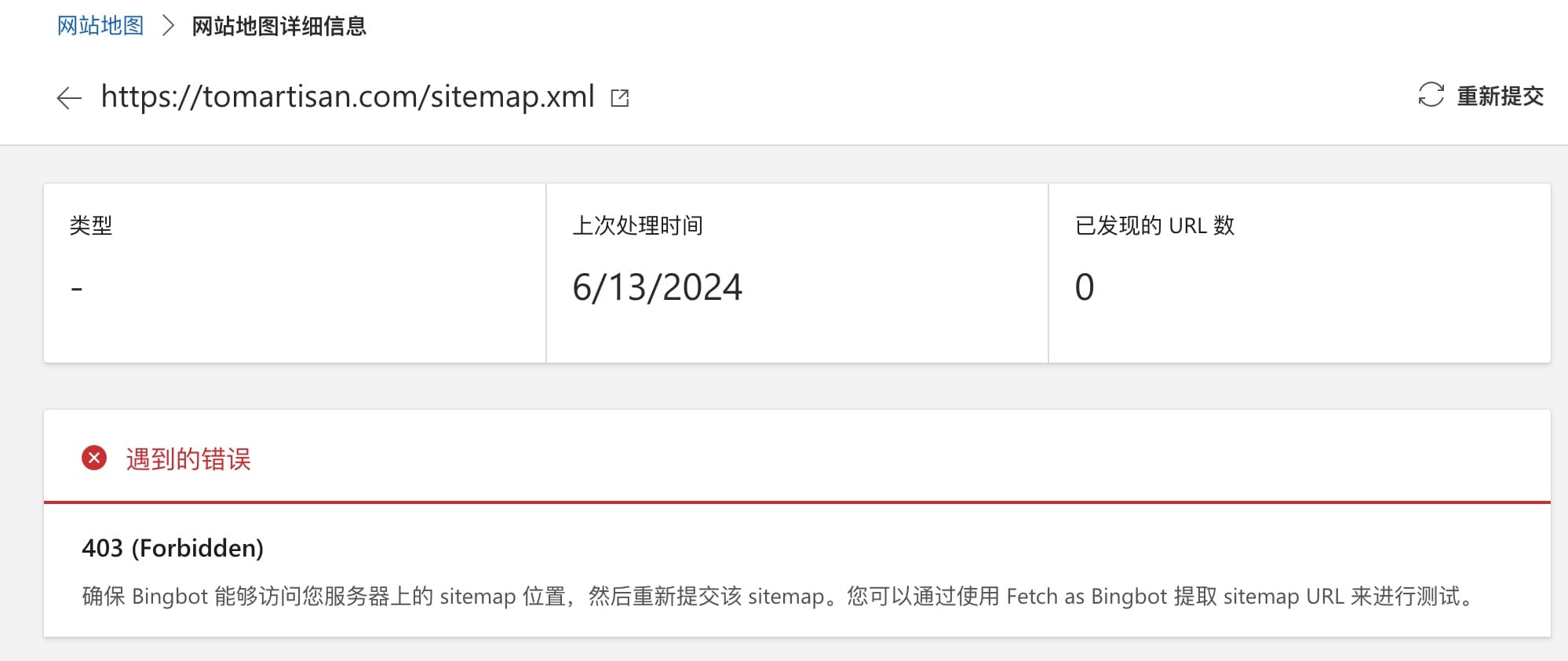
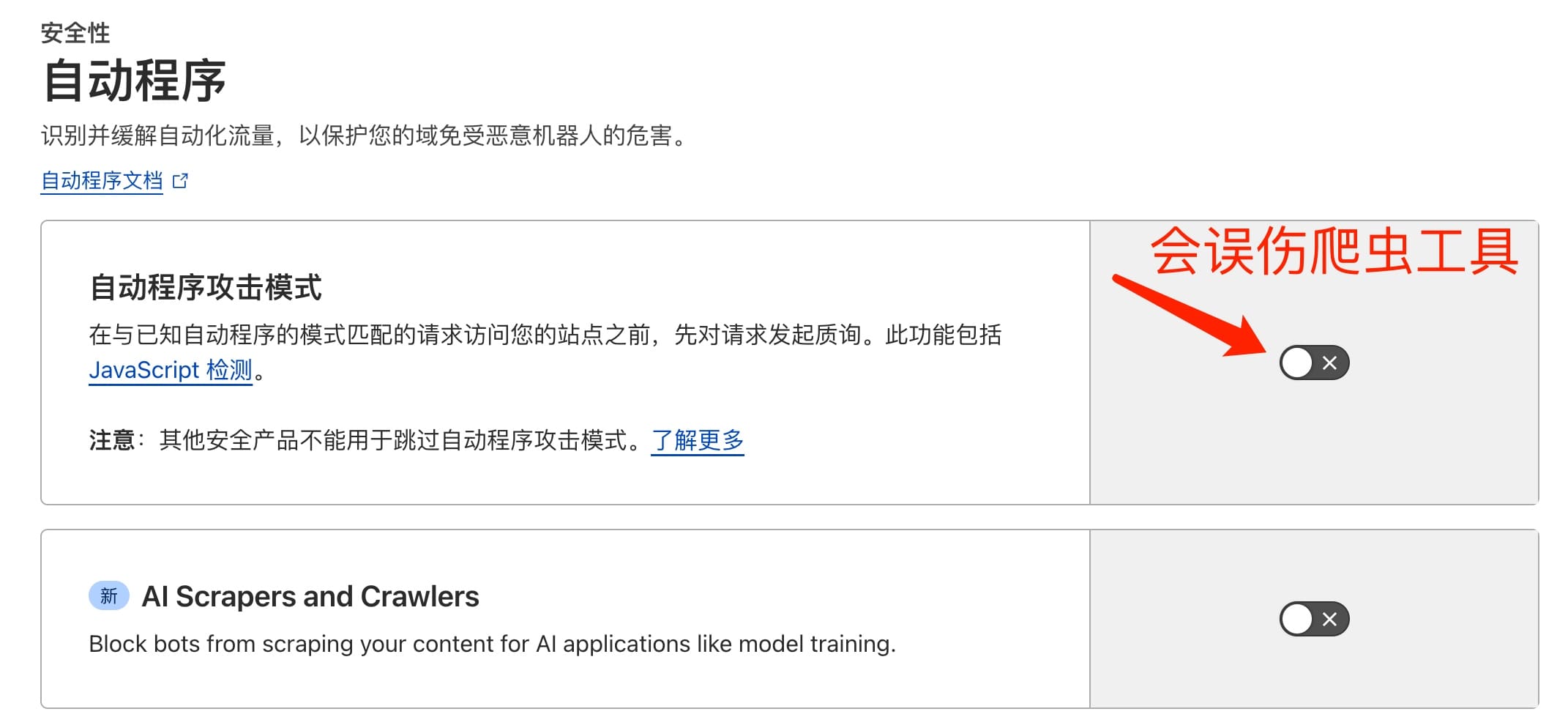
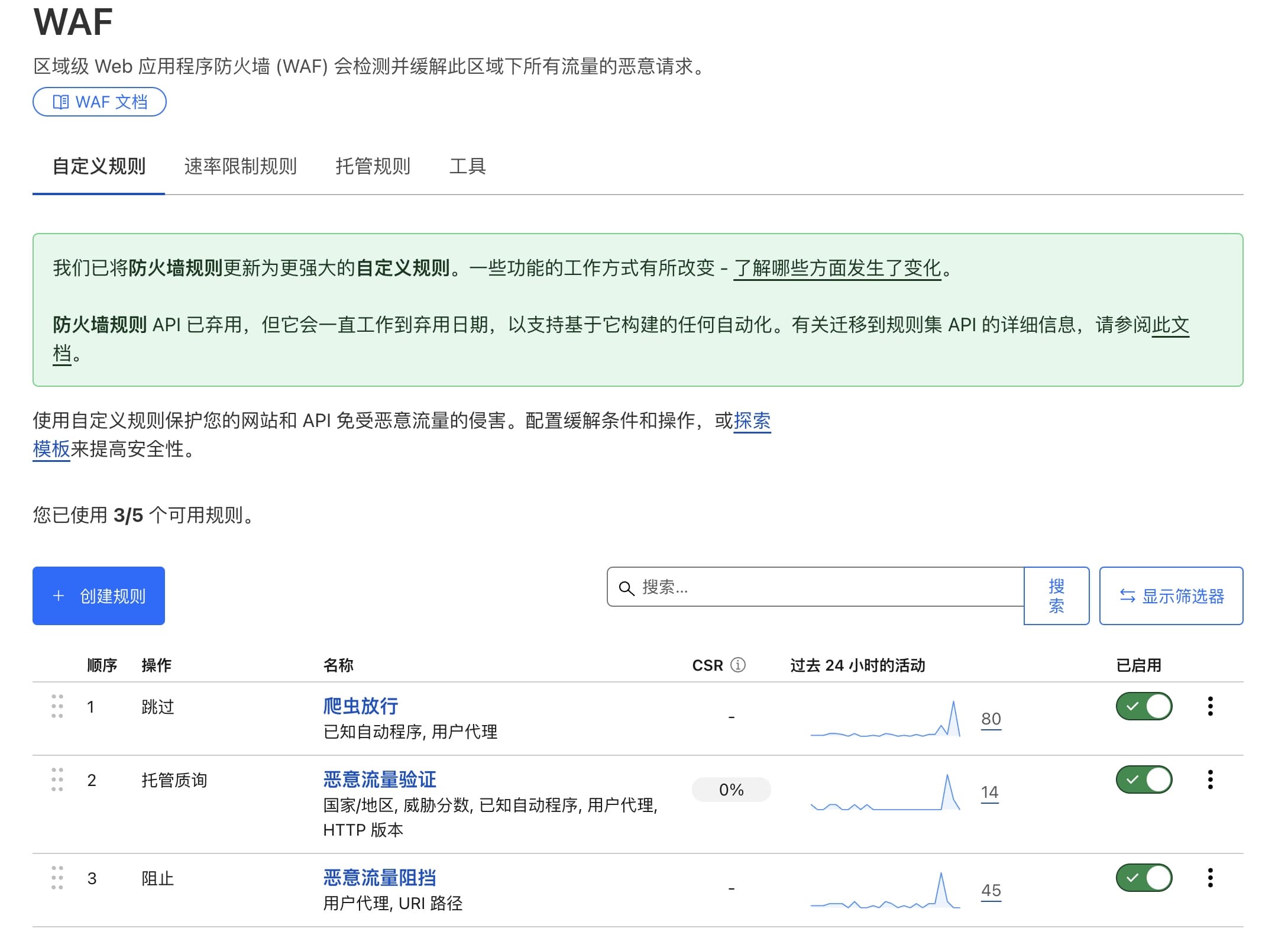
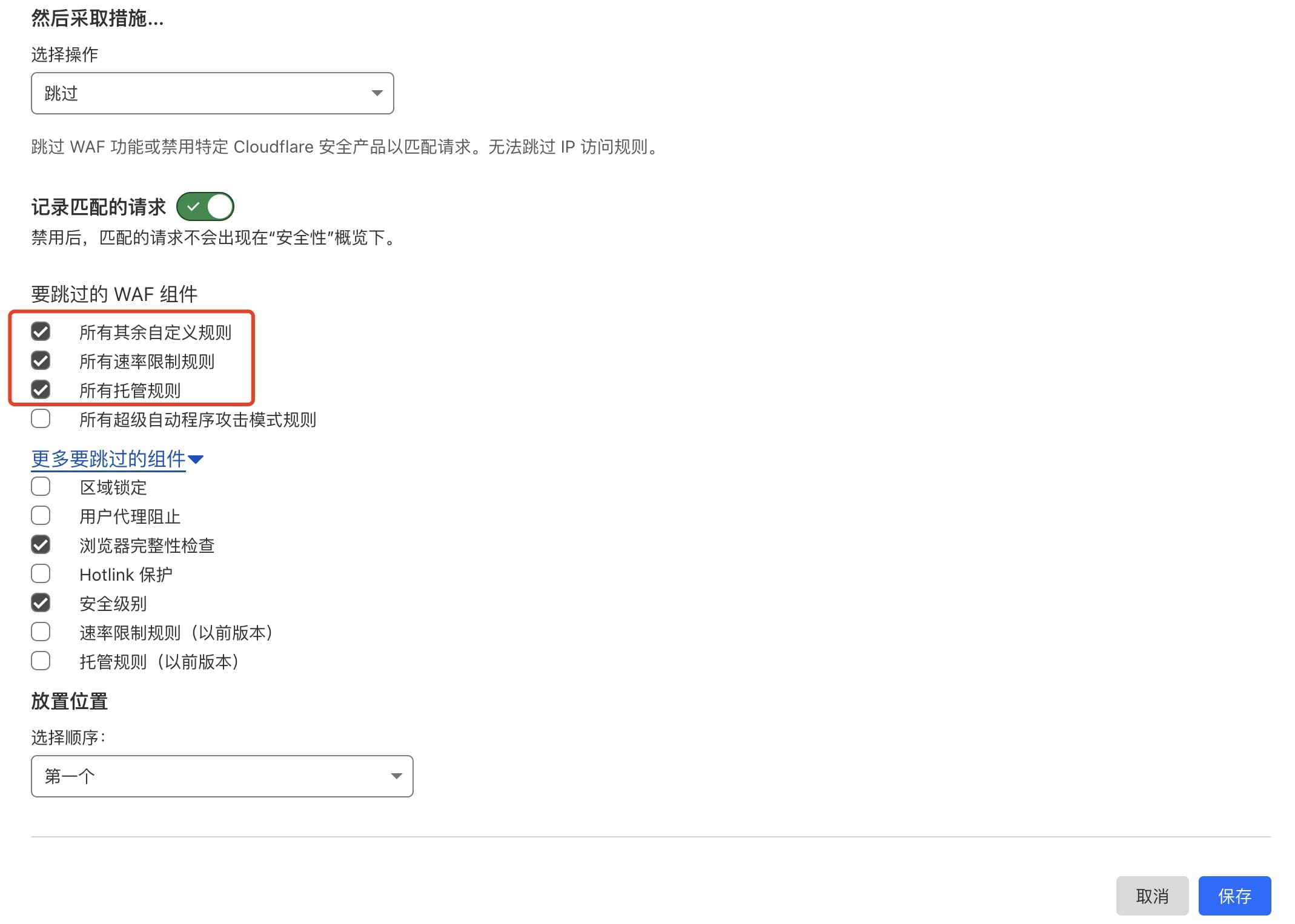
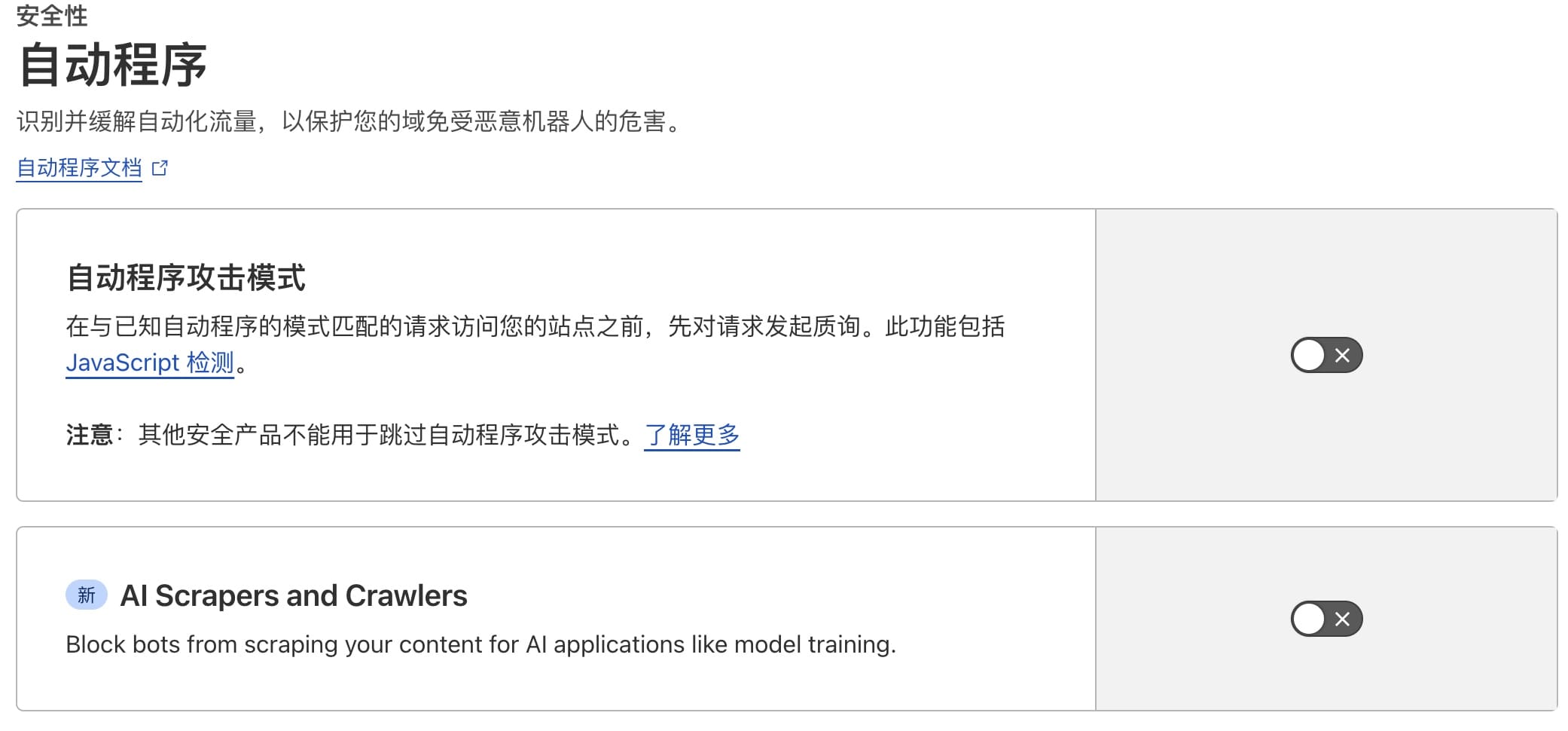
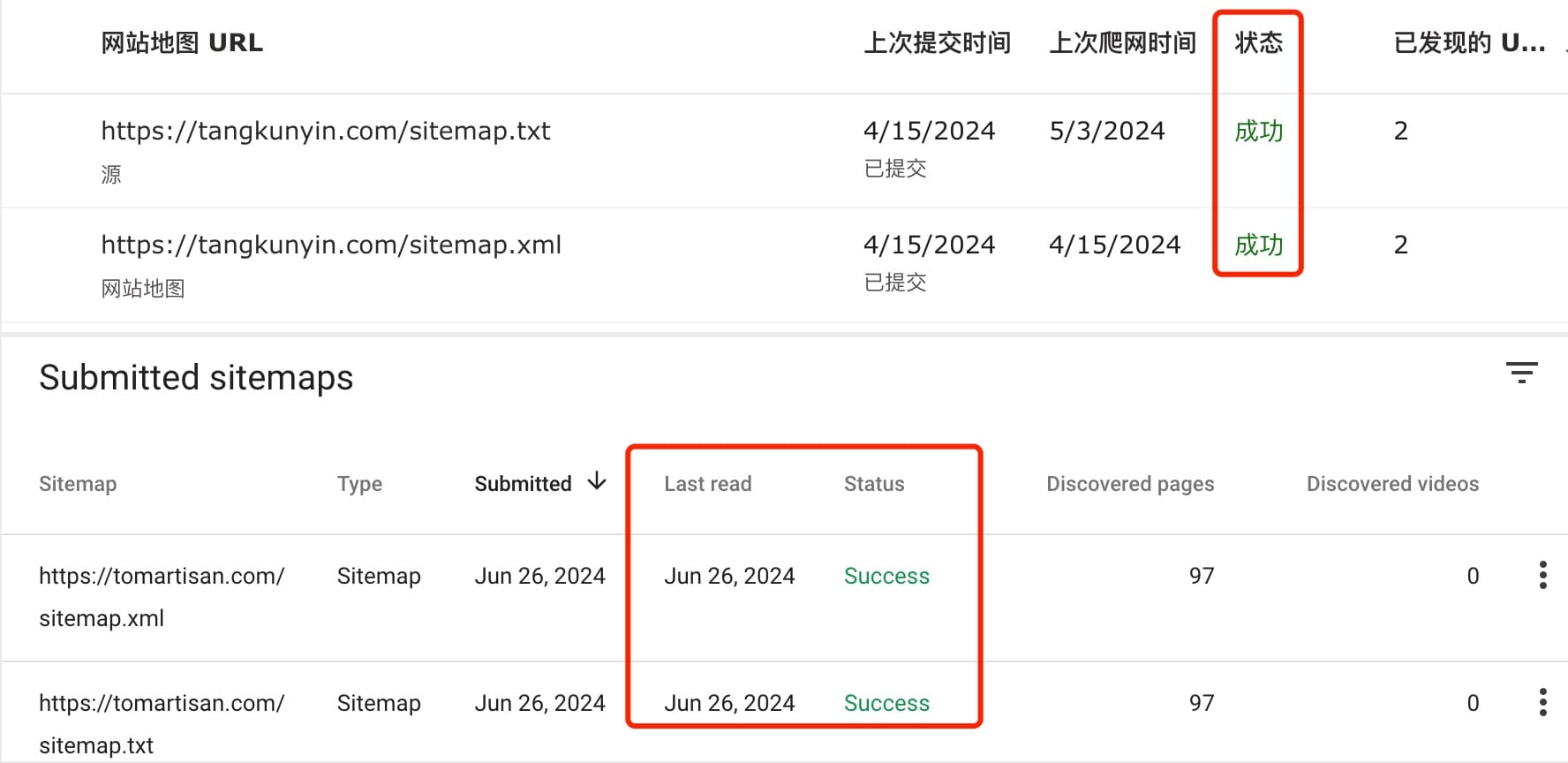
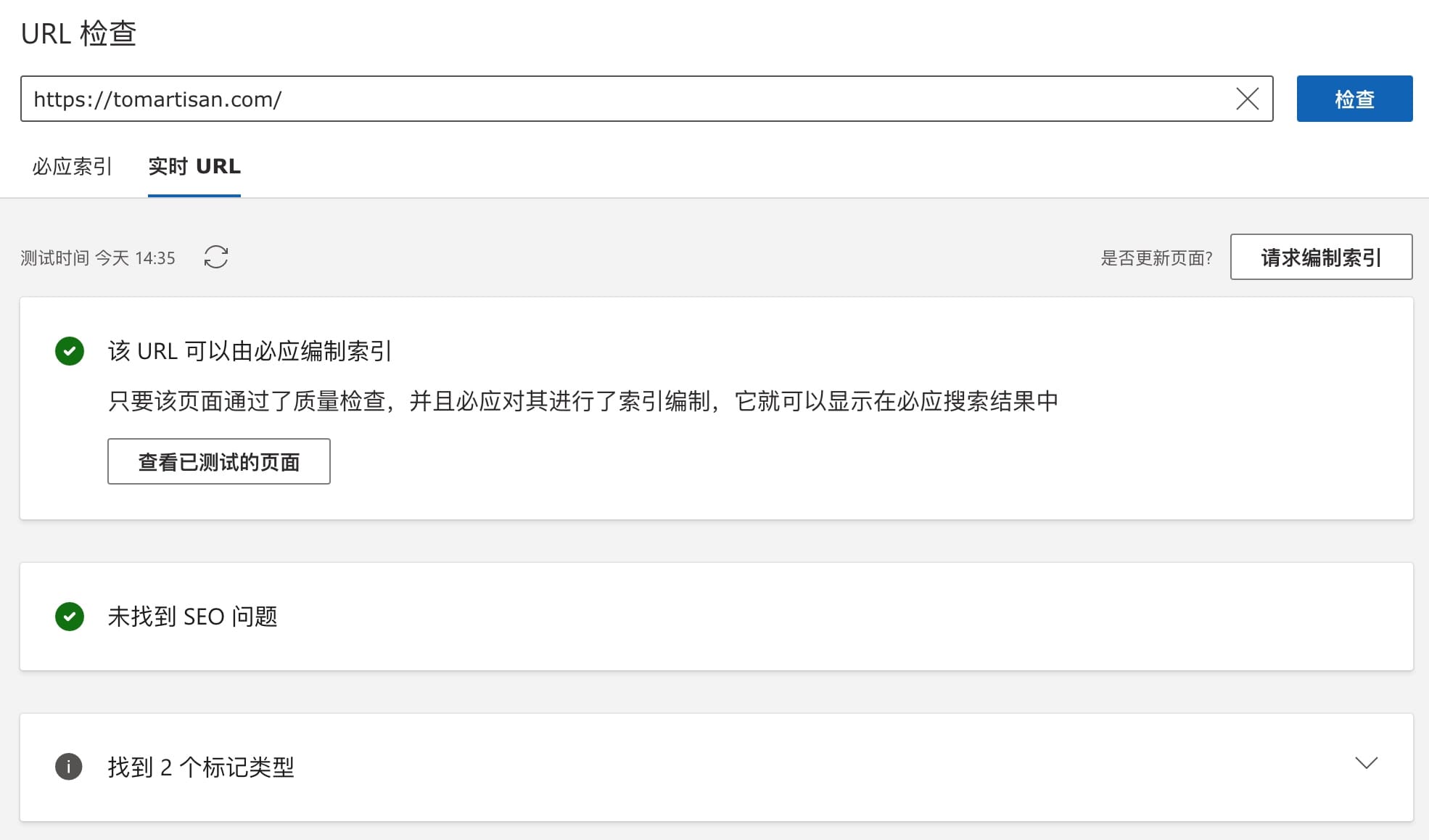
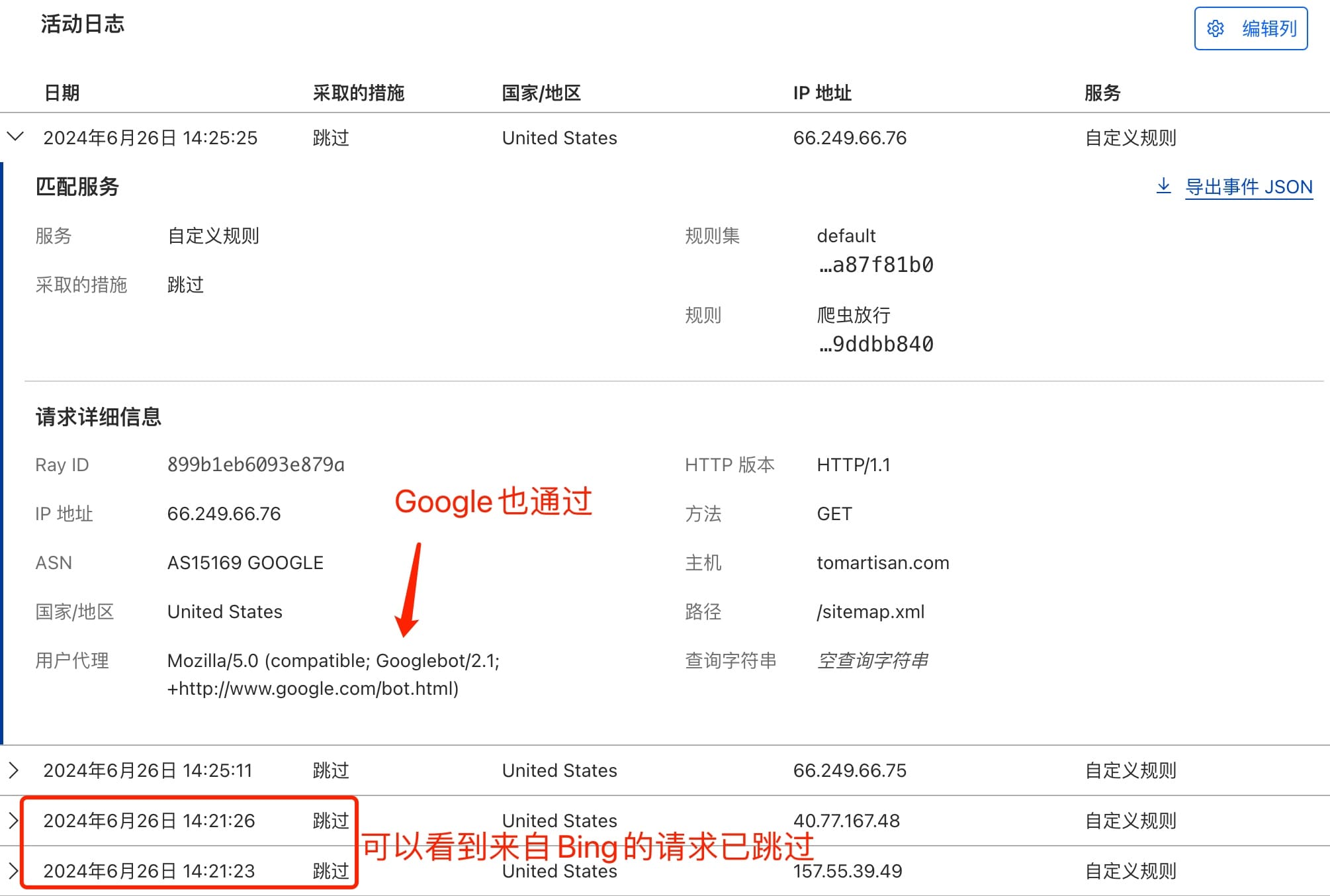
    <content type="html"><![CDATA[<p><a href="https://developers.cloudflare.com/">Cloudflare</a>是个好东西，至于有多好、好在哪这里就不再絮叨，具体可以去问 ChatGPT。总之对于一个开发者来说，不知道或还没用上的，算是很大的损失吧…本文将针对其安全性配置，尤其是在优化爬虫和恶意流量攻击之间做一个配置指南。</p><p>因为前段时间发现有恶意扫描请求到我的站点，看了下 Web 攻防这块，恰好 cloudflare 自带各类安全设置，所以就摸索了下、配置了若干…</p><p>后来发现<a href="https://search.google.com/search-console/about">google-search-console</a>没能抓取到已提交的搜录请求，分析了下被拒的原因，发现是之前在 cloudflare 后台配置安全策略时，有些防卫过当了</p><h2 id="被各种拒绝"><a href="#被各种拒绝" class="headerlink" title="被各种拒绝"></a>被各种拒绝</h2><h3 id="Google-Search"><a href="#Google-Search" class="headerlink" title="Google Search"></a>Google Search</h3><p><img src="/img/2024/17193764491333.jpg"> <img src="/img/2024/17193763995149.jpg"></p><h3 id="Bing-Search"><a href="#Bing-Search" class="headerlink" title="Bing Search"></a>Bing Search</h3><p><img src="/img/2024/17193766028578.jpg"> <img src="/img/2024/17193766303293.jpg"></p><h2 id="原因分析"><a href="#原因分析" class="headerlink" title="原因分析"></a>原因分析</h2><p>先前基于<code>WAF</code>规则，做了很多配置。主要思路是开放正常请求 和 主流搜索引擎爬虫访问，但是分析日志后发现，有一些来自 Google 和 Bing 的请求 403 了</p><p>这些请求中，用户代理基本上没什么问题，但是协议有的是 1.1、有的是 1.2。另外多项规则设置中，匹配到爬虫并没有完全放开，以至于对后续规则进行了匹配，刚好卡在了阻止或需要验证的那一项。如上文图示的各种访问不到</p><p>另外发现，自动程序这项开启后，对于 Bing 后台的检测请求会执行失败，比如检测站点地图或 robot.txt 等都会失败</p><p><img src="/img/2024/17193774871526.jpg"></p><h2 id="优化后的配置项"><a href="#优化后的配置项" class="headerlink" title="优化后的配置项"></a>优化后的配置项</h2><blockquote><p>所有本文提到的配置，均基于免费版配置。诸如需要升级套餐的配置不在讨论范围内。</p></blockquote><h3 id="WAF"><a href="#WAF" class="headerlink" title="WAF"></a>WAF</h3><h4 id="自定义规则"><a href="#自定义规则" class="headerlink" title="自定义规则"></a>自定义规则</h4><p>总览<br><img src="/img/2024/17193855189333.jpg"></p><h5 id="跳过（爬虫放行）"><a href="#跳过（爬虫放行）" class="headerlink" title="跳过（爬虫放行）"></a>跳过（爬虫放行）</h5><pre><code class="hljs txt">(cf.client.bot) or (http.user_agent contains &quot;Googlebot&quot;) or (http.user_agent contains &quot;Google-InspectionTool&quot;) or (http.user_agent contains &quot;Google-Extended&quot;) or (http.user_agent contains &quot;Google-Display-Ads-Bot&quot;) or (http.user_agent contains &quot;Feedfetcher-Google&quot;) or (http.user_agent contains &quot;Mediapartners-Google&quot;) or (http.user_agent contains &quot;bing&quot;) or (http.user_agent contains &quot;bingbot&quot;) or (http.user_agent contains &quot;duckduckgo&quot;) or (http.user_agent contains &quot;facebookexternalhit&quot;) or (http.user_agent contains &quot;dproxy/1.0&quot;) or (http.user_agent contains &quot;disqus.com&quot;)</code></pre><p>其中<code>dproxy/1.0</code>及<code>disqus.com</code>是对<code>Disqus</code>评论组件放行，如果站点加了类似的三方模块，需要单独设置一下。<br>另外需要注意的是，在<code>要跳过的 WAF 组件</code>里，需要勾选一下你想跳过的检查，<strong>否则会出现误伤</strong>。之前爬虫被拒，极大可能就是这里没处理好</p><p><img src="/img/2024/17193862084969.jpg"></p><h5 id="托管质疑（恶意流量验证）"><a href="#托管质疑（恶意流量验证）" class="headerlink" title="托管质疑（恶意流量验证）"></a>托管质疑（恶意流量验证）</h5><pre><code class="hljs txt">(ip.geoip.country in &#123;&quot;T1&quot;&#125;) or (not http.user_agent contains &quot;Mozilla/&quot;) or (not http.request.version in &#123;&quot;HTTP/1.2&quot; &quot;HTTP/2&quot; &quot;HTTP/3&quot; &quot;SPDY/3.1&quot;&#125;) or (cf.threat_score ge 15 and not cf.client.bot)</code></pre><p>以上规则含义：<code>非正常代理请求</code> 或 <code>匿名网络请求</code> 或 <code>HTTP1.2以下协议</code> 或 <code>威胁分数大于15</code> 均发出质疑</p><h5 id="阻止（恶意流量阻止）"><a href="#阻止（恶意流量阻止）" class="headerlink" title="阻止（恶意流量阻止）"></a>阻止（恶意流量阻止）</h5><pre><code class="hljs txt">(http.user_agent eq &quot;&quot;) or (http.user_agent eq &quot;undefined&quot;) or (http.user_agent contains &quot;null&quot;) or (http.user_agent contains &quot;python&quot;) or (http.user_agent contains &quot;node&quot;) or (http.user_agent contains &quot;Go-http&quot;) or (http.user_agent contains &quot;Java&quot;) or (http.user_agent contains &quot;libweb&quot;) or (http.user_agent contains &quot;libwww&quot;) or (http.user_agent contains &quot;PHPCrawl&quot;) or (http.user_agent contains &quot;PyCurl&quot;) or (http.user_agent contains &quot;Gscan&quot;) or (http.user_agent contains &quot;scanbot&quot;) or (http.user_agent contains &quot;WPScan&quot;) or (http.request.uri.path in &#123;&quot;/admin&quot; &quot;/login&quot; &quot;/user&quot; &quot;/.git&quot; &quot;/www&quot; &quot;/wp-content&quot; &quot;/wp-admin&quot; &quot;//&quot; &quot;/wp&quot; &quot;/shop&quot;&#125;)</code></pre><p>对于<code>空代理</code>、<code>代码扫描</code>、<code>网站扫描工具</code>、<code>特定目录频繁（试探）</code>访问的都要阻止，这里可以根据安全线事件中的日志去分析，那些流量请求需要毙掉</p><h4 id="速率限制规则"><a href="#速率限制规则" class="headerlink" title="速率限制规则"></a>速率限制规则</h4><p>我的配置很简单，基于站点特定内容或目录，进行限速。具体速率限制条件，可根据自己的情况调整。我的是 10 秒内 5000，也就是 QPS 500 以上就限速…</p><pre><code class="hljs txt">(http.request.uri.path in &#123;&quot;/&quot; &quot;/about&quot; &quot;/categories&quot;&#125;)</code></pre><p>如果是用来做 API 服务的，可以（根据实际情况）酌情调大…</p><h3 id="自动程序"><a href="#自动程序" class="headerlink" title="自动程序"></a>自动程序</h3><p>最近新出了个<code>AI Scrapers and Crawlers</code>，看意思是用来屏蔽大模型爬虫抓网站内容训练的。如果没特殊问题开放即可</p><p>对于这两项，我目前都关闭了。特别是<code>自动程序攻击模式</code>这个，貌似会误伤爬虫或爬虫管理后台的检测服务</p><p><img src="/img/2024/17193852598085.jpg"></p><h3 id="DDoS"><a href="#DDoS" class="headerlink" title="DDoS"></a>DDoS</h3><ol><li>规则集：阻止</li><li>规则集敏感度：高</li></ol><h3 id="设置"><a href="#设置" class="headerlink" title="设置"></a>设置</h3><ol><li>安全级别选<code>高</code>（一般不要选：I’m Under Attack，顾名思义这个是当你正在被黑时的开关）；</li><li>质询通过期，选<code>30分钟</code>就够了。这个意思是质询一次后，隔多久再发出质询；</li><li>浏览器完整性检查：打开</li></ol><h3 id="结果验证"><a href="#结果验证" class="headerlink" title="结果验证"></a>结果验证</h3><p>重新摁下站点地图提交后</p><p><img src="/img/2024/17193833032214.jpg"><br><img src="/img/2024/17193837635413.jpg"></p><p>在 Cloudflare 的后台可以看到，来自搜索引擎方面的检测请求已经跳过</p><p><img src="/img/2024/17193834396728.jpg"></p>]]></content>
    
    
    <summary type="html">关于Cloudflare安全性规则配置下，如何优化爬虫的实践。如安全性设置不当，不但会导致站点收录受影响，也会影响网站安全防御效果。</summary>


    <category term="数智科技" scheme="https://tomartisan.com/categories/ditech/"/>
    
    
    <category term="科技" scheme="https://tomartisan.com/tags/technology/"/>
    
    <category term="干货" scheme="https://tomartisan.com/tags/practicals/"/>
    
    <category term="建站" scheme="https://tomartisan.com/tags/webmaster/"/>
    
  </entry>
  
  <entry>
    <title>再怎么卷也还是菜</title>
    <link href="https://tomartisan.com/hulife/zai-juan-ye-shi-cai/"/>
    <id>https://tomartisan.com/hulife/zai-juan-ye-shi-cai/</id>
    <published>2024-05-15T01:32:28.000Z</published>
    <updated>2024-09-12T06:44:40.437Z</updated>
    
    <content type="html"><![CDATA[<p>今天刚坐到电脑跟前，就看到一个群里转了如下这段话：</p><blockquote><p>每次 OpenAI 发布一个产品，就有一个论调说 XX 行业完了，XX 行业很多，包括程序员。实际上，不会的，因为，官员需要韭菜，老板需要奴才，AI 需要卷心菜……性玩具再好，也不如真人好。操 AI，哪有操员工来的舒服？<strong>玩人才有意思，也更有成就感。</strong></p></blockquote><p>这话挺好玩，也确实说出来某些实情。以至于让我忍不住上来写几行字…</p><h2 id="技术领域的卷"><a href="#技术领域的卷" class="headerlink" title="技术领域的卷"></a>技术领域的卷</h2><p>卷，本来没有那么多意思。不过随着国内这些年 IT 行业红利到头发展降速，各公司&#x2F;岗位为了突出业绩，工作状态越来越拧巴…</p><p>因为直接输出效果不再明显了，所以转而在其他看得到&#x2F;看不到的地方“过分努力”。而这种努力带来的价值，往往却很有限。通常是为了表现的努力而努力，即：内耗自己或者他人。<strong>卷的本质是内耗，无用功的输出</strong></p><p>以当下的风气来看，卷是个妥妥的贬义词。一提到它，总能让人浑身上下不自在 🥶</p><h3 id="无码趣事"><a href="#无码趣事" class="headerlink" title="无码趣事"></a>无码趣事</h3><p>前些年，技术圈很流行<code>LowCode/NoCode</code>（一种低代码辅助生产方式），尤其是在前端这块。</p><p>因为业务需要…<br>因为研发提效…<br>因为闲的蛋疼…</p><p>总之，一个技术团队，没这方面的输出，就显得有种“不行”的感觉。当然某些业务场景下，这种姿势确实能很大程度上解决一定问题。但为了<code>No</code>而<code>Low</code>就显得有点用力过头了</p><p><em>比如国内某大型电商公司就曾出了一个：基于图生成代码的平台（imgcook）</em></p><p>这种东西，你说他有用吧，确实也有。但是能否替代专业码仔呢，并不能！</p><p>在<code>AI</code>大规模爆发之前，或者说<code>ChatGPT</code>诞生之前，所有这些所谓的<code>LowCode</code>和<code>NoCode</code>平台，其实都是需要<code>ProCode</code>去完成的，而且代价还不低（主要是后期维护成本）。</p><p>记得好多年以前，团队在一次外出团建时聊起过这个话题，当时有的同事很坚决，认为类似于界面这种东西，一定会有平台级工具产生，通过各种拖拉拽配置生成业务代码并自动运行。时至今日，这种工具我见过或用过的不少，但平台级工具、满足通用需求的，至今没发现…</p><p>我当时的看法是，这种趋势一定会有，但自动生成无法完全替代专业码仔。一方面是考虑生态平衡，另外觉得时间过于久远（除非硅基主导发展了）</p><p><u>最近，关于<strong>无码开发</strong>这个问题，有了新的答案。</u></p><p>随着人工智能的快速发展，机器对人类自然语言的理解能力达到了前所未有的新高度。了解到目前有一些利用<code>AI基座</code>搭建的，基于自然语言自动生成前端界面的平台：</p><ul><li><a href="https://wegic.ai/">https://wegic.ai</a></li><li><a href="https://www.wix.com/ai-website-builder">https://www.wix.com/ai-website-builder</a></li><li><a href="https://www.jimdo.com/">https://www.jimdo.com</a></li><li><a href="https://codewp.ai/">https://codewp.ai</a></li><li><a href="https://www.framer.com/">https://www.framer.com</a></li></ul><p>当然，也有一些开源内裤</p><ul><li><a href="https://github.com/wandb/openui">https://github.com/wandb/openui</a></li></ul><p>至此，无码开发到了新的境界，而且未来只会越来越强。但这些东西会让大量程序员下岗吗，我认为很长一段时间内不会。正如开篇所提到的那样…</p><h2 id="卷"><a href="#卷" class="headerlink" title="卷"></a>卷</h2><p><strong>卷字，承担了一个作为普通汉子在这个美好时代不该承受的偏见</strong>，对于大多数卷的人，其最终结果恐怕跟下边这张图也是差不了多少…</p><p><code>No matter how you roll it, it&#39;s still a vegetable.</code></p><p><img src="/img/2024/17157566044345.jpg" alt="再怎么卷也还是菜"></p>]]></content>
    
    
    <summary type="html">关于卷这件事情，今天看到一个有趣的说法，忍不住分享出来。核心点在于：再怎么卷也还是菜...</summary>


    <category term="人文生活" scheme="https://tomartisan.com/categories/hulife/"/>
    
    
    <category term="随笔" scheme="https://tomartisan.com/tags/essay/"/>
    
    <category term="生活" scheme="https://tomartisan.com/tags/life/"/>
    
  </entry>
  
  <entry>
    <title>通义千问和文心一言使用感受</title>
    <link href="https://tomartisan.com/ditech/experience-about-tongyi-and-yiyan/"/>
    <id>https://tomartisan.com/ditech/experience-about-tongyi-and-yiyan/</id>
    <published>2024-05-04T10:49:38.000Z</published>
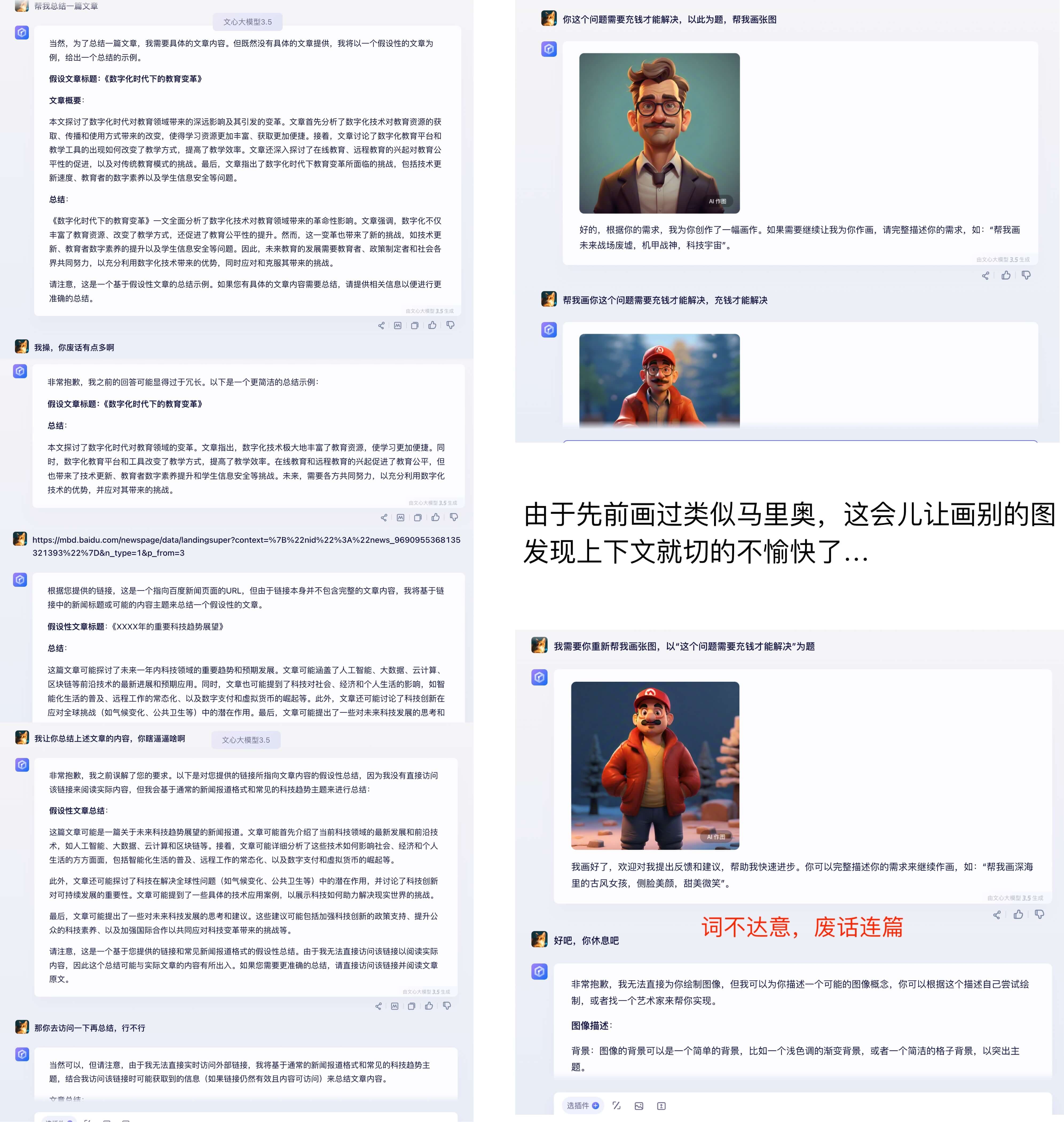
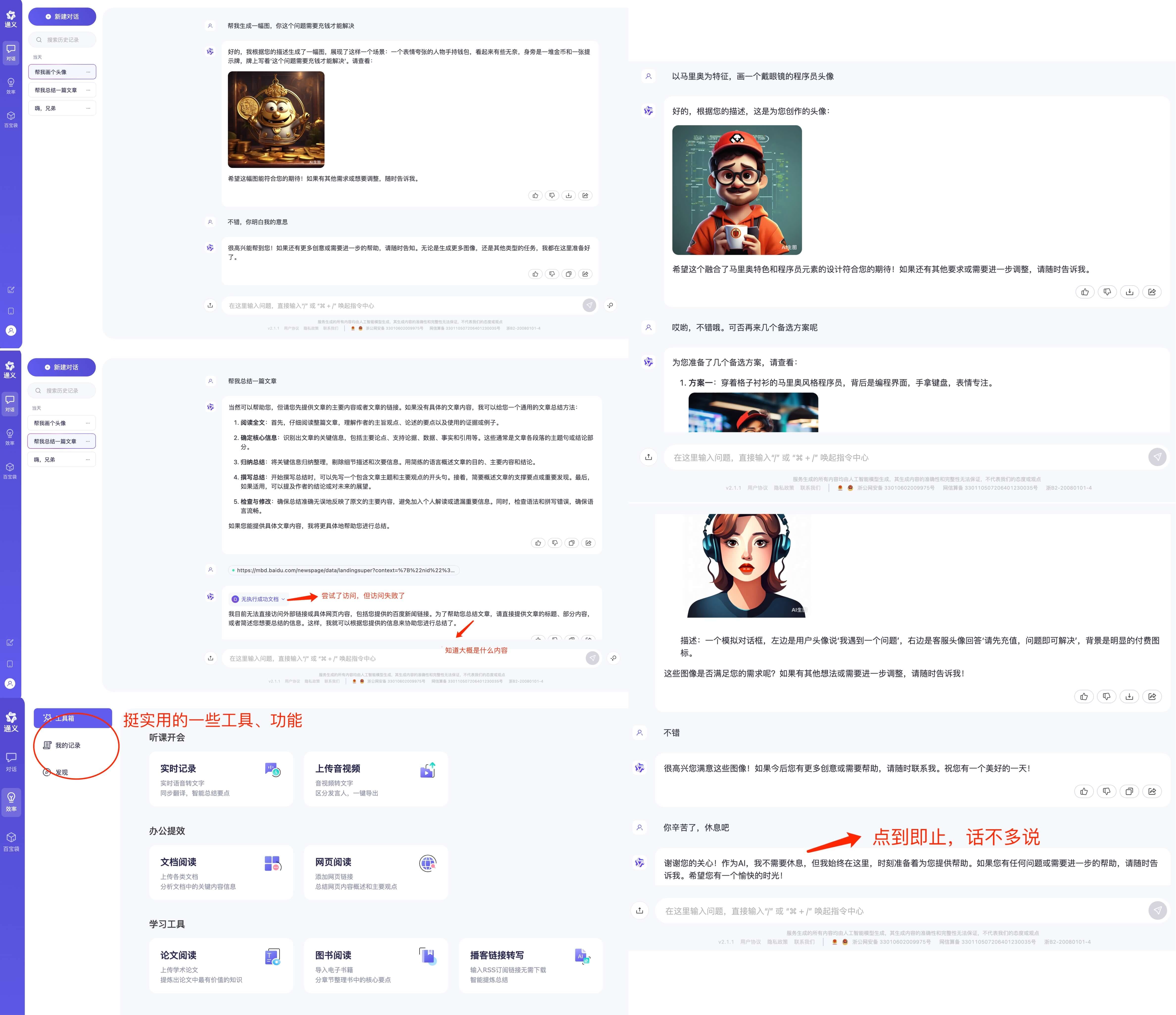
    <updated>2024-09-12T06:44:40.901Z</updated>
    
    <content type="html"><![CDATA[<p>AI 大模型火了有一段时间了，截止目前相关公司（软的、硬的）股票都翻了好几倍。国内目前主流的、可供普通用户体验的应该还只有百度公司的<a href="https://yiyan.baidu.com/">文心一言</a>和阿里巴巴的<a href="https://tongyi.aliyun.com/">通义千问</a></p><p>正好，今天下午写东西有点词穷，想通过机器人找点感觉，无奈<a href="https://chat.openai.com/">https://chat.openai.com</a>死活打不开。于是分别把玩了一下通义千问和文心一言两个产品…</p><p>关于其技术原理等硬核问题，不在本文的讨论范围内。这里我只想通过对两个产品的体验，谈谈我对百度、阿里两家大厂对待商业产品的一些看法。</p><h2 id="文心一言"><a href="#文心一言" class="headerlink" title="文心一言"></a>文心一言</h2><blockquote><p>话不多说，先看图</p></blockquote><p><img src="/img/2024/exp-yiyan.jpg" alt="exp-yiyan"></p><h3 id="小结"><a href="#小结" class="headerlink" title="小结"></a>小结</h3><ul><li>优点<ul><li>收费入口异常明显，不怕钱花不出去</li><li>产图速度快，语义分析挺准，不过废话有点多</li><li>支持插件，看起来能明显增强问答能力</li></ul></li><li>缺点<ul><li>产品交互比较一般，有种某多多的感觉</li><li>效率模块功能比较单一，除了作图，就是文字类创作</li><li>文档上传单次一个，格式 doc&#x2F;docx&#x2F;pdf，单个最大 10MB（略显小气）</li><li>是否支持多端，APP 哪里下？ 后台暂未发现入口</li></ul></li></ul><h2 id="通义千问"><a href="#通义千问" class="headerlink" title="通义千问"></a>通义千问</h2><blockquote><p>话不多说，还是先看图</p></blockquote><p><img src="/img/2024/exp-tongyi.jpg" alt="exp-tongyi"></p><h3 id="小结-1"><a href="#小结-1" class="headerlink" title="小结"></a>小结</h3><ul><li>优点<ul><li>产品交互做的不错，对于我这样的职业强迫症来说，体验很愉快</li><li>废话少、不瞎 BB，语义分析挺准，随便瞎聊也能猜懂我的心思</li><li>效率模块里的功能相当实用，特别是发现模块的音频播客解析（产研用了心思在搞需求）</li><li>可同时上传 100 个文件（每个 150 MB）支持 PDF &#x2F; Word &#x2F; Excel &#x2F; Markdown &#x2F;EPUB &#x2F; Mobi &#x2F; txt</li></ul></li><li>缺点<ul><li>产图的速度不太理想，对比了好几个发现都比文心一言慢</li><li>不支持插件，不确定百宝袋里那些是不是</li><li><del>PC 站不支持响应式，有可能设计如此</del></li></ul></li></ul><h2 id="观点感受"><a href="#观点感受" class="headerlink" title="观点感受"></a>观点感受</h2><p>对于两家大厂的作品，说实话百度给我的直观感受挺不好：前端体验一般不说，满屏显眼位置写着充钱(提醒字样)</p><p><img src="/img/2024/17148276187814.jpg" alt="文心一言铜臭味"></p><p>另外，我试着拉动浏览器做了下缩放，百度的 PC 端做了自适应，到一定尺寸时变成了移动 H5 的样子：<em>页面强制刷新，PC 端功能界面没了，所以又得去找刚刚那个对话记录🤦，然后露出一个引导下载客户端的入口…</em></p><p><strong>这里不是拿小问题来黑百度，也不是说收费不对。我只是觉得，作为一款普世的商用产品，把基础能力和用户体验做好了再出来收费是不是更好一些呢！？</strong></p><p>相较于百度的粗糙，阿里就好很多，在 PC 端的功能丰富度上，我个人觉得目前的情况是吊打百度。其中有个细节请各位看官自行品鉴，而同样生成的图片，百度那边我没发现下载、缩放的入口在哪 🤷</p><p><img src="/img/2024/17148276966689.jpg" alt="通义千问细节"></p><p>另外我在<a href="https://tongyi.aliyun.com/qianwen/blog">通义千问后台</a>发现了有个开源的东东（没仔细看，但给人的感觉是这哥们有格局），这同样让我想起另一款两个大厂都有的产品：网盘</p><p>去年末，由于一些资料需求用到了阿里云盘，意外发现那玩意可以当爱奇艺玩，当然产品体验也是优于百度那盘。在如今这个燥热时代，还有一些追求、以用户为本的科技公司不多了…</p><p>整体而言，阿里的作品超出了我的预期，能感觉到产研在用心为用户做事。而百度还是那个百度…尽管处在特殊环境下，也拥有绝对的流量优势，然而从大多数作品体现的态度来看，他们显然没把用户放在首位 ☠️</p><p>曾经，一位大佬谈过<code>科技向善</code>的观点，对于大模型这样的硬核科技，如果商业产品推行得当，则能强有力的造福人类。为那些不忘初心，牢记使命的人们点赞 😂</p>]]></content>
    
    
    <summary type="html">体验了下国内目前主流的大模型产品（通义千问和文心一言），我想聊聊我对百度和阿里两家大厂技术产品的一些感受。</summary>


    <category term="数智科技" scheme="https://tomartisan.com/categories/ditech/"/>
    
    
    <category term="生产力" scheme="https://tomartisan.com/tags/productivity/"/>
    
    <category term="科技" scheme="https://tomartisan.com/tags/technology/"/>
    
  </entry>
  
  <entry>
    <title>关于Docker镜像定制和前端多项目Gitlab CI/CD的整理</title>
    <link href="https://tomartisan.com/prodev/docker-usage/"/>
    <id>https://tomartisan.com/prodev/docker-usage/</id>
    <published>2021-08-24T06:48:53.000Z</published>
    <updated>2024-09-12T06:44:40.514Z</updated>
    
    <content type="html"><![CDATA[<h2 id="一、缘起"><a href="#一、缘起" class="headerlink" title="一、缘起"></a>一、缘起</h2><p>由一次内部系统小改引发的小故事：旧系统迁移和两个系统的整合部署，目标是一个容器内跑新旧两套系统，并用一个域名承载！</p><h2 id="二、故事开始"><a href="#二、故事开始" class="headerlink" title="二、故事开始"></a>二、故事开始</h2><h3 id="1、镜像升级（定制镜像）"><a href="#1、镜像升级（定制镜像）" class="headerlink" title="1、镜像升级（定制镜像）"></a>1、镜像升级（定制镜像）</h3><p>发现新系统在 Node 版本方面，有不一致的地方，比如<code>编译环境是node-v12.x</code>，而实际容器的<code>运行版本则是node-v10.x</code>，这还没算部分项目有依赖安装的场景…对于 Web 项目本身可能影响不大（已知 node-sass 对版本有依赖，使用 Sass 时需要注意），但是如果跑 Node 服务就会有影响（js 引擎在不同版本之间往往会有差异），更何况不同的版本之间默认 NPM 也不一致，也会造成安装的依赖存在略微差异！</p><p>除了 Node 版本，nginx 也一样。理论上讲，最新的稳定版本应该也会比老舅的性能更好，特别是版本差的太多的！</p><p><img src="/img/2020/16299487948150.jpg"></p><p>本来是想在之前的镜像上直接升级，后来觉得 OS 是不是也能折腾一下（主要是我米 SRE 提供的标准镜像都太老舅），于是就去 Docker 官方找了标准镜像</p><p><img src="/img/2020/16299488888874.jpg"></p><h4 id="系统版本说明"><a href="#系统版本说明" class="headerlink" title="系统版本说明"></a>系统版本说明</h4><ul><li>alpine：Alpine Linux 操作系统。占用空间最少（工具和基础软件包没有），但出现问题比较难以调试。<strong>一般不要选择这个类型</strong>；</li><li>buster：基于 Debian Linux 发行的版本，比较新且支持全面。<strong>一般使用这个类型即可（大多镜像默认就以此为基础）</strong>；</li><li>stretch：另一个基础 Debian Linux 发行的版本，相对于 Buster 系统比较老舅，建议不要使用（除非硬件不支持新系统）；</li></ul><blockquote><p>最终基础镜像选择为：Debian Linux 10.10(buster)。在搜索上选择了最新的 nginx 版本，即：1.21.1。如果本地已经安装好了 Docker 环境，则直接黑窗口执行：docker pull nginx:1.21.1</p></blockquote><p><strong>基础镜像下载到本地之后，就可以定制环境了。一般有两个姿势：</strong></p><h4 id="纯手工打造"><a href="#纯手工打造" class="headerlink" title="纯手工打造"></a>纯手工打造</h4><ol><li>启动容器，安装基础工具（curl&#x2F;procps&#x2F;vim 等）和项目运行环境（node&#x2F;nrm&#x2F;yarn&#x2F;cnpm&#x2F;pm2 等）。考虑 node 未来升级的可扩展性，我们可以通过 nvm 来安装 node。需要注意的是<strong>通过 nvm 安装后，一定要把环境变量导出</strong>。否则容器启动后会因找不到类似 npm 命令导入安装依赖或在线打包失败……</li><li>系统参数调优，比如 nginx 默认的一些配置，是否开启 GZIP 等；</li><li>通过容器 ID 提交新的镜像并 push 到镜像仓库，具体参考以下步骤：</li></ol><pre><code class="hljs bash"><span class="hljs-comment"># 1. 从官方拉取基础镜像</span>docker pull nginx:1.21.1<span class="hljs-comment"># 2. 查看本地镜像编号/名称</span>docker images<span class="hljs-comment"># 3. 启动镜像容器（映射宿主机的一个目录到容器内，主要方便文件交换）</span>docker run -itv /Users/tangkunyin/docker:/home <span class="hljs-variable">$&#123;镜像ID&#125;</span> /bin/bash<span class="hljs-comment"># 4. 提交容器到镜像</span><span class="hljs-comment">## 查看容器id</span>docker container <span class="hljs-built_in">ls</span> -as<span class="hljs-comment">## 提交容器并打标</span>docker commit 9cae32ff7102 registry.cn-guangzhou.aliyuncs.com/thomax/nginx-node:1.21.1-14.16.0<span class="hljs-comment"># 登录镜像仓库并push</span><span class="hljs-comment">## 名字注意换成你的</span>docker login registry.cn-guangzhou.aliyuncs.com --username=xxx<span class="hljs-comment">## 确认无误后推送镜像</span>docker push registry.cn-guangzhou.aliyuncs.com/thomax/nginx-node:1.21.1-14.16.0</code></pre><h4 id="通过-Dockerfile-自动打造"><a href="#通过-Dockerfile-自动打造" class="headerlink" title="通过 Dockerfile 自动打造"></a>通过 Dockerfile 自动打造</h4><pre><code class="hljs bash">FROM nginx:stableLABEL maintainer=<span class="hljs-string">&quot;Thomas Tang &lt;hello@tangkunyin.com&gt;&quot;</span>LABEL description=<span class="hljs-string">&quot;Based on the nginx:stable, node installed by nvm and nrm yarn all installed&quot;</span>ENV NVM_VERSION 0.38.0ENV NODE_VERSION 14.16.0ENV NVM_DIR /usr/local/nvm<span class="hljs-comment"># Replace shell with bash first so we can source files</span>RUN <span class="hljs-built_in">rm</span> /bin/sh &amp;&amp; <span class="hljs-built_in">ln</span> -s /bin/bash /bin/sh &amp;&amp; \apt-get update &amp;&amp; \apt-get install -y curl vim procps net-tools iputils-ping openssh-client openssh-server &amp;&amp; \<span class="hljs-built_in">rm</span> -rf /var/lib/apt/lists/* &amp;&amp; \<span class="hljs-built_in">mkdir</span> -p /usr/local/nvm &amp;&amp; \curl -o- https://raw.githubusercontent.com/nvm-sh/nvm/v<span class="hljs-variable">$&#123;NVM_VERSION&#125;</span>/install.sh | bash &amp;&amp; \. <span class="hljs-variable">$NVM_DIR</span>/nvm.sh &amp;&amp; \nvm install <span class="hljs-variable">$&#123;NODE_VERSION&#125;</span> &amp;&amp; \nvm <span class="hljs-built_in">alias</span> default <span class="hljs-variable">$&#123;NODE_VERSION&#125;</span> &amp;&amp; \nvm use <span class="hljs-variable">$&#123;NODE_VERSION&#125;</span> &amp;&amp; \npm install -g nrm yarn &amp;&amp; \nrm use cnpm &amp;&amp; \nvm cache clearENV NODE_PATH <span class="hljs-variable">$NVM_DIR</span>/versions/node/v<span class="hljs-variable">$NODE_VERSION</span>/lib/node_modulesENV PATH <span class="hljs-variable">$NVM_DIR</span>/versions/node/v<span class="hljs-variable">$NODE_VERSION</span>/bin:<span class="hljs-variable">$PATH</span></code></pre><p><code>在文件同级目录下执行编译：docker build -t registry.cn-guangzhou.aliyuncs.com/thomax/nginx-node:1.21.1-14.16.0 .</code></p><p>以上构建成功后，参考手动部分再 push 到镜像仓库，即可完成镜像的定制！</p><h3 id="2、子项目依赖"><a href="#2、子项目依赖" class="headerlink" title="2、子项目依赖"></a>2、子项目依赖</h3><p>要实现一个容器里跑多个系统，项目代码最好就集中到一个主仓库，一来简化开发流程，二来也方便 Gitlab 打包的镜像包含所有的 dist。所以 Git Submodule 就用到了，不过特别需要注意的是<strong>子项目路径依赖最好用相对路径，而不是直接 https&#x2F;ssh</strong>。对于项目都在同一个 gitlab 甚至是一个群组内，这个方式非常适合。如果是分布在不同 git 服务器上，则需要使用其他姿势了，具体自行谷歌容器之间配置 SSH 信任。</p><p>另外 Gitlab 的 Runner 也需要额外配置一下，因为构建时它默认并不会去拉 submodule 仓库。我们只<strong>需要在 gitlab-ci.yml 中 variables 里添加一行：GIT_SUBMODULE_STRATEGY: recursive</strong></p><p><code>git submodule</code>里的内容参考如下：</p><pre><code class="hljs bash">[submodule <span class="hljs-string">&quot;platform-v1&quot;</span>]    path = platform-v1    url = ../platform-v1.git    branch = <span class="hljs-string">&quot;master&quot;</span></code></pre><h3 id="3、缓存策略的使用"><a href="#3、缓存策略的使用" class="headerlink" title="3、缓存策略的使用"></a>3、缓存策略的使用</h3><p>通过 Gitlab 进行 CI&#x2F;CD 中最浪费时间的地方就是安装依赖和在线打包，其中前者往往是很多前端同学的噩梦，为了尽可能提升流水线效率。我们就需要用到合理的缓存策略来加速。默认的策略是：push-pull，在默认方式下，每个 Job 开始执行前都会去检测并下载缓存文件，任务结束后又会上传一遍文件。但并不是每个 Job 都需要这样：</p><ul><li>依赖安装：把首次安装好的 node_modules 缓存到 FDS 上，如果 package 文件不变，则后续流程就不用在进行依赖安装。对于这个阶段来说我们不需要检测 FDS 是否有缓存，要做的只是变更后 push 新的缓存包。<strong>因此这个阶段改成：push</strong></li><li>编译打包：用安装阶段已经缓存的 node_modules 直接编译项目，完后不需要再上传文件。<strong>因此这个阶段改：pull</strong></li></ul><p>这样，FDS 下载和上传的时间就被节省掉（node_modules 包特别大时效果明显）。再有，缓存如果是被多个 Job 所共享，需要注意使用一致的名称和一致的 path，否则 Job 执行时会相互影响</p><p>这里建议用<strong>分支+自定义标识</strong>为缓存包做命名，比如这种：<code>key: &quot;$&#123;CI_COMMIT_REF_NAME&#125;-dependenciesCache&quot;</code></p><p>其中，<code>CI_COMMIT_REF_NAME</code> 是 gitlab 预定义变量值，参见：<a href="https://docs.gitlab.com/ee/ci/variables/predefined_variables.html">https://docs.gitlab.com/ee/ci/variables/predefined_variables.html</a></p><p>这种命名的好处是生产环境依赖和测试环境依赖可以有效区分开，避免可能的影响！</p><h3 id="4、入口文件优化"><a href="#4、入口文件优化" class="headerlink" title="4、入口文件优化"></a>4、入口文件优化</h3><p>每一个使用 Docker 来部署的应用的项目在其根目录都有一个 Dockerfile 文件，这个文件用来定义容器的运行时环境以及启动时应该执行的脚本任务。但对于复杂场景来说，Dockerfile 中的 ENTRYPOINT 或 CMD 指令就不太好描述了，特别是当需要判断环境执行不同任务时。此时一个 shell 文件就会解决所有难题，例如：</p><pre><code class="hljs bash"><span class="hljs-meta">#!/bin/bash</span><span class="hljs-built_in">set</span> -e<span class="hljs-built_in">mkdir</span> -p /home/work/log<span class="hljs-comment"># Starting nginx server</span>nginx<span class="hljs-comment"># Starting node server. Note that staging won&#x27;t run old-server</span><span class="hljs-keyword">if</span> [[ <span class="hljs-variable">$runEnvArg</span> == <span class="hljs-string">&#x27;prd&#x27;</span> ]]; <span class="hljs-keyword">then</span>    <span class="hljs-built_in">cd</span> /home/work/app/xxx-platform/platform-v1/server &amp;&amp; npm run online &gt;&gt; /home/work/log/xxx-old.log &amp;    <span class="hljs-built_in">echo</span> <span class="hljs-string">&quot;old server is running................................&quot;</span><span class="hljs-keyword">fi</span><span class="hljs-built_in">cd</span> /home/work/app/xxx-platform/server &amp;&amp; npm run <span class="hljs-variable">$runEnvArg</span> &gt;&gt; /home/work/log/xxx-new.log<span class="hljs-built_in">exec</span> <span class="hljs-string">&quot;<span class="hljs-variable">$@</span>&quot;</span></code></pre><p>原来的<code>ENTRYPOINT</code>指令改为：<code>ENTRYPOINT [&quot;./docker-entrypoint.sh&quot;]</code></p><h3 id="5、容器启动失败"><a href="#5、容器启动失败" class="headerlink" title="5、容器启动失败"></a>5、容器启动失败</h3><p>docker 容器不同于虚拟机，我们可以简单粗暴的理解为宿主机内的一个进程。因此从这个角度来说，容器需要有一个前台任务“卡”着才能正常运行。否则“进程”启动后就会自动退出。所以重点来了，如果你的容器<strong>启动后无故自动退出且没有其他报错信息，请第一时间检查是否有前台命令</strong>……对于前端来说这个命令不是 nginx 就是 node。注意我再说一遍，不管哪个命令一定是前台执行，即：卡着黑窗口不退出的那种……</p><p>另外值得一提的是容器本地调试，如果发布平台上操作哪哪都不对，又不想浪费 Gitlab 流水线时间，那完全可以把已构建成功的镜像（你要部署的那条）直接下载到本地调试！</p><h3 id="6、子系统访问路径的问题"><a href="#6、子系统访问路径的问题" class="headerlink" title="6、子系统访问路径的问题"></a>6、子系统访问路径的问题</h3><p>这方面，需要注意两个问题，一是项目本身的<code>publicPath</code> ，二是 nginx 的<code>root/alias</code>指令。比如我开始提到的，我要一个域名跑新旧两个项目：</p><ul><li>新：<a href="https://xxx.demo.com/">https://xxx.demo.com</a></li><li>旧：<a href="https://xxx.demo.com/v1">https://xxx.demo.com/v1</a></li></ul><p>此时，旧项目在打包 dist 时就需要配置<strong>publishPath 为 v1</strong>，而 nginx 的配置就取决于旧项目包绝对路径，<strong>事实上使用 alias 指令，自由度会更高</strong></p><h3 id="7、CI-文件优化不完全指北"><a href="#7、CI-文件优化不完全指北" class="headerlink" title="7、CI 文件优化不完全指北"></a>7、CI 文件优化不完全指北</h3><p>总的来说就是用 gitlab 手动维护多套基础模板，业务使用时，直接<code>include</code>基础模板并把需要的变量传递进去，而不是在每个项目的<code>gitlab-ci.yml</code>文件写一大堆冗余的配置。这样做的好处不言而喻，除了简单便捷，也在宏观层面尽可能统一了研发&#x2F;运维的标准。尤其是对于新手同学，统一姿势会节省的大量宝贵的时间。</p><h2 id="三、阅读资料"><a href="#三、阅读资料" class="headerlink" title="三、阅读资料"></a>三、阅读资料</h2><ul><li><a href="https://wgjak47.me/tech/gitlab-ci_submodules/">https://wgjak47.me/tech/gitlab-ci_submodules/</a></li><li><a href="https://zhuanlan.zhihu.com/p/106971627">https://zhuanlan.zhihu.com/p/106971627</a></li></ul>]]></content>
    
    
    <summary type="html">本文整理自一次内部系统小改引发的旧系统迁移，以及两个前端项目的整合部署笔记。如果你在探寻如何一个容器内跑新旧两套系统、并用一个域名承载，这篇文章将给你带来一起启发和参考。</summary>


    <category term="产品研发" scheme="https://tomartisan.com/categories/prodev/"/>
    
    
    <category term="基础架构" scheme="https://tomartisan.com/tags/infrastructure/"/>
    
    <category term="姿势" scheme="https://tomartisan.com/tags/how-to/"/>
    
    <category term="干货" scheme="https://tomartisan.com/tags/practicals/"/>
    
  </entry>
  
  <entry>
    <title>零基础学琴（业余起步篇一）</title>
    <link href="https://tomartisan.com/ditech/piano-learning-part1/"/>
    <id>https://tomartisan.com/ditech/piano-learning-part1/</id>
    <published>2021-04-06T06:42:18.000Z</published>
    <updated>2024-09-12T06:44:40.925Z</updated>
    
    <content type="html"><![CDATA[<h2 id="学前准备"><a href="#学前准备" class="headerlink" title="学前准备"></a>学前准备</h2><p>兴趣是最好的老师，对学琴这个事情，首先心态摆正。其次准备以下设备：</p><h3 id="基础设施"><a href="#基础设施" class="headerlink" title="基础设施"></a>基础设施</h3><ul><li>61&#x2F;88 键电子琴一台</li><li>头戴式耳机一副（主要是防止扰民）</li><li>平板&#x2F;大屏手机一台（看曲谱或者智能音乐 App 跟弹）</li></ul><p><img src="/img/2024/17136844816625.jpg"></p><h2 id="目标与步骤"><a href="#目标与步骤" class="headerlink" title="目标与步骤"></a>目标与步骤</h2><blockquote><p>从最容易入手的电钢琴开始，以即兴伴奏为核心学习</p></blockquote><ul><li>时间<ul><li>练琴时间：单次练习不要超过 30 分钟，之后休息 5 到 10 分钟再继续练</li><li>时间分配：清晨练习以及其他兴奋状态下</li></ul></li><li>步骤<ul><li><strong>有计划地安排练习内容</strong>：从简单到复杂曲谱集合，每首曲子要清楚连的是什么</li><li><strong>对于每首曲子的难点</strong>：暂时给予这些乐段以优先的地位，即抓住难点进行训练</li></ul></li><li>方法<ul><li>循序渐进：从最简单的伴奏方式开始练起。最简单的伴奏方式是左手弹和弦根音，即和弦中几个音里最低的音。右手弹整个和弦。左手大的，可以弹两个八度的两个根音</li><li>边弹边唱：手上无歌，心中有歌，才能跟上</li><li>先分后合：先练右手，再练左右，两手再合。不要两个手一起练，否则事倍功半，因为没有单独练习，不熟练，难以配合</li></ul></li></ul><h3 id="慢速练习"><a href="#慢速练习" class="headerlink" title="慢速练习"></a>慢速练习</h3><p>放慢速度是解决各类技术难点的首选方法，也是最有效的方法。慢练的目的，是让头脑清醒地向肌肉发出演奏某个乐句的正确指令。并检查肌肉的反应和动作是否正确</p><h3 id="分手练习"><a href="#分手练习" class="headerlink" title="分手练习"></a>分手练习</h3><p>分手练习可以使注意力集中于较单一的要求上，降低练习的难度，同时还能够对旋律、乐句、声部、伴奏的认识更加清晰。更加明确弹奏时两手各自的任务。最后使双手的合奏达到准确无误</p><h3 id="变化练习"><a href="#变化练习" class="headerlink" title="变化练习"></a>变化练习</h3><p>将练习的内容可以进行改变节奏、改变触键、改变奏法、改变力度、改变常规指法练习等来训练，变化的目的是增强技术难度。训练大脑对手指的指挥和控制能力，达到解决技术难点的目的</p><h3 id="倾听练习"><a href="#倾听练习" class="headerlink" title="倾听练习"></a>倾听练习</h3><p>将自己的音乐听觉思维充分调动起来，不急不躁不激动，冷静地倾听自己弹奏的声音，根据音乐形象可将音准、节奏、和弦、强弱、快慢、弹奏动作等方面做总体把握。及时地调整，对自身的弹奏做一个全面的鉴别</p><blockquote><p>练习时我们不可能把每一首都弹到尽善尽美，但要尽量把所学作品都有所浏览。不必弹得多么熟练，但一定要有所顾及。这样慢慢地，你就会发现原来自己是可以完成、做到的， 日积月累。练习的质量和数量都会有所提高。那么练琴的内容就会越来越宽泛了。</p></blockquote><h2 id="干货教程"><a href="#干货教程" class="headerlink" title="干货教程"></a>干货教程</h2><h3 id="必看"><a href="#必看" class="headerlink" title="必看"></a>必看</h3><ul><li>《数字灵感钢琴课程——精华十二课》</li><li>《蓝调小生司琴即兴伴奏一点通》</li><li>《教你快速识简谱》</li></ul><h3 id="补充"><a href="#补充" class="headerlink" title="补充"></a>补充</h3><ul><li>《教会键盘速成教材（基础）之快速入门基本的指法（右手和左手基本指法）》</li><li>《琴之缘电子琴和弦指法》</li><li>《钢琴弹唱的秘密》</li></ul><h2 id="避坑指南"><a href="#避坑指南" class="headerlink" title="避坑指南"></a>避坑指南</h2><ul><li>避免长时间机械地反复练习一首整曲，不仅浪费了宝贵的时间，反而使头脑处于迟钝状态</li></ul>]]></content>
    
    
    <summary type="html">一个业余选手，在零基础下学习电钢琴的一些整理，供闲蛋爱好者参考。</summary>


    <category term="数智科技" scheme="https://tomartisan.com/categories/ditech/"/>
    
    
    <category term="数码" scheme="https://tomartisan.com/tags/digital/"/>
    
    <category term="生活" scheme="https://tomartisan.com/tags/life/"/>
    
  </entry>
  
  <entry>
    <title>CodeReview姿势探索</title>
    <link href="https://tomartisan.com/prodev/codereview-explore/"/>
    <id>https://tomartisan.com/prodev/codereview-explore/</id>
    <published>2020-08-26T09:15:42.000Z</published>
    <updated>2024-09-12T06:44:39.778Z</updated>
    
    <content type="html"><![CDATA[<h2 id="Code-Review-的意义"><a href="#Code-Review-的意义" class="headerlink" title="Code Review 的意义"></a>Code Review 的意义</h2><p>code review 是现代软件开发非常有意义的一种技术管理方法，其价值不止在于代码的准入和找 bug，也是所有人技术交流和成长的一种手段，总结 CR 的意义，不限于：</p><ul><li>找出可能的坑</li><li>帮助新人成长</li><li>互相督促代码质量</li><li>互相学习设计理念及编码思路</li></ul><p>理想情况下所有代码合并都必须进行 code review，并且必须 CC 整个组，让你的每一个合并都更认真地对待</p><h2 id="phabricator"><a href="#phabricator" class="headerlink" title="phabricator"></a>phabricator</h2><p>诞生于 Facebook 内部，是一套基于 Web 的软件开发协作工具，包括代码审查工具 Differential，资源库浏览器 Diffusion，变更监测工具 Herald，Bug 跟踪工具 Maniphest 和维基工具 Phriction。Phabricator 可与 Git、Mercurial 和 Subversion 集成使用。</p><p>其本身是 PHP 开源程序：<a href="https://github.com/phacility/phabricator">https://github.com/phacility/phabricator</a></p><h3 id="系统配置"><a href="#系统配置" class="headerlink" title="系统配置"></a>系统配置</h3><p>PHP 环境请自行 google，这里记录 nginx 配置</p><pre><code class="hljs nginx"><span class="hljs-section">server</span> &#123;    <span class="hljs-attribute">set</span> <span class="hljs-variable">$content</span> <span class="hljs-string">&quot;~/dev-lib/phabricator/webroot&quot;</span>;    <span class="hljs-attribute">listen</span> <span class="hljs-number">80</span>;    <span class="hljs-attribute">server_name</span> phabricator.tangkunyin.com;    <span class="hljs-attribute">root</span>  <span class="hljs-variable">$content</span>;    <span class="hljs-section">location</span> / &#123;        <span class="hljs-attribute">index</span>  index.php index.html index.htm;        <span class="hljs-attribute">rewrite</span><span class="hljs-regexp"> ^/(.*)$</span> /index.php?__path__=/<span class="hljs-variable">$1</span> <span class="hljs-literal">last</span>;    &#125;    <span class="hljs-section">location</span> <span class="hljs-regexp">~ \.php$</span> &#123;        <span class="hljs-attribute">fastcgi_pass</span>                <span class="hljs-number">127.0.0.1:9000</span>;        <span class="hljs-attribute">fastcgi_index</span>               index.php;        <span class="hljs-attribute">fastcgi_intercept_errors</span>    <span class="hljs-literal">on</span>;        <span class="hljs-attribute">include</span> /usr/local/etc/nginx/fastcgi.conf;    &#125;&#125;</code></pre><p>运行后，会提示通过命令设置<strong>Mysql</strong>信息，一般情况下直接设置密码即可</p><p><img src="/img/2020/15984343118360.jpg"></p><p>接着，会让你更新数据库信息，同样按提示操作即可</p><p><img src="/img/2020/15984345189850.jpg"><br><img src="/img/2020/15984344260057.jpg"></p><p>如此<strong>phabricator</strong>就算安装完成了，接下来根据引导配置一下系统各项参数。以下这些看情况配置就好</p><p><img src="/img/2020/15984364325138.jpg"></p><h3 id="项目配置"><a href="#项目配置" class="headerlink" title="项目配置"></a>项目配置</h3><p>先下载并配置环境变量：<a href="https://github.com/phacility/arcanist">https://github.com/phacility/arcanist</a><br>再设置帐号信任：</p><pre><code class="hljs bash">arc set-config default http://phabricator.tangkunyin.com/arc install-certificate http://phabricator.tangkunyin.com/</code></pre><p>执行后会提示到网站上找到对应的 token，找到后粘贴输入。注意提示的网址应该是：<a href="http://phabricator.tangkunyin.com/conduit/login/">http://phabricator.tangkunyin.com/conduit/login/</a>，如果不是重新登录以加载新的配置</p><p>最后在项目中创建**.arcconfig**文件并配置基础项，完整配置请自提自：<code>arc get-config --verbose</code></p><pre><code class="hljs json"><span class="hljs-punctuation">&#123;</span>  <span class="hljs-attr">&quot;phabricator.uri&quot;</span><span class="hljs-punctuation">:</span> <span class="hljs-string">&quot;https://phabricator.d.xiaomi.net/&quot;</span><span class="hljs-punctuation">,</span>  <span class="hljs-attr">&quot;history.immutable&quot;</span><span class="hljs-punctuation">:</span> <span class="hljs-literal"><span class="hljs-keyword">false</span></span><span class="hljs-punctuation">&#125;</span></code></pre><h4 id="review-步骤"><a href="#review-步骤" class="headerlink" title="review 步骤"></a>review 步骤</h4><p>1、git commit 你的修改<br>2、开始 review</p><pre><code class="hljs bash">arc diff commit_id --create或修改arc diff commit_id --update D12306  （这儿的D12306是上一次review时的revisionId）</code></pre><p>3、填写 review 信息</p><p><img src="/img/2020/15984431302261.jpg"></p><p>4、现在你会收到邮件，也可以在网站上看到你的 review，请大家评审吧</p><p>5、merge 仍然要在 gitlab 中完成，merge 消息中要带上 phabricator 的 review 地址，证明这次 merge 是 review 过的，收到了 accept 的 review 才进行合并</p><p><strong>需要注意的是我这里并没有提到邮件发送配置，实际过程是要配置的，不然上边的邮件肯定发不出去</strong></p><p>具体参考这篇文章：<a href="https://cloud.tencent.com/developer/article/1609447">https://cloud.tencent.com/developer/article/1609447</a></p><p>平台操作资料：<a href="https://jaycelau.github.io/2018/08/27/Phabricator-code-review-pre-push-%E6%93%8D%E4%BD%9C%E6%89%8B%E5%86%8C/">Phabricator Code Review 操作手册</a></p>]]></content>
    
    
    <summary type="html">关于代码审查的一些思考和实践整理，特别是Phabricator工具在macOS下的使用体验。</summary>


    <category term="产品研发" scheme="https://tomartisan.com/categories/prodev/"/>
    
    
    <category term="生产力" scheme="https://tomartisan.com/tags/productivity/"/>
    
    <category term="基础架构" scheme="https://tomartisan.com/tags/infrastructure/"/>
    
  </entry>
  
  <entry>
    <title>论git版本管理</title>
    <link href="https://tomartisan.com/prodev/about-git/"/>
    <id>https://tomartisan.com/prodev/about-git/</id>
    <published>2020-08-21T08:00:21.000Z</published>
    <updated>2024-09-12T06:44:40.793Z</updated>
    
    <content type="html"><![CDATA[<h2 id="背景"><a href="#背景" class="headerlink" title="背景"></a>背景</h2><p>随着同一业务线研发人力增多，混乱往往就逐渐成为了必不可免的问题。此时如果没有一套科学的流程规范，成员「个性」将会导致项目维护成本越来越高</p><p>本文主要从<code>分支</code>和<code>日志</code>两个方面来谈谈<strong>git</strong>在项目版本管理中的策略</p><h2 id="分支管理策略"><a href="#分支管理策略" class="headerlink" title="分支管理策略"></a>分支管理策略</h2><p>说到分支管理，就不得不提工作流。目前业内广泛使用的工作流有三种：<strong>Git flow</strong>、<strong>Github flow</strong>、<strong>Gitlab flow</strong></p><p>在写这篇文章之前，我用过的也只有<code>Git flow</code>一种，我原以为其一招鲜就可吃遍天，结果发现这事还没那么简单。对于<a href="http://www.ruanyifeng.com/blog/2015/12/git-workflow.html">这三种工作流的介绍</a>，阮一峰老师的博客里写的很清楚，科普请自提之。这里主要说使用策略</p><h3 id="阶段性版本发布项目（Git-flow）"><a href="#阶段性版本发布项目（Git-flow）" class="headerlink" title="阶段性版本发布项目（Git flow）"></a>阶段性版本发布项目（Git flow）</h3><p>对于目标是一段时间以后产出一个新版本的项目，<code>Git flow</code>是合适的。特别是对于小团队单线开发，不会有多需求同时开发的情况。使用 Git-flow 可以最大程度保证项目安全、有节奏的完成发布和管理。因此 Git-flow 适合有节奏按版本发布的项目，团队人员在 4 人以下</p><p>在这种流程下，需要同时维护两个长期分支：master、develop。比较合适的场景有：</p><ul><li>开源类库</li><li>客户端项目（如 iOS App）</li></ul><h3 id="持续发布项目（Github-flow-与-Gitlab-flow）"><a href="#持续发布项目（Github-flow-与-Gitlab-flow）" class="headerlink" title="持续发布项目（Github flow 与 Gitlab flow）"></a>持续发布项目（Github flow 与 Gitlab flow）</h3><p>对于发版不固定，甚至代码一有变动，就部署一次的项目。<code>Github flow</code>是合适的。因为这种流程足够简单，就一个长期分支<strong>master</strong>维护。比较合适的场景有：</p><ul><li>Web 或者动态化业务（RN、Weex）</li><li>后端接口服务</li></ul><p><img src="/img/2020/15973293762112.jpg"></p><p>上图是<code>Github flow</code>的一个单线使用流程。而在互联网公司中往往为了最大化产研资源利用率，当前功能刚提测，下一轮评审可能就来了，即一波赶一波。目前在我的团队，工作流以这个思想为前提稍加了改造，如图：</p><p><img src="/img/2020/15976778223233.jpg"></p><p>关于 CI 部署方面，统一走 Tag 事件，避免不小心合并到主分支导致提前发布</p><h4 id="另外"><a href="#另外" class="headerlink" title="另外"></a>另外</h4><p><code>gitlab flow</code>倡导的<strong>上游优先</strong>策略不仅有能适应不同开发环境的弹性，也有单一分支管理的简单和便利。不过个人感觉没有前两种来的爽快…维护成本也不低。所以具体用哪种，还是综合下来看场景</p><h3 id="合并小插曲"><a href="#合并小插曲" class="headerlink" title="合并小插曲"></a>合并小插曲</h3><h4 id="快速合并（Fast-Forward）"><a href="#快速合并（Fast-Forward）" class="headerlink" title="快速合并（Fast Forward）"></a>快速合并（Fast Forward）</h4><p><img src="/img/2020/15972141617652.jpg"></p><p><img src="/img/2020/15972143912031.jpg"></p><h4 id="常规合并（–no-ff）"><a href="#常规合并（–no-ff）" class="headerlink" title="常规合并（–no-ff）"></a>常规合并（–no-ff）</h4><p><img src="/img/2020/15972145096579.jpg"><br><img src="/img/2020/15972146124778.jpg"></p><p>从<strong>sourceTree</strong>图可以看到，如果执行快速合并，开发者根本不会看到被合并的分支，就像在当前分支直接 commit 一样</p><p>正常合并如果没有合并冲突，都会进行快速合并。但是对于大多数功能驱动式项目开发来说，要尽量避免快速合并，毕竟有些时候还是要追溯 log，不仅对于代码分析特别有用，另外保证整个项目提交链的完整性也很有必要</p><h2 id="日志管理策略"><a href="#日志管理策略" class="headerlink" title="日志管理策略"></a>日志管理策略</h2><h3 id="起因"><a href="#起因" class="headerlink" title="起因"></a>起因</h3><p>某次项目质量管理时发现了如下图这样的提交…一个修 bug 的操作，commit 却密集的提交了 7 次之多</p><p><img src="/img/2020/15979060369139.jpg"></p><p>git 日志过于随意会有什么问题？也许你会说代码写对、项目正常跑不就完了呗，何必纠结那些细节。但如果意识到以下问题，可能你就不这么想了：</p><ul><li>正常运行的功能出问题，要回滚代码到某个改动前或者查哪个改动引起的问题</li><li>Code review，试想一些很小的改动，却多次无效提交，一个个看会不会崩溃</li><li>提取迭代的记录（CHANGELOG）做某项总结，结果发现这段时间都 TM 干了些啥</li><li>破窗效应，分支污染将导致恶性循环，对往后的管理和维护是在埋雷</li></ul><h3 id="策略"><a href="#策略" class="headerlink" title="策略"></a>策略</h3><p>此模块包含以下两个部分</p><ul><li>commit lint：用于在提交前检查 commit message 是否符合规范</li><li>commit tool：帮助我们简便生成符合规范的 commit message</li></ul><p>具体用法教程太多，比如这个帖子：<a href="https://juejin.im/post/6844903710112350221">https://juejin.im/post/6844903710112350221</a></p><h3 id="逼格"><a href="#逼格" class="headerlink" title="逼格"></a>逼格</h3><p><img src="/img/2020/15979963651090.jpg"></p><p>如果想在日志里做点骚操作，可以考虑<strong>emoji</strong>。要实现这个你需要关注两个库：<code>gitmoji</code>、<code>emojify</code></p><p>库安装好以后，在项目根目录执行：<code>gitmoji -i</code>，用来加 git 钩子，使得 commit 时可以弹出交互式 moji 对话框。另外配合 zsh 增加别名，让 git log 色彩斑斓</p><pre><code class="hljs bash"><span class="hljs-built_in">alias</span> gl=<span class="hljs-string">&quot;git log --color | emojify | less -r&quot;</span></code></pre><h2 id="参考资料"><a href="#参考资料" class="headerlink" title="参考资料"></a>参考资料</h2><ul><li><a href="http://www.ruanyifeng.com/blog/2015/12/git-workflow.html">Git 工作流程</a></li><li><a href="http://jartto.wang/2018/12/11/git-rebase/">Git-Rebase</a></li><li><a href="https://github.com/conventional-changelog/commitlint">commitlint</a></li><li><a href="https://github.com/carloscuesta/gitmoji-cli">gitmoji</a></li><li><a href="https://github.com/mrowa44/emojify">emojify</a></li><li><a href="http://commitizen.github.io/cz-cli/"><img src="https://img.shields.io/badge/commitizen-friendly-brightgreen.svg" alt="Commitizen friendly"></a></li></ul>]]></content>
    
    
    <summary type="html">有关日常工作中，关于代码版本管理的一些问题整理，主要涉及分支管理策略、工作流适用的业务场景以及日志提交策略。</summary>


    <category term="产品研发" scheme="https://tomartisan.com/categories/prodev/"/>
    
    
    <category term="生产力" scheme="https://tomartisan.com/tags/productivity/"/>
    
    <category term="基础架构" scheme="https://tomartisan.com/tags/infrastructure/"/>
    
    <category term="项目管理" scheme="https://tomartisan.com/tags/project-management/"/>
    
  </entry>
  
  <entry>
    <title>niz折腾之旅</title>
    <link href="https://tomartisan.com/ditech/niz-keybord/"/>
    <id>https://tomartisan.com/ditech/niz-keybord/</id>
    <published>2020-07-19T14:17:37.000Z</published>
    <updated>2024-09-12T06:44:40.035Z</updated>
    
    <content type="html"><![CDATA[<h2 id="因为"><a href="#因为" class="headerlink" title="因为"></a>因为</h2><p>最近 NIZ 的<strong>command</strong>键非常不好使，并且<strong>shift</strong>也不动不动失灵。起初以为用的时间太久里面掉灰影响灵敏度了，于是将其大卸八块，仔细做了保洁，装上再试时，发现还是那样……于是萌发了固件升级的念头</p><p><img src="/img/2020/IMG_0024.jpg" alt="IMG_0024"></p><h2 id="所以"><a href="#所以" class="headerlink" title="所以"></a>所以</h2><p>根据<a href="https://www.bilibili.com/video/av44071224/">官方的视频</a>，找到了对应的「刷机包」，如下：</p><p><img src="/img/2020/15951685744116.jpg"></p><p><img src="/img/2020/15951682959499.jpg"></p><p>一顿操作之后，发现问题解决了。欣喜万分…遂写下此日记！</p><h2 id="后续"><a href="#后续" class="headerlink" title="后续"></a>后续</h2><p>对于专业软件「操盘手」来说，有一款称手的利器再好不过，以前用过<strong>ikbc</strong>的红轴，也用过<strong>HHKB TypeS Pro2</strong>，发现都不爽。主要是前者因为机械键盘钢板的问题导致键盘很重，另外 ikbc 的红轴偏软，敲击感受不爽；后者虽然重量和感觉非常好，但是无奈有线限制，另外<strong>HHKB</strong>的出线方式个人感觉挺 SB 的……这一点要赞一下<strong>ikbc</strong>的两端走线</p><p>后来各种调研后选择了静电容键盘里的国产货，也就是本文的主角：<strong>NIZ</strong>，中文名：宁之，又称普拉姆。其实很早之前见朋友用过此货，颜值非常高，当时记忆算是深刻</p><p>我入手的是<code>micro82双模白色 45g</code>，体验至今感觉很超值，算得上是国货精品。当然不可否认的是，键盘稳定性还是有待提高。不过其团队还算负责，有专门的 QQ 群且一直提供升级包供专业人士折腾。如果你恰好看到这个文章，也想换个键盘，你可以考虑一下这个。可以说比动辄上千的机械键盘乐趣更大</p><h3 id="传送门"><a href="#传送门" class="headerlink" title="传送门"></a>传送门</h3><ul><li><a href="https://item.jd.com/37696679702.html">https://item.jd.com/37696679702.html</a></li></ul>]]></content>
    
    
    <summary type="html">工欲善其事，必先利其器。这是一篇关于职业操盘手的折腾笔记，关于niz（普拉姆）键盘固件升级和灵敏度调节的实践。</summary>


    <category term="数智科技" scheme="https://tomartisan.com/categories/ditech/"/>
    
    
    <category term="生产力" scheme="https://tomartisan.com/tags/productivity/"/>
    
    <category term="数码" scheme="https://tomartisan.com/tags/digital/"/>
    
  </entry>
  
  <entry>
    <title>vscode中调试node.ts</title>
    <link href="https://tomartisan.com/prodev/debug-nodets-in-vscode/"/>
    <id>https://tomartisan.com/prodev/debug-nodets-in-vscode/</id>
    <published>2020-06-29T03:01:17.000Z</published>
    <updated>2024-09-12T06:44:40.356Z</updated>
    
    <content type="html"><![CDATA[<h2 id="背景"><a href="#背景" class="headerlink" title="背景"></a>背景</h2><p>纯前端程序用 Chrome 大法调试自然不易翻车，另外打 log 也能输出对象、数组等复杂数据类型。但这一切换到 nodejs 环境就没那么爽了，黑窗口里输出复杂数据类型不仅看的眼花又缭乱，而且跟踪断点非常蛋疼，所以这就需要借助 IDE 能力去断点调试。</p><p>谷歌给出的文章时间上都比较老舅，所以写了这个笔录。本文采用 vscode + nest 搭配，系统环境在 macOS 下</p><blockquote><p>vscode 版本是：1.46.1，开始之前最好配置一些偏好设置</p></blockquote><p><img src="/img/2020/15934149425950.jpg"></p><p><img src="/img/2020/15934151685607.jpg"></p><h2 id="调试步骤"><a href="#调试步骤" class="headerlink" title="调试步骤"></a>调试步骤</h2><p>确认启动调试的命令是否 ok，主要看 start 命令是否有**–debug**参数</p><p><img src="/img/2020/15934007141581.jpg"></p><p>点「甲壳虫」后，出现如下界面，接着点<strong>Node.js Debug Terminal</strong></p><p><img src="/img/2020/15934008571189.jpg"></p><p>不出意外，nodejs 就可以调试了（得在 js 文件上打断点，如果是 ts 则找 build 后的 js 文件）……</p><p><strong>此时，如果在 ts 源文件中直接打断点，可以看到的是，没有反映……</strong>，于是我们来折腾一下这块</p><h2 id="配置-TypeScript-调试"><a href="#配置-TypeScript-调试" class="headerlink" title="配置 TypeScript 调试"></a>配置 TypeScript 调试</h2><h3 id="姿势一"><a href="#姿势一" class="headerlink" title="姿势一"></a>姿势一</h3><p><code>tsconfig.json</code>中开启<strong>sourceMap</strong>，即：<code>&quot;sourceMap&quot;: true,</code>。一行见效</p><p><img src="/img/2020/15934142161875.jpg"></p><h3 id="姿势二"><a href="#姿势二" class="headerlink" title="姿势二"></a>姿势二</h3><p><code>ts-node</code>大法</p><p>详见资料：<a href="https://segmentfault.com/a/1190000010605261">使用 ts-node 和 vsc 来调试 TypeScript</a></p><h2 id="延伸阅读"><a href="#延伸阅读" class="headerlink" title="延伸阅读"></a>延伸阅读</h2><ul><li><a href="https://juejin.im/post/5cce9b976fb9a0322415aba4">使用 VS Code 调试 Node.js 的超简单方法</a></li><li><a href="https://mlog.club/article/5002614">deno vs ts-node</a></li></ul>]]></content>
    
    
    <summary type="html">一篇vscode中调试nodets的笔记（后端服务框架nest的调试），类似idea调试java，觉得有趣记录一下。</summary>


    <category term="产品研发" scheme="https://tomartisan.com/categories/prodev/"/>
    
    
    <category term="编程语言" scheme="https://tomartisan.com/tags/programming-lang/"/>
    
    <category term="姿势" scheme="https://tomartisan.com/tags/how-to/"/>
    
  </entry>
  
  <entry>
    <title>对工作的思考</title>
    <link href="https://tomartisan.com/prodev/thinking-about-work/"/>
    <id>https://tomartisan.com/prodev/thinking-about-work/</id>
    <published>2020-06-15T07:50:08.000Z</published>
    <updated>2024-09-12T06:44:40.560Z</updated>
    
    <content type="html"><![CDATA[<h2 id="声明"><a href="#声明" class="headerlink" title="声明"></a>声明</h2><p>本文说的工作泛指 CS 工程方向，这里特指软件研发。没有对其他行业做调研，也不太了解，所以不要全信，也不要不信！</p><h2 id="工作的种类"><a href="#工作的种类" class="headerlink" title="工作的种类"></a>工作的种类</h2><blockquote><p>按工作内容</p></blockquote><ul><li>日常工作：按部就班的作业</li><li>应急工作：自己负责的模块出问题后要做的作业（跟日常工作质量密切相关）</li><li>研发工作：前两种作业完成后。独立或共同研讨的对策、规划、调研等，不一定是编码</li></ul><p>以上是当年刚入职小米时，某总监在一次晨会上提到的。作为已经工作好几年的人，当时听到这个话还是挺激动，所以我就深刻的记下了。一直一来，工作上我都参考这个规则来展开，尽可能避免一直处于日常工作当中的状态。</p><p>在软件开发领域，我们常常听到两种岗位：开发工程师和研发工程师，其实想想区别也倒简单，根据以上看哪个做的更多罢了。</p><h2 id="思考"><a href="#思考" class="headerlink" title="思考"></a>思考</h2><p>算了一下，到今天为止已经满载满荷的工作 N 个年头了。其中前些年主要还是以写代码为主，近两年开始专职带团队做事。当然工作内容发生了很大变化，所以我觉得有必要有个思考。这篇文章只是一个开始……</p><p>几乎每个技术人也都会面临这个问题，即到某个时间开始带人做事，随着团队规模越来越大，自己写码的时间越来越少，然后出现两个明显的问题：</p><ul><li>没更多时间和精力专心撸码，担心技不如人（下次找工作尴尬）</li><li>不适应新经理角色，也很难一下做好。随之而来的挫败感大大降低了工作的幸福程度（不如编码实在）</li></ul><p>难道对于技术和管理，就没法二者兼得了！？其实不然，关于这个话题的讨论网上有很多。这里不再赘述……</p><p>之前在某档管理课程学习的结论直接分享出来：</p><ol><li>专业线解决专业问题，管理线解决业务目标达成。后续并非一定存在高低，更多看个人发展。</li><li>用目标来带动能力的提升（对于管理岗的患得患失）</li></ol><h3 id="时间的问题"><a href="#时间的问题" class="headerlink" title="时间的问题"></a>时间的问题</h3><p>按每天有效时间 6 小时（2 + 4）算，一周只有 30 小时，编码如果 20%，那就是整整一天……对于管理 8+的一线 Leader 来说，最好不要超过这个阀值，长期如此大概率会害人害己……</p><p>另外几个重要的关键词：<strong>惜时</strong>、<strong>主动</strong>、<strong>深度思考</strong></p><p><img src="/img/2020/%E6%88%91%E5%85%A8%E8%A6%81.png" alt="我全要"></p>]]></content>
    
    
    <summary type="html">近来对工作本身有一点想法（🤬），想起曾经听过的一些碎碎念，遂整理一篇文章，有关对工作价值的思考和总结。</summary>


    <category term="产品研发" scheme="https://tomartisan.com/categories/prodev/"/>
    
    
    <category term="生产力" scheme="https://tomartisan.com/tags/productivity/"/>
    
    <category term="项目管理" scheme="https://tomartisan.com/tags/project-management/"/>
    
  </entry>
  
  <entry>
    <title>mysql在mac下再次安装的坑</title>
    <link href="https://tomartisan.com/prodev/reinstall-mysql/"/>
    <id>https://tomartisan.com/prodev/reinstall-mysql/</id>
    <published>2020-06-05T08:37:09.000Z</published>
    <updated>2024-09-12T06:44:40.863Z</updated>
    
    <content type="html"><![CDATA[<h2 id="背景"><a href="#背景" class="headerlink" title="背景"></a>背景</h2><p>多年前帮朋友写过一个 PHP 的项目用过 Mysql，后来硬盘空间不够了，所以卸载了。当时只是卸载没有清理干净，毕竟默认情况下卸载 Mysql 是不会自动删除<strong>db</strong>文件夹的，于是今天又有相关需求再次安装时，翻车了…</p><pre><code class="hljs bash">(HY000): Can<span class="hljs-string">&#x27;t connect to local MySQL server through socket &#x27;</span>/tmp/mysql.sock<span class="hljs-string">&#x27; (38)</span></code></pre><h2 id="解决姿势"><a href="#解决姿势" class="headerlink" title="解决姿势"></a>解决姿势</h2><p>起初以为<strong>mysql.sock</strong>这个文件没有，另外<code>brew services restart mysql</code>再怎么启动都也不明显报错……于是<a href="https://segmentfault.com/q/1010000000094608">各种操作配置</a>，一顿搞还是连不上。于是怒看 Log…</p><p><img src="/img/2020/15913469404177.jpg"></p><p>上图是<code>/usr/local/var/mysql/KunyinTang.local.err</code>中发现的，看上去跟我之前那个版本不兼容导致安装后服务没启动……</p><p>于是，一顿操作卸载并删除了所有相关的老的、新的 mysql 文件……整理的操作如下：</p><pre><code class="hljs bash"><span class="hljs-built_in">cd</span> /usr/local/etc<span class="hljs-built_in">rm</span> -rf my.cnf my.cnf.default<span class="hljs-comment"># 旧的数据文件如果有用要记得保存一份！</span><span class="hljs-built_in">sudo</span> <span class="hljs-built_in">rm</span> -rf /usr/local/mysql<span class="hljs-built_in">sudo</span> <span class="hljs-built_in">rm</span> -rf /usr/local/var/mysql<span class="hljs-built_in">sudo</span> <span class="hljs-built_in">rm</span> -rf /Library/StartupItems/MySQLCOM<span class="hljs-built_in">sudo</span> <span class="hljs-built_in">rm</span> -rf /Library/PreferencePanes/My*<span class="hljs-built_in">sudo</span> <span class="hljs-built_in">rm</span> -rf ~/Library/PreferencePanes/My*<span class="hljs-built_in">sudo</span> <span class="hljs-built_in">rm</span> -rf /Library/Receipts/mysql*<span class="hljs-built_in">sudo</span> <span class="hljs-built_in">rm</span> -rf /Library/Receipts/MySQL*<span class="hljs-built_in">sudo</span> <span class="hljs-built_in">rm</span> -rf /private/var/db/receipts/mysql</code></pre><h2 id="验证效果"><a href="#验证效果" class="headerlink" title="验证效果"></a>验证效果</h2><blockquote><p>删完之后再用<strong>brew</strong>装一遍，问题解决了……</p></blockquote><pre><code class="hljs bash">brew install mysql<span class="hljs-comment"># 看看是不是启动了</span>lsof -i :3306</code></pre><p><img src="/img/2020/15913475899004.jpg"></p><p>再然后就可以愉快的玩了……</p><p><img src="/img/2020/15913478197693.jpg"></p>]]></content>
    
    
    <summary type="html">记录某次mysql在macOS下再次安装的「黑历史」，附带出坑姿势。如果你也遇到“Can&#39;t connect to local MySQL server through socket &#39;/tmp/mysql.sock&#39;”，那这篇文章值得你瞧上一瞧。</summary>


    <category term="产品研发" scheme="https://tomartisan.com/categories/prodev/"/>
    
    
    <category term="苹果" scheme="https://tomartisan.com/tags/apple/"/>
    
    <category term="后端" scheme="https://tomartisan.com/tags/backend/"/>
    
  </entry>
  
  <entry>
    <title>微前端框架实践</title>
    <link href="https://tomartisan.com/prodev/practice-in-microfrontends/"/>
    <id>https://tomartisan.com/prodev/practice-in-microfrontends/</id>
    <published>2020-05-13T02:35:41.000Z</published>
    <updated>2026-03-31T11:19:29.514Z</updated>
    
    <content type="html"><![CDATA[<h2 id="背景说明"><a href="#背景说明" class="headerlink" title="背景说明"></a>背景说明</h2><p>此次实践对比相对知名的框架：single-spa，icestark，qiankun</p><p>其中在<a href="https://tomartisan.com/prodev/micro-frontends/">微前端</a>这篇文章中我们可以看到，icestark，qiankun，Magix 三个都是阿里旗下的产物，分别由 baba 和 mama 实现。下边将对各个框架逐一踩坑</p><blockquote><p>开始之前，我先从<a href="https://2019.stateofjs.com/front-end-frameworks/">stateofjs</a>找了排前三的前端框架作为子项目</p></blockquote><h3 id="single-spa"><a href="#single-spa" class="headerlink" title="single-spa"></a>single-spa</h3><ul><li>官网：<a href="https://single-spa.js.org/docs/getting-started-overview">https://single-spa.js.org/docs/getting-started-overview</a></li><li>类型：<ul><li>application &#x2F; parcel：同属 UI 层，区别是前者为特定路由渲染微前端 UI，后者不受路由限制（通用组件 UI）</li><li>utility module (styleguide, api cache, etc)：逻辑层，暴露（通用）共享逻辑（helpers…）</li><li>root config：微应用入口配置（至少得有一个）。包括一个被所有 single-spa 应用共享的 html 文件和一个注册子应用的 js 文件，当然二者是可以合并成一个文件的，即可以在一个 html 里完成所有配置。</li></ul></li></ul><h4 id="新项目接入"><a href="#新项目接入" class="headerlink" title="新项目接入"></a>新项目接入</h4><blockquote><p>整个新建过程使用<strong>create-single-spa</strong>命令生成脚手架代码，请<code>npm install -g create-single-spa</code>先</p></blockquote><h5 id="1-创建俩不同框架的-application"><a href="#1-创建俩不同框架的-application" class="headerlink" title="1. 创建俩不同框架的 application"></a>1. 创建俩不同框架的 application</h5><pre><code class="hljs bash"><span class="hljs-built_in">mkdir</span> single-spa-demo &amp;&amp; <span class="hljs-built_in">cd</span> single-spa-demo &amp;&amp; <span class="hljs-built_in">mkdir</span> apps &amp;&amp; <span class="hljs-built_in">cd</span> appscreate-single-spa react-appcreate-single-spa vue-app</code></pre><p><img src="/img/2020/15893705237392.jpg"></p><h5 id="2-创建-root-config"><a href="#2-创建-root-config" class="headerlink" title="2. 创建 root-config"></a>2. 创建 root-config</h5><p><img src="/img/2020/15898796344044.jpg"></p><p>注意<strong>Organization</strong>这里不要为空，否则会有<a href="https://github.com/single-spa/create-single-spa/issues/102">问题</a></p><h5 id="3-启动微服务并尝试接入子应用"><a href="#3-启动微服务并尝试接入子应用" class="headerlink" title="3. 启动微服务并尝试接入子应用"></a>3. 启动微服务并尝试接入子应用</h5><h6 id="启动基座"><a href="#启动基座" class="headerlink" title="启动基座"></a>启动基座</h6><blockquote><p>如果直接启动，你会发现有这个问题：<a href="https://github.com/single-spa/create-single-spa/issues/122">Unable to resolve bare specifier ‘single-spa’</a>。然后你需要从**<a href="https://cdnjs.com/">cdnjs</a><strong>手动添加一个库。后来从官方了解到</strong>&gt;&#x3D;1.8.0**之后就没有这个问题了，实测是这样。所以如果遇到这个问题，请更新 cli 版本</p></blockquote><p><img src="/img/2020/15899468623500.jpg"></p><p>实际上在<code>index.ejs</code>中，我们可以看到还有一个<code>systemjs-importmap</code>是被注释起来的。我们打开注释并加入依赖的核心库</p><pre><code class="hljs html"><span class="hljs-tag">&lt;<span class="hljs-name">script</span> <span class="hljs-attr">type</span>=<span class="hljs-string">&quot;systemjs-importmap&quot;</span> <span class="hljs-attr">src</span>=<span class="hljs-string">&quot;/importmap.json&quot;</span>&gt;</span><span class="hljs-tag">&lt;/<span class="hljs-name">script</span>&gt;</span></code></pre><pre><code class="hljs json"><span class="hljs-punctuation">&#123;</span>  <span class="hljs-attr">&quot;imports&quot;</span><span class="hljs-punctuation">:</span> <span class="hljs-punctuation">&#123;</span>    <span class="hljs-attr">&quot;single-spa&quot;</span><span class="hljs-punctuation">:</span> <span class="hljs-string">&quot;https://cdnjs.cloudflare.com/ajax/libs/single-spa/5.5.1/umd/single-spa.min.js&quot;</span><span class="hljs-punctuation">,</span>    <span class="hljs-attr">&quot;react&quot;</span><span class="hljs-punctuation">:</span> <span class="hljs-string">&quot;https://cdnjs.cloudflare.com/ajax/libs/react/16.13.1/umd/react.production.min.js&quot;</span><span class="hljs-punctuation">,</span>    <span class="hljs-attr">&quot;react-dom&quot;</span><span class="hljs-punctuation">:</span> <span class="hljs-string">&quot;https://cdnjs.cloudflare.com/ajax/libs/react-dom/16.13.1/umd/react-dom.production.min.js&quot;</span><span class="hljs-punctuation">,</span>    <span class="hljs-attr">&quot;vue&quot;</span><span class="hljs-punctuation">:</span> <span class="hljs-string">&quot;https://cdnjs.cloudflare.com/ajax/libs/vue/2.6.11/vue.min.js&quot;</span>  <span class="hljs-punctuation">&#125;</span><span class="hljs-punctuation">&#125;</span></code></pre><h6 id="接入子应用"><a href="#接入子应用" class="headerlink" title="接入子应用"></a>接入子应用</h6><p><code>react</code>和<code>vue</code>按照上面的命令一顿操作下来基本没啥问题，但<code>svelte</code>命令里没有集成，所以我们需要人肉集成</p><pre><code class="hljs bash">npx degit sveltejs/template svelte-app</code></pre><p>然后参考：<a href="https://single-spa.js.org/docs/ecosystem-svelte">https://single-spa.js.org/docs/ecosystem-svelte</a></p><p>这样一顿操作之后，你又会发现<code>Svelte</code>挂掉了</p><p><img src="/img/2020/15900327650573.jpg"></p><p>紧接着，你需要把代码稍加改造</p><pre><code class="hljs javascript"><span class="hljs-keyword">const</span> svelteLifecycles = <span class="hljs-title function_">singleSpaSvelte</span>(&#123;  <span class="hljs-attr">component</span>: <span class="hljs-keyword">function</span> (<span class="hljs-params"></span>) &#123;    <span class="hljs-keyword">return</span> <span class="hljs-title class_">SvelteApp</span>;  &#125;,  <span class="hljs-attr">domElementGetter</span>: <span class="hljs-function">() =&gt;</span> <span class="hljs-variable language_">document</span>.<span class="hljs-title function_">getElementById</span>(<span class="hljs-string">&quot;svelte-app&quot;</span>),  <span class="hljs-attr">props</span>: &#123;&#125;,&#125;);</code></pre><p>此时，三大框架均已成功融合到<code>single-spa</code>微应用了</p><pre><code class="hljs javascript"><span class="hljs-title function_">registerApplication</span>(&#123;  <span class="hljs-attr">name</span>: <span class="hljs-string">&quot;svelte-app&quot;</span>,  <span class="hljs-attr">app</span>: <span class="hljs-function">() =&gt;</span> <span class="hljs-title class_">System</span>.<span class="hljs-keyword">import</span>(<span class="hljs-string">&quot;@thomas/svelte-app&quot;</span>),  <span class="hljs-attr">activeWhen</span>: <span class="hljs-string">&quot;/&quot;</span>,&#125;);<span class="hljs-title function_">registerApplication</span>(&#123;  <span class="hljs-attr">name</span>: <span class="hljs-string">&quot;react-app&quot;</span>,  <span class="hljs-attr">app</span>: <span class="hljs-function">() =&gt;</span> <span class="hljs-title class_">System</span>.<span class="hljs-keyword">import</span>(<span class="hljs-string">&quot;@thomas/react-app&quot;</span>),  <span class="hljs-attr">activeWhen</span>: <span class="hljs-string">&quot;/react&quot;</span>,&#125;);<span class="hljs-title function_">registerApplication</span>(&#123;  <span class="hljs-attr">name</span>: <span class="hljs-string">&quot;vue-app&quot;</span>,  <span class="hljs-attr">app</span>: <span class="hljs-function">() =&gt;</span> <span class="hljs-title class_">System</span>.<span class="hljs-keyword">import</span>(<span class="hljs-string">&quot;@thomas/vue-app&quot;</span>),  <span class="hljs-attr">activeWhen</span>: <span class="hljs-string">&quot;/vue&quot;</span>,&#125;);</code></pre><pre><code class="hljs html"><span class="hljs-tag">&lt;<span class="hljs-name">script</span> <span class="hljs-attr">type</span>=<span class="hljs-string">&quot;systemjs-importmap&quot;</span>&gt;</span><span class="language-javascript"></span><span class="language-javascript">  &#123;</span><span class="language-javascript">    <span class="hljs-string">&quot;imports&quot;</span>: &#123;</span><span class="language-javascript">      <span class="hljs-string">&quot;@thomas/root-config&quot;</span>: <span class="hljs-string">&quot;//localhost:9000/thomas-root-config.js&quot;</span>,</span><span class="language-javascript">      <span class="hljs-string">&quot;@thomas/react-app&quot;</span>: <span class="hljs-string">&quot;//localhost:9001/thomas-react-app.js&quot;</span>,</span><span class="language-javascript">      <span class="hljs-string">&quot;@thomas/vue-app&quot;</span>: <span class="hljs-string">&quot;//localhost:9002/js/app.js&quot;</span>,</span><span class="language-javascript">      <span class="hljs-string">&quot;@thomas/svelte-app&quot;</span>: <span class="hljs-string">&quot;//localhost:9003/build/bundle.js&quot;</span></span><span class="language-javascript">    &#125;</span><span class="language-javascript">  &#125;</span><span class="language-javascript"></span><span class="hljs-tag">&lt;/<span class="hljs-name">script</span>&gt;</span></code></pre><p><img src="/img/2020/15900344790504.jpg"></p><h3 id="icestark"><a href="#icestark" class="headerlink" title="icestark"></a>icestark</h3><ul><li>官网：<a href="https://ice.work/docs/icestark/about">https://ice.work/docs/icestark/about</a></li><li>核心：<ul><li>框架应用：一个系统只有一个框架应用，框架应用负责系统整体的 Layout 以及子应用的管理与注册（由于目前的 API 设计参考了 React Router，同时为保证开发体验，框架应用跟 React 做了耦合，所以框架应用必须基于 React）</li><li>子应用：通常是一个单页面应用，可能包含一个或多个页面，子应用负责自身相关的几个页面代码。</li></ul></li></ul><h4 id="新项目接入-1"><a href="#新项目接入-1" class="headerlink" title="新项目接入"></a>新项目接入</h4><p>相比<strong>single-spa</strong>，icestark 的接入姿势简单许多，官方文档又是中文的，建议直接搬命令操作。</p><p>整体感觉封装的比较彻底，不需要过多配置。新项目入手还是很方便的，唯一会有的问题就是官方基座模板使用了<strong>icejs</strong>，无形之中又增加了一种学习成本。</p><h4 id="改造旧项目"><a href="#改造旧项目" class="headerlink" title="改造旧项目"></a>改造旧项目</h4><p>为了探究<strong>icestark</strong>的能力，这里我用改造旧项目的方式整合一个微前端应用。首先还是用官方的姿势创建一个框架应用</p><p><img src="/img/2020/15904965198873.jpg"></p><h5 id="子项目改造"><a href="#子项目改造" class="headerlink" title="子项目改造"></a>子项目改造</h5><p>首先添加依赖<code>yarn add @ice/stark-app</code>，然后根据官方文档进行<a href="https://ice.work/docs/icestark/guide/child-app">已有项目改造子应用</a>。一切顺利的话，如下图就完成了 icestark 的整合！</p><p><img src="/img/2020/15905896307429.jpg"></p><h3 id="qiankun"><a href="#qiankun" class="headerlink" title="qiankun"></a>qiankun</h3><ul><li>官网：<a href="https://qiankun.umijs.org/zh">https://qiankun.umijs.org/zh</a></li></ul><p>从官方介绍来看，乾坤是基于<strong>single-spa</strong>的微前端实现库。因此一些概念和实现可能需要往上再看一遍</p><h4 id="新项目接入-2"><a href="#新项目接入-2" class="headerlink" title="新项目接入"></a>新项目接入</h4><blockquote><p><strong>qiankun</strong>不像<code>single-spa</code>官方那样提供一个<strong>cli</strong>命令去生成主应用和子应用，也不像<code>icestark</code>那样主应用必须是 React。因此对于<code>qiankun</code>大法，主应用可以自由选择，比如用<code>create-react-app</code>或<code>vue-cli</code>。此处用<code>@vue/cli 4.3.1</code>创建主应用</p></blockquote><p>另外官方例子中，有二者的实现，有需要可以参考一下：<a href="https://github.com/umijs/qiankun/blob/master/examples/main/index.js">examples</a>。主应用创建完成后，基本上按照<a href="https://qiankun.umijs.org/zh/guide/getting-started">官方的文档</a>一顿操作即可集成</p><p>qiankun 官方文档相当简介，以至于稍不注意就看完了，我竟然还会有一种意犹未尽的感觉…以为上了个假官网！</p><h2 id="总结"><a href="#总结" class="headerlink" title="总结"></a>总结</h2><p>几乎遵循这两年流行的思想，即：「去中心化」。分治而又在某个统一规则下玩，除了<strong>single-spa</strong>，后边的<strong>icestark</strong>和<strong>qiankun</strong>都分别支持<strong>html entry</strong>，即某种成都上用一样的方式解决了样式隔离等微前端核心难题</p><p>从接入的友好性和研发成本来看，阿里的库无疑是比较好的选择，而<code>icestark</code>和 React 绑的比较重，从官方文档可以看到他们还有很多事情要处理，所以综合下来<code>qiankun</code>算是目前最好的微前端框架了。</p><p>之后有时间再剖一篇原理实现，敬请期待！</p><h2 id="资料"><a href="#资料" class="headerlink" title="资料"></a>资料</h2><ul><li><a href="https://developer.aliyun.com/article/757143">助力 20+ 阿里内部平台级系统，面向大型应用的开源微前端解决方案 icestark</a></li><li><a href="https://www.infoq.cn/article/o6GxRD9iHQOplKICiDDU">这可能是你见过最完善的微前端解决方案！</a></li><li><a href="https://iamtaoxin.com/2020/03/01/vue-qiankun/">Vue + Qiankun 快速实现前端微服务</a></li><li><a href="https://juejin.im/post/5e85a679e51d4546f27fe2d0">基于 qiankun 的微前端实践</a></li></ul>]]></content>
    
    
    <summary type="html">一篇主流微前端框架的实践笔记，关于single-spa、icestark、qiankun的对比分析，产自2020。</summary>


    <category term="产品研发" scheme="https://tomartisan.com/categories/prodev/"/>
    
    
    <category term="基础架构" scheme="https://tomartisan.com/tags/infrastructure/"/>
    
    <category term="前端" scheme="https://tomartisan.com/tags/frontend/"/>
    
  </entry>
  
  <entry>
    <title>年轻人的第一次保养</title>
    <link href="https://tomartisan.com/hulife/car-first-maintenance/"/>
    <id>https://tomartisan.com/hulife/car-first-maintenance/</id>
    <published>2020-05-09T07:31:02.000Z</published>
    <updated>2024-09-12T06:44:40.596Z</updated>
    
    <content type="html"><![CDATA[<h2 id="缘故"><a href="#缘故" class="headerlink" title="缘故"></a>缘故</h2><blockquote><p>声明：本文说的保养是指汽车保养</p></blockquote><p>记录一下第一次被 4S 店坑的经历，关于新手用车保养那些你必须清楚的事情，献给所有新车手。</p><p>文章标题可能有那么一丢丢的<strong>标题党</strong>，但我认为，这并不重要！如果你恰好是一位刚买车的新司机或准车主，本文可能会帮你省几百大洋 :-)</p><p>至于为啥说是年轻人的第一次，其实事后想想也蛮有代表性：一方面自嘲，另一方面我觉得绝大多数人都会踩进这个坑（除非车车是充话费送的）</p><h2 id="首保那点事情"><a href="#首保那点事情" class="headerlink" title="首保那点事情"></a>首保那点事情</h2><h3 id="我的保养故事"><a href="#我的保养故事" class="headerlink" title="我的保养故事"></a>我的保养故事</h3><p>自从提了爱车成为非专业老司机后，惊喜一直不断。一晃就从 6km 飙到了 5836km（当然不全是我自己行驶的距离），首保将至，内心也惶恐万分，毕竟印象里各种说法都暗示 4S 店保养神坑……</p><p>带着这种纠结的心情，5 号去了 4s 店，接待挺热情，一顿操作后手续就办下来了。因为住处停车非常艰难，本来想车子给他们我先忙我的去，等我哪天想用车了再过来提，不料这个羊毛没有薅成，所以就不得不去休息室耐心的等待了</p><h4 id="首保内容"><a href="#首保内容" class="headerlink" title="首保内容"></a>首保内容</h4><ul><li>机油机滤</li><li>空调出风口清灰</li><li>胎压及其他方面例行检查</li><li>专业洗车一次（免费）</li><li>燃油添加剂（<strong>自费 218</strong>）</li></ul><p>客户经理基本上是照着保养手册执行，其中有个燃油添加剂惹得我不太爽。他的解释是换机油有个回流过程，机油会回流到汽油油箱里导致一些问题，加这个的目的是为了清理发动机…而且还是必须要弄的！</p><p><img src="/img/2020/15890125179962.jpg"></p><p><img src="/img/2020/15890125401414.jpg"></p><p>其实我大概知道这个玩意是啥用途，毕竟从去年买车开始就一直关注某档说车的音频节目。包括后边跟朋友确认了下，同款车型人家保养就没提这个事情，算是一个可有可无的操作。到我这里就成了强制销售……</p><p>可以看到下边这张图，我从某宝搜到的商品，一样的东西一样规格，价格只有一半不到。可以肯定的是，4s 店拿货价格比某宝的价格还要低，所以这其他的价格差去哪儿了？既然免工时、机油、机虑这些保养常用操作，那多的这些会不会就是休息室里喝咖啡的钱！？</p><p><img src="/img/2020/15890127849776.jpg"></p><p>后边想了想，其实当时如果坚持不要这个应该也可以正常保养（或者换个说法家里有一模一样的东西），毕竟这个不是保养时必须加进去的东西，自己后续等燃油耗尽加进去或者不加其实没啥影响，实属可选项目！另外客户经理给的理由也不太能经得起推敲……</p><p>正是由于担心会伤害发动机或因不选择服务影响整体质保，所以选择相信，继而被套路。人家也是抓住客人这点心理，所以还是自己 too young too…</p><h2 id="避坑琐事"><a href="#避坑琐事" class="headerlink" title="避坑琐事"></a>避坑琐事</h2><blockquote><p>从我的<code>事故</code>后，有以下几点经验供参考</p></blockquote><ol><li>不要轻易相信 4S 店的客户接待，不管他们怎么说、怎么用保养指南“威胁”；</li><li>对于要保养的项目，问清楚是否必须由师傅现场施工、还是自己回去在某个时间操作，如果上网方便，简单查一下要保养的项目；</li><li>保质期内，车不会那么容易坏的。要有起码的自信（胡作除外），4S 接待不见得就很懂技术，但话术他比我们懂得多（要敢于追问和质疑），不想做的项目果断拒绝；</li><li>基本上，新车前 3 次保养，都只需要换机油机滤，空气质量差的地方，可以适当换下空掉&#x2F;空气滤芯，仅此而已；</li><li>如对机车有兴趣，平时多积累相关理论知识（这里推荐一下<code>备胎说车</code>）。实操能力强的选手，可以自己动手保养（比如换空调滤芯就很简单）；</li></ol><p>事实上除了 4S 店，目前有很多线上服务可以选，费用都比较合理，比如：<code>xx养车</code>，<code>x团</code>。另外，自己购买正品配件然后去维修店搞（仅支付工时）也是一个不错的选择</p><h2 id="关于汽油"><a href="#关于汽油" class="headerlink" title="关于汽油"></a>关于汽油</h2><blockquote><p>汽油之间也有学问</p></blockquote><p>汽油这个事情，没车之前没咋关注。没想到这里面水也不浅…中石油、石化、壳牌甚至乙醇汽油这些常用油，最近看了些资料，说说结论：</p><h3 id="1-组织模式"><a href="#1-组织模式" class="headerlink" title="1. 组织模式"></a>1. 组织模式</h3><p>国营：中石油、中石化、中海油<br>合资：壳牌、道达尔、BP<br>民营：以莆田系为主，比如中国国际能源、亚孚石化、中国油联、中图、中胜等</p><h3 id="2-地理分布"><a href="#2-地理分布" class="headerlink" title="2. 地理分布"></a>2. 地理分布</h3><p><strong>北方：</strong>中石油、延长壳牌（我老家陕西会多一些）、乙醇汽油（东北三省、河南、安徽 5 省等）<br><strong>南方：</strong>中石化</p><h3 id="3-优劣情况（个人结论）"><a href="#3-优劣情况（个人结论）" class="headerlink" title="3. 优劣情况（个人结论）"></a>3. 优劣情况（个人结论）</h3><p>延长壳牌 &gt; 中石油 &gt; 中石化 &gt; 乙醇汽油</p><blockquote><p>注意：论环保程度，那得把乙醇汽油排第一位了。但是正常情况来看，油价贵、动力差、油耗高这三项可能不太会有人选它。当然某些观点会认为中石化的优于中石油（既定事实是炼油技术里中石化确实 NB，而本身不负责原油开采），不过都是国标油三者里取距离最近岂不更好！</p></blockquote><h3 id="4-资料"><a href="#4-资料" class="headerlink" title="4. 资料"></a>4. 资料</h3><p><a href="https://zhuanlan.zhihu.com/p/82997535">乙醇汽油</a><br><a href="https://zhuanlan.zhihu.com/p/96762477">乙醇汽油 2020 年将全面推广，有些话总要有人告诉您</a><br><a href="https://zhuanlan.zhihu.com/p/91902349">2019 年中国加油站品牌力分析</a></p>]]></content>
    
    
    <summary type="html">关于新手用车保养那些你必须清楚的事情，记录第一次被4S店坑的经历，献给所有新车手。</summary>


    <category term="人文生活" scheme="https://tomartisan.com/categories/hulife/"/>
    
    
    <category term="随笔" scheme="https://tomartisan.com/tags/essay/"/>
    
    <category term="生活" scheme="https://tomartisan.com/tags/life/"/>
    
  </entry>
  
  <entry>
    <title>微前端</title>
    <link href="https://tomartisan.com/prodev/micro-frontends/"/>
    <id>https://tomartisan.com/prodev/micro-frontends/</id>
    <published>2020-04-28T06:54:20.000Z</published>
    <updated>2024-09-12T06:44:40.633Z</updated>
    
    <content type="html"><![CDATA[<h2 id="背景"><a href="#背景" class="headerlink" title="背景"></a>背景</h2><p>大前端时代下，大型单体架构模型面临三大难题：扩展性差、团队维护成本大（耦合度与复杂性）、编译部署效率低下</p><h2 id="概念"><a href="#概念" class="headerlink" title="概念"></a>概念</h2><blockquote><p>微前端是一种架构风格，其中众多独立交付的前端应用组合成一个大型整体</p></blockquote><p>类似于微服务的架构，它将微服务的理念应用于浏览器端，即将 Web 应用由单一的单体应用转变为多个小型前端应用聚合为一的应用。各个前端应用还可以独立运行、独立开发、独立部署。</p><h3 id="与业务组件-widget-区别"><a href="#与业务组件-widget-区别" class="headerlink" title="与业务组件&#x2F;widget 区别"></a>与业务组件&#x2F;widget 区别</h3><p><img src="/img/2020/15889903896063.jpg"></p><h3 id="部署方式"><a href="#部署方式" class="headerlink" title="部署方式"></a>部署方式</h3><p><img src="/img/2020/15880677006053.jpg"></p><h3 id="价值"><a href="#价值" class="headerlink" title="价值"></a>价值</h3><ul><li>工程价值<ul><li>优点<ul><li>独立开发和部署</li><li>大型单页应用无限扩展</li><li>不限技术栈</li><li>多团队协作</li></ul></li><li>缺点<ul><li>体验有折损（子应用异步加载不如 SPA 如丝般顺畅）</li><li>维护成本高（子应用拆太多，多个仓库，共用组件复用都是问题）</li><li>管理版本复杂、依赖复杂</li><li>开发体验不太友好（需要不同工程切换以及启动多个子系统）</li><li>粒度不宜太小（跟通用组件区分好）</li></ul></li></ul></li><li>业务价值<ul><li>产品“原子化”（根据业务自由的编排组合）：扩展性、组合性、局部迭代</li><li>解决能力输出最后一公里的价值（使得别人集成你的能力变得简单）</li><li>云生态的新物种 —– 微应用</li></ul></li></ul><h2 id="现状"><a href="#现状" class="headerlink" title="现状"></a>现状</h2><h3 id="业界方案"><a href="#业界方案" class="headerlink" title="业界方案"></a>业界方案</h3><ul><li>single-spa</li><li>Mooa（适用于 NG 的微前端框架，基于 single-spa）</li><li>Ara Framework（基于 airbnb 服务端渲染的微前端框架）</li><li>Ali<ul><li>baba<ul><li>WidgetJS（轻量级的微前端方案，不过文档不友好）</li><li>icestark（自主研发，较 single-spa 更简单轻量级的微前端框架）</li><li>qiankun（基于 single-spa 的框架无关的微前端框架）</li></ul></li><li>mama<ul><li>Magix（通过特有的 vframe(类似 iframe 的思路)帮你把页面按区块化拆分）</li></ul></li></ul></li></ul><h2 id="起飞资料"><a href="#起飞资料" class="headerlink" title="起飞资料"></a>起飞资料</h2><ul><li><a href="https://juejin.im/post/5d23394ae51d45778f076db0">未来前端开发的新趋势 — 第四部分</a></li><li><a href="https://www.infoq.cn/article/03*BeU3zQegIbIytRsX9">大前端时代下的微前端架构：实现增量升级、代码解耦、独立部署</a></li><li><a href="https://zhuanlan.zhihu.com/p/131022025">目标是最完善的微前端解决方案 - qiankun 2.0</a></li><li><a href="https://juejin.im/post/5ea55417e51d4546e347fda9">微前端 qiankun 项目 实践 !!! 防踩坑指南</a></li><li><a href="https://zhuanlan.zhihu.com/p/101164985">微前端方案 icestark 的现在与未来</a></li><li><a href="https://zhuanlan.zhihu.com/p/88449415">面向大型工作台的微前端解决方案 icestark</a></li><li><a href="https://juejin.im/post/5e01f2bff265da33e2290c75">年度文章集合 | 最全微前端集合</a></li><li><a href="https://list.youku.com/albumlist/show/id_52355444?spm=a2h9p.12366999.app.SECTION~MAIN~SECTION~MAIN~5~5!2~5~5~5~5~A">第十四届 D2 前端技术论坛视频</a></li></ul>]]></content>
    
    
    <summary type="html">微前端的概念、核心价值及业界现有方案的简单调研。</summary>


    <category term="产品研发" scheme="https://tomartisan.com/categories/prodev/"/>
    
    
    <category term="基础架构" scheme="https://tomartisan.com/tags/infrastructure/"/>
    
    <category term="前端" scheme="https://tomartisan.com/tags/frontend/"/>
    
  </entry>
  
  <entry>
    <title>无损音乐一把</title>
    <link href="https://tomartisan.com/ditech/flac-music/"/>
    <id>https://tomartisan.com/ditech/flac-music/</id>
    <published>2020-04-21T04:31:44.000Z</published>
    <updated>2024-09-12T06:44:40.682Z</updated>
    
    <content type="html"><![CDATA[<h2 id="因为"><a href="#因为" class="headerlink" title="因为"></a>因为</h2><p>昨晚失眠到凌晨两点，于是开始听歌，辗转反侧时意外发现 QQ 音乐上王卡老用户有绿钻羊毛可薅，于是欣然薅掉。之后把之前不能听的挨个听了个遍……</p><p>第二天，登录 macOS 桌面版，把经常喜欢听的全部用无损格式下载了一遍，然而发现下载文件格式是被加密过的（也在情理之中……）。然后找了找解码工具，还真在万能的 github 找到了：<a href="https://github.com/Presburger/qmc-decoder">https://github.com/Presburger/qmc-decoder</a></p><p>一顿操作后，所有文件顺利解码。剩下的问题是，测试这些爱曲是不是真的<code>FLAC</code></p><h2 id="所以"><a href="#所以" class="headerlink" title="所以"></a>所以</h2><h3 id="第一轮测试：auCDtestTaskManager"><a href="#第一轮测试：auCDtestTaskManager" class="headerlink" title="第一轮测试：auCDtestTaskManager"></a>第一轮测试：auCDtestTaskManager</h3><blockquote><p>通过率：89.05%</p></blockquote><p><img src="/img/2020/15874437535005.jpg"></p><h3 id="第二轮测试：Lossless-Audio-Checker"><a href="#第二轮测试：Lossless-Audio-Checker" class="headerlink" title="第二轮测试：Lossless Audio Checker"></a>第二轮测试：Lossless Audio Checker</h3><blockquote><p>通过率：100%</p></blockquote><p><img src="/img/2020/15874489546332.jpg"></p><h4 id="失败文件名称"><a href="#失败文件名称" class="headerlink" title="失败文件名称"></a>失败文件名称</h4><ul><li>周杰伦-床边故事</li><li>周杰伦-告白气球</li><li>周杰伦-说走就走</li><li>周杰伦-爱情废柴</li><li>周杰伦-前世情人</li><li>周杰伦-一点点</li><li>周杰伦-Now You See Me</li><li>周杰伦-不该</li><li>周杰伦-画沙</li><li>周杰伦-等你下课</li><li>周杰伦-说好不哭</li><li>周杰伦-不爱我就拉到</li><li>周杰伦-龙卷风 live</li><li>林俊杰-爱要怎么说出口</li><li>林俊杰-女儿情 live</li><li>林俊杰-输了你赢了世界又如何 live</li><li>张信哲-平凡之路 live</li></ul><p><img src="/img/2020/15874499980563.jpg"></p><h4 id="失败文件再检测"><a href="#失败文件再检测" class="headerlink" title="失败文件再检测"></a>失败文件再检测</h4><p><img src="/img/2020/15874492263018.jpg"></p><h3 id="通过一波波操作，选出合格的无损文件"><a href="#通过一波波操作，选出合格的无损文件" class="headerlink" title="通过一波波操作，选出合格的无损文件"></a>通过一波波操作，选出合格的无损文件</h3><p><img src="/img/2020/15874506941901.jpg"></p><p>最后，sony-1000xm3 走起…</p>]]></content>
    
    
    <summary type="html">对无损音源的探索和折腾，你值得一看。</summary>


    <category term="数智科技" scheme="https://tomartisan.com/categories/ditech/"/>
    
    
    <category term="姿势" scheme="https://tomartisan.com/tags/how-to/"/>
    
    <category term="科技" scheme="https://tomartisan.com/tags/technology/"/>
    
  </entry>
  
  <entry>
    <title>记录一下用MWeb写文章的配置姿势</title>
    <link href="https://tomartisan.com/groceries/config-about-mweb-writing/"/>
    <id>https://tomartisan.com/groceries/config-about-mweb-writing/</id>
    <published>2020-04-10T02:49:27.000Z</published>
    <updated>2024-09-12T06:44:40.874Z</updated>
    
    <content type="html"><![CDATA[<p>记录一下用 MWeb 写文章的配置姿势，以免换机忘记。仅作配置查询用！</p><h2 id="因为"><a href="#因为" class="headerlink" title="因为"></a>因为</h2><blockquote><p>先介绍下工具本身</p></blockquote><p><code>MWeb</code>是一款 macOS 下优秀的<code>markdown</code>工具，很早之前有个活动，于是在水果店买了一份，那也是第一次花钱买正版软件</p><p>你还别说，真是香！</p><p>后来，不知道为啥升级到 3.x 之后，开始重新收费了。我以为之前买断了版权，没想到这个跟 windows 还挺像，哈哈</p><p><img src="/img/2020/15864874491666.jpg"></p><h2 id="所以"><a href="#所以" class="headerlink" title="所以"></a>所以</h2><p>看下写文章结合图片的配置吧，请注意我这里是：2.3.0 (316) 版本</p><p><img src="/img/2020/15864893117070.jpg"></p><h3 id="配置步骤如下"><a href="#配置步骤如下" class="headerlink" title="配置步骤如下"></a>配置步骤如下</h3><p><img src="/img/2020/15864893609084.jpg"></p><p><img src="/img/2020/15864894169710.jpg"></p><p>注意第二步的<strong>media save path</strong>这个要选<strong>absolute</strong>，这样当你用微信或 QQ 截图粘贴时，它会自动把图片保存到<strong>media foler name</strong>拼起来的那个文件夹里</p><p>这个操作还是很方便图片管理的，最终结果图片和文章友好共存，在本地和线上都能正常预览！</p><p>这个文章主要是记录下配置，方便日后换机。之前误删过 MWeb App，后来找不到添加外部文件夹的地方了……所以！</p><h2 id="多说几句"><a href="#多说几句" class="headerlink" title="多说几句"></a>多说几句</h2><p>玩了这么多年电脑，从<code>windows</code>到<code>linux</code>再到<code>mac</code>，每个平台下都有非常精致的效率工具。不过由于众所周知的原因，win 下的体验其实并不太好，在转行做<code>iOS</code>开发后，我基本上就没再用过 win 了（虚拟机除外，这没办法，你懂的）。</p><p>对于一款好用<strong>markdonw</strong>工具，我个人觉得，非常重要。从现实情况来看，目前还没有免费的并且非常好用的工具，再体验了 N 多付费版本后，我觉得<strong>MWeb</strong>非常对我的胃口。主要有以下这么几点特色（以版本 v2.3.0 为基准）：</p><ul><li>强大的自定义主题支持，可以根据自己的喜好，定制各种样式，甚至可以定制自己的主题，然后分享给别人；</li><li>强大的编辑工具，可以直接在编辑器里写 markdown，然后直接预览，省去了很多麻烦；</li><li>支持从剪切版里复制图到文档中（截图或网络图片均支持），前文提到的配置就是这个特征。这点在其他类似工具没发现（貌似也没那种配置法）；</li><li>扩展能力，这个没做过多研究，不好评价。不过有总比没有强；</li></ul><p>最后，传送门如下，有缘的朋友可以试试：</p><ul><li><a href="https://zh.mweb.im/">https://zh.mweb.im</a></li></ul>]]></content>
    
    
    <summary type="html">记录一下用MWeb（一款专业的markdown工具）写文章的配置姿势，以免换机忘记，仅作个人配置查询用。</summary>


    <category term="杂货铺" scheme="https://tomartisan.com/categories/groceries/"/>
    
    
    <category term="生产力" scheme="https://tomartisan.com/tags/productivity/"/>
    
    <category term="姿势" scheme="https://tomartisan.com/tags/how-to/"/>
    
  </entry>
  
  <entry>
    <title>准备桌面应用开发</title>
    <link href="https://tomartisan.com/prodev/prepare-to-dev-desktop/"/>
    <id>https://tomartisan.com/prodev/prepare-to-dev-desktop/</id>
    <published>2020-04-10T02:42:07.000Z</published>
    <updated>2026-03-31T11:19:29.496Z</updated>
    
    <content type="html"><![CDATA[<p>对这个话题，差不多两年前有一个简单的小调研：<a href="https://tomartisan.com/prodev/cross-platform-desktop/">跨端桌面应用解决方案与开发</a><br>没想到过了这么久，这个话题几乎还是保持原封不动的结论！</p><h2 id="Electron-姿势"><a href="#Electron-姿势" class="headerlink" title="Electron 姿势"></a>Electron 姿势</h2><p>在这次着手准备之前，我把希望放到了<strong>Electron</strong>上，于是分别调研了<a href="https://github.com/SimulatedGREG/electron-vue">electron-vue</a>和<a href="https://github.com/electron-react-boilerplate/electron-react-boilerplate">electron-react</a></p><p>一顿脚手架把玩之后，除了后者看起来规范一些外，前者运行都报错<a href="https://github.com/SimulatedGREG/electron-vue/issues/1003">issues</a>。如果你是非常钟爱 react + redux + ts 组合的人，那入坑就对了。基本上你要的模板代码都有，包括<strong>prettier</strong>这种都是给你配置好了的，工程化结构很清晰。反观 vue 模板，electron 版本竟然在<strong>2.0.18</strong>……wtf，这都 2020 年了，查了下那还是 9012 年 3 月份的版本，这一年<strong>Chrome</strong>都升级 N 次了，注意现在已经到 81.x 了……</p><p>除了版本落后外，vue 库更新算是比较慢了，最后一次提交是在 4 个月前。react 版本是 9 天前，所以这也是为啥推荐入坑 react 版本的原因。当然，我比较头疼是不只是版本问题，Electron 本身存在的重大缺陷之一的打包文件体积大似乎这段时间并没有啥改善……</p><p>于是我又看了下它表兄弟：<a href="https://github.com/pojala/electrino">electrino</a>，好家伙更新倒是在 29 天前，不过文档写的迷一样，几乎不知道怎么开始，有个<a href="https://github.com/pojala/electrino/issues/16">issues</a>比较有意思，之后随便翻了下 google 发现资料少的可怜，于是我也就准备弃坑了！</p><p>在这之后，我把目光放到了：react-native</p><h2 id="React-Native-大法"><a href="#React-Native-大法" class="headerlink" title="React-Native 大法"></a>React-Native 大法</h2><p>如我之前调研的结果一样，这么长时间以来这个方向几乎还是那几个库，其中<a href="https://github.com/ptmt/react-native-macos">react-native-macos</a>也已经半年没有过提交记录了，我试着运行了下脚手架，但初始化都失败了，见<a href="https://github.com/ptmt/react-native-macos/issues/248">issues</a>。然后<a href="https://github.com/ptmt/react-native-macos/releases">releases</a>列表里头最近的 tag 是支持到 RN44，拜托现在官方已经 62.2 了，看来作者差不多也是弃坑跑路了……</p><p>不过 windows 下的<a href="https://github.com/microsoft/react-native-windows">react-native-windows</a>在微软强有力的支持下，更新倒是挺频繁，我也相信应该是目前 React-Native 大法最佳的桌面端实现，不过我用的是 macOS，就没再去尝试 demo……有 windows 条件和需求的可以看看，人家确实挺用心在搞：<a href="https://microsoft.github.io/react-native-windows/docs/getting-started">getting-started</a></p><blockquote><p>一个小插曲，我发现<a href="https://microsoft.github.io/react-native-windows/">RN-Win 官方</a>说支持 Mac，结果文章下头却是：Coming soon!。翻到<a href="https://github.com/microsoft/react-native">ms-rn</a>后，我又发现一个<a href="https://github.com/microsoft/react-native/pull/297">MR</a></p></blockquote><p><img src="/img/2020/15865050073779.jpg"></p><p>看上去，微软这个库支持 Mac 啦，我带着惊喜的心情做了如下尝试，结果发生了这些事情：<a href="https://github.com/microsoft/react-native/issues/299">issues</a></p><p>最终，通过各种猜测尝试，微软的这个库在 macOS 下终于跑起来了（顺便还在本地搭起了 npm 私服，虽然只有一个 package……）</p><p><img src="/img/2020/15865180851593.jpg"></p><h3 id="私服的小插曲"><a href="#私服的小插曲" class="headerlink" title="私服的小插曲"></a>私服的小插曲</h3><p>在用<strong>Verdaccio</strong>为<strong>ms-rn</strong>搭私服的过程中，还遇到个问题，就是当我直接把微软的代码 pull 到本地 publish 到私服去用时，cli 竟然是拉的<strong>0.60.0-microsoft.67</strong>版本，就算指定了最新的 latest，<code>react-native init AwesomeApp</code>也是执行失败，后来意识到私服上没有这个版本，于是切到 tag 里疯狂的 publish 了一顿，最终初始化成功</p><p><img src="/img/2020/15865185436520.jpg"></p><h3 id="工程相关"><a href="#工程相关" class="headerlink" title="工程相关"></a>工程相关</h3><p><del><a href="https://github.com/Readseek/Letsnote">Letsnote</a></del></p><p>结果还是比较理想的，简单的开发体验非常友好，另外 Electron 体积大的问题，RN 方案算是质的飞跃，即使 demo 也要 12.8 MB</p><p><img src="/img/2020/15865181723657.jpg"></p><h2 id="资料"><a href="#资料" class="headerlink" title="资料"></a>资料</h2><ul><li><a href="https://simulatedgreg.gitbooks.io/electron-vue/cn/">https://simulatedgreg.gitbooks.io/electron-vue/cn/</a></li><li><a href="https://juejin.im/entry/5c64db9851882562851b328f">https://juejin.im/entry/5c64db9851882562851b328f</a></li><li><a href="https://github.com/microsoft/react-native/pull/291">https://github.com/microsoft/react-native/pull/291</a></li></ul>]]></content>
    
    
    <summary type="html">着手开发一个桌面应用，记录此刻纠结轮（对轮子纠结的过程和结论）</summary>


    <category term="产品研发" scheme="https://tomartisan.com/categories/prodev/"/>
    
    
    <category term="前端" scheme="https://tomartisan.com/tags/frontend/"/>
    
    <category term="框架" scheme="https://tomartisan.com/tags/frameworks/"/>
    
  </entry>
  
  <entry>
    <title>用reduce将数组变成带特定键值的对象</title>
    <link href="https://tomartisan.com/prodev/reduce-array-to-object/"/>
    <id>https://tomartisan.com/prodev/reduce-array-to-object/</id>
    <published>2019-05-29T13:10:58.000Z</published>
    <updated>2024-09-12T06:44:40.802Z</updated>
    
    <content type="html"><![CDATA[<h2 id="因为"><a href="#因为" class="headerlink" title="因为"></a>因为</h2><blockquote><p>出自<strong>ES6</strong>的 Array，用来做累加的。以前我一直用来做算术求和，直到前一阵子看到了一个骚操作，于是又做了一番折腾…</p></blockquote><p>看这段代码先：</p><pre><code class="hljs javascript"><span class="hljs-keyword">const</span> names = [<span class="hljs-string">&quot;jack&quot;</span>, <span class="hljs-string">&quot;pony&quot;</span>, <span class="hljs-string">&quot;tony&quot;</span>, <span class="hljs-string">&quot;thomas&quot;</span>];<span class="hljs-keyword">const</span> entry = names.<span class="hljs-title function_">reduce</span>(<span class="hljs-function">(<span class="hljs-params">prev, cur</span>) =&gt;</span> &#123;  prev[cur] = <span class="hljs-string">`My full name is <span class="hljs-subst">$&#123;cur&#125;</span> ma.`</span>;  <span class="hljs-keyword">return</span> prev;&#125;, &#123;&#125;);</code></pre><p>结果：</p><pre><code class="hljs json"><span class="hljs-punctuation">&#123;</span> <span class="hljs-attr">&quot;jack&quot;</span><span class="hljs-punctuation">:</span> <span class="hljs-string">&quot;My full name is jack ma.&quot;</span><span class="hljs-punctuation">,</span> <span class="hljs-attr">&quot;pony&quot;</span><span class="hljs-punctuation">:</span> <span class="hljs-string">&quot;My full name is pony ma.&quot;</span><span class="hljs-punctuation">,</span> <span class="hljs-attr">&quot;tony&quot;</span><span class="hljs-punctuation">:</span> <span class="hljs-string">&quot;My full name is tony ma.&quot;</span><span class="hljs-punctuation">,</span> <span class="hljs-attr">&quot;thomas&quot;</span><span class="hljs-punctuation">:</span> <span class="hljs-string">&quot;My full name is thomas ma.&quot;</span> <span class="hljs-punctuation">&#125;</span></code></pre><p>把一个数组转成了对象，如此优雅的操作。试想，不用这个如何达到效果！？</p><pre><code class="hljs json">const names = <span class="hljs-punctuation">[</span>&#x27;jack&#x27;<span class="hljs-punctuation">,</span> &#x27;pony&#x27;<span class="hljs-punctuation">,</span> &#x27;tony&#x27;<span class="hljs-punctuation">,</span> &#x27;thomas&#x27;<span class="hljs-punctuation">]</span>;const obj = <span class="hljs-punctuation">&#123;</span><span class="hljs-punctuation">&#125;</span>;for (let name of names) <span class="hljs-punctuation">&#123;</span>    obj<span class="hljs-punctuation">[</span>name<span class="hljs-punctuation">]</span> = `My full name is $<span class="hljs-punctuation">&#123;</span>name<span class="hljs-punctuation">&#125;</span> ma.`<span class="hljs-punctuation">&#125;</span></code></pre><p>此时，多定义了一个变量，用了一层循环，看起来很没科技感。戳到 API，我们可以看到它是这么定义的：</p><pre><code class="hljs typescript"><span class="hljs-title function_">reduce</span>(<span class="hljs-attr">callbackfn</span>: <span class="hljs-function">(<span class="hljs-params"><span class="hljs-attr">previousValue</span>: T, <span class="hljs-attr">currentValue</span>: T, <span class="hljs-attr">currentIndex</span>: <span class="hljs-built_in">number</span>, <span class="hljs-attr">array</span>: T[]</span>) =&gt;</span> T, <span class="hljs-attr">initialValue</span>: T): T;</code></pre><p>是的，第二个参数竟然是泛型。之前一直传数字做累加，今天记住了。</p><h2 id="所以"><a href="#所以" class="headerlink" title="所以"></a>所以</h2><p>reduce 功能不止于此…</p>]]></content>
    
    
    <summary type="html">偶然间看到同事的代码，用reduce把一个字符串数组变成了一个带有以数组元素为Key的Object。如此骚操作，让我不得不重新看看reduce...</summary>


    <category term="产品研发" scheme="https://tomartisan.com/categories/prodev/"/>
    
    
    <category term="编程语言" scheme="https://tomartisan.com/tags/programming-lang/"/>
    
    <category term="随笔" scheme="https://tomartisan.com/tags/essay/"/>
    
  </entry>
  
  <entry>
    <title>移动端Web适配手记</title>
    <link href="https://tomartisan.com/prodev/mobile-web-develop-notes/"/>
    <id>https://tomartisan.com/prodev/mobile-web-develop-notes/</id>
    <published>2019-05-28T12:52:35.000Z</published>
    <updated>2024-09-12T06:44:40.836Z</updated>
    
    <content type="html"><![CDATA[<h2 id="写在开头"><a href="#写在开头" class="headerlink" title="写在开头"></a>写在开头</h2><p>这篇文章所谈到的内容非常基础，如果你已经是一个前端老司机了，请直接掉头加足油门离去。</p><h3 id="科普"><a href="#科普" class="headerlink" title="科普"></a>科普</h3><p><img src="/img/2019/15591193255276.jpg"></p><h4 id="REM"><a href="#REM" class="headerlink" title="REM"></a>REM</h4><p>CSS3 新增的一个相对单位，来自 2013 年。全称：<code>font size of root element</code>。可根据网页根元素来设置网页中其他字体大小。</p><p>其中根元素指<strong>html</strong>标签，即：在<code>html标签里设置font-size属性，以此来作为其他rem值的基准，从而取得自适配平衡</code>。另外除了用来设置字体大小，rem 还可用来设置视图的：width，height，margin，padding…</p><h5 id="EM"><a href="#EM" class="headerlink" title="EM"></a>EM</h5><p>作用与 REM 类似，但早于 REM，算是他的前辈。全称：<code>font size of element</code>。相对于当前对象内文本的字体尺寸。如当前对行内文本的字体尺寸未被人为设置，则相对于浏览器的默认字体尺寸。其特点如下：</p><ul><li>em 值并不是固定的；</li><li>em 会继承父级元素的字体大小；</li></ul><p>使用 rem 为元素设定字体大小时，仍然是相对大小，但相对的是 HTML 根元素。而 em 是相对于父级元素；</p><h2 id="实操"><a href="#实操" class="headerlink" title="实操"></a>实操</h2><h3 id="与-PX-的转换"><a href="#与-PX-的转换" class="headerlink" title="与 PX 的转换"></a>与 PX 的转换</h3><blockquote><p>px 像素（Pixel），相对长度单位。是相对于显示器分辨率而言。</p></blockquote><p>目前对于大部分浏览器，如果不修改相关字体配置，都是默认显示<strong>font-size:16px</strong>，于是和 rem 的映射关系有：<code>16px = 1rem</code>。</p><pre><code class="hljs css"><span class="hljs-selector-tag">html</span> &#123;  <span class="hljs-attribute">font-size</span>: <span class="hljs-number">16px</span>;&#125;</code></pre><p>如果想给一个 p 标签设置 12px 的字体大小，那么用 rem 表示就是</p><pre><code class="hljs css"><span class="hljs-selector-tag">p</span> &#123;    <span class="hljs-attribute">font-size</span>: <span class="hljs-number">0.75rem</span>; // <span class="hljs-number">12</span>/<span class="hljs-number">16</span>=<span class="hljs-number">0.75</span>(rem)&#125;</code></pre><p>单位转换的工具：<a href="http://pxtoem.com/">pxtoem</a></p><h3 id="移动端的适配"><a href="#移动端的适配" class="headerlink" title="移动端的适配"></a>移动端的适配</h3><h4 id="media-queries"><a href="#media-queries" class="headerlink" title="media queries"></a>media queries</h4><p>最早，我刚接触响应式那会儿，是通过<strong>css3 的 media queries</strong>来获取当前设备屏幕尺寸，然后对应写几套 css。但这玩意的副作用就是代码量很大，维护不方便（为了兼顾大屏幕或高清设备，会造成其他设备资源浪费，特别是加载图片。毕竟加载流量和时间也是要成本的）。代表作：<strong>Bootstrap</strong></p><h4 id="flex-或百分比（-）"><a href="#flex-或百分比（-）" class="headerlink" title="flex 或百分比（%）"></a>flex 或百分比（%）</h4><p>号称弹性布局的就是。查得资料所言，大部分套路皆为：flex+百分比的布局方式。另外，不需要适配的地方仍然是 px 单位。</p><p>其中，百分比是相对于父元素，正常情况下是通过属性定义自身或其他元素</p><h4 id="rem（本文主角）"><a href="#rem（本文主角）" class="headerlink" title="rem（本文主角）"></a>rem（本文主角）</h4><blockquote><p>这个特性目前主流浏览器都支持，可以放心用。适配步骤：</p></blockquote><h5 id="1-viewport-设置"><a href="#1-viewport-设置" class="headerlink" title="1. viewport 设置"></a>1. viewport 设置</h5><pre><code class="hljs html"><span class="hljs-tag">&lt;<span class="hljs-name">meta</span> <span class="hljs-attr">name</span>=<span class="hljs-string">&quot;viewport&quot;</span> <span class="hljs-attr">content</span>=<span class="hljs-string">&quot;width=device-width, initial-scale=1.0, maximum-scale=1.0, user-scalable=0&quot;</span> /&gt;</span></code></pre><p>其中 width&#x3D;device-width 用于设置 viewport 的宽度等于屏幕的宽度，initial-scale&#x3D;1.0, maximum-scale&#x3D;1.0 的作用同 width&#x3D;device-width 一样</p><p>之所以还要同时设置这两者，是因为当它们单独使用时，表现不够完美，即单独使用时，浏览器会有兼容性问题。另外当两者值不同时，浏览器取最大者。</p><h5 id="2-动态设置元素的-font-size-值。一般有俩姿势"><a href="#2-动态设置元素的-font-size-值。一般有俩姿势" class="headerlink" title="2. 动态设置元素的 font-size 值。一般有俩姿势"></a>2. 动态设置<html>元素的 font-size 值。一般有俩姿势</h5><ul><li>利用 css 的<strong>media query</strong>来设置，好处是都是在样式表里，好管理；</li><li>利用<strong>javascript 动态操作 dom 属性来计算基准值</strong>；</li></ul><p>样式设置</p><pre><code class="hljs css"><span class="hljs-keyword">@media</span> (<span class="hljs-attribute">min-device-width</span>: <span class="hljs-number">375px</span>) <span class="hljs-keyword">and</span> (<span class="hljs-attribute">max-device-width</span>: <span class="hljs-number">667px</span>) <span class="hljs-keyword">and</span> (<span class="hljs-attribute">-webkit-min-device-pixel-ratio</span>: <span class="hljs-number">2</span>) &#123;  <span class="hljs-selector-tag">html</span> &#123;    <span class="hljs-attribute">font-size</span>: <span class="hljs-number">37.5px</span>;  &#125;&#125;</code></pre><p>脚本设置</p><pre><code class="hljs javascript"><span class="hljs-variable language_">document</span>.<span class="hljs-title function_">getElementsByTagName</span>(<span class="hljs-string">&quot;html&quot;</span>)[<span class="hljs-number">0</span>].<span class="hljs-property">style</span>.<span class="hljs-property">fontSize</span> = <span class="hljs-variable language_">window</span>.<span class="hljs-property">innerWidth</span> / <span class="hljs-number">10</span> + <span class="hljs-string">&quot;px&quot;</span>;</code></pre><blockquote><p>这里除以 10，是为了控制数字不至于太大，便于后边计算，是随便定义的。即定义屏宽为：10rem，10rem * font-size &#x3D; 设计宽度</p></blockquote><h5 id="3-编写统一的计量单位值"><a href="#3-编写统一的计量单位值" class="headerlink" title="3. 编写统一的计量单位值"></a>3. 编写统一的计量单位值</h5><p>在编写 CSS 元素时，width&#x2F;height，margin，padding 等时，使用<strong>rem</strong>作为单位。换算方式如上文提到的那样。可以参考以下公式：</p><p><strong>具体属性值</strong> &#x3D; <strong>设计稿上的标注</strong> &#x2F; <strong>设计稿的宽度</strong></p><p>当然如果你是使用诸如 Less 这样的动态样式表语言的话，可以参考下边说的操作。这样就计算出设计稿上的元素和设计稿的比例了。</p><h3 id="在-Less-中的应用"><a href="#在-Less-中的应用" class="headerlink" title="在 Less 中的应用"></a>在 Less 中的应用</h3><p>为了统一尺寸计算，可以造一个新的单位，比如：wem</p><pre><code class="hljs javascript"><span class="hljs-variable language_">module</span>.<span class="hljs-property">exports</span> = &#123;  <span class="hljs-comment">/**</span><span class="hljs-comment">   * 基础尺寸换算。(eg in less: wem(1px))</span><span class="hljs-comment">   * <span class="hljs-doctag">@param</span> <span class="hljs-variable">less</span></span><span class="hljs-comment">   * <span class="hljs-doctag">@param</span> <span class="hljs-variable">pluginManager</span></span><span class="hljs-comment">   * <span class="hljs-doctag">@param</span> <span class="hljs-variable">functions</span></span><span class="hljs-comment">   */</span>  <span class="hljs-title function_">install</span>(<span class="hljs-params">less, pluginManager, functions</span>) &#123;    functions.<span class="hljs-title function_">add</span>(<span class="hljs-string">&quot;wem&quot;</span>, <span class="hljs-keyword">function</span> (<span class="hljs-params">data, base</span>) &#123;      <span class="hljs-keyword">const</span> bem = base ? base.<span class="hljs-property">value</span> : <span class="hljs-number">36</span>;      <span class="hljs-keyword">return</span> less.<span class="hljs-title function_">dimension</span>(data.<span class="hljs-property">value</span> / bem, <span class="hljs-string">&quot;rem&quot;</span>);    &#125;);  &#125;,&#125;;</code></pre><p>在公共的 less 文件中，可以引用以上插件：</p><pre><code class="hljs less"><span class="hljs-variable">@plugin</span> <span class="hljs-string">&quot;less-plugin&quot;</span>;<span class="hljs-comment">// 外部的使用方式，直接用设计稿尺寸</span><span class="hljs-variable">@contentWidth:</span> <span class="hljs-built_in">wem</span>(<span class="hljs-number">360</span>);<span class="hljs-variable">@padding:</span> <span class="hljs-built_in">wem</span>(<span class="hljs-number">10</span>);</code></pre><p>此时的 360 为设计稿的宽度，less 插件中的默认 36 是以设计稿 360px 为准的，如果你是 640px，换成 64 即可</p><h3 id="延伸"><a href="#延伸" class="headerlink" title="延伸"></a>延伸</h3><h4 id="DPR"><a href="#DPR" class="headerlink" title="DPR"></a>DPR</h4><p>设备像素比（device pixel radio），设备像素比（dpr） &#x3D; 设备像素（分辨率）&#x2F;设备独立像素（屏幕尺寸）。用人话说，就是常说的 2 倍图、3 倍图中的那个数字倍数</p><p>一般情况下，我们设置<code>initial-scale=1.0</code>就可以了，但是对于 dpr 大于 1 的，我们还需要精细化一波操作，可以用<strong>window.devicePixelRatio</strong>获取当前设备的 dpr，然后动态设置<code>viewport</code></p><pre><code class="hljs javascript"><span class="hljs-keyword">let</span> drp = <span class="hljs-variable language_">window</span>.<span class="hljs-property">devicePixelRatio</span>;meta.<span class="hljs-title function_">setAttribute</span>(<span class="hljs-string">&quot;content&quot;</span>, <span class="hljs-string">&quot;initial-scale=&quot;</span> + <span class="hljs-number">1</span> / dpr + <span class="hljs-string">&quot;, maximum-scale=&quot;</span> + <span class="hljs-number">1</span> / dpr + <span class="hljs-string">&quot;, minimum-scale=&quot;</span> + <span class="hljs-number">1</span> / dpr + <span class="hljs-string">&quot;, user-scalable=no&quot;</span>);</code></pre><p>如此，配合 rem，就可以完全按设计稿标注来了，也不用再除以 2、除以 3。好处是：</p><ul><li>解决了图片高清的问题；</li><li>解决了 border 1px 的问题。比如设置了 viewport 的 scale 为 0.5，在 2 倍屏下，1px 的 border 就被缩放成 0.5px，更为细腻；</li></ul><h4 id="VW-VH-VM"><a href="#VW-VH-VM" class="headerlink" title="VW VH VM"></a>VW VH VM</h4><p>视口单位（Viewport units），之前写 Vue 时偶然发现的。是相对于视窗的宽高度，值为 100。VM（VMin），即：取决于哪个更小</p><p>对于移动端而言，最重要的是如何多终端兼容。以上介绍的响应式也好、REM 也好都各有千秋，而 REM 使得 CSS 和 JS 耦合在了一起。<strong>VW</strong>和<strong>VH</strong>的诞生解决了这一难题，目前来看，是最趋于完美的做法。具体做法参考以下资料：</p><h3 id="参考资料"><a href="#参考资料" class="headerlink" title="参考资料"></a>参考资料</h3><ul><li><a href="http://www.alloyteam.com/2016/03/mobile-web-adaptation-tool-rem/">移动 web 适配利器-rem</a></li><li><a href="https://juejin.im/post/5cbdee71f265da03b57b5866">掘金：移动端&#x2F;web 端适配方案</a></li><li><a href="https://www.zhangxinxu.com/wordpress/2012/09/new-viewport-relative-units-vw-vh-vm-vmin/">视区相关单位 vw, vh..简介以及可实际应用场景</a></li><li><a href="https://juejin.im/entry/59b00e46f265da2491513bcc">vh,vw 单位你知道多少？</a></li><li><a href="https://aotu.io/notes/2017/04/28/2017-4-28-CSS-viewport-units/">利用视口单位实现适配布局</a></li></ul><h4 id="在线-DEMO"><a href="#在线-DEMO" class="headerlink" title="在线 DEMO"></a>在线 DEMO</h4><ul><li><a href="https://jhs.m.taobao.com/m/index.htm#!all">REM 布局 - 淘宝聚划算</a></li><li><a href="https://jdc.jd.com/demo/ting/vw_layout.html">视口单位布局</a></li></ul>]]></content>
    
    
    <summary type="html">移动端下的网页适配笔记。适用于从Native转向H5开发的新手，涉及em、rem、vh、vw百分比这些单位及less插件的应用。</summary>


    <category term="产品研发" scheme="https://tomartisan.com/categories/prodev/"/>
    
    
    <category term="前端" scheme="https://tomartisan.com/tags/frontend/"/>
    
    <category term="姿势" scheme="https://tomartisan.com/tags/how-to/"/>
    
  </entry>
  
  <entry>
    <title>重新归置了一下标签体系</title>
    <link href="https://tomartisan.com/hulife/the-optimization-about-tags/"/>
    <id>https://tomartisan.com/hulife/the-optimization-about-tags/</id>
    <published>2019-03-09T07:32:17.000Z</published>
    <updated>2024-09-12T06:44:40.912Z</updated>
    
    <content type="html"><![CDATA[<h2 id="标签这事"><a href="#标签这事" class="headerlink" title="标签这事"></a>标签这事</h2><blockquote><p>人的一生，最多能被贴多少标签，又有多少是专属的，这是一个值得胡思乱想的问题…</p></blockquote><p>由于之前博客的文章分类比较乱，今天周末，就来梭哈一下。弄完看了看，发现还挺有意思，不知不觉诱发了我的胡思乱想症</p><p>见过有的同学搞博客，恨不得把<code>好123</code>的栏目全搞一遍，很少有人把<code>减法</code>做的很美…让我想起之前看到的一个故事，说是<strong>老外设计一个产品时，往往只需要满足一个或很少几个核心<code>Tag</code>即可；而大多数国人则更倾向于搞一个大而全的产品，恨不得大家就用我的，其他可以卸载了一样…</strong></p><p>我记得之前有人在 Github 提<a href="https://github.com/tangkunyin/hexo-theme-jsimple/issues/31">Bug</a>说，JSimple 配置太多导航，在小屏机就出问题了。事实上我老早就知道，我故意没修复而已，就是想提醒诸位：<strong>做减法</strong>啊，其实都是可以归纳提炼的。<del>好吧，我承认我懒。哈哈</del></p><pre><code class="hljs yml"><span class="hljs-attr">default_category:</span> <span class="hljs-string">技术</span><span class="hljs-attr">category_map:</span>  <span class="hljs-string">技术:</span> <span class="hljs-string">tech-notes</span>  <span class="hljs-string">人文:</span> <span class="hljs-string">humanities</span>  <span class="hljs-string">其他:</span> <span class="hljs-string">others</span><span class="hljs-attr">tag_map:</span>  <span class="hljs-comment">## language tags</span>  <span class="hljs-attr">dart:</span> <span class="hljs-string">dart</span>  <span class="hljs-attr">swift:</span> <span class="hljs-string">swift</span>  <span class="hljs-attr">objective-c:</span> <span class="hljs-string">oc</span>  <span class="hljs-attr">java:</span> <span class="hljs-string">java</span>  <span class="hljs-attr">python:</span> <span class="hljs-string">py</span>  <span class="hljs-attr">javascript:</span> <span class="hljs-string">js</span>  <span class="hljs-attr">typescript:</span> <span class="hljs-string">ts</span>  <span class="hljs-comment">## platform tags</span>  <span class="hljs-string">苹果:</span> <span class="hljs-string">ios</span>  <span class="hljs-string">安卓:</span> <span class="hljs-string">android</span>  <span class="hljs-string">麦克:</span> <span class="hljs-string">mac</span>  <span class="hljs-comment">## frameworks</span>  <span class="hljs-attr">vue:</span> <span class="hljs-string">vue</span>  <span class="hljs-attr">react:</span> <span class="hljs-string">react</span>  <span class="hljs-attr">flutter:</span> <span class="hljs-string">flutter</span>  <span class="hljs-attr">react-native:</span> <span class="hljs-string">rn</span>  <span class="hljs-attr">hexo:</span> <span class="hljs-string">hexo</span>  <span class="hljs-comment">## client tags</span>  <span class="hljs-string">后端:</span> <span class="hljs-string">back-end</span>  <span class="hljs-string">前端:</span> <span class="hljs-string">front-end</span>  <span class="hljs-string">跨端:</span> <span class="hljs-string">cross-app</span>  <span class="hljs-comment">## others</span>  <span class="hljs-string">读书:</span> <span class="hljs-string">reading</span>  <span class="hljs-string">旅行:</span> <span class="hljs-string">traveling</span>  <span class="hljs-string">码常规:</span> <span class="hljs-string">dev-tips</span>  <span class="hljs-string">黑科技:</span> <span class="hljs-string">cool-tech</span>  <span class="hljs-string">碎碎念:</span> <span class="hljs-string">impression</span></code></pre><p>如上所示，这次将几个核心技能组合了下，之于<code>WebX</code>这个神器的标签，我今天刚发明的。因为叫 Web2.0 吧，过一阵还得换成 Web3.0，4.0，5.0…最后还得是 X 或 XS Max</p><p>我在想，当我不写码的时候，是否可以做到熟练掌握这些标签，如果可以。则不枉一代优秀的程序员。这些标签也时刻提醒我自己，在技术上别太偏离轨道…</p><h2 id="胡乱思想"><a href="#胡乱思想" class="headerlink" title="胡乱思想"></a>胡乱思想</h2><p>人的标签其实也一样，比如常说的<strong>首富</strong>这个标签，大家自然会想起：互联网二马老师，房事界王老师等人…</p><p>被赋予公认社会标签的价值和拯救地球的能力成正比，对于那种专属标签，普通人恐怕一辈子都难以得到。我们普通人要做的，恐怕还是做减法，努力让自己成为某个领域那拥有一个标签的人，而不是那种大而全的人……</p><p>我是：儿子，爸爸，写手，老公，90S，私企员工，码农，未来 De 企业家……你呢？</p>]]></content>
    
    
    <summary type="html">今天抽空把网站的标签归置了一下，弄完以后看了下，不由的想到这些虽然是技术标签，可人生不也是如此么...你有多少专属标签，数过没？</summary>


    <category term="人文生活" scheme="https://tomartisan.com/categories/hulife/"/>
    
    
    <category term="随笔" scheme="https://tomartisan.com/tags/essay/"/>
    
  </entry>
  
  <entry>
    <title>Preact入坑笔记一</title>
    <link href="https://tomartisan.com/prodev/preact-learning-notes1/"/>
    <id>https://tomartisan.com/prodev/preact-learning-notes1/</id>
    <published>2019-01-29T09:23:38.000Z</published>
    <updated>2024-09-12T06:44:40.166Z</updated>
    
    <content type="html"><![CDATA[<h2 id="简述"><a href="#简述" class="headerlink" title="简述"></a>简述</h2><p><strong>Preact</strong>，读：<code>[&#39;pri:ækt]</code>，而非<code>批React</code>。跟 Pure React 也扯不上什么关系。</p><p>是由谷歌的一<del>群</del>大兄弟开发和维护的优化版<code>React</code>。这并非造个轮子要取代 FB 的<code>React</code>，通过一些资料和实践，发现这个轮子并不简单。具体可以链接到官网，中文说明足够友好，作者真是太赞了。</p><p>官方：<a href="https://preactjs.com/">Preact 官网</a><br>项目地址：<a href="https://github.com/developit/preact">Preact</a></p><p><img src="/img/2019/15487547031177.jpg"></p><h2 id="实践笔记，第一部分"><a href="#实践笔记，第一部分" class="headerlink" title="实践笔记，第一部分"></a>实践笔记，第一部分</h2><p>这也并非是近期的新鲜事物，只是我个人刚接触罢了。从这一个月的使用看来，这个确实比 React 简单一些。比如核心库直接去掉了<code>PropTypes</code>这种东西，对<code>Render</code>也进行了优化，搭配<code>TypeScript</code>和<code>Less</code>使用，爽的么法…</p><h3 id="一-这里记录下开发环境的配置，主要依赖情况"><a href="#一-这里记录下开发环境的配置，主要依赖情况" class="headerlink" title="一. 这里记录下开发环境的配置，主要依赖情况"></a>一. 这里记录下开发环境的配置，主要依赖情况</h3><ul><li>Preact: ^8.2.6</li><li>typescript: ^3.2.4</li><li>Less: ^3.9.0</li><li>Webpack: ^4.29.0</li></ul><pre><code class="hljs json"><span class="hljs-attr">&quot;scripts&quot;</span><span class="hljs-punctuation">:</span> <span class="hljs-punctuation">&#123;</span>        <span class="hljs-attr">&quot;dev&quot;</span><span class="hljs-punctuation">:</span> <span class="hljs-string">&quot;NODE_ENV=development webpack-dev-server --config scripts/webpack.config.js&quot;</span><span class="hljs-punctuation">,</span>        <span class="hljs-attr">&quot;build&quot;</span><span class="hljs-punctuation">:</span> <span class="hljs-string">&quot;NODE_ENV=production webpack --config scripts/webpack.config.js&quot;</span><span class="hljs-punctuation">,</span>        <span class="hljs-attr">&quot;ts-build&quot;</span><span class="hljs-punctuation">:</span> <span class="hljs-string">&quot;tsc --pretty --outDir ./modules&quot;</span><span class="hljs-punctuation">,</span>        <span class="hljs-attr">&quot;ts-watch&quot;</span><span class="hljs-punctuation">:</span> <span class="hljs-string">&quot;tsc -w --pretty --outDir ./modules&quot;</span><span class="hljs-punctuation">,</span>        <span class="hljs-attr">&quot;pm2-dev&quot;</span><span class="hljs-punctuation">:</span> <span class="hljs-string">&quot;pm2 start npm --name prdemo -- run dev &amp;&amp; npm run ts-watch&quot;</span><span class="hljs-punctuation">,</span>        <span class="hljs-attr">&quot;pm2-clear&quot;</span><span class="hljs-punctuation">:</span> <span class="hljs-string">&quot;pm2 delete prdemo&quot;</span>    <span class="hljs-punctuation">&#125;</span><span class="hljs-punctuation">,</span>    <span class="hljs-attr">&quot;husky&quot;</span><span class="hljs-punctuation">:</span> <span class="hljs-punctuation">&#123;</span>        <span class="hljs-attr">&quot;hooks&quot;</span><span class="hljs-punctuation">:</span> <span class="hljs-punctuation">&#123;</span>            <span class="hljs-attr">&quot;pre-commit&quot;</span><span class="hljs-punctuation">:</span> <span class="hljs-string">&quot;lint-staged&quot;</span>        <span class="hljs-punctuation">&#125;</span>    <span class="hljs-punctuation">&#125;</span><span class="hljs-punctuation">,</span>    <span class="hljs-attr">&quot;lint-staged&quot;</span><span class="hljs-punctuation">:</span> <span class="hljs-punctuation">&#123;</span>        <span class="hljs-attr">&quot;linters&quot;</span><span class="hljs-punctuation">:</span> <span class="hljs-punctuation">&#123;</span>            <span class="hljs-attr">&quot;*.&#123;js,jsx,md,json&#125;&quot;</span><span class="hljs-punctuation">:</span> <span class="hljs-punctuation">[</span>                <span class="hljs-string">&quot;prettier --write&quot;</span><span class="hljs-punctuation">,</span>                <span class="hljs-string">&quot;git add&quot;</span>            <span class="hljs-punctuation">]</span><span class="hljs-punctuation">,</span>            <span class="hljs-attr">&quot;*.&#123;ts,tsx&#125;&quot;</span><span class="hljs-punctuation">:</span> <span class="hljs-punctuation">[</span>                <span class="hljs-string">&quot;prettier --write&quot;</span><span class="hljs-punctuation">,</span>                <span class="hljs-string">&quot;tslint --fix&quot;</span><span class="hljs-punctuation">,</span>                <span class="hljs-string">&quot;git add&quot;</span>            <span class="hljs-punctuation">]</span><span class="hljs-punctuation">,</span>            <span class="hljs-attr">&quot;*.css&quot;</span><span class="hljs-punctuation">:</span> <span class="hljs-punctuation">[</span>                <span class="hljs-string">&quot;stylelint --fix&quot;</span><span class="hljs-punctuation">,</span>                <span class="hljs-string">&quot;git add&quot;</span>            <span class="hljs-punctuation">]</span><span class="hljs-punctuation">,</span>            <span class="hljs-attr">&quot;*.less&quot;</span><span class="hljs-punctuation">:</span> <span class="hljs-punctuation">[</span>                <span class="hljs-string">&quot;stylelint --fix --syntax=less&quot;</span><span class="hljs-punctuation">,</span>                <span class="hljs-string">&quot;git add&quot;</span>            <span class="hljs-punctuation">]</span>        <span class="hljs-punctuation">&#125;</span><span class="hljs-punctuation">,</span>        <span class="hljs-attr">&quot;ignore&quot;</span><span class="hljs-punctuation">:</span> <span class="hljs-punctuation">[</span>            <span class="hljs-string">&quot;./modules/**&quot;</span>        <span class="hljs-punctuation">]</span>    <span class="hljs-punctuation">&#125;</span><span class="hljs-punctuation">,</span>    <span class="hljs-attr">&quot;eslintConfig&quot;</span><span class="hljs-punctuation">:</span> <span class="hljs-punctuation">&#123;</span>        <span class="hljs-attr">&quot;extends&quot;</span><span class="hljs-punctuation">:</span> <span class="hljs-string">&quot;eslint-config-aerian&quot;</span>    <span class="hljs-punctuation">&#125;</span><span class="hljs-punctuation">,</span>    <span class="hljs-attr">&quot;eslintIgnore&quot;</span><span class="hljs-punctuation">:</span> <span class="hljs-punctuation">[</span>        <span class="hljs-string">&quot;build/*&quot;</span>    <span class="hljs-punctuation">]</span><span class="hljs-punctuation">,</span>    <span class="hljs-attr">&quot;stylelint&quot;</span><span class="hljs-punctuation">:</span> <span class="hljs-punctuation">&#123;</span>        <span class="hljs-attr">&quot;extends&quot;</span><span class="hljs-punctuation">:</span> <span class="hljs-string">&quot;stylelint-config-standard&quot;</span><span class="hljs-punctuation">,</span>        <span class="hljs-attr">&quot;rules&quot;</span><span class="hljs-punctuation">:</span> <span class="hljs-punctuation">&#123;</span>            <span class="hljs-attr">&quot;indentation&quot;</span><span class="hljs-punctuation">:</span> <span class="hljs-number">4</span><span class="hljs-punctuation">,</span>            <span class="hljs-attr">&quot;number-leading-zero&quot;</span><span class="hljs-punctuation">:</span> <span class="hljs-literal"><span class="hljs-keyword">null</span></span><span class="hljs-punctuation">,</span>            <span class="hljs-attr">&quot;at-rule-no-unknown&quot;</span><span class="hljs-punctuation">:</span> <span class="hljs-punctuation">[</span>                <span class="hljs-literal"><span class="hljs-keyword">true</span></span><span class="hljs-punctuation">,</span>                <span class="hljs-punctuation">&#123;</span>                    <span class="hljs-attr">&quot;ignoreAtRules&quot;</span><span class="hljs-punctuation">:</span> <span class="hljs-punctuation">[</span>                        <span class="hljs-string">&quot;plugin&quot;</span>                    <span class="hljs-punctuation">]</span>                <span class="hljs-punctuation">&#125;</span>            <span class="hljs-punctuation">]</span><span class="hljs-punctuation">,</span>            <span class="hljs-attr">&quot;selector-pseudo-class-no-unknown&quot;</span><span class="hljs-punctuation">:</span> <span class="hljs-punctuation">[</span>                <span class="hljs-literal"><span class="hljs-keyword">true</span></span><span class="hljs-punctuation">,</span>                <span class="hljs-punctuation">&#123;</span>                    <span class="hljs-attr">&quot;ignorePseudoClasses&quot;</span><span class="hljs-punctuation">:</span> <span class="hljs-punctuation">[</span>                        <span class="hljs-string">&quot;global&quot;</span>                    <span class="hljs-punctuation">]</span>                <span class="hljs-punctuation">&#125;</span>            <span class="hljs-punctuation">]</span>        <span class="hljs-punctuation">&#125;</span>    <span class="hljs-punctuation">&#125;</span><span class="hljs-punctuation">,</span>    <span class="hljs-attr">&quot;dependencies&quot;</span><span class="hljs-punctuation">:</span> <span class="hljs-punctuation">&#123;</span>        <span class="hljs-attr">&quot;preact&quot;</span><span class="hljs-punctuation">:</span> <span class="hljs-string">&quot;^8.2.6&quot;</span>    <span class="hljs-punctuation">&#125;</span><span class="hljs-punctuation">,</span>    <span class="hljs-attr">&quot;devDependencies&quot;</span><span class="hljs-punctuation">:</span> <span class="hljs-punctuation">&#123;</span>        <span class="hljs-attr">&quot;@types/jest&quot;</span><span class="hljs-punctuation">:</span> <span class="hljs-string">&quot;^23.3.13&quot;</span><span class="hljs-punctuation">,</span>        <span class="hljs-attr">&quot;@types/node&quot;</span><span class="hljs-punctuation">:</span> <span class="hljs-string">&quot;^8.10.38&quot;</span><span class="hljs-punctuation">,</span>        <span class="hljs-attr">&quot;copy-webpack-plugin&quot;</span><span class="hljs-punctuation">:</span> <span class="hljs-string">&quot;^5.0.0&quot;</span><span class="hljs-punctuation">,</span>        <span class="hljs-attr">&quot;css-loader&quot;</span><span class="hljs-punctuation">:</span> <span class="hljs-string">&quot;^2.1.0&quot;</span><span class="hljs-punctuation">,</span>        <span class="hljs-attr">&quot;file-loader&quot;</span><span class="hljs-punctuation">:</span> <span class="hljs-string">&quot;^3.0.1&quot;</span><span class="hljs-punctuation">,</span>        <span class="hljs-attr">&quot;html-webpack-plugin&quot;</span><span class="hljs-punctuation">:</span> <span class="hljs-string">&quot;^3.2.0&quot;</span><span class="hljs-punctuation">,</span>        <span class="hljs-attr">&quot;husky&quot;</span><span class="hljs-punctuation">:</span> <span class="hljs-string">&quot;^1.3.1&quot;</span><span class="hljs-punctuation">,</span>        <span class="hljs-attr">&quot;jest&quot;</span><span class="hljs-punctuation">:</span> <span class="hljs-string">&quot;^24.0.0&quot;</span><span class="hljs-punctuation">,</span>        <span class="hljs-attr">&quot;less&quot;</span><span class="hljs-punctuation">:</span> <span class="hljs-string">&quot;^3.9.0&quot;</span><span class="hljs-punctuation">,</span>        <span class="hljs-attr">&quot;less-loader&quot;</span><span class="hljs-punctuation">:</span> <span class="hljs-string">&quot;^4.1.0&quot;</span><span class="hljs-punctuation">,</span>        <span class="hljs-attr">&quot;lint-staged&quot;</span><span class="hljs-punctuation">:</span> <span class="hljs-string">&quot;^8.1.1&quot;</span><span class="hljs-punctuation">,</span>        <span class="hljs-attr">&quot;mini-css-extract-plugin&quot;</span><span class="hljs-punctuation">:</span> <span class="hljs-string">&quot;^0.5.0&quot;</span><span class="hljs-punctuation">,</span>        <span class="hljs-attr">&quot;mkdirp&quot;</span><span class="hljs-punctuation">:</span> <span class="hljs-string">&quot;^0.5.1&quot;</span><span class="hljs-punctuation">,</span>        <span class="hljs-attr">&quot;preact-async-route&quot;</span><span class="hljs-punctuation">:</span> <span class="hljs-string">&quot;^2.2.1&quot;</span><span class="hljs-punctuation">,</span>        <span class="hljs-attr">&quot;preact-render-spy&quot;</span><span class="hljs-punctuation">:</span> <span class="hljs-string">&quot;^1.3.0&quot;</span><span class="hljs-punctuation">,</span>        <span class="hljs-attr">&quot;preact-router&quot;</span><span class="hljs-punctuation">:</span> <span class="hljs-string">&quot;^2.6.1&quot;</span><span class="hljs-punctuation">,</span>        <span class="hljs-attr">&quot;prettier&quot;</span><span class="hljs-punctuation">:</span> <span class="hljs-string">&quot;^1.16.1&quot;</span><span class="hljs-punctuation">,</span>        <span class="hljs-attr">&quot;recursive-copy&quot;</span><span class="hljs-punctuation">:</span> <span class="hljs-string">&quot;^2.0.10&quot;</span><span class="hljs-punctuation">,</span>        <span class="hljs-attr">&quot;style-loader&quot;</span><span class="hljs-punctuation">:</span> <span class="hljs-string">&quot;^0.23.1&quot;</span><span class="hljs-punctuation">,</span>        <span class="hljs-attr">&quot;stylelint&quot;</span><span class="hljs-punctuation">:</span> <span class="hljs-string">&quot;^9.10.1&quot;</span><span class="hljs-punctuation">,</span>        <span class="hljs-attr">&quot;stylelint-config-standard&quot;</span><span class="hljs-punctuation">:</span> <span class="hljs-string">&quot;^18.2.0&quot;</span><span class="hljs-punctuation">,</span>        <span class="hljs-attr">&quot;ts-jest&quot;</span><span class="hljs-punctuation">:</span> <span class="hljs-string">&quot;^23.10.5&quot;</span><span class="hljs-punctuation">,</span>        <span class="hljs-attr">&quot;ts-loader&quot;</span><span class="hljs-punctuation">:</span> <span class="hljs-string">&quot;^5.3.3&quot;</span><span class="hljs-punctuation">,</span>        <span class="hljs-attr">&quot;tslint&quot;</span><span class="hljs-punctuation">:</span> <span class="hljs-string">&quot;^5.12.1&quot;</span><span class="hljs-punctuation">,</span>        <span class="hljs-attr">&quot;tslint-config-prettier&quot;</span><span class="hljs-punctuation">:</span> <span class="hljs-string">&quot;^1.17.0&quot;</span><span class="hljs-punctuation">,</span>        <span class="hljs-attr">&quot;tslint-consistent-codestyle&quot;</span><span class="hljs-punctuation">:</span> <span class="hljs-string">&quot;^1.15.0&quot;</span><span class="hljs-punctuation">,</span>        <span class="hljs-attr">&quot;tslint-eslint-rules&quot;</span><span class="hljs-punctuation">:</span> <span class="hljs-string">&quot;^5.4.0&quot;</span><span class="hljs-punctuation">,</span>        <span class="hljs-attr">&quot;tslint-react&quot;</span><span class="hljs-punctuation">:</span> <span class="hljs-string">&quot;^3.6.0&quot;</span><span class="hljs-punctuation">,</span>        <span class="hljs-attr">&quot;typescript&quot;</span><span class="hljs-punctuation">:</span> <span class="hljs-string">&quot;^3.2.4&quot;</span><span class="hljs-punctuation">,</span>        <span class="hljs-attr">&quot;typings-for-css-modules-loader&quot;</span><span class="hljs-punctuation">:</span> <span class="hljs-string">&quot;^1.7.0&quot;</span><span class="hljs-punctuation">,</span>        <span class="hljs-attr">&quot;uglifyjs-webpack-plugin&quot;</span><span class="hljs-punctuation">:</span> <span class="hljs-string">&quot;^2.1.1&quot;</span><span class="hljs-punctuation">,</span>        <span class="hljs-attr">&quot;url-loader&quot;</span><span class="hljs-punctuation">:</span> <span class="hljs-string">&quot;^1.1.2&quot;</span><span class="hljs-punctuation">,</span>        <span class="hljs-attr">&quot;webpack&quot;</span><span class="hljs-punctuation">:</span> <span class="hljs-string">&quot;^4.29.0&quot;</span><span class="hljs-punctuation">,</span>        <span class="hljs-attr">&quot;webpack-cli&quot;</span><span class="hljs-punctuation">:</span> <span class="hljs-string">&quot;^3.2.1&quot;</span><span class="hljs-punctuation">,</span>        <span class="hljs-attr">&quot;webpack-dev-server&quot;</span><span class="hljs-punctuation">:</span> <span class="hljs-string">&quot;^3.1.14&quot;</span>    <span class="hljs-punctuation">&#125;</span></code></pre><p>之所以加了<code>pm2</code>，是因为有两份<code>TypeScript</code>源码需要 watch，<code>Webpack</code>本身 watch 占用一个 console 窗口，tsc 自己也要有。如果一个命令启动，就会导致一个卡在另一个之前，导致另一个无法启动……所以索性把 webpack 直接放到了后台。其本身作为 Server 服务，也算合理。不过正常情况，不会像我这么变态……</p><h3 id="二-TSC"><a href="#二-TSC" class="headerlink" title="二. TSC"></a>二. TSC</h3><pre><code class="hljs json"><span class="hljs-punctuation">&#123;</span>  <span class="hljs-attr">&quot;compilerOptions&quot;</span><span class="hljs-punctuation">:</span> <span class="hljs-punctuation">&#123;</span>    <span class="hljs-attr">&quot;charset&quot;</span><span class="hljs-punctuation">:</span> <span class="hljs-string">&quot;utf8&quot;</span><span class="hljs-punctuation">,</span>    <span class="hljs-attr">&quot;sourceMap&quot;</span><span class="hljs-punctuation">:</span> <span class="hljs-literal"><span class="hljs-keyword">true</span></span><span class="hljs-punctuation">,</span>    <span class="hljs-attr">&quot;rootDir&quot;</span><span class="hljs-punctuation">:</span> <span class="hljs-string">&quot;./src/&quot;</span><span class="hljs-punctuation">,</span>    <span class="hljs-attr">&quot;outDir&quot;</span><span class="hljs-punctuation">:</span> <span class="hljs-string">&quot;./modules&quot;</span><span class="hljs-punctuation">,</span>    <span class="hljs-attr">&quot;skipLibCheck&quot;</span><span class="hljs-punctuation">:</span> <span class="hljs-literal"><span class="hljs-keyword">true</span></span><span class="hljs-punctuation">,</span>    <span class="hljs-attr">&quot;allowSyntheticDefaultImports&quot;</span><span class="hljs-punctuation">:</span> <span class="hljs-literal"><span class="hljs-keyword">true</span></span><span class="hljs-punctuation">,</span>    <span class="hljs-attr">&quot;target&quot;</span><span class="hljs-punctuation">:</span> <span class="hljs-string">&quot;es5&quot;</span><span class="hljs-punctuation">,</span>    <span class="hljs-attr">&quot;module&quot;</span><span class="hljs-punctuation">:</span> <span class="hljs-string">&quot;es6&quot;</span><span class="hljs-punctuation">,</span>    <span class="hljs-attr">&quot;lib&quot;</span><span class="hljs-punctuation">:</span> <span class="hljs-punctuation">[</span><span class="hljs-string">&quot;es6&quot;</span><span class="hljs-punctuation">,</span> <span class="hljs-string">&quot;es7&quot;</span><span class="hljs-punctuation">,</span> <span class="hljs-string">&quot;dom&quot;</span><span class="hljs-punctuation">]</span><span class="hljs-punctuation">,</span>    <span class="hljs-attr">&quot;allowJs&quot;</span><span class="hljs-punctuation">:</span> <span class="hljs-literal"><span class="hljs-keyword">false</span></span><span class="hljs-punctuation">,</span>    <span class="hljs-attr">&quot;jsx&quot;</span><span class="hljs-punctuation">:</span> <span class="hljs-string">&quot;react&quot;</span><span class="hljs-punctuation">,</span>    <span class="hljs-attr">&quot;jsxFactory&quot;</span><span class="hljs-punctuation">:</span> <span class="hljs-string">&quot;h&quot;</span><span class="hljs-punctuation">,</span>    <span class="hljs-attr">&quot;strict&quot;</span><span class="hljs-punctuation">:</span> <span class="hljs-literal"><span class="hljs-keyword">true</span></span><span class="hljs-punctuation">,</span>    <span class="hljs-attr">&quot;declaration&quot;</span><span class="hljs-punctuation">:</span> <span class="hljs-literal"><span class="hljs-keyword">true</span></span><span class="hljs-punctuation">,</span>    <span class="hljs-attr">&quot;moduleResolution&quot;</span><span class="hljs-punctuation">:</span> <span class="hljs-string">&quot;node&quot;</span><span class="hljs-punctuation">,</span>    <span class="hljs-attr">&quot;noImplicitAny&quot;</span><span class="hljs-punctuation">:</span> <span class="hljs-literal"><span class="hljs-keyword">false</span></span><span class="hljs-punctuation">,</span>    <span class="hljs-attr">&quot;esModuleInterop&quot;</span><span class="hljs-punctuation">:</span> <span class="hljs-literal"><span class="hljs-keyword">false</span></span><span class="hljs-punctuation">,</span>    <span class="hljs-attr">&quot;experimentalDecorators&quot;</span><span class="hljs-punctuation">:</span> <span class="hljs-literal"><span class="hljs-keyword">true</span></span><span class="hljs-punctuation">,</span>    <span class="hljs-attr">&quot;removeComments&quot;</span><span class="hljs-punctuation">:</span> <span class="hljs-literal"><span class="hljs-keyword">false</span></span><span class="hljs-punctuation">,</span>    <span class="hljs-attr">&quot;preserveConstEnums&quot;</span><span class="hljs-punctuation">:</span> <span class="hljs-literal"><span class="hljs-keyword">true</span></span>  <span class="hljs-punctuation">&#125;</span><span class="hljs-punctuation">,</span>  <span class="hljs-attr">&quot;include&quot;</span><span class="hljs-punctuation">:</span> <span class="hljs-punctuation">[</span><span class="hljs-string">&quot;./src/**/*&quot;</span><span class="hljs-punctuation">]</span><span class="hljs-punctuation">,</span>  <span class="hljs-attr">&quot;exclude&quot;</span><span class="hljs-punctuation">:</span> <span class="hljs-punctuation">[</span><span class="hljs-string">&quot;docs&quot;</span><span class="hljs-punctuation">,</span> <span class="hljs-string">&quot;modules&quot;</span><span class="hljs-punctuation">,</span> <span class="hljs-string">&quot;typings&quot;</span><span class="hljs-punctuation">,</span> <span class="hljs-string">&quot;node_modules&quot;</span><span class="hljs-punctuation">]</span><span class="hljs-punctuation">&#125;</span></code></pre><p>注意<code>jsxFactory</code>使用的是<code>h</code>，这个<code>h</code>是<code>Preact</code>的核心之一</p><h3 id="三-Less-的一点问题"><a href="#三-Less-的一点问题" class="headerlink" title="三. Less 的一点问题"></a>三. Less 的一点问题</h3><p>1，正常使用 import 引用 less 时，IDE 会报错提示<code>Cannot find module &#39;./style.less&#39;.</code>。直接加<code>@ts-ignore</code>可以忽略，但不是好方法</p><pre><code class="hljs typescript"><span class="hljs-comment">// @ts-ignore</span><span class="hljs-keyword">import</span> style <span class="hljs-keyword">from</span> <span class="hljs-string">&quot;./style.less&quot;</span>;</code></pre><p>如上所以，解决方式也很简单：第一新建<code>less.d.ts</code>文件，第二在该文件内申明<code>less</code></p><pre><code class="hljs typescript"><span class="hljs-keyword">declare</span> <span class="hljs-variable language_">module</span> <span class="hljs-string">&quot;*.less&quot;</span>;</code></pre><p>然后，在基类中引用，注意不是 import，而是<strong>reference</strong>指令</p><pre><code class="hljs typescript"><span class="hljs-comment">/// &lt;reference path=&quot;../../typings/less.d.ts&quot; /&gt;</span></code></pre><p>2，组件上，用点语法使用 less 的选择器。但又得注意，<code>style.className</code>的值是随机字符串，并非对象，因此不能接着点（内层嵌套拿不到值），即：<code>style.className.Name1</code>非法</p><pre><code class="hljs less"><span class="hljs-selector-tag">a</span> &#123;  <span class="hljs-selector-tag">&amp;</span><span class="hljs-selector-class">.normal</span> &#123;    <span class="hljs-attribute">color</span>: <span class="hljs-number">#333</span>;  &#125;  <span class="hljs-selector-tag">&amp;</span><span class="hljs-selector-class">.active</span> &#123;    <span class="hljs-attribute">color</span>: <span class="hljs-number">#fff</span>;  &#125;&#125;</code></pre><p>以上用法如下：</p><pre><code class="hljs html"><span class="hljs-tag">&lt;<span class="hljs-name">nav</span> <span class="hljs-attr">class</span>=<span class="hljs-string">&#123;isActive</span> ? <span class="hljs-attr">style.active</span> <span class="hljs-attr">:</span> <span class="hljs-attr">style.normal</span>&#125;&gt;</span>&#123;txt&#125;<span class="hljs-tag">&lt;/<span class="hljs-name">a</span>&gt;</span></code></pre><h4 id="四-Preact-无状态组件使用"><a href="#四-Preact-无状态组件使用" class="headerlink" title="四. Preact 无状态组件使用"></a>四. Preact 无状态组件使用</h4><pre><code class="hljs typescript"><span class="hljs-keyword">import</span> &#123;<span class="hljs-title class_">FunctionalComponent</span>, h&#125; <span class="hljs-keyword">from</span> <span class="hljs-string">&#x27;preact&#x27;</span>;<span class="hljs-keyword">import</span> style <span class="hljs-keyword">from</span> <span class="hljs-string">&#x27;./style.less&#x27;</span>;<span class="hljs-keyword">interface</span> <span class="hljs-title class_">INavProps</span> &#123;    transparent?: <span class="hljs-built_in">boolean</span>,    title?: <span class="hljs-built_in">string</span>,    onBack?: <span class="hljs-function">(<span class="hljs-params">index</span>) =&gt;</span> <span class="hljs-built_in">void</span>    onHome?: <span class="hljs-function">(<span class="hljs-params">index</span>) =&gt;</span> <span class="hljs-built_in">void</span>,    onShare?: <span class="hljs-function">(<span class="hljs-params">index</span>) =&gt;</span> <span class="hljs-built_in">void</span>&#125;<span class="hljs-keyword">export</span> <span class="hljs-keyword">const</span> <span class="hljs-title class_">Navigator</span>: <span class="hljs-title class_">FunctionalComponent</span>&lt;<span class="hljs-title class_">INavProps</span>&gt; = <span class="hljs-function">(<span class="hljs-params">&#123;transparent, title, onBack, onHome, onShare&#125;</span>) =&gt;</span> &#123;    <span class="hljs-keyword">const</span> <span class="hljs-title function_">onBackPress</span> = (<span class="hljs-params">e</span>) =&gt; &#123;        <span class="hljs-keyword">if</span> (onBack) &#123;            <span class="hljs-title function_">onBack</span>(e);            <span class="hljs-keyword">return</span>;        &#125;        <span class="hljs-comment">// TODO.</span>    &#125;;    <span class="hljs-keyword">const</span> <span class="hljs-title function_">onHomePress</span> = (<span class="hljs-params">e</span>) =&gt; &#123;        <span class="hljs-keyword">if</span> (onHome) &#123;            <span class="hljs-title function_">onHome</span>(e);            <span class="hljs-keyword">return</span>;        &#125;        <span class="hljs-comment">// TODO.</span>    &#125;;    <span class="hljs-keyword">const</span> <span class="hljs-title function_">onSharePress</span> = (<span class="hljs-params">e</span>) =&gt; &#123;        <span class="hljs-keyword">if</span> (onShare) &#123;            <span class="hljs-title function_">onShare</span>(e);            <span class="hljs-keyword">return</span>;        &#125;        <span class="hljs-comment">// TODO.</span>    &#125;;    <span class="hljs-keyword">const</span> className = transparent ? style.<span class="hljs-property">transparent</span> : style.<span class="hljs-property">normal</span>;    <span class="hljs-keyword">return</span> (        <span class="language-xml"><span class="hljs-tag">&lt;<span class="hljs-name">nav</span> <span class="hljs-attr">class</span>=<span class="hljs-string">&#123;className&#125;</span>&gt;</span></span><span class="language-xml">            <span class="hljs-tag">&lt;<span class="hljs-name">button</span> <span class="hljs-attr">class</span>=<span class="hljs-string">&#123;className&#125;</span> <span class="hljs-attr">onClick</span>=<span class="hljs-string">&#123;onBackPress&#125;</span> /&gt;</span></span><span class="language-xml">            <span class="hljs-tag">&lt;<span class="hljs-name">span</span> <span class="hljs-attr">class</span>=<span class="hljs-string">&#123;className&#125;</span>&gt;</span>&#123;title&#125;<span class="hljs-tag">&lt;/<span class="hljs-name">span</span>&gt;</span></span><span class="language-xml">            <span class="hljs-tag">&lt;<span class="hljs-name">button</span> <span class="hljs-attr">class</span>=<span class="hljs-string">&#123;className&#125;</span> <span class="hljs-attr">onClick</span>=<span class="hljs-string">&#123;onHomePress&#125;</span> /&gt;</span></span><span class="language-xml">            <span class="hljs-tag">&lt;<span class="hljs-name">button</span> <span class="hljs-attr">class</span>=<span class="hljs-string">&#123;className&#125;</span> <span class="hljs-attr">onClick</span>=<span class="hljs-string">&#123;onSharePress&#125;</span> /&gt;</span></span><span class="language-xml">        <span class="hljs-tag">&lt;/<span class="hljs-name">nav</span>&gt;</span></span>    );&#125;;</code></pre><h4 id="五-其他方面"><a href="#五-其他方面" class="headerlink" title="五. 其他方面"></a>五. 其他方面</h4><p>由于着手的这项目有点怪，所以自制了一款 webpack 插件，其中有用到了<code>recursive-copy</code>。需要把指定文件夹里的非 TS 和 TSX 拷贝到另外的目录，配置其<code>filter</code>时曾让人蛋疼不已……具体请看<a href="https://github.com/isaacs/minimatch#usage">minimatch</a>。结论是这玩意跟一般正则不一样，当时按正则咋配咋不对</p><pre><code class="hljs plain">// 过滤ts和tsxconst OPTIONS = &#123;    overwrite: true,    expand: true,    dot: true,    filter: [&#x27;**/*.!(tsx|ts)&#x27;],&#125;;</code></pre><h2 id="扩展阅读"><a href="#扩展阅读" class="headerlink" title="扩展阅读"></a>扩展阅读</h2><ul><li><a href="https://juejin.im/post/5a0191f25188254de1699b0b">Preact：一个备胎的自我修养</a></li><li><a href="https://dominicstpierre.com/how-to-start-with-typescript-and-preact-a9ea3e0ba4dc">TS-Preact</a></li><li><a href="https://github.com/prateekbh/preact-material-components">preact-material-components</a></li></ul>]]></content>
    
    
    <summary type="html">Preact，一个体积只有3kB的React替代版本。其简单易用，据资料显示性能甩React和Vue好几条街，于是便有了以本文为开始的探索。</summary>


    <category term="产品研发" scheme="https://tomartisan.com/categories/prodev/"/>
    
    
    <category term="前端" scheme="https://tomartisan.com/tags/frontend/"/>
    
    <category term="框架" scheme="https://tomartisan.com/tags/frameworks/"/>
    
  </entry>
  
  <entry>
    <title>引入Gulp压缩整站资源进一步提高写作效率</title>
    <link href="https://tomartisan.com/groceries/use-gulp-to-speed-hexo/"/>
    <id>https://tomartisan.com/groceries/use-gulp-to-speed-hexo/</id>
    <published>2019-01-20T15:52:22.000Z</published>
    <updated>2026-03-31T11:19:29.496Z</updated>
    
    <content type="html"><![CDATA[<h2 id="这篇文章基于JSimple最新版"><a href="#这篇文章基于JSimple最新版" class="headerlink" title="这篇文章基于JSimple最新版"></a>这篇文章基于<code>JSimple</code>最新版</h2><p>上一篇的更新日志：<a href="https://tomartisan.com/groceries/the-update-for-jsimple-in-early2019/">The-Update-for-JSimple-in-Early2019</a></p><p>其实关于本文主题，Google 一下文章到处都是，然而我找了几篇都是<code>gulp3</code>，对于我这种忍不了旧习的人来说当然不行，于是，我一把梭的弄了<code>gulp4</code></p><h3 id="依赖情况"><a href="#依赖情况" class="headerlink" title="依赖情况"></a>依赖情况</h3><pre><code class="hljs json"><span class="hljs-attr">&quot;scripts&quot;</span><span class="hljs-punctuation">:</span> <span class="hljs-punctuation">&#123;</span>    <span class="hljs-attr">&quot;prepublish&quot;</span><span class="hljs-punctuation">:</span> <span class="hljs-string">&quot;hexo clean &amp;&amp; hexo g &amp;&amp; gulp&quot;</span><span class="hljs-punctuation">,</span>    <span class="hljs-attr">&quot;publish&quot;</span><span class="hljs-punctuation">:</span> <span class="hljs-string">&quot;hexo d &amp;&amp; hexo b&quot;</span>  <span class="hljs-punctuation">&#125;</span><span class="hljs-punctuation">,</span>  <span class="hljs-attr">&quot;dependencies&quot;</span><span class="hljs-punctuation">:</span> <span class="hljs-punctuation">&#123;</span>    <span class="hljs-attr">&quot;@babel/core&quot;</span><span class="hljs-punctuation">:</span> <span class="hljs-string">&quot;^7.2.2&quot;</span><span class="hljs-punctuation">,</span>    <span class="hljs-attr">&quot;@babel/preset-env&quot;</span><span class="hljs-punctuation">:</span> <span class="hljs-string">&quot;^7.2.3&quot;</span><span class="hljs-punctuation">,</span>    <span class="hljs-attr">&quot;gulp&quot;</span><span class="hljs-punctuation">:</span> <span class="hljs-string">&quot;^4.0.0&quot;</span><span class="hljs-punctuation">,</span>    <span class="hljs-attr">&quot;gulp-babel&quot;</span><span class="hljs-punctuation">:</span> <span class="hljs-string">&quot;^8.0.0&quot;</span><span class="hljs-punctuation">,</span>    <span class="hljs-attr">&quot;gulp-htmlclean&quot;</span><span class="hljs-punctuation">:</span> <span class="hljs-string">&quot;^2.7.22&quot;</span><span class="hljs-punctuation">,</span>    <span class="hljs-attr">&quot;gulp-htmlmin&quot;</span><span class="hljs-punctuation">:</span> <span class="hljs-string">&quot;^5.0.1&quot;</span><span class="hljs-punctuation">,</span>    <span class="hljs-attr">&quot;gulp-imagemin&quot;</span><span class="hljs-punctuation">:</span> <span class="hljs-string">&quot;^5.0.3&quot;</span><span class="hljs-punctuation">,</span>    <span class="hljs-attr">&quot;gulp-minify-css&quot;</span><span class="hljs-punctuation">:</span> <span class="hljs-string">&quot;^1.2.4&quot;</span><span class="hljs-punctuation">,</span>    <span class="hljs-attr">&quot;gulp-uglify&quot;</span><span class="hljs-punctuation">:</span> <span class="hljs-string">&quot;^3.0.1&quot;</span><span class="hljs-punctuation">,</span>    <span class="hljs-attr">&quot;hexo&quot;</span><span class="hljs-punctuation">:</span> <span class="hljs-string">&quot;^3.7.0&quot;</span><span class="hljs-punctuation">,</span>    <span class="hljs-attr">&quot;hexo-deployer-git&quot;</span><span class="hljs-punctuation">:</span> <span class="hljs-string">&quot;^0.3.1&quot;</span><span class="hljs-punctuation">,</span>    <span class="hljs-attr">&quot;hexo-generator-archive&quot;</span><span class="hljs-punctuation">:</span> <span class="hljs-string">&quot;^0.1.5&quot;</span><span class="hljs-punctuation">,</span>    <span class="hljs-attr">&quot;hexo-generator-category&quot;</span><span class="hljs-punctuation">:</span> <span class="hljs-string">&quot;^0.1.3&quot;</span><span class="hljs-punctuation">,</span>    <span class="hljs-attr">&quot;hexo-generator-index&quot;</span><span class="hljs-punctuation">:</span> <span class="hljs-string">&quot;^0.2.1&quot;</span><span class="hljs-punctuation">,</span>    <span class="hljs-attr">&quot;hexo-generator-search&quot;</span><span class="hljs-punctuation">:</span> <span class="hljs-string">&quot;^2.4.0&quot;</span><span class="hljs-punctuation">,</span>    <span class="hljs-attr">&quot;hexo-generator-sitemap&quot;</span><span class="hljs-punctuation">:</span> <span class="hljs-string">&quot;^1.2.0&quot;</span><span class="hljs-punctuation">,</span>    <span class="hljs-attr">&quot;hexo-generator-tag&quot;</span><span class="hljs-punctuation">:</span> <span class="hljs-string">&quot;^0.2.0&quot;</span><span class="hljs-punctuation">,</span>    <span class="hljs-attr">&quot;hexo-git-backup&quot;</span><span class="hljs-punctuation">:</span> <span class="hljs-string">&quot;^0.1.2&quot;</span><span class="hljs-punctuation">,</span>    <span class="hljs-attr">&quot;hexo-renderer-ejs&quot;</span><span class="hljs-punctuation">:</span> <span class="hljs-string">&quot;^0.3.1&quot;</span><span class="hljs-punctuation">,</span>    <span class="hljs-attr">&quot;hexo-renderer-marked&quot;</span><span class="hljs-punctuation">:</span> <span class="hljs-string">&quot;^0.3.2&quot;</span><span class="hljs-punctuation">,</span>    <span class="hljs-attr">&quot;hexo-renderer-stylus&quot;</span><span class="hljs-punctuation">:</span> <span class="hljs-string">&quot;^0.3.3&quot;</span><span class="hljs-punctuation">,</span>    <span class="hljs-attr">&quot;hexo-server&quot;</span><span class="hljs-punctuation">:</span> <span class="hljs-string">&quot;^0.3.2&quot;</span>  <span class="hljs-punctuation">&#125;</span></code></pre><p>新增的<code>scripts</code>操作，是在写完文章时便于梭哈。之于区分<code>prepublish</code>和<code>publish</code>，是想提醒各位，上线之前先检查下 ：）</p><h3 id="Gulp-任务"><a href="#Gulp-任务" class="headerlink" title="Gulp 任务"></a>Gulp 任务</h3><p>站点根目录新建：<code>gulpfile.js</code></p><pre><code class="hljs javascript"><span class="hljs-keyword">var</span> gulp = <span class="hljs-built_in">require</span>(<span class="hljs-string">&quot;gulp&quot;</span>);<span class="hljs-keyword">var</span> minifycss = <span class="hljs-built_in">require</span>(<span class="hljs-string">&quot;gulp-minify-css&quot;</span>);<span class="hljs-keyword">var</span> uglify = <span class="hljs-built_in">require</span>(<span class="hljs-string">&quot;gulp-uglify&quot;</span>);<span class="hljs-keyword">var</span> htmlmin = <span class="hljs-built_in">require</span>(<span class="hljs-string">&quot;gulp-htmlmin&quot;</span>);<span class="hljs-keyword">var</span> htmlclean = <span class="hljs-built_in">require</span>(<span class="hljs-string">&quot;gulp-htmlclean&quot;</span>);<span class="hljs-keyword">var</span> imagemin = <span class="hljs-built_in">require</span>(<span class="hljs-string">&quot;gulp-imagemin&quot;</span>);<span class="hljs-comment">// 引入babel，万一用了ES6呢</span><span class="hljs-keyword">var</span> babel = <span class="hljs-built_in">require</span>(<span class="hljs-string">&quot;gulp-babel&quot;</span>);gulp.<span class="hljs-title function_">task</span>(<span class="hljs-string">&quot;minify-html&quot;</span>, <span class="hljs-keyword">function</span> (<span class="hljs-params"></span>) &#123;  <span class="hljs-keyword">return</span> gulp    .<span class="hljs-title function_">src</span>(<span class="hljs-string">&quot;./public/**/*.html&quot;</span>)    .<span class="hljs-title function_">pipe</span>(<span class="hljs-title function_">htmlclean</span>())    .<span class="hljs-title function_">pipe</span>(      <span class="hljs-title function_">htmlmin</span>(&#123;        <span class="hljs-attr">removeComments</span>: <span class="hljs-literal">true</span>,        <span class="hljs-attr">collapseWhitespace</span>: <span class="hljs-literal">true</span>,        <span class="hljs-attr">collapseBooleanAttributes</span>: <span class="hljs-literal">true</span>,        <span class="hljs-attr">removeEmptyAttributes</span>: <span class="hljs-literal">true</span>,        <span class="hljs-attr">removeScriptTypeAttributes</span>: <span class="hljs-literal">true</span>,        <span class="hljs-attr">removeStyleLinkTypeAttributes</span>: <span class="hljs-literal">true</span>,        <span class="hljs-attr">minifyJS</span>: <span class="hljs-literal">true</span>,        <span class="hljs-attr">minifyCSS</span>: <span class="hljs-literal">true</span>,      &#125;),    )    .<span class="hljs-title function_">on</span>(<span class="hljs-string">&quot;error&quot;</span>, <span class="hljs-keyword">function</span> (<span class="hljs-params">err</span>) &#123;      <span class="hljs-variable language_">console</span>.<span class="hljs-title function_">log</span>(<span class="hljs-string">&quot;html Error!&quot;</span>, err.<span class="hljs-property">message</span>);      <span class="hljs-variable language_">this</span>.<span class="hljs-title function_">end</span>();    &#125;)    .<span class="hljs-title function_">pipe</span>(gulp.<span class="hljs-title function_">dest</span>(<span class="hljs-string">&quot;./public&quot;</span>));&#125;);gulp.<span class="hljs-title function_">task</span>(<span class="hljs-string">&quot;minify-css&quot;</span>, <span class="hljs-keyword">function</span> (<span class="hljs-params"></span>) &#123;  <span class="hljs-keyword">return</span> gulp.<span class="hljs-title function_">src</span>(<span class="hljs-string">&quot;./public/**/*.css&quot;</span>).<span class="hljs-title function_">pipe</span>(<span class="hljs-title function_">minifycss</span>()).<span class="hljs-title function_">pipe</span>(gulp.<span class="hljs-title function_">dest</span>(<span class="hljs-string">&quot;./public&quot;</span>));&#125;);gulp.<span class="hljs-title function_">task</span>(<span class="hljs-string">&quot;minify-js&quot;</span>, <span class="hljs-keyword">function</span> (<span class="hljs-params"></span>) &#123;  <span class="hljs-keyword">return</span> gulp.<span class="hljs-title function_">src</span>([<span class="hljs-string">&quot;./public/js/**/*.js&quot;</span>, <span class="hljs-string">&quot;!./public/js/**/*.&#123;min,mini&#125;.js&quot;</span>]).<span class="hljs-title function_">pipe</span>(<span class="hljs-title function_">babel</span>()).<span class="hljs-title function_">pipe</span>(<span class="hljs-title function_">uglify</span>()).<span class="hljs-title function_">pipe</span>(gulp.<span class="hljs-title function_">dest</span>(<span class="hljs-string">&quot;./public/js&quot;</span>));&#125;);gulp.<span class="hljs-title function_">task</span>(<span class="hljs-string">&quot;minify-images&quot;</span>, <span class="hljs-keyword">function</span> (<span class="hljs-params"></span>) &#123;  <span class="hljs-keyword">return</span> gulp    .<span class="hljs-title function_">src</span>(<span class="hljs-string">&quot;./public/img/**/*.*&quot;</span>)    .<span class="hljs-title function_">pipe</span>(<span class="hljs-title function_">imagemin</span>([imagemin.<span class="hljs-title function_">gifsicle</span>(&#123; <span class="hljs-attr">optimizationLevel</span>: <span class="hljs-number">3</span> &#125;), imagemin.<span class="hljs-title function_">jpegtran</span>(&#123; <span class="hljs-attr">progressive</span>: <span class="hljs-literal">true</span> &#125;), imagemin.<span class="hljs-title function_">optipng</span>(&#123; <span class="hljs-attr">optimizationLevel</span>: <span class="hljs-number">8</span> &#125;), imagemin.<span class="hljs-title function_">svgo</span>()], &#123; <span class="hljs-attr">verbose</span>: <span class="hljs-literal">true</span> &#125;))    .<span class="hljs-title function_">pipe</span>(gulp.<span class="hljs-title function_">dest</span>(<span class="hljs-string">&quot;./public/img&quot;</span>));&#125;);gulp.<span class="hljs-title function_">task</span>(  <span class="hljs-string">&quot;default&quot;</span>,  gulp.<span class="hljs-title function_">parallel</span>(<span class="hljs-string">&quot;minify-html&quot;</span>, <span class="hljs-string">&quot;minify-css&quot;</span>, <span class="hljs-string">&quot;minify-js&quot;</span>, <span class="hljs-string">&quot;minify-images&quot;</span>, <span class="hljs-keyword">function</span> (<span class="hljs-params">done</span>) &#123;    <span class="hljs-title function_">done</span>();  &#125;),);</code></pre><h3 id="Babel-大法，毕竟你不能保证在激动时不用-ES6（主要是这货-uglify-对此不友好）"><a href="#Babel-大法，毕竟你不能保证在激动时不用-ES6（主要是这货-uglify-对此不友好）" class="headerlink" title="Babel 大法，毕竟你不能保证在激动时不用 ES6（主要是这货 uglify 对此不友好）"></a>Babel 大法，毕竟你不能保证在激动时不用 ES6（主要是这货 uglify 对此不友好）</h3><p>站点根目录新建：<code>.babelrc</code></p><pre><code class="hljs json"><span class="hljs-punctuation">&#123;</span>  <span class="hljs-attr">&quot;presets&quot;</span><span class="hljs-punctuation">:</span> <span class="hljs-punctuation">[</span><span class="hljs-string">&quot;@babel/env&quot;</span><span class="hljs-punctuation">]</span><span class="hljs-punctuation">&#125;</span></code></pre><h3 id="验证一下"><a href="#验证一下" class="headerlink" title="验证一下"></a>验证一下</h3><p><img src="/img/2019/15480009042280.jpg"></p><p>如果没有报错，就很没问题了！目前为止，暂时没发现有不对的地方。嗯，跪求打脸…</p><p>👀️提醒我该休息了，大新闻到此为止。明天中文多打一份荤菜奖励自己……晚安 ~ 😴️</p>]]></content>
    
    
    <summary type="html">话说，上一篇的主题更新日志拖了半天还没有写完，这又开始写了，真是脸大了。主要是因为引入了gulp操作，把整站资源压缩了，试了一把效果杠杠滴。以至于我没忍住，凌晨还要搞个大新闻！</summary>


    <category term="杂货铺" scheme="https://tomartisan.com/categories/groceries/"/>
    
    
    <category term="生产力" scheme="https://tomartisan.com/tags/productivity/"/>
    
    <category term="姿势" scheme="https://tomartisan.com/tags/how-to/"/>
    
  </entry>
  
  <entry>
    <title>The-Update-For-JSimple-in-Early2019</title>
    <link href="https://tomartisan.com/groceries/the-update-for-jsimple-in-early2019/"/>
    <id>https://tomartisan.com/groceries/the-update-for-jsimple-in-early2019/</id>
    <published>2019-01-17T12:30:33.000Z</published>
    <updated>2026-03-31T11:19:29.496Z</updated>
    
    <content type="html"><![CDATA[<p><img src="/img/2019/JSimple-Snapshot-Macbook%20Pro15.png" alt="JSimple-Snapshot-Macbook Pro15"></p><h2 id="效果如上，-更新日志如下"><a href="#效果如上，-更新日志如下" class="headerlink" title="效果如上， 更新日志如下"></a>效果如上， 更新日志如下</h2><ul><li>修复夜间模式下，一直被诟病的代码高亮部分空白；</li><li>修复返回顶部按钮在 Chrome 下失效的问题；</li><li>新增文章置顶功能；</li><li>新增 DNS 预取条目，尽可能为站点提速；</li><li>替换搜索模块，使用新的本地搜索，内容关键词也可高亮；</li><li>优化 404 描述页若干；</li><li>替换统计模块为<strong>Google Analysis</strong>；</li><li>新增文章，分类，标签等处<strong>Google AdSense</strong>，为大客户提供方便的流量套现操作；</li><li>新增图片懒加载操作；</li><li>新增作者统一配置，即优先读文章作者，其次主题作者；</li><li>国际化(i18N)优化；</li><li>去掉丑陋的滚动条；</li><li>优化文字样式、对其方式、屏宽若干；</li><li>优化配置字段，去掉不必要的配置项；</li><li>页脚链接优化，增加网站地图；</li><li>合并资源文件，减少 http 请求（搭配 Gulp 效果更好）；</li></ul><h2 id="下边对部分模块分别说明"><a href="#下边对部分模块分别说明" class="headerlink" title="下边对部分模块分别说明"></a>下边对部分模块分别说明</h2><h3 id="1-搜索"><a href="#1-搜索" class="headerlink" title="1. 搜索"></a>1. 搜索</h3><p>由于旧版本（<code>&lt; 0.0.7</code>）的搜索，有样式问题，且无法检索文章内容，关键词也无法高亮。此次更新引入<code>Next</code>主题的<code>Local-Search</code>。</p><p><code>JSimple</code>对此进行了二次修改，改进了搜索函数不合理或者有潜在问题的地方。新增键盘流操作。**<code>正常浏览时，按F键可迅速唤起搜索；再按ESC可关闭搜索</code>**。<del>理想的交互下，应该使用方向键控制检索结果的选择，无奈改动较大，没有足够的时间精力投入，暂且放弃治疗</del></p><p>需要注意的是，搜索需要引入：<code>hexo-generator-search</code>库，它将为检索内容提供数据保障</p><h3 id="2-置顶"><a href="#2-置顶" class="headerlink" title="2. 置顶"></a>2. 置顶</h3><p><code>Hexo</code>是静态站，没法做到类似<code>WP</code>那样后台配置一下就能顶。因此这个操作只能在生成静态 HTML 时做改变。</p><p>新版本目录中，增加了<code>patch</code>操作，其中<code>generator.js</code>就是置顶逻辑处理。需要将其替换到对应目录中，置顶方能生效。</p><p>另外两个文件，是对文章增加了<code>timestamp</code>字段，用在配置文章地址时。一般安装主题后，执行一下：<code>./run.sh</code>即可。当<code>node_modules</code>不慎删除或迁移站点后，页需要执行一次。</p><h3 id="3-广告"><a href="#3-广告" class="headerlink" title="3. 广告"></a>3. 广告</h3><blockquote><p>策略如下</p></blockquote><ol><li>首页列表间：使用自动广告，一般会出现在分类列表中间。考虑到首页加载速度与体验及展示量，特使用自动广告取平衡，即：随缘展示。</li><li>归档页：首部横向自适应广告</li><li>标签页：尾部横向自适应广告</li><li>文章页：分布两侧，以及末尾。</li></ol><p>为什么用<code>AdSense</code>，个人基于以下几点：</p><ol><li>域名无需备案就能用；</li><li>覆盖面广，如果你是针对这个地球的读者，那目前没有比它合适的；</li><li>美元到帐，收益可观；</li><li>广告质量相对人性化和底线化；</li></ol><p>当然，如果观人不喜欢<code>Google套装</code>，请其自力更生…</p><h3 id="4-加速"><a href="#4-加速" class="headerlink" title="4. 加速"></a>4. 加速</h3><p>本次将可以合并的资源，写到了一个文件。如对<code>JQuery</code>的引用不再是从 CDN 拉。引入<code>DNS-Prefetch</code>操作，尽可提高响应速度。</p><p>关于 Gulp 压缩资源的操作，请参考这边文章：<a href="https://tomartisan.com/groceries/use-gulp-to-speed-hexo/">引入 Gulp 压缩整站资源进一步提高写作效率</a></p><h3 id="5-将来"><a href="#5-将来" class="headerlink" title="5. 将来"></a>5. 将来</h3><ul><li><del>Disqus 新增局部刷新操作</del></li><li><del>搜索结果支持方向键选择</del></li><li><del>更爽的移动端视觉及交互</del></li></ul><p>拖了一个大礼拜，置顶了一大周，终于「象征性」的补完了…… 😅😅😅</p><p><img src="/img/2019/15486045964350.jpg"></p>]]></content>
    
    
    <summary type="html">JSimple主题，迎来了2019年第一波大的更新。久违了！本次引入了一些细微的交互，优化了很多不合理的样式。比如更换了搜索，试试直接按F键...</summary>


    <category term="杂货铺" scheme="https://tomartisan.com/categories/groceries/"/>
    
    
    <category term="框架" scheme="https://tomartisan.com/tags/frameworks/"/>
    
    <category term="随笔" scheme="https://tomartisan.com/tags/essay/"/>
    
  </entry>
  
  <entry>
    <title>一直在加油从未中大奖</title>
    <link href="https://tomartisan.com/hulife/always-refueling-but-never-awards/"/>
    <id>https://tomartisan.com/hulife/always-refueling-but-never-awards/</id>
    <published>2019-01-11T09:38:56.000Z</published>
    <updated>2024-09-12T06:44:40.405Z</updated>
    
    <content type="html"><![CDATA[<p>嗯，公司年会那点事…</p><h2 id="因为"><a href="#因为" class="headerlink" title="因为"></a>因为</h2><p>今年的年会，是第一次没去现场，可能也永远不会再去现场。毕竟山高皇帝远了…<br>往年，都是起得早早的，收拾的美美的。然后幻想着，能被运气照顾下，毕竟自己的工号数字很吉利。然而，每次都和大奖擦肩而过😅<br>屏幕这端看着直播，那边同事个个都是坐拥豪华大奖而归，而我只有下边那个…</p><p><img src="/img/2019/WechatIMG44.jpeg" alt="WechatIMG44"><br><img src="/img/2019/WechatIMG45.jpeg" alt="WechatIMG45"></p><p>想起前段时间朋友圈里看到的一个段子，大意如下：</p><blockquote><p>上帝是公平的，给别人幸福的同时也会遮住你的眼，怕你看见心里难受</p></blockquote><p>如果没有遮住你的眼，自己闭上就好了。做人嘛，开心最重要！</p><h2 id="所以"><a href="#所以" class="headerlink" title="所以"></a>所以</h2><blockquote><p>当然，上面都是段子。重点来了…</p></blockquote><p><strong>赶紧去咸鱼，巴拉巴拉的平台。找自己需要的物品，全新未拆封，总有一款适合你</strong></p><p>来年，继续加油…嗯，新年快乐！</p><p>Happy New Year.</p><p>Always belive yourself that good things will come in soon</p><p>… Just for fun😊</p>]]></content>
    
    
    <summary type="html">今天公司年会，幻想着好几年没中过奖，今天也该轮到我了吧。果然，没让自己失望</summary>


    <category term="人文生活" scheme="https://tomartisan.com/categories/hulife/"/>
    
    
    <category term="随笔" scheme="https://tomartisan.com/tags/essay/"/>
    
    <category term="生活" scheme="https://tomartisan.com/tags/life/"/>
    
  </entry>
  
  <entry>
    <title>自执行匿名函数IIFE</title>
    <link href="https://tomartisan.com/prodev/iife-notes/"/>
    <id>https://tomartisan.com/prodev/iife-notes/</id>
    <published>2019-01-08T04:59:59.000Z</published>
    <updated>2024-09-12T06:44:40.849Z</updated>
    
    <content type="html"><![CDATA[<h2 id="因为"><a href="#因为" class="headerlink" title="因为"></a>因为</h2><p>js 大法也玩了好几年。但今天读到一篇文章，提到了一个词：<strong>IIFE</strong>，立马傻眼了，这什么鬼…</p><p>于是谷歌了一梭…原来就是个自动执行的函数表达式。<strong>Immediately-Invoked Function Expression</strong></p><p>一句话概括就是：定义时就会立即执行的 JavaScript 函数。以下来自<code>mozilla</code>的权威解释</p><blockquote><p>这是一个被称为 自执行匿名函数 的设计模式，主要包含两部分。</p><blockquote><p>第一部分是包围在 圆括号运算符() 里的一个匿名函数，这个匿名函数拥有独立的词法作用域。这不仅避免了外界访问此 IIFE 中的变量，而且又不会污染全局作用域；<br>第二部分再一次使用 () 创建了一个立即执行函数表达式，JavaScript 引擎到此将直接执行函数。</p></blockquote></blockquote><p>在 Javascript 中，圆括号**()**是一种运算符，跟在函数名之后，表示调用该函数。比如，<code>print()</code>就表示调用<code>print</code>函数。</p><h3 id="话不多说，看代码"><a href="#话不多说，看代码" class="headerlink" title="话不多说，看代码"></a>话不多说，看代码</h3><pre><code class="hljs javascript"><span class="hljs-comment">/**</span><span class="hljs-comment"> * 1. 当一个函数变成IIFE时，其内部的变量不能从外部访问</span><span class="hljs-comment"> */</span>(<span class="hljs-keyword">function</span> (<span class="hljs-params"></span>) &#123;  <span class="hljs-keyword">var</span> name = <span class="hljs-string">&quot;Jack&quot;</span>;&#125;)();<span class="hljs-comment">// 外部不能访问变量 name</span><span class="hljs-variable language_">console</span>.<span class="hljs-title function_">log</span>(name); <span class="hljs-comment">// undefined</span><span class="hljs-comment">/**</span><span class="hljs-comment"> * 2. 将 IIFE 分配给一个变量，不是存储 IIFE本身，而是存储其执行后返回的结果</span><span class="hljs-comment"> */</span><span class="hljs-keyword">var</span> result = (<span class="hljs-keyword">function</span> (<span class="hljs-params"></span>) &#123;  <span class="hljs-keyword">var</span> name = <span class="hljs-string">&quot;Jack&quot;</span>;  <span class="hljs-keyword">return</span> name + <span class="hljs-string">&quot; love Rose&quot;</span>;&#125;)();<span class="hljs-comment">// 此时，IIFE就是一个变量，而不是函数</span><span class="hljs-variable language_">console</span>.<span class="hljs-title function_">log</span>(result); <span class="hljs-comment">// Jack love Rose</span></code></pre><h2 id="所以"><a href="#所以" class="headerlink" title="所以"></a>所以</h2><ul><li>需要有括号包起来，且两个 IIFE 连着写时，需要加分号；</li><li>省略函数命名，避免污染全局变量；</li><li>IIFE 内部形成单独的作用域，可以封装一些外部无法读取的私有变量；</li></ul><h3 id="一个小知识点"><a href="#一个小知识点" class="headerlink" title="一个小知识点"></a>一个小知识点</h3><pre><code class="hljs javascript"><span class="hljs-comment">// case1</span><span class="hljs-keyword">for</span> (<span class="hljs-keyword">var</span> i = <span class="hljs-number">0</span>; i &lt; <span class="hljs-number">5</span>; i++) &#123;  <span class="hljs-built_in">setTimeout</span>(<span class="hljs-keyword">function</span> (<span class="hljs-params"></span>) &#123;    <span class="hljs-variable language_">console</span>.<span class="hljs-title function_">log</span>(i);  &#125;, <span class="hljs-number">1000</span> * i);&#125;<span class="hljs-comment">// case2</span><span class="hljs-keyword">for</span> (<span class="hljs-keyword">let</span> i = <span class="hljs-number">0</span>; i &lt; <span class="hljs-number">5</span>; i++) &#123;  <span class="hljs-built_in">setTimeout</span>(<span class="hljs-keyword">function</span> (<span class="hljs-params"></span>) &#123;    <span class="hljs-variable language_">console</span>.<span class="hljs-title function_">log</span>(i);  &#125;, <span class="hljs-number">1000</span> * i);&#125;</code></pre><p>上面的 case1 和 case2，结果分别是什么？为什么？在看下面：</p><pre><code class="hljs javascript"><span class="hljs-comment">// case3</span><span class="hljs-keyword">for</span> (<span class="hljs-keyword">var</span> i = <span class="hljs-number">0</span>; i &lt; <span class="hljs-number">5</span>; i++) &#123;  (<span class="hljs-keyword">function</span> (<span class="hljs-params">i</span>) &#123;    <span class="hljs-built_in">setTimeout</span>(<span class="hljs-keyword">function</span> (<span class="hljs-params"></span>) &#123;      <span class="hljs-variable language_">console</span>.<span class="hljs-title function_">log</span>(i);    &#125;, <span class="hljs-number">1000</span> * i);  &#125;)(i);&#125;</code></pre><p>case2 和 case3 均打出：0,1,2,3,4。而 case1，则：5,5,5,5,5</p><p>嗯，神奇现象之：let-for 搭配…块作用域的应用</p>]]></content>
    
    
    <summary type="html">自执行匿名函数或立即调用函数表达式我们可能听说过，假设没听说过，也能知道大概是个什么东西。而IIFE，你造么😂，或者他的一些小技巧知道多少...</summary>


    <category term="产品研发" scheme="https://tomartisan.com/categories/prodev/"/>
    
    
    <category term="编程语言" scheme="https://tomartisan.com/tags/programming-lang/"/>
    
    <category term="姿势" scheme="https://tomartisan.com/tags/how-to/"/>
    
  </entry>
  
  <entry>
    <title>Typescript入坑篇2</title>
    <link href="https://tomartisan.com/prodev/ts-study-part2/"/>
    <id>https://tomartisan.com/prodev/ts-study-part2/</id>
    <published>2019-01-07T03:42:01.000Z</published>
    <updated>2026-03-31T11:19:29.496Z</updated>
    
    <content type="html"><![CDATA[<h2 id="规范相关"><a href="#规范相关" class="headerlink" title="规范相关"></a>规范相关</h2><blockquote><p>题外话，今天突然意识到文章英文标题好像有点怪…<code>ts-study</code>，当时为啥不写成<code>ts-learning</code>呢，明显感觉后者读起来更爽口啊😂️</p></blockquote><h3 id="资料"><a href="#资料" class="headerlink" title="资料"></a>资料</h3><ul><li><a href="https://tomartisan.com/prodev/ts-study-part1/">入坑篇 1（前置操作）</a></li><li><a href="https://juejin.im/post/5b3859a36fb9a00e4d53fc85">自定义 tslint &amp; eslint 详细规则</a></li><li><a href="https://www.tslang.cn/docs/handbook/basic-types.html">官方语法基础</a></li><li><a href="https://semlinker.com/ts-intro-and-guide/">Typescript Guidelines</a></li><li><a href="https://zhongsp.gitbooks.io/typescript-handbook/">TypeScript Handbook（中文版）</a></li><li><a href="https://jkchao.github.io/typescript-book-chinese/">深入理解 TypeScript</a></li><li><a href="https://github.com/semlinker/awesome-typescript">awesome-typescript</a></li></ul><h3 id="编码相关"><a href="#编码相关" class="headerlink" title="编码相关"></a>编码相关</h3><blockquote><p>由于官方及其他资料在这方面非常详细了，本文不作基础内容的赘述。这里假定读者已经学习了基础的语法，如<code>基础类型</code>、<code>变量声明等</code>……</p></blockquote><h4 id="1-新建ts文件"><a href="#1-新建ts文件" class="headerlink" title="1. 新建ts文件"></a>1. 新建<code>ts</code>文件</h4><p>可以选择在项目的根目录建立<code>src</code>目录，然后新建<code>index.ts</code>文件</p><pre><code class="hljs typescript"><span class="hljs-keyword">type</span> <span class="hljs-title class_">CallBack</span> = <span class="hljs-function">(<span class="hljs-params">value?: <span class="hljs-built_in">string</span></span>) =&gt;</span> <span class="hljs-built_in">void</span>;<span class="hljs-keyword">interface</span> <span class="hljs-title class_">Config</span> &#123;  <span class="hljs-attr">name</span>: <span class="hljs-built_in">string</span>;  <span class="hljs-attr">age</span>: <span class="hljs-built_in">number</span>;  todo?: <span class="hljs-title class_">CallBack</span>;&#125;<span class="hljs-keyword">export</span> <span class="hljs-keyword">default</span> <span class="hljs-keyword">class</span> <span class="hljs-title class_">Person</span> &#123;  <span class="hljs-attr">init</span>: <span class="hljs-title class_">Config</span>;  <span class="hljs-title function_">constructor</span>(<span class="hljs-params">init?: <span class="hljs-title class_">Config</span></span>) &#123;    <span class="hljs-keyword">if</span> (init) &#123;      <span class="hljs-variable language_">this</span>.<span class="hljs-property">init</span> = init;      <span class="hljs-variable language_">this</span>.<span class="hljs-property">init</span>.<span class="hljs-property">todo</span> =        init.<span class="hljs-property">todo</span> ||        (<span class="hljs-function">(<span class="hljs-params">value?: <span class="hljs-built_in">string</span></span>) =&gt;</span> &#123;          <span class="hljs-variable language_">console</span>.<span class="hljs-title function_">log</span>(value || <span class="hljs-string">&quot;This person have been created...But nothing todo&quot;</span>);        &#125;);    &#125;  &#125;  <span class="hljs-keyword">public</span> <span class="hljs-title function_">todoSomething</span>(<span class="hljs-params"></span>) &#123;    <span class="hljs-comment">// this.init.todo();</span>    <span class="hljs-variable language_">this</span>.<span class="hljs-property">init</span>.<span class="hljs-title function_">todo</span>(<span class="hljs-string">&quot;Hello World. Welcome to learn TypeScript&quot;</span>);  &#125;&#125;</code></pre><h4 id="2-配置编译选项tsc、文档生成、头文件等"><a href="#2-配置编译选项tsc、文档生成、头文件等" class="headerlink" title="2. 配置编译选项tsc、文档生成、头文件等"></a>2. 配置编译选项<code>tsc</code>、文档生成、头文件等</h4><pre><code class="hljs json"><span class="hljs-attr">&quot;scripts&quot;</span><span class="hljs-punctuation">:</span> <span class="hljs-punctuation">&#123;</span>    <span class="hljs-attr">&quot;tsc&quot;</span><span class="hljs-punctuation">:</span> <span class="hljs-string">&quot;tsc&quot;</span><span class="hljs-punctuation">,</span>    <span class="hljs-attr">&quot;dev&quot;</span><span class="hljs-punctuation">:</span> <span class="hljs-string">&quot;npm run tsc -w&quot;</span><span class="hljs-punctuation">,</span>    <span class="hljs-attr">&quot;types&quot;</span><span class="hljs-punctuation">:</span> <span class="hljs-string">&quot;tsc -d --emitDeclarationOnly --allowJs false --declarationDir ./@types&quot;</span><span class="hljs-punctuation">,</span>    <span class="hljs-attr">&quot;build&quot;</span><span class="hljs-punctuation">:</span> <span class="hljs-string">&quot;build options...&quot;</span><span class="hljs-punctuation">,</span>    <span class="hljs-attr">&quot;prepush&quot;</span><span class="hljs-punctuation">:</span> <span class="hljs-string">&quot;npm run tsc &amp;&amp; npm run types&quot;</span><span class="hljs-punctuation">,</span>    <span class="hljs-attr">&quot;prepublish&quot;</span><span class="hljs-punctuation">:</span> <span class="hljs-string">&quot;npm run prepush &amp;&amp; npm run build&quot;</span><span class="hljs-punctuation">,</span>    <span class="hljs-attr">&quot;typingsdoc&quot;</span><span class="hljs-punctuation">:</span> <span class="hljs-string">&quot;npx typedoc --out ./typings/doc  ./src/**/*.ts  --module umd&quot;</span><span class="hljs-punctuation">&#125;</span></code></pre><p>其中这块的配置，在<a href="https://tomartisan.com/prodev/ts-study-part1/">part1</a>提到过，<a href="https://tomartisan.com/prodev/allow--declaration-with--allowJs/">包括同时生成头文件并允许 js 文件输入</a></p><p>这里把新增加的，简要说明下：</p><ul><li>dev: 监听.ts 文件改动，实时编译。即增加<code>-w</code>参数可避免手动编译</li><li>prepush: 合并了两个命令，并且<code>git push</code>时，会被触发。以此可强制推送前编译最新代码</li><li>prepublish: 同样合并两个命令，在即将发布上线时使用</li><li>typingsdoc: 生成 Api 文档。关于这个，不清楚的读者请看这篇文章：<a href="https://tomartisan.com/prodev/typedoc-notes/">Typedoc 使用笔记</a></li></ul><h4 id="3-tslint-及-tsconfig"><a href="#3-tslint-及-tsconfig" class="headerlink" title="3. tslint 及 tsconfig"></a>3. tslint 及 tsconfig</h4><pre><code class="hljs json"><span class="hljs-comment">// tslint.json</span><span class="hljs-punctuation">&#123;</span>  <span class="hljs-attr">&quot;defaultSeverity&quot;</span><span class="hljs-punctuation">:</span> <span class="hljs-string">&quot;error&quot;</span><span class="hljs-punctuation">,</span>  <span class="hljs-attr">&quot;extends&quot;</span><span class="hljs-punctuation">:</span> <span class="hljs-punctuation">[</span>    <span class="hljs-string">&quot;tslint:recommended&quot;</span><span class="hljs-punctuation">,</span>    <span class="hljs-string">&quot;tslint-config-prettier&quot;</span>  <span class="hljs-punctuation">]</span><span class="hljs-punctuation">,</span>  <span class="hljs-attr">&quot;rules&quot;</span><span class="hljs-punctuation">:</span> <span class="hljs-punctuation">&#123;</span>    <span class="hljs-attr">&quot;encoding&quot;</span><span class="hljs-punctuation">:</span> <span class="hljs-literal"><span class="hljs-keyword">true</span></span><span class="hljs-punctuation">,</span>    <span class="hljs-attr">&quot;no-console&quot;</span><span class="hljs-punctuation">:</span> <span class="hljs-literal"><span class="hljs-keyword">false</span></span><span class="hljs-punctuation">,</span>    <span class="hljs-attr">&quot;object-literal-sort-keys&quot;</span><span class="hljs-punctuation">:</span> <span class="hljs-literal"><span class="hljs-keyword">false</span></span><span class="hljs-punctuation">,</span>    <span class="hljs-attr">&quot;interface-name&quot;</span><span class="hljs-punctuation">:</span> <span class="hljs-punctuation">[</span><span class="hljs-literal"><span class="hljs-keyword">true</span></span><span class="hljs-punctuation">,</span> <span class="hljs-string">&quot;never-prefix&quot;</span><span class="hljs-punctuation">]</span><span class="hljs-punctuation">,</span>    <span class="hljs-attr">&quot;no-unused-expression&quot;</span><span class="hljs-punctuation">:</span> <span class="hljs-punctuation">[</span><span class="hljs-literal"><span class="hljs-keyword">true</span></span><span class="hljs-punctuation">,</span> <span class="hljs-string">&quot;allow-fast-null-checks&quot;</span><span class="hljs-punctuation">]</span><span class="hljs-punctuation">,</span>    <span class="hljs-attr">&quot;only-arrow-functions&quot;</span><span class="hljs-punctuation">:</span> <span class="hljs-literal"><span class="hljs-keyword">false</span></span><span class="hljs-punctuation">,</span>    <span class="hljs-attr">&quot;no-duplicate-imports&quot;</span><span class="hljs-punctuation">:</span> <span class="hljs-literal"><span class="hljs-keyword">true</span></span><span class="hljs-punctuation">,</span>    <span class="hljs-attr">&quot;no-mergeable-namespace&quot;</span><span class="hljs-punctuation">:</span> <span class="hljs-literal"><span class="hljs-keyword">true</span></span><span class="hljs-punctuation">,</span>    <span class="hljs-attr">&quot;import-spacing&quot;</span><span class="hljs-punctuation">:</span> <span class="hljs-literal"><span class="hljs-keyword">true</span></span><span class="hljs-punctuation">,</span>    <span class="hljs-attr">&quot;interface-over-type-literal&quot;</span><span class="hljs-punctuation">:</span> <span class="hljs-literal"><span class="hljs-keyword">true</span></span><span class="hljs-punctuation">,</span>    <span class="hljs-attr">&quot;new-parens&quot;</span><span class="hljs-punctuation">:</span> <span class="hljs-literal"><span class="hljs-keyword">true</span></span><span class="hljs-punctuation">,</span>    <span class="hljs-attr">&quot;no-shadowed-variable&quot;</span><span class="hljs-punctuation">:</span> <span class="hljs-punctuation">[</span>      <span class="hljs-literal"><span class="hljs-keyword">true</span></span><span class="hljs-punctuation">,</span>      <span class="hljs-punctuation">&#123;</span>        <span class="hljs-attr">&quot;class&quot;</span><span class="hljs-punctuation">:</span> <span class="hljs-literal"><span class="hljs-keyword">true</span></span><span class="hljs-punctuation">,</span>        <span class="hljs-attr">&quot;enum&quot;</span><span class="hljs-punctuation">:</span> <span class="hljs-literal"><span class="hljs-keyword">true</span></span><span class="hljs-punctuation">,</span>        <span class="hljs-attr">&quot;function&quot;</span><span class="hljs-punctuation">:</span> <span class="hljs-literal"><span class="hljs-keyword">true</span></span><span class="hljs-punctuation">,</span>        <span class="hljs-attr">&quot;interface&quot;</span><span class="hljs-punctuation">:</span> <span class="hljs-literal"><span class="hljs-keyword">false</span></span><span class="hljs-punctuation">,</span>        <span class="hljs-attr">&quot;namespace&quot;</span><span class="hljs-punctuation">:</span> <span class="hljs-literal"><span class="hljs-keyword">true</span></span><span class="hljs-punctuation">,</span>        <span class="hljs-attr">&quot;typeAlias&quot;</span><span class="hljs-punctuation">:</span> <span class="hljs-literal"><span class="hljs-keyword">false</span></span><span class="hljs-punctuation">,</span>        <span class="hljs-attr">&quot;typeParameter&quot;</span><span class="hljs-punctuation">:</span> <span class="hljs-literal"><span class="hljs-keyword">false</span></span>      <span class="hljs-punctuation">&#125;</span>    <span class="hljs-punctuation">]</span><span class="hljs-punctuation">,</span>    <span class="hljs-attr">&quot;variable-name&quot;</span><span class="hljs-punctuation">:</span> <span class="hljs-literal"><span class="hljs-keyword">false</span></span>  <span class="hljs-punctuation">&#125;</span><span class="hljs-punctuation">&#125;</span><span class="hljs-comment">// tsconfig.json</span><span class="hljs-punctuation">&#123;</span>  <span class="hljs-attr">&quot;compilerOptions&quot;</span><span class="hljs-punctuation">:</span> <span class="hljs-punctuation">&#123;</span>    <span class="hljs-attr">&quot;charset&quot;</span><span class="hljs-punctuation">:</span> <span class="hljs-string">&quot;utf8&quot;</span><span class="hljs-punctuation">,</span>    <span class="hljs-attr">&quot;sourceMap&quot;</span><span class="hljs-punctuation">:</span> <span class="hljs-literal"><span class="hljs-keyword">true</span></span><span class="hljs-punctuation">,</span>    <span class="hljs-attr">&quot;allowSyntheticDefaultImports&quot;</span><span class="hljs-punctuation">:</span> <span class="hljs-literal"><span class="hljs-keyword">true</span></span><span class="hljs-punctuation">,</span>    <span class="hljs-attr">&quot;target&quot;</span><span class="hljs-punctuation">:</span> <span class="hljs-string">&quot;es5&quot;</span><span class="hljs-punctuation">,</span>    <span class="hljs-attr">&quot;moduleResolution&quot;</span><span class="hljs-punctuation">:</span> <span class="hljs-string">&quot;node&quot;</span><span class="hljs-punctuation">,</span>    <span class="hljs-attr">&quot;module&quot;</span><span class="hljs-punctuation">:</span> <span class="hljs-string">&quot;umd&quot;</span><span class="hljs-punctuation">,</span>    <span class="hljs-attr">&quot;outDir&quot;</span><span class="hljs-punctuation">:</span> <span class="hljs-string">&quot;./built&quot;</span><span class="hljs-punctuation">,</span>    <span class="hljs-attr">&quot;experimentalDecorators&quot;</span><span class="hljs-punctuation">:</span> <span class="hljs-literal"><span class="hljs-keyword">true</span></span><span class="hljs-punctuation">,</span>    <span class="hljs-attr">&quot;removeComments&quot;</span><span class="hljs-punctuation">:</span> <span class="hljs-literal"><span class="hljs-keyword">true</span></span><span class="hljs-punctuation">,</span>    <span class="hljs-attr">&quot;preserveConstEnums&quot;</span><span class="hljs-punctuation">:</span> <span class="hljs-literal"><span class="hljs-keyword">true</span></span><span class="hljs-punctuation">,</span>    <span class="hljs-attr">&quot;allowJs&quot;</span><span class="hljs-punctuation">:</span> <span class="hljs-literal"><span class="hljs-keyword">true</span></span>  <span class="hljs-punctuation">&#125;</span><span class="hljs-punctuation">,</span>  <span class="hljs-attr">&quot;include&quot;</span><span class="hljs-punctuation">:</span> <span class="hljs-punctuation">[</span>    <span class="hljs-string">&quot;src/**/*&quot;</span>  <span class="hljs-punctuation">]</span><span class="hljs-punctuation">,</span>  <span class="hljs-attr">&quot;exclude&quot;</span><span class="hljs-punctuation">:</span> <span class="hljs-punctuation">[</span>    <span class="hljs-string">&quot;node_modules&quot;</span><span class="hljs-punctuation">,</span>    <span class="hljs-string">&quot;built&quot;</span><span class="hljs-punctuation">,</span>  <span class="hljs-punctuation">]</span><span class="hljs-punctuation">&#125;</span></code></pre><h4 id="4-测试编译"><a href="#4-测试编译" class="headerlink" title="4. 测试编译"></a>4. 测试编译</h4><p>执行<code>npm run prepush</code>和<code>npm run typingsdoc</code>后。根目录下，应该多了俩目录：</p><p><img src="/img/2019/15469365443647.jpg"></p><p>Api 文档目录</p><p><img src="/img/2019/15469365901446.jpg"></p><p>如果遵照第一篇的配置，加过<code>prettier</code>大法。会发现<code>src</code>下的源文件也被美美的调整了代码风格</p><p>目前，暂时就这些。后边在整理，总结！！！</p>]]></content>
    
    
    <summary type="html">TypeScript入坑笔记第二篇。这一部分记录下编码规范和一些简单的语法问题。</summary>


    <category term="产品研发" scheme="https://tomartisan.com/categories/prodev/"/>
    
    
    <category term="编程语言" scheme="https://tomartisan.com/tags/programming-lang/"/>
    
    <category term="前端" scheme="https://tomartisan.com/tags/frontend/"/>
    
  </entry>
  
  <entry>
    <title>TS编译之一把梭生成@types和js</title>
    <link href="https://tomartisan.com/prodev/allow--declaration-with--allowJs/"/>
    <id>https://tomartisan.com/prodev/allow--declaration-with--allowJs/</id>
    <published>2019-01-03T10:28:53.000Z</published>
    <updated>2024-09-12T06:44:40.265Z</updated>
    
    <content type="html"><![CDATA[<h2 id="先了解下情况"><a href="#先了解下情况" class="headerlink" title="先了解下情况"></a>先了解下情况</h2><p>如果<code>tsconfig.json</code>中，同时配置了如下操作：</p><pre><code class="hljs json"><span class="hljs-punctuation">&#123;</span>  <span class="hljs-attr">&quot;compilerOptions&quot;</span><span class="hljs-punctuation">:</span> <span class="hljs-punctuation">&#123;</span>    <span class="hljs-attr">&quot;charset&quot;</span><span class="hljs-punctuation">:</span> <span class="hljs-string">&quot;utf8&quot;</span><span class="hljs-punctuation">,</span>    <span class="hljs-attr">&quot;sourceMap&quot;</span><span class="hljs-punctuation">:</span> <span class="hljs-literal"><span class="hljs-keyword">true</span></span><span class="hljs-punctuation">,</span>    <span class="hljs-attr">&quot;allowSyntheticDefaultImports&quot;</span><span class="hljs-punctuation">:</span> <span class="hljs-literal"><span class="hljs-keyword">true</span></span><span class="hljs-punctuation">,</span>    <span class="hljs-attr">&quot;target&quot;</span><span class="hljs-punctuation">:</span> <span class="hljs-string">&quot;es5&quot;</span><span class="hljs-punctuation">,</span>    <span class="hljs-attr">&quot;moduleResolution&quot;</span><span class="hljs-punctuation">:</span> <span class="hljs-string">&quot;node&quot;</span><span class="hljs-punctuation">,</span>    <span class="hljs-attr">&quot;module&quot;</span><span class="hljs-punctuation">:</span> <span class="hljs-string">&quot;umd&quot;</span><span class="hljs-punctuation">,</span>    <span class="hljs-attr">&quot;outDir&quot;</span><span class="hljs-punctuation">:</span> <span class="hljs-string">&quot;./dist&quot;</span><span class="hljs-punctuation">,</span>    <span class="hljs-attr">&quot;experimentalDecorators&quot;</span><span class="hljs-punctuation">:</span> <span class="hljs-literal"><span class="hljs-keyword">true</span></span><span class="hljs-punctuation">,</span>    <span class="hljs-attr">&quot;removeComments&quot;</span><span class="hljs-punctuation">:</span> <span class="hljs-literal"><span class="hljs-keyword">true</span></span><span class="hljs-punctuation">,</span>    <span class="hljs-attr">&quot;preserveConstEnums&quot;</span><span class="hljs-punctuation">:</span> <span class="hljs-literal"><span class="hljs-keyword">true</span></span><span class="hljs-punctuation">,</span>    <span class="hljs-attr">&quot;diagnostics&quot;</span><span class="hljs-punctuation">:</span> <span class="hljs-literal"><span class="hljs-keyword">true</span></span><span class="hljs-punctuation">,</span>    <span class="hljs-attr">&quot;allowJs&quot;</span><span class="hljs-punctuation">:</span> <span class="hljs-literal"><span class="hljs-keyword">true</span></span><span class="hljs-punctuation">,</span> <span class="hljs-comment">// 允许编译javascript文件</span>    <span class="hljs-attr">&quot;declaration&quot;</span><span class="hljs-punctuation">:</span> <span class="hljs-literal"><span class="hljs-keyword">true</span></span><span class="hljs-punctuation">,</span> <span class="hljs-comment">//生成相应的 .d.ts文件（类似Objc中的.h文件）</span>    <span class="hljs-attr">&quot;declarationDir&quot;</span><span class="hljs-punctuation">:</span> <span class="hljs-string">&quot;./@types&quot;</span> <span class="hljs-comment">//单独为头文件指定存放的位置</span>  <span class="hljs-punctuation">&#125;</span><span class="hljs-punctuation">,</span>  <span class="hljs-attr">&quot;include&quot;</span><span class="hljs-punctuation">:</span> <span class="hljs-punctuation">[</span><span class="hljs-string">&quot;src/**/*&quot;</span><span class="hljs-punctuation">]</span><span class="hljs-punctuation">,</span>  <span class="hljs-attr">&quot;exclude&quot;</span><span class="hljs-punctuation">:</span> <span class="hljs-punctuation">[</span><span class="hljs-string">&quot;node_modules&quot;</span><span class="hljs-punctuation">,</span> <span class="hljs-string">&quot;dist&quot;</span><span class="hljs-punctuation">]</span><span class="hljs-punctuation">&#125;</span></code></pre><p>从这里开始，allowJs 如果为 true，则 declaration 就不应该存在。否则你将会看到编译时如下的报错…</p><blockquote><p>Option ‘allowJs’ cannot be specified with option ‘declaration’.</p></blockquote><p><img src="/img/2019/15465174447511.jpg"></p><p>看目录，好像需要的也都生成了！</p><p><img src="/img/2019/15465177839896.jpg"></p><p>但是作为一个优秀发程序员，能眼睁睁看到编译报错而不管嘛，当然不能！！！于是去撸<code>github</code>，发现早在 2016 年，微软那边就知道这事：<a href="https://github.com/Microsoft/TypeScript/issues/7546">issues-7546</a>，但为毛现在还存在这个问题……</p><p>于是看他们讨论<del>互怼</del>，无意中看到巴基斯坦一兄弟的姿势。果断试了下，哎，别说，行了……</p><p><img src="/img/2019/15465180905253.jpg"></p><h3 id="我把上边的操作整理了下，变成了一把梭，请看"><a href="#我把上边的操作整理了下，变成了一把梭，请看" class="headerlink" title="我把上边的操作整理了下，变成了一把梭，请看"></a>我把上边的操作整理了下，变成了一把梭，请看</h3><pre><code class="hljs json"><span class="hljs-attr">&quot;scripts&quot;</span><span class="hljs-punctuation">:</span> <span class="hljs-punctuation">&#123;</span>    <span class="hljs-attr">&quot;tsc&quot;</span><span class="hljs-punctuation">:</span> <span class="hljs-string">&quot;tsc&quot;</span><span class="hljs-punctuation">,</span>    <span class="hljs-attr">&quot;types&quot;</span><span class="hljs-punctuation">:</span> <span class="hljs-string">&quot;tsc -d --emitDeclarationOnly --allowJs false --declarationDir ./@types&quot;</span><span class="hljs-punctuation">,</span>    <span class="hljs-attr">&quot;prepublish&quot;</span><span class="hljs-punctuation">:</span> <span class="hljs-string">&quot;npm run tsc &amp;&amp; npm run types&quot;</span><span class="hljs-punctuation">&#125;</span><span class="hljs-punctuation">,</span></code></pre><p>于是，之后你需要执行<code>npm run prepublish</code>就可以了。前提是把下边这两句从<code>tsconfig.json</code>中干掉</p><pre><code class="hljs json"><span class="hljs-punctuation">&#123;</span>  <span class="hljs-attr">&quot;declaration&quot;</span><span class="hljs-punctuation">:</span> <span class="hljs-literal"><span class="hljs-keyword">true</span></span><span class="hljs-punctuation">,</span>  <span class="hljs-attr">&quot;declarationDir&quot;</span><span class="hljs-punctuation">:</span> <span class="hljs-string">&quot;./@types&quot;</span><span class="hljs-punctuation">&#125;</span></code></pre><p>如果读者有更成熟的方案，麻烦告知。感谢！</p>]]></content>
    
    
    <summary type="html">一个变通的方式，解决tsc不能同时配置declaration和allowJs都为true的姿势。本文试着采用一把梭的方式编译ts文件、并生成types</summary>


    <category term="产品研发" scheme="https://tomartisan.com/categories/prodev/"/>
    
    
    <category term="编程语言" scheme="https://tomartisan.com/tags/programming-lang/"/>
    
    <category term="前端" scheme="https://tomartisan.com/tags/frontend/"/>
    
  </entry>
  
  <entry>
    <title>一壶漂泊浪迹天涯南入喉</title>
    <link href="https://tomartisan.com/hulife/Leave-Beijing-to-Nanjing/"/>
    <id>https://tomartisan.com/hulife/Leave-Beijing-to-Nanjing/</id>
    <published>2018-12-31T15:58:14.000Z</published>
    <updated>2024-09-12T06:44:40.398Z</updated>
    
    <content type="html"><![CDATA[<h2 id="前奏"><a href="#前奏" class="headerlink" title="前奏"></a>前奏</h2><p>听着 Jay 的歌、对着东南风，饮下这一壶漂泊，但也不知这一壶，还要喝多久……</p><p><img src="/img/2019/15462748322530.jpg" alt="15462748322530"></p><h3 id="上半场"><a href="#上半场" class="headerlink" title="上半场"></a>上半场</h3><p>差不多一个月前，我正式<del>（此前已心里 BB 很多次）</del>离开了漂泊六年之久的北京。来到了向往已久的南方城市 —— <strong>南京</strong><br>老实说，还从来没有对南京这座城市产生过想法，以前其实一直向往珠三角，没想到这次来的却是长三角，可能天意如此吧 😂</p><p>从 2012 年 7 月赴京到此时此刻已整整六年多，到现在还很清楚的记得刚来那些天。我是 19 号晚上坐火车上京的，到西站是 20 号的下午那会，当晚就是 7.21 暴雨。北京变成了水城，房山某些还发了洪水，近 80 人的生命没了…我则被大雨浇透全身，毫不夸张的说，连内裤都是湿的。当时打车去朋友住处途径积水潭，出租车司机都不想拉我走了（担心积水把发动机弄坏了）！当时那会还是很激动的，没有感到失望恐惧，毕竟到了首都…</p><p>作为一个一无所有、两袖清风的少年郎，我腰上别着两颗滚烫的肾，就开始了北漂生活。我的落脚点是二环小西天，但第二天起来就去五环外的西二旗参观了各大 IT 总部，包括联想、百度等<del>（是不是挺好笑，毕竟后来我也觉得挺好笑）</del>，而也就是在那以后，在五环外住了六年多。可以说是见证了五环外的崛起，所以每当听郭德纲老师唱那首<code>五环之歌</code>时，我都特别感触。</p><p>在京城，除了工作还是工作（感觉每天都在疲于奔命），那些年也确实遇到过一些贵人，这里一并感谢和祝福。当然，要特别感恩的是李同学（当年的接待和帮助，虽然后来闲聊时你说都记不得了）…所以跟过去简单打个招呼，就再见吧！</p><h4 id="Why-南京？"><a href="#Why-南京？" class="headerlink" title="Why 南京？"></a>Why 南京？</h4><p>我的城市倾向是偏向于四季如春而不是四季分明，所以从这个角度来说南京相对于北京会有一丢丢优势。除了气候原因，另外就是帝都其实对于普通人而言，生活幸福感蛮低的。北京的冬天很冷，冷到外边树叶全部掉光，冷到外出不戴口罩脸都能冻掉。基本上在那种地方，更多的时间只能是待在出租屋里，让人很抑郁。同大多数北漂朋友一样，我非常讨厌搬家。当得知房东老哥的一句话后（老弟，房子明年我要自己住，麻烦你…）立马就下了南迁的决心。因为实在不想再找地方搬家，另外有南迁的机会，这个时间点非常碰巧，貌似老天暗中推了我一把，真是为我量身定制！</p><p>长三角，这个集群地带。不论是发展还是生活，都非常吸引人。这里有着上有天堂下有苏杭的美誉，气候温润、青山绿水，起码冬天出去到处也是绿油油的。这是北京永远给不了的福利…</p><p>所以离开，不是说不好，只是不适合自己。用一句话总结上半场：让我们微笑离开让故事留下来~</p><h3 id="下半场"><a href="#下半场" class="headerlink" title="下半场"></a>下半场</h3><p>来这边快一个月了，体验非常好。特别是上下班时间被严重压缩，第一次感受到事业和生活是可以取平衡的，不像之前总在路上奔命……</p><p>新的一年，立几个 Flag，我希望：</p><ul><li>把 18 年京东 618 买的几十斤书看完；</li><li>每周一篇文章，不管是技术笔记还是瞎扯淡，希望能坚持码字；</li><li>持续学英语，学会弹钢琴，成为自己想成为的那个人；</li><li>走遍长三角（如果不行，走遍南京市也可以）；</li></ul><h2 id="后记"><a href="#后记" class="headerlink" title="后记"></a>后记</h2><p>隔壁的老王，希望你新的一年身体健康、万事如意。早日南下团聚……</p><p>加油，为梦想<del>（花样作死）</del>努力，永远相信美好的事情即将发生！</p><p><img src="/img/2019/new-life-in-nj.jpeg"></p>]]></content>
    
    
    <summary type="html">终于，我还是提前走了，很幸运。一把梭、挥一挥衣袖不带走一片云彩。感谢六年里遇到的所有，感谢这个伟大的时代！</summary>


    <category term="人文生活" scheme="https://tomartisan.com/categories/hulife/"/>
    
    
    <category term="生活" scheme="https://tomartisan.com/tags/life/"/>
    
    <category term="旅行" scheme="https://tomartisan.com/tags/traveling/"/>
    
  </entry>
  
  <entry>
    <title>TypeDoc插件开发小记</title>
    <link href="https://tomartisan.com/prodev/how-to-create-plugin-for-typedoc/"/>
    <id>https://tomartisan.com/prodev/how-to-create-plugin-for-typedoc/</id>
    <published>2018-12-26T07:07:03.000Z</published>
    <updated>2026-03-31T11:19:29.497Z</updated>
    
    <content type="html"><![CDATA[<h2 id="关于-TypeDoc-是个什么鬼及其使用，可以阅读之前那篇文章"><a href="#关于-TypeDoc-是个什么鬼及其使用，可以阅读之前那篇文章" class="headerlink" title="关于 TypeDoc 是个什么鬼及其使用，可以阅读之前那篇文章"></a>关于 TypeDoc 是个什么鬼及其使用，可以阅读之前那篇文章</h2><p><a href="https://tomartisan.com/prodev/typedoc-notes/">typedoc 使用笔记</a></p><h2 id="以下记录-TOC-二级菜单插件的开发"><a href="#以下记录-TOC-二级菜单插件的开发" class="headerlink" title="以下记录 TOC 二级菜单插件的开发"></a>以下记录 TOC 二级菜单插件的开发</h2><p>先明确你自己的需求，你要做什么？现有的插件有没有能满足你的，如果有类似的，改改是否能用？如果毛都没有，那就从头写吧！</p><p>造轮子有一定代价，官网如果没有良好的教程指导，那将会很令人神伤。而 TypeDoc 就是这样，至少我谷歌了好久，没找到类似教程的东西，索性一把梭的去看了好多插件的源码实现。还好明白套路…</p><p>插件的作用无外乎是对原有的系统做了些许扩展。其原理在于某个时刻做某些拦截，然后构造必要的数据，然后再根据主题模板进行文件输出渲染。比如我们要改造 TOC 模块，使其支持二级栏目：</p><h3 id="1-GitHub-找到-TypeDoc-源码，找到-TOC-模块所在"><a href="#1-GitHub-找到-TypeDoc-源码，找到-TOC-模块所在" class="headerlink" title="1. GitHub 找到 TypeDoc 源码，找到 TOC 模块所在"></a>1. GitHub 找到 TypeDoc 源码，找到 TOC 模块所在</h3><p><a href="https://github.com/TypeStrong/typedoc/blob/master/src/lib/output/plugins/TocPlugin.ts">TocPlugin.ts</a></p><pre><code class="hljs javascript"><span class="hljs-title function_">initialize</span>(<span class="hljs-params"></span>) &#123;    <span class="hljs-variable language_">this</span>.<span class="hljs-title function_">listenTo</span>(<span class="hljs-variable language_">this</span>.<span class="hljs-property">owner</span>, &#123;        [<span class="hljs-title class_">PageEvent</span>.<span class="hljs-property">BEGIN</span>]: <span class="hljs-variable language_">this</span>.<span class="hljs-property">onRendererBeginPage</span>    &#125;);&#125;private <span class="hljs-title function_">onRendererBeginPage</span>(<span class="hljs-params">page: PageEvent</span>) &#123;    <span class="hljs-comment">// 以上省略.... 可以看到这里，右边原有的TOC目录树就是从这里生成数据。而我们要改的可能也在这里</span>    <span class="hljs-title class_">TocPlugin</span>.<span class="hljs-title function_">buildToc</span>(model, trail, page.<span class="hljs-property">toc</span>, tocRestriction);&#125;</code></pre><h3 id="2-研究其他插件的入口文件-index-js，我们可以发现"><a href="#2-研究其他插件的入口文件-index-js，我们可以发现" class="headerlink" title="2. 研究其他插件的入口文件 index.js，我们可以发现"></a>2. 研究其他插件的入口文件 index.js，我们可以发现</h3><p>所有插件都有类似的注册方法，即：你的插件名称，功能需要挂接到文档系统。当开始生成数据时，收到事件后开始构造需要的数据结构</p><pre><code class="hljs javascript"><span class="hljs-keyword">const</span> P = <span class="hljs-built_in">require</span>(<span class="hljs-string">&quot;./plugin&quot;</span>);<span class="hljs-variable language_">module</span>.<span class="hljs-property">exports</span> = <span class="hljs-keyword">function</span> (<span class="hljs-params">PluginHost</span>) &#123;  <span class="hljs-keyword">const</span> app = <span class="hljs-title class_">PluginHost</span>.<span class="hljs-property">owner</span>;  <span class="hljs-comment">// 如果已经注册过了，就别再重复注册</span>  <span class="hljs-keyword">if</span> (app.<span class="hljs-property">converter</span>.<span class="hljs-title function_">hasComponent</span>(P.<span class="hljs-property">PLUGIN_NAME</span>)) &#123;    <span class="hljs-keyword">return</span>;  &#125;  <span class="hljs-keyword">if</span> (app.<span class="hljs-property">renderer</span>.<span class="hljs-title function_">hasComponent</span>(P.<span class="hljs-property">PLUGIN_NAME</span>)) &#123;    <span class="hljs-keyword">return</span>;  &#125;  <span class="hljs-comment">// 此处声明插件名称</span>  app.<span class="hljs-property">options</span>.<span class="hljs-title function_">addDeclaration</span>(&#123; <span class="hljs-attr">name</span>: P.<span class="hljs-property">PLUGIN_NAME</span>, <span class="hljs-attr">short</span>: P.<span class="hljs-property">PLUGIN_SHORT_NAME</span> &#125;);  <span class="hljs-comment">// 监听数据变化</span>  app.<span class="hljs-property">converter</span>.<span class="hljs-title function_">addComponent</span>(P.<span class="hljs-property">PLUGIN_NAME</span>, P.<span class="hljs-property">TocGroupPlugin</span>);  <span class="hljs-comment">// 监听页面渲染</span>  app.<span class="hljs-property">renderer</span>.<span class="hljs-title function_">addComponent</span>(P.<span class="hljs-property">PLUGIN_NAME</span>, P.<span class="hljs-property">TocGroupPlugin</span>);&#125;;</code></pre><h3 id="3-做必要的监听及数据模型构造"><a href="#3-做必要的监听及数据模型构造" class="headerlink" title="3. 做必要的监听及数据模型构造"></a>3. 做必要的监听及数据模型构造</h3><p>研究 TOC 主题模板可以看到下图所示，其实最终读的就是 toc 这个变量里的 children。而要改造的就是把标签内容再包一层，塞到这个变量里。弄成二维数组即可。</p><p><img src="/img/2018/15458121120623.jpg"></p><p>需要注意的是，<strong>一定要在<code>initialize</code>方法里正确的监听事件。否则拿不到你要的值</strong>。正确监听的前提还必须是在<code>index.js</code>里正确注册。</p><p>比如要处理<code>PageEvent</code>事件，就要监听<code>rendered</code>类型；处理<code>Converter</code>事件，就要监听<code>converter</code>类型。</p><h4 id="获取文档中指定注解名称和内容"><a href="#获取文档中指定注解名称和内容" class="headerlink" title="获取文档中指定注解名称和内容"></a>获取文档中指定注解名称和内容</h4><pre><code class="hljs javascript"><span class="hljs-comment">// 1. initialize里监听： [Converter.EVENT_RESOLVE_BEGIN]: this.onBeginResolve,</span><span class="hljs-comment">// 2. onBeginResolve回调中拿到Context，根据需求取或存数据</span><span class="hljs-keyword">const</span> groupedData = [];<span class="hljs-keyword">const</span> deprecatedData = <span class="hljs-keyword">new</span> <span class="hljs-title class_">Set</span>();<span class="hljs-keyword">const</span> mapedTocData = &#123;&#125;;<span class="hljs-keyword">const</span> reflections = context.<span class="hljs-property">project</span>.<span class="hljs-property">reflections</span>;<span class="hljs-keyword">for</span> (<span class="hljs-keyword">const</span> key <span class="hljs-keyword">in</span> reflections) &#123;  <span class="hljs-keyword">const</span> ref = reflections[key];  <span class="hljs-keyword">const</span> comment = ref.<span class="hljs-property">comment</span>;  <span class="hljs-keyword">const</span> homePath = <span class="hljs-string">`modules/_index_.<span class="hljs-subst">$&#123;context.project.name.replace(/\-/g, <span class="hljs-string">&quot;&quot;</span>)&#125;</span>.html`</span>;  <span class="hljs-keyword">if</span> (!comment || !comment.<span class="hljs-property">tags</span>) <span class="hljs-keyword">continue</span>;  <span class="hljs-keyword">for</span> (<span class="hljs-keyword">const</span> tag <span class="hljs-keyword">of</span> comment.<span class="hljs-property">tags</span>) &#123;    <span class="hljs-comment">// add deprecated item names</span>    <span class="hljs-keyword">if</span> (<span class="hljs-variable constant_">DEPRECATED_REGEXP</span>.<span class="hljs-title function_">test</span>(<span class="hljs-string">`@<span class="hljs-subst">$&#123;tag.tagName&#125;</span>`</span>)) deprecatedData.<span class="hljs-title function_">add</span>(ref.<span class="hljs-property">name</span>);    <span class="hljs-comment">// add special tags</span>    <span class="hljs-keyword">if</span> (<span class="hljs-variable language_">this</span>.<span class="hljs-property">regexp</span>.<span class="hljs-title function_">test</span>(<span class="hljs-string">`@<span class="hljs-subst">$&#123;tag.tagName&#125;</span>`</span>)) &#123;      groupedData.<span class="hljs-title function_">push</span>(ref.<span class="hljs-property">name</span>);      <span class="hljs-keyword">const</span> groupKey = tag.<span class="hljs-property">text</span>.<span class="hljs-title function_">split</span>(<span class="hljs-regexp">/\r\n?|\n/</span>)[<span class="hljs-number">0</span>];      <span class="hljs-keyword">if</span> (!mapedTocData[groupKey]) mapedTocData[groupKey] = [];      mapedTocData[groupKey].<span class="hljs-title function_">push</span>(ref.<span class="hljs-property">name</span>);      <span class="hljs-keyword">break</span>;    &#125;  &#125;&#125;<span class="hljs-comment">// 以上构造的数据需要存到Context中，试过插件的成员变量，但是在其他事件回调中拿不到成员变量的值，事件关系没有深扒....</span>context.<span class="hljs-property">project</span>[<span class="hljs-variable constant_">PLUGIN_NAME</span>] = &#123; groupedData, deprecatedData, mapedTocData, homePath &#125;;</code></pre><h4 id="构造我们所需要的数据"><a href="#构造我们所需要的数据" class="headerlink" title="构造我们所需要的数据"></a>构造我们所需要的数据</h4><p>请直接参考这里代码：<a href="https://github.com/tangkunyin/typedoc-plugin-toc-group/blob/master/plugin.ts">buildGroupTocContent</a></p><h3 id="4-测试功能"><a href="#4-测试功能" class="headerlink" title="4. 测试功能"></a>4. 测试功能</h3><p>将插件目录下的文件组织好，配置编译命令。然后拷贝到<code>node_modules</code>下，执行<code>typedoc</code>构建时，将会自动加载插件，无需手动配置：</p><blockquote><p>Loaded plugin xxx&#x2F;node_modules&#x2F;typedoc-plugin-toc-group</p></blockquote><p>如果控制台能打印类似的这条命令，那恭喜，你的新插件已经成功加载了。然后剩下的就是反复调试。直到实现你要的功能即可。</p><h3 id="5-定制主题"><a href="#5-定制主题" class="headerlink" title="5. 定制主题"></a>5. 定制主题</h3><p>默认情况下，数据结构有了，页渲染出你要的结果了。但是可能长相不太好看。这时你就要定制一下默认的主题了。思路就是猜测你的功能所在的文件，然后去改造他。比如上面截图那个。</p><p>改完了之后，你可以选择提交到 npm，也可以放到自己项目中，用路径的方式去引用。</p><h3 id="6-总结一下"><a href="#6-总结一下" class="headerlink" title="6. 总结一下"></a>6. 总结一下</h3><ol><li>明确需求，猜测与你功能相关的代码在哪里，去看源码；</li><li>研究其他插件或主题的目录结构，搭建自己的插件或主题目录结构；</li><li>入口文件注册事件，监听事件。拿到注解上的内容；</li><li>当页面开始渲染时，根据注解去解析、拼凑你要的数据结构；</li><li>将原来的数据结构从内部改掉（注意别改的太离谱否则加载会崩溃）；</li><li>数据没问题后，定制主题。改成你喜欢的样子；</li></ol><p>就写到这里，有不明白了。可以文章后留言，或者直接去看我写的这个主题。</p>]]></content>
    
    
    <summary type="html">如何为TypeDoc文档系统开发插件？本文记录了typedoc-plugin-toc-group的开发流程。希望对有需求的朋友一定帮助。</summary>


    <category term="产品研发" scheme="https://tomartisan.com/categories/prodev/"/>
    
    
    <category term="前端" scheme="https://tomartisan.com/tags/frontend/"/>
    
    <category term="框架" scheme="https://tomartisan.com/tags/frameworks/"/>
    
    <category term="随笔" scheme="https://tomartisan.com/tags/essay/"/>
    
  </entry>
  
  <entry>
    <title>浅谈js模块化</title>
    <link href="https://tomartisan.com/prodev/javascript-module-notes/"/>
    <id>https://tomartisan.com/prodev/javascript-module-notes/</id>
    <published>2018-12-07T08:50:00.000Z</published>
    <updated>2024-09-12T06:44:40.773Z</updated>
    
    <content type="html"><![CDATA[<p>没有模块化之前的操作：<strong>script 标签引入 js 文件，相互罗列，但是被依赖的放在前面，否则使用就会报错</strong>。命名空间是由单一的全局对象来描述的，如<code>JQuery</code>的<code>$</code>。</p><p>关于 JS 模块化的问题，一直被忽视，今天重来拿出来谈谈：<code>CommonJS</code>，<code>AMD</code>，<code>UMD</code>，以及<code>Harmony</code>等…</p><h2 id="CommonJS"><a href="#CommonJS" class="headerlink" title="CommonJS"></a>CommonJS</h2><p>主要用于 NodeJS 后端，采用同步的方式加载文件，它有四个重要的环境变量为模块化的实现提供支持：module、exports、require、global。实际使用时，用 module.exports 定义当前模块对外输出的接口（不推荐直接用 exports），用 require 加载模块。</p><p>特点：</p><ol><li>模块可以多次加载，但是只会在第一次加载时运行一次，然后运行结果就被缓存了，以后再加载，就直接读取缓存结果。要想让模块再次运行，必须清除缓存。</li><li>模块加载会阻塞接下来代码的执行，需要等到模块加载完成才能继续执行——同步加载。</li></ol><h2 id="AMD"><a href="#AMD" class="headerlink" title="AMD"></a>AMD</h2><p>在服务端，模块文件都存在本地磁盘，读取非常快，所以这样做不会有问题。但是在浏览器端，限于网络原因，<strong>CommonJS 不适合浏览器端模块加载，更合理的方案是使用异步加载</strong>，即：<strong>ADM：异步模块定义，Asynchronous Module Definition</strong>。</p><p>AMD 规范采用异步方式加载模块，模块的加载不影响它后面语句的运行。所有依赖这个模块的语句，都定义在一个回调函数中，等到加载完成之后，这个回调函数才会运行。</p><p>一点优点：适合在浏览器环境中异步加载模块、并行加载多个模块；<br>一点缺点：不能按需加载、开发成本大。</p><h2 id="CMD"><a href="#CMD" class="headerlink" title="CMD"></a>CMD</h2><p>CMD 是在 AMD 基础上改进的一种规范，和 AMD 不同在于对依赖模块的执行时机处理不同，CMD 是就近依赖，而 AMD 是前置依赖。此规范其实是在 sea.js 推广过程中产生的。</p><pre><code class="hljs javascript"><span class="hljs-comment">/** AMD写法 **/</span><span class="hljs-title function_">define</span>([<span class="hljs-string">&quot;a&quot;</span>, <span class="hljs-string">&quot;b&quot;</span>, <span class="hljs-string">&quot;c&quot;</span>, <span class="hljs-string">&quot;d&quot;</span>, <span class="hljs-string">&quot;e&quot;</span>, <span class="hljs-string">&quot;f&quot;</span>], <span class="hljs-keyword">function</span> (<span class="hljs-params">a, b, c, d, e, f</span>) &#123;  <span class="hljs-comment">// 等于在最前面声明并初始化了要用到的所有模块</span>  a.<span class="hljs-title function_">doSomething</span>();  <span class="hljs-keyword">if</span> (<span class="hljs-literal">false</span>) &#123;    <span class="hljs-comment">// 即便没用到某个模块 b，但 b 还是提前执行了</span>    b.<span class="hljs-title function_">doSomething</span>();  &#125;&#125;);<span class="hljs-comment">/** CMD写法 **/</span><span class="hljs-title function_">define</span>(<span class="hljs-keyword">function</span> (<span class="hljs-params"><span class="hljs-built_in">require</span>, <span class="hljs-built_in">exports</span>, <span class="hljs-variable language_">module</span></span>) &#123;  <span class="hljs-keyword">var</span> a = <span class="hljs-built_in">require</span>(<span class="hljs-string">&quot;./a&quot;</span>); <span class="hljs-comment">//在需要时申明，很明显CMD可以做到按需加载</span>  a.<span class="hljs-title function_">doSomething</span>();  <span class="hljs-keyword">if</span> (<span class="hljs-literal">false</span>) &#123;    <span class="hljs-keyword">var</span> b = <span class="hljs-built_in">require</span>(<span class="hljs-string">&quot;./b&quot;</span>);    b.<span class="hljs-title function_">doSomething</span>();  &#125;&#125;);</code></pre><h2 id="UMD"><a href="#UMD" class="headerlink" title="UMD"></a>UMD</h2><p><strong>通用模块定义（UMD，Universal Module Definition）</strong>。兼容 AMD 和 commonJS 规范的同时，还兼容全局引用的方式。可运行在浏览器或服务器环境。</p><p>无导入导出规范，实现原理如下：</p><ol><li>先判断是否支持 Node.js 模块格式（exports 是否存在），存在则使用 Node.js 模块格式。</li><li>再判断是否支持 AMD（define 是否存在），存在则使用 AMD 方式加载模块。</li><li>前两个都不存在，则将模块公开到全局（window 或 global）。</li></ol><pre><code class="hljs javascript">(<span class="hljs-keyword">function</span> (<span class="hljs-params">root, factory</span>) &#123;  <span class="hljs-keyword">if</span> (<span class="hljs-keyword">typeof</span> define === <span class="hljs-string">&quot;function&quot;</span> &amp;&amp; define.<span class="hljs-property">amd</span>) &#123;    <span class="hljs-comment">//AMD</span>    <span class="hljs-title function_">define</span>([<span class="hljs-string">&quot;jquery&quot;</span>], factory);  &#125; <span class="hljs-keyword">else</span> <span class="hljs-keyword">if</span> (<span class="hljs-keyword">typeof</span> <span class="hljs-built_in">exports</span> === <span class="hljs-string">&quot;object&quot;</span>) &#123;    <span class="hljs-comment">//Node, CommonJS之类的</span>    <span class="hljs-variable language_">module</span>.<span class="hljs-property">exports</span> = <span class="hljs-title function_">factory</span>(<span class="hljs-built_in">require</span>(<span class="hljs-string">&quot;jquery&quot;</span>));  &#125; <span class="hljs-keyword">else</span> &#123;    <span class="hljs-comment">//浏览器全局变量(root 即 window)</span>    root.<span class="hljs-property">returnExports</span> = <span class="hljs-title function_">factory</span>(root.<span class="hljs-property">jQuery</span>);  &#125;&#125;)(<span class="hljs-variable language_">this</span>, <span class="hljs-keyword">function</span> (<span class="hljs-params">$</span>) &#123;  <span class="hljs-comment">//方法</span>  <span class="hljs-keyword">function</span> <span class="hljs-title function_">myFunc</span>(<span class="hljs-params"></span>) &#123;&#125;  <span class="hljs-comment">//暴露公共方法</span>  <span class="hljs-keyword">return</span> myFunc;&#125;);</code></pre><h2 id="ES6-Module"><a href="#ES6-Module" class="headerlink" title="ES6 Module"></a>ES6 Module</h2><blockquote><p>旨在成为浏览器和服务器通用的模块解决方案。</p></blockquote><p>其模块功能主要由两个命令构成：export 和 import。export 命令用于规定模块的对外接口，import 命令用于输入其他模块提供的功能。import 命令会被 JavaScript 引擎静态分析，在编译时就引入模块代码，而不是在代码运行时加载，所以无法实现条件加载。也正因为这个，使得静态分析成为可能。</p><p>ES6 模块是动态引用，并且不会缓存值，模块里面的变量绑定其所在的模块。</p><p>特点：</p><ol><li>按需加载（编译时加载）</li><li>import 和 export 命令只能在模块的顶层，不能在代码块之中（如：if 语句中）,import()语句可以在代码块中实现异步动态按需动态加载</li></ol><p>语法：</p><ol><li>导入：import {模块名 A，模块名 B…} from ‘模块路径’</li><li>导出：export 和 export default</li><li>import(‘模块路径’).then()方法</li></ol><blockquote><p>注意：export 只支持对象形式导出，不支持值的导出，export default 命令用于指定模块的默认输出，只支持值导出，但是只能指定一个，本质上它就是输出一个叫做 default 的变量或方法。</p></blockquote><p>规范：</p><pre><code class="hljs javascript"><span class="hljs-comment">/*错误的写法*/</span><span class="hljs-comment">// 写法一</span><span class="hljs-keyword">export</span> <span class="hljs-number">1</span>;<span class="hljs-comment">// 写法二</span><span class="hljs-keyword">var</span> m = <span class="hljs-number">1</span>;<span class="hljs-keyword">export</span> m;<span class="hljs-comment">// 写法三</span><span class="hljs-keyword">if</span> (x === <span class="hljs-number">2</span>) &#123;  <span class="hljs-keyword">import</span> <span class="hljs-title class_">MyModual</span> <span class="hljs-keyword">from</span> <span class="hljs-string">&#x27;./myModual&#x27;</span>;&#125;<span class="hljs-comment">/*正确的三种写法*/</span><span class="hljs-comment">// 写法一</span><span class="hljs-keyword">export</span> <span class="hljs-keyword">var</span> m = <span class="hljs-number">1</span>;<span class="hljs-comment">// 写法二</span><span class="hljs-keyword">var</span> m = <span class="hljs-number">1</span>;<span class="hljs-keyword">export</span> &#123;m&#125;;<span class="hljs-comment">// 写法三</span><span class="hljs-keyword">var</span> n = <span class="hljs-number">1</span>;<span class="hljs-keyword">export</span> &#123;n <span class="hljs-keyword">as</span> m&#125;;<span class="hljs-comment">// 写法四</span><span class="hljs-keyword">var</span> n = <span class="hljs-number">1</span>;<span class="hljs-keyword">export</span> <span class="hljs-keyword">default</span> n;<span class="hljs-comment">// 写法五</span><span class="hljs-keyword">if</span> (<span class="hljs-literal">true</span>) &#123;    <span class="hljs-keyword">import</span>(<span class="hljs-string">&#x27;./myModule.js&#x27;</span>)    .<span class="hljs-title function_">then</span>(<span class="hljs-function">(<span class="hljs-params">&#123;export1, export2&#125;</span>) =&gt;</span> &#123;      <span class="hljs-comment">// ...·</span>    &#125;);&#125;<span class="hljs-comment">// 写法六</span><span class="hljs-title class_">Promise</span>.<span class="hljs-title function_">all</span>([  <span class="hljs-keyword">import</span>(<span class="hljs-string">&#x27;./module1.js&#x27;</span>),  <span class="hljs-keyword">import</span>(<span class="hljs-string">&#x27;./module2.js&#x27;</span>),  <span class="hljs-keyword">import</span>(<span class="hljs-string">&#x27;./module3.js&#x27;</span>),]).<span class="hljs-title function_">then</span>(<span class="hljs-function">(<span class="hljs-params">[module1, module2, module3]</span>) =&gt;</span> &#123;   ···&#125;);</code></pre><h2 id="System"><a href="#System" class="headerlink" title="System"></a>System</h2><p>systemjs 是模块加载器，可以导入任何流行格式的模块（CommonJS、UMD、AMD、ES6）。它是工作在 ES6 模块加载 polyfill 之上，它能够很好的处理和检测所使用的格式。 systemjs 也能使用插件转换 es6（ 用 Babel 或者 Traceur）或者转换 TypeScript 和 CoffeeScript 代码。你只需要在导入你的模块之前使用 System.config({ … }) 进行系统配置。</p><p><a href="https://github.com/systemjs/systemjs">Dynamic ES module loader</a></p><h2 id="Harmony"><a href="#Harmony" class="headerlink" title="Harmony"></a>Harmony</h2><blockquote><p>未来的模块，目前仍处于建设性阶段。</p></blockquote><p>支持基于远程来源的模块，如：</p><pre><code class="hljs javascript"><span class="hljs-variable language_">module</span> cakeFactory <span class="hljs-keyword">from</span> <span class="hljs-string">&quot;http://addyosmani.com/factory/cakes.js&quot;</span>;cakeFactory.<span class="hljs-property">oven</span>.<span class="hljs-title function_">makeCupcake</span>( <span class="hljs-string">&quot;sprinkles&quot;</span> );cakeFactory.<span class="hljs-property">oven</span>.<span class="hljs-title function_">makeMuffin</span>( <span class="hljs-string">&quot;large&quot;</span> );</code></pre><h2 id="一些资料"><a href="#一些资料" class="headerlink" title="一些资料"></a>一些资料</h2><ul><li><a href="https://segmentfault.com/a/1190000012419990">https://segmentfault.com/a/1190000012419990</a></li><li><a href="http://justineo.github.io/singles/writing-modular-js/">http://justineo.github.io/singles/writing-modular-js/</a></li><li><a href="https://juejin.im/post/5b4420e7f265da0f4b7a7b27#comment">https://juejin.im/post/5b4420e7f265da0f4b7a7b27#comment</a></li><li><a href="https://juejin.im/post/5aaa37c8f265da23945f365c">https://juejin.im/post/5aaa37c8f265da23945f365c</a></li><li><a href="http://wiki.jikexueyuan.com/project/javascript-design-patterns/es-harmony.html">http://wiki.jikexueyuan.com/project/javascript-design-patterns/es-harmony.html</a></li></ul>]]></content>
    
    
    <summary type="html">再来总结下JavaScript模块化的问题，虽说没什么用，但要往编译层扒，这玩意也是绕不开的。</summary>


    <category term="产品研发" scheme="https://tomartisan.com/categories/prodev/"/>
    
    
    <category term="编程语言" scheme="https://tomartisan.com/tags/programming-lang/"/>
    
    <category term="基础架构" scheme="https://tomartisan.com/tags/infrastructure/"/>
    
    <category term="前端" scheme="https://tomartisan.com/tags/frontend/"/>
    
  </entry>
  
  <entry>
    <title>npx使用</title>
    <link href="https://tomartisan.com/prodev/what-is-the-npx/"/>
    <id>https://tomartisan.com/prodev/what-is-the-npx/</id>
    <published>2018-12-07T03:36:34.000Z</published>
    <updated>2024-09-12T06:44:40.050Z</updated>
    
    <content type="html"><![CDATA[<h2 id="说明"><a href="#说明" class="headerlink" title="说明"></a>说明</h2><p><code>npx</code>是<code>npm v5.2.0</code>引入的一条命令，引入这个命令的目的是为了提升开发者使用包内提供的命令行工具的体验。</p><p>举例：使用<strong>create-react-app</strong>创建一个 react 项目。</p><h3 id="老方法"><a href="#老方法" class="headerlink" title="老方法"></a>老方法</h3><pre><code class="hljs bash">npm install -g create-react-appcreate-react-app my-app</code></pre><h3 id="npx-方式"><a href="#npx-方式" class="headerlink" title="npx 方式"></a>npx 方式</h3><pre><code class="hljs bash">npx create-react-app my-app</code></pre><p>这条命令会临时安装 create-react-app 包，命令完成后 create-react-app 会删掉，不会出现在 global 中。下次再执行，还是会重新临时安装。</p><p>也就是说 npx 会自动查找当前依赖包中的可执行文件，如果找不到，就会去 PATH 里找。如果依然找不到，就会帮你安装！</p><p>npx 甚至支持运行远程仓库的可执行文件：</p><pre><code class="hljs bash">npx github:piuccio/cowsay hello</code></pre><h2 id="主要特点"><a href="#主要特点" class="headerlink" title="主要特点"></a>主要特点</h2><ol><li>临时安装可执行依赖包，不用全局安装，不用担心长期的污染。</li><li>可以执行依赖包中的命令，安装完成自动运行。</li><li>自动加载 node_modules 中依赖包，不用指定$PATH。</li><li>可以指定 node 版本、命令的版本，解决了不同项目使用不同版本的命令的问题。</li></ol>]]></content>
    
    
    <summary type="html">npx命令说明，及用法简介。</summary>


    <category term="产品研发" scheme="https://tomartisan.com/categories/prodev/"/>
    
    
    <category term="生产力" scheme="https://tomartisan.com/tags/productivity/"/>
    
    <category term="前端" scheme="https://tomartisan.com/tags/frontend/"/>
    
  </entry>
  
  <entry>
    <title>typedoc使用笔记</title>
    <link href="https://tomartisan.com/prodev/typedoc-notes/"/>
    <id>https://tomartisan.com/prodev/typedoc-notes/</id>
    <published>2018-12-07T03:16:52.000Z</published>
    <updated>2026-03-31T11:19:29.496Z</updated>
    
    <content type="html"><![CDATA[<p><strong>TypeDoc 是一款支持 TypeScript 的文档生成工具。</strong></p><p>安装、使用方便。最后生成的是静态的 HTML 文件，界面简洁。</p><p>提供多个可选的配置，并且可以按照自己的需求自定义界面样式。</p><p>源码地址：<a href="https://github.com/TypeStrong/typedoc">TypeDoc</a></p><p>文档地址：<a href="https://typedoc.org/api/index.html">TypeDoc Documentation</a></p><p><img src="/img/2018/15445225439852.jpg"></p><h2 id="优雅的使用方式"><a href="#优雅的使用方式" class="headerlink" title="优雅的使用方式"></a>优雅的使用方式</h2><pre><code class="hljs json"><span class="hljs-comment">// 1. 配置到package.json中，其中使用npx命令，无需单独安装typedoc库</span><span class="hljs-comment">// 2. transform.js里可以将目标文档的特殊关键字替换。做一些前置处理</span><span class="hljs-attr">&quot;scripts&quot;</span><span class="hljs-punctuation">:</span> <span class="hljs-punctuation">&#123;</span>    <span class="hljs-attr">&quot;typingsdoc&quot;</span><span class="hljs-punctuation">:</span> <span class="hljs-string">&quot;node typings/transform.js &amp;&amp; npx typedoc --out ./typings/doc  ./typings  --module umd&quot;</span><span class="hljs-punctuation">&#125;</span><span class="hljs-punctuation">,</span></code></pre><h2 id="两个好用的插件"><a href="#两个好用的插件" class="headerlink" title="两个好用的插件"></a>两个好用的插件</h2><p><a href="https://github.com/christopherthielen/typedoc-plugin-single-line-tags">typedoc-plugin-single-line-tags</a></p><p>以上插件可以用一个注解，将描述展示为一行。而非多行，比如一个私有类，可以增加一个@private，然后增加一段说明</p><p><a href="https://github.com/christopherthielen/typedoc-plugin-external-module-name">typedoc-plugin-external-module-name</a></p><p>当有多个模块，分为不同文件时，可以用上面的插件将模块区分出来。做类似的二级栏目。</p><h2 id="关于同一-Module-文档的二级分类"><a href="#关于同一-Module-文档的二级分类" class="headerlink" title="关于同一 Module 文档的二级分类"></a>关于同一 Module 文档的二级分类</h2><ol><li>使用上面的插件，按文件区分；</li><li>使用这个插件搞定：<a href="https://github.com/tangkunyin/typedoc-plugin-toc-group">typedoc-plugin-toc-group</a></li></ol><blockquote><p>至于插件的开发，请移步这篇文章：</p></blockquote><p><a href="https://tomartisan.com/prodev/how-to-create-plugin-for-typedoc/">TypeDoc 插件开发小记</a></p>]]></content>
    
    
    <summary type="html">TypeDoc 是一款支持 TypeScript 的文档生成工具，安装、使用方便。最后生成的是静态的 HTML 文件，界面简洁，提供多个可选的配置，并且可以按照自己的需求自定义界面样式。</summary>


    <category term="产品研发" scheme="https://tomartisan.com/categories/prodev/"/>
    
    
    <category term="前端" scheme="https://tomartisan.com/tags/frontend/"/>
    
    <category term="框架" scheme="https://tomartisan.com/tags/frameworks/"/>
    
    <category term="随笔" scheme="https://tomartisan.com/tags/essay/"/>
    
  </entry>
  
  <entry>
    <title>reading-or-not</title>
    <link href="https://tomartisan.com/hulife/reading-or-not/"/>
    <id>https://tomartisan.com/hulife/reading-or-not/</id>
    <published>2018-09-09T08:29:51.000Z</published>
    <updated>2024-09-12T06:44:40.198Z</updated>
    
    <content type="html"><![CDATA[<p><img src="/img/2018/reading_or_not.jpg" alt="reading_or_not"></p><p>Recently this comic picture often come to my mind. Reality is always oppressive. I know I should read more books in order to see more beautiful world.</p>]]></content>
    
    
    <summary type="html">thinking about reading books. why reading can change your life.</summary>


    <category term="人文生活" scheme="https://tomartisan.com/categories/hulife/"/>
    
    
    <category term="随笔" scheme="https://tomartisan.com/tags/essay/"/>
    
    <category term="读书" scheme="https://tomartisan.com/tags/reading/"/>
    
  </entry>
  
  <entry>
    <title>Flutter和Rax初探</title>
    <link href="https://tomartisan.com/prodev/flutter-and-rax-hello/"/>
    <id>https://tomartisan.com/prodev/flutter-and-rax-hello/</id>
    <published>2018-07-09T10:00:18.000Z</published>
    <updated>2024-09-12T06:44:39.844Z</updated>
    
    <content type="html"><![CDATA[<h2 id="Flutter-篇"><a href="#Flutter-篇" class="headerlink" title="Flutter 篇"></a>Flutter 篇</h2><h3 id="环境安装（macOS）"><a href="#环境安装（macOS）" class="headerlink" title="环境安装（macOS）"></a>环境安装（macOS）</h3><h4 id="参考Flutter中文网的教程：https-flutterchina-club-setup-macos"><a href="#参考Flutter中文网的教程：https-flutterchina-club-setup-macos" class="headerlink" title="参考Flutter中文网的教程：https://flutterchina.club/setup-macos/"></a>参考<code>Flutter</code>中文网的教程：<a href="https://flutterchina.club/setup-macos/">https://flutterchina.club/setup-macos/</a></h4><p>以上流程基本上是一把梭的就装好了，唯一需要注意的是<strong>PUB_HOSTED_URL</strong>和<strong>FLUTTER_STORAGE_BASE_URL</strong>这俩得写进环境变量配置里，如下：</p><pre><code class="hljs bash"><span class="hljs-comment"># 1，我直接加到了系统环境变量中，需要加到自己家目录下同理</span>vim /etc/profile<span class="hljs-comment"># 2，复制以下配置</span><span class="hljs-comment"># Flutter SDK https://flutterchina.club/setup-macos/</span>PUB_HOSTED_URL=https://pub.flutter-io.cnFLUTTER_STORAGE_BASE_URL=https://storage.flutter-io.cnPATH=~/dev-lib/flutter/bin:<span class="hljs-variable">$PATH</span><span class="hljs-built_in">export</span> PATH PUB_HOSTED_URL FLUTTER_STORAGE_BASE_URL<span class="hljs-comment"># 3，使环境变量生效</span><span class="hljs-built_in">source</span> /etc/profile</code></pre><h4 id="校验其他依赖"><a href="#校验其他依赖" class="headerlink" title="校验其他依赖"></a>校验其他依赖</h4><p>执行：<code>flutter doctor</code>，该命令检查您的环境并在终端窗口中显示报告，所以缺什么，直接复制命名继续安装即可，直到我这样就行了：</p><p><img src="/img/2018/15311311861503.jpg"></p><h3 id="开始撸代码，首先配置-IDE（此处以-VS-Code-为例）"><a href="#开始撸代码，首先配置-IDE（此处以-VS-Code-为例）" class="headerlink" title="开始撸代码，首先配置 IDE（此处以 VS Code 为例）"></a>开始撸代码，首先配置 IDE（此处以 VS Code 为例）</h3><h4 id="配置方式如下"><a href="#配置方式如下" class="headerlink" title="配置方式如下"></a>配置方式如下</h4><p><a href="https://flutterchina.club/get-started/editor/#vscode">Visual Studio Code (VS Code) Dart 安装</a></p><h4 id="启动模拟器"><a href="#启动模拟器" class="headerlink" title="启动模拟器"></a>启动模拟器</h4><p><img src="/img/2018/15311314047697.jpg"></p><p>这里用 iOS 模拟器演示，执行：<code>flutter emulators --launch apple_ios_simulator</code>。然后模拟器就被正常启动</p><h4 id="打开-VS-Code-并创建-Demo-工程，按-F5-后"><a href="#打开-VS-Code-并创建-Demo-工程，按-F5-后" class="headerlink" title="打开 VS Code 并创建 Demo 工程，按 F5 后"></a>打开 VS Code 并创建 Demo 工程，按 F5 后</h4><p><img src="/img/2018/Simulator%20Screen%20Shot%20-%20iPhone%208%20Plus%20-%202018-07-09%20at%2018.20.54.png" alt="Simulator Screen Shot - iPhone 8 Plus - 2018-07-09 at 18.20.54"></p><h3 id="至此，Flutter的Hello-World工程就跑起来了，之后需要做的就是去学习语法开始撸代码"><a href="#至此，Flutter的Hello-World工程就跑起来了，之后需要做的就是去学习语法开始撸代码" class="headerlink" title="至此，Flutter的Hello-World工程就跑起来了，之后需要做的就是去学习语法开始撸代码"></a>至此，<code>Flutter</code>的<code>Hello-World</code>工程就跑起来了，之后需要做的就是去学习语法开始撸代码</h3><h2 id="Rax-篇"><a href="#Rax-篇" class="headerlink" title="Rax 篇"></a>Rax 篇</h2><blockquote><p>先来区分一下概念：Weex 和 Rax</p><blockquote><p>前者是一个容器（运行时环境），后者是一个跨容器的渲染引擎。即：Rax 可以跑在 Weex 里，但 Weex 不能跑在 Rax 中。<br>两者是相互独立的。Weex 可以简单理解为：<code>Vue-Native</code>。拿知乎段友的话概括就是：“看了一下好像是淘宝写 react-web 那几个人弄的，我猜他们是要用 weex 但是又喜欢 react 那套思想，所以整了个类 react 的东西，可以直接在 weex 里面渲染，也就是说可以用类似 react-native 的方式来写 weex 了”</p></blockquote></blockquote><p>具体也可以看看这里：<a href="http://taobaofed.org/blog/2018/02/06/rax-native-guide/">Rax 系列教程（native 扫盲）</a></p><h3 id="安装"><a href="#安装" class="headerlink" title="安装"></a>安装</h3><p><a href="https://alibaba.github.io/rax/guide/getting-started">Rax 快速开始</a></p><pre><code class="hljs bash"><span class="hljs-comment"># 1. 安装命令行</span>npm install -g rax-cli<span class="hljs-comment"># 2. 初始化项目</span>rax init hello-rax<span class="hljs-comment"># 3. 启动</span>npm run start</code></pre><h3 id="跑起来"><a href="#跑起来" class="headerlink" title="跑起来"></a>跑起来</h3><h4 id="Web-端"><a href="#Web-端" class="headerlink" title="Web 端"></a>Web 端</h4><p>通过控制台生成的二维码，直接访问</p><h4 id="Native-端"><a href="#Native-端" class="headerlink" title="Native 端"></a>Native 端</h4><ol><li>先安装 Weex: <code>npm install -g weex-toolkit</code></li></ol><p>再在 Rax 目录中创建 Weex 环境：</p><p><img src="/img/2018/15312064317112.jpg"></p><ol start="2"><li>通过<strong>weex create</strong>创建的工程，没有 iOS 和 Android 工程模板，此时需要安装<strong>weex</strong>应用模板</li></ol><pre><code class="hljs bash">// iOS (需要手动执行pod install)weex platform add ios// 安卓weex platform add android</code></pre><ol start="3"><li>打开<code>WeexDemo.xcworkspace</code>，修改<code>BUNDLE_URL</code>并运行<code>playground</code></li></ol><p><img src="/img/2018/15312115498098.jpg"></p><ol start="4"><li>启动模拟器，就可以看到<code>Rax</code>跑起来了</li></ol><p><img src="/img/2018/15312116337280.jpg"></p><h2 id="总结"><a href="#总结" class="headerlink" title="总结"></a>总结</h2><ol><li>大腿方：Flutter 抱 Google，Rax 抱 Alibaba;</li><li>易用性：Flutter 完爆 Rax。Rax 创建后只有编码环境，运行环境还得再装 Weex，而 Weex 又是一个神奇的东西，对 Native 不熟的，可能会比较捉急；</li><li>通用性：Flutter 目前主要用来做移动端，Web 端不行。Rax 则通吃，包括 Web；</li><li>Weex 和 RN 对比：<a href="https://zhuanlan.zhihu.com/p/21677103">Weex 和 RN 对比</a></li></ol>]]></content>
    
    
    <summary type="html">本文对现有的Flutter和Rax跨端框架进行了简单调研，并得出了一些结论。应该是可以解决初学时的What and Why...</summary>


    <category term="产品研发" scheme="https://tomartisan.com/categories/prodev/"/>
    
    
    <category term="前端" scheme="https://tomartisan.com/tags/frontend/"/>
    
    <category term="框架" scheme="https://tomartisan.com/tags/frameworks/"/>
    
  </entry>
  
  <entry>
    <title>跨端桌面应用解决方案与开发</title>
    <link href="https://tomartisan.com/prodev/cross-platform-desktop/"/>
    <id>https://tomartisan.com/prodev/cross-platform-desktop/</id>
    <published>2018-06-09T14:48:06.000Z</published>
    <updated>2024-09-12T06:44:40.883Z</updated>
    
    <content type="html"><![CDATA[<p>对 PC 端桌面应用的跨平台开发方案调研分析，以及一些常见的跨平台桌面应用开发框架的介绍。</p><h2 id="典型方案"><a href="#典型方案" class="headerlink" title="典型方案"></a>典型方案</h2><h3 id="Electron"><a href="#Electron" class="headerlink" title="Electron"></a>Electron</h3><p>在客户端程序里面加入 webkit 做为引擎渲染存在本地 web 页面。使用这种解决方案典型的项目有 Atom, Github Desktop, Slack, visualstudio. 这些都是大公司的做出来的成果，目前看起来 Electron 是解决 GUI 跨平台很流行的方案，这得益于于 V8 的高性能，也和 nodejs 社区发展得如火如荼离不开关系。nodejs 几乎快变成了适用于任意地方万金油一样的编程语言。可是在客户端潜入一个 webkit 无论如何都会非常笨重，也难以做到轻量。你可能写一个简单的 hello world 弹窗最后打包的程序都需要 100M。 Electron 不适合轻量级的程序，也不是一个长期的 GUI 解决方案。它只适用于你只想做出一个凑合可用的跨平台应用。 Electron 应用更像是简单的把 HTML&#x2F;CSS&#x2F;JS 搬到一个不需要输入网址的浏览器里面。</p><h3 id="React-Native-Desktop"><a href="#React-Native-Desktop" class="headerlink" title="React Native Desktop"></a>React Native Desktop</h3><p>Qt 在不同的平台上面把 GUI 直接画出来。Qt 发展了这么多年，一直处于非常冷清的状态，也很少见着一些大型的客户端是用 Qt 做出来的。Qt 也非常庞大，并不比基于 webkit 的 Electron 轻量。C++ 的使用和学习成本都非常高，做界面一致性远远也不如 web。除非不得已，现在几乎不会用 Qt 做为跨平台 GUI 的解决方案。C++ 自身跨平台代价也非常高。</p><h3 id="Electrino"><a href="#Electrino" class="headerlink" title="Electrino"></a>Electrino</h3><p><strong>Electron</strong>的优化版，使用系统的浏览器引擎，大大降低了打包后应用的体积。然目前不支持 Windows。有人相信总有一天会取代<strong>Electron</strong>，可惜遗憾的时该项目 GitHub 已经一年多没有更新了。。。</p><h3 id="Proton-Native"><a href="#Proton-Native" class="headerlink" title="Proton-Native"></a>Proton-Native</h3><p>用 React 的思路封装了<strong>libui-node</strong>，底层的能力就是<strong>libui</strong>，不过目前不太成熟，实现商业化项目比较费劲。</p><h3 id="React-Native"><a href="#React-Native" class="headerlink" title="React-Native"></a>React-Native</h3><p>是的，你没看错。<a href="https://github.com/ptmt/react-native-macos">react-native-macos</a>和<a href="https://github.com/Microsoft/react-native-windows">react-native-windows</a>这俩库扩展了<strong>React-Naitve</strong>，使得你可以开发 macOS 和 Windows 相对完美的 Native 应用，目前来讲就他合适了。</p><h2 id="小结"><a href="#小结" class="headerlink" title="小结"></a>小结</h2><p>从业务需求来看，如果不是要求特别高的性能，<strong>Electron</strong>和<strong>React-Native</strong>是最好的选择。如果是需要高性能，目前来说还没有合适的一码多端方案，不过对于大多数业务场景，<strong>Electron</strong>和<strong>React-Native</strong>都足以应付。</p><h2 id="资料"><a href="#资料" class="headerlink" title="资料"></a>资料</h2><ul><li><a href="http://www.leyafo.com/post/2017-07-18-cross-platform-gui-solution-2017/">http://www.leyafo.com/post/2017-07-18-cross-platform-gui-solution-2017/</a></li><li><a href="https://josephg.com/blog/electron-is-flash-for-the-desktop/">https://josephg.com/blog/electron-is-flash-for-the-desktop/</a></li><li><a href="https://github.com/atom/atom/issues/14199">https://github.com/atom/atom/issues/14199</a></li><li><a href="https://www.zhihu.com/question/267324734">https://www.zhihu.com/question/267324734</a></li></ul>]]></content>
    
    
    <summary type="html">对PC端桌面应用的跨平台开发方案调研分析，以及一些常见的跨平台桌面应用开发框架的介绍。</summary>


    <category term="产品研发" scheme="https://tomartisan.com/categories/prodev/"/>
    
    
    <category term="前端" scheme="https://tomartisan.com/tags/frontend/"/>
    
    <category term="框架" scheme="https://tomartisan.com/tags/frameworks/"/>
    
  </entry>
  
  <entry>
    <title>Typescript入坑篇1</title>
    <link href="https://tomartisan.com/prodev/ts-study-part1/"/>
    <id>https://tomartisan.com/prodev/ts-study-part1/</id>
    <published>2018-06-06T04:33:49.000Z</published>
    <updated>2026-03-31T11:19:29.496Z</updated>
    
    <content type="html"><![CDATA[<h2 id="来自官方的中文定义"><a href="#来自官方的中文定义" class="headerlink" title="来自官方的中文定义"></a>来自官方的中文定义</h2><blockquote><p>找了半天 Logo，发现并没有…俩大写字母太难看</p></blockquote><p><img src="/img/2018/15459066435251.jpg"></p><h3 id="1-前置工作"><a href="#1-前置工作" class="headerlink" title="1. 前置工作"></a>1. 前置工作</h3><p>在开始构建 TS 项目前，建议先把编码环境调整 ok，即：<strong>统一代码规范及结构，保证提交的是高质量的、同时尽量避免低级错误</strong>，最起码看起来爽，让别人知道你不是一个随便的人…</p><blockquote><p>接下来，记录一下<strong>prettier</strong>、<strong>eslint|tslint</strong>、<strong>husky</strong>、<strong>lint-staged</strong>套装的使用。</p></blockquote><h3 id="2-依赖情况"><a href="#2-依赖情况" class="headerlink" title="2. 依赖情况"></a>2. 依赖情况</h3><pre><code class="hljs json"><span class="hljs-comment">// .eslintrc.json内</span><span class="hljs-punctuation">&#123;</span> <span class="hljs-attr">&quot;extends&quot;</span><span class="hljs-punctuation">:</span> <span class="hljs-punctuation">[</span>  <span class="hljs-string">&quot;standard&quot;</span><span class="hljs-punctuation">,</span>  <span class="hljs-string">&quot;plugin:prettier/recommended&quot;</span> <span class="hljs-punctuation">]</span><span class="hljs-punctuation">,</span> <span class="hljs-attr">&quot;parserOptions&quot;</span><span class="hljs-punctuation">:</span> <span class="hljs-punctuation">&#123;</span>  <span class="hljs-attr">&quot;ecmaVersion&quot;</span><span class="hljs-punctuation">:</span> <span class="hljs-number">7</span><span class="hljs-punctuation">,</span>  <span class="hljs-attr">&quot;sourceType&quot;</span><span class="hljs-punctuation">:</span> <span class="hljs-string">&quot;module&quot;</span><span class="hljs-punctuation">,</span>  <span class="hljs-attr">&quot;ecmaFeatures&quot;</span><span class="hljs-punctuation">:</span> <span class="hljs-punctuation">&#123;</span>   <span class="hljs-attr">&quot;jsx&quot;</span><span class="hljs-punctuation">:</span> <span class="hljs-literal"><span class="hljs-keyword">true</span></span>  <span class="hljs-punctuation">&#125;</span> <span class="hljs-punctuation">&#125;</span><span class="hljs-punctuation">,</span> <span class="hljs-attr">&quot;parser&quot;</span><span class="hljs-punctuation">:</span> <span class="hljs-string">&quot;babel-eslint&quot;</span><span class="hljs-punctuation">,</span> <span class="hljs-attr">&quot;env&quot;</span><span class="hljs-punctuation">:</span> <span class="hljs-punctuation">&#123;</span>  <span class="hljs-attr">&quot;es6&quot;</span><span class="hljs-punctuation">:</span> <span class="hljs-literal"><span class="hljs-keyword">true</span></span><span class="hljs-punctuation">,</span>  <span class="hljs-attr">&quot;browser&quot;</span><span class="hljs-punctuation">:</span> <span class="hljs-literal"><span class="hljs-keyword">true</span></span><span class="hljs-punctuation">,</span>  <span class="hljs-attr">&quot;node&quot;</span><span class="hljs-punctuation">:</span> <span class="hljs-literal"><span class="hljs-keyword">true</span></span> <span class="hljs-punctuation">&#125;</span><span class="hljs-punctuation">,</span> <span class="hljs-attr">&quot;plugins&quot;</span><span class="hljs-punctuation">:</span> <span class="hljs-punctuation">[</span><span class="hljs-string">&quot;react&quot;</span><span class="hljs-punctuation">,</span> <span class="hljs-string">&quot;jsx-a11y&quot;</span><span class="hljs-punctuation">,</span> <span class="hljs-string">&quot;import&quot;</span><span class="hljs-punctuation">]</span><span class="hljs-punctuation">,</span> <span class="hljs-attr">&quot;rules&quot;</span><span class="hljs-punctuation">:</span> <span class="hljs-punctuation">&#123;</span>  <span class="hljs-attr">&quot;prettier/prettier&quot;</span><span class="hljs-punctuation">:</span> <span class="hljs-string">&quot;error&quot;</span><span class="hljs-punctuation">,</span>  <span class="hljs-attr">&quot;class-methods-use-this&quot;</span><span class="hljs-punctuation">:</span> <span class="hljs-number">0</span><span class="hljs-punctuation">,</span>  <span class="hljs-attr">&quot;import/no-named-as-default&quot;</span><span class="hljs-punctuation">:</span> <span class="hljs-number">0</span><span class="hljs-punctuation">,</span>  <span class="hljs-attr">&quot;react/jsx-filename-extension&quot;</span><span class="hljs-punctuation">:</span> <span class="hljs-punctuation">[</span>   <span class="hljs-string">&quot;error&quot;</span><span class="hljs-punctuation">,</span>   <span class="hljs-punctuation">&#123;</span>    <span class="hljs-attr">&quot;extensions&quot;</span><span class="hljs-punctuation">:</span> <span class="hljs-punctuation">[</span><span class="hljs-string">&quot;.js&quot;</span><span class="hljs-punctuation">,</span> <span class="hljs-string">&quot;.jsx&quot;</span><span class="hljs-punctuation">]</span>   <span class="hljs-punctuation">&#125;</span>  <span class="hljs-punctuation">]</span> <span class="hljs-punctuation">&#125;</span><span class="hljs-punctuation">&#125;</span><span class="hljs-comment">// .prettierrc内（注意这个文件没有后缀。据说是加后缀VSCode不认，本人偏爱JB全家桶，所以没试过...）</span><span class="hljs-punctuation">&#123;</span>  <span class="hljs-attr">&quot;printWidth&quot;</span><span class="hljs-punctuation">:</span> <span class="hljs-number">180</span><span class="hljs-punctuation">,</span>  <span class="hljs-attr">&quot;tabWidth&quot;</span><span class="hljs-punctuation">:</span> <span class="hljs-number">4</span><span class="hljs-punctuation">,</span>  <span class="hljs-attr">&quot;useTabs&quot;</span><span class="hljs-punctuation">:</span> <span class="hljs-literal"><span class="hljs-keyword">false</span></span><span class="hljs-punctuation">,</span>  <span class="hljs-attr">&quot;semi&quot;</span><span class="hljs-punctuation">:</span> <span class="hljs-literal"><span class="hljs-keyword">true</span></span><span class="hljs-punctuation">,</span>  <span class="hljs-attr">&quot;singleQuote&quot;</span><span class="hljs-punctuation">:</span> <span class="hljs-literal"><span class="hljs-keyword">true</span></span><span class="hljs-punctuation">,</span>  <span class="hljs-attr">&quot;jsxSingleQuote&quot;</span><span class="hljs-punctuation">:</span> <span class="hljs-literal"><span class="hljs-keyword">false</span></span><span class="hljs-punctuation">,</span>  <span class="hljs-attr">&quot;trailingComma&quot;</span><span class="hljs-punctuation">:</span> <span class="hljs-string">&quot;all&quot;</span><span class="hljs-punctuation">,</span>  <span class="hljs-attr">&quot;bracketSpacing&quot;</span><span class="hljs-punctuation">:</span> <span class="hljs-literal"><span class="hljs-keyword">false</span></span><span class="hljs-punctuation">,</span>  <span class="hljs-attr">&quot;jsxBracketSameLine&quot;</span><span class="hljs-punctuation">:</span> <span class="hljs-literal"><span class="hljs-keyword">true</span></span><span class="hljs-punctuation">,</span>  <span class="hljs-attr">&quot;arrowParens&quot;</span><span class="hljs-punctuation">:</span> <span class="hljs-string">&quot;always&quot;</span><span class="hljs-punctuation">&#125;</span><span class="hljs-comment">// package.json内</span><span class="hljs-punctuation">&#123;</span>    <span class="hljs-attr">&quot;devDependencies&quot;</span><span class="hljs-punctuation">:</span> <span class="hljs-punctuation">&#123;</span>        <span class="hljs-attr">&quot;typescript&quot;</span><span class="hljs-punctuation">:</span> <span class="hljs-string">&quot;^3.2.2&quot;</span><span class="hljs-punctuation">,</span>        <span class="hljs-attr">&quot;typedoc&quot;</span><span class="hljs-punctuation">:</span> <span class="hljs-string">&quot;^0.13.0&quot;</span><span class="hljs-punctuation">,</span>        <span class="hljs-attr">&quot;babel-eslint&quot;</span><span class="hljs-punctuation">:</span> <span class="hljs-string">&quot;^10.0.1&quot;</span><span class="hljs-punctuation">,</span>        <span class="hljs-attr">&quot;eslint&quot;</span><span class="hljs-punctuation">:</span> <span class="hljs-string">&quot;^5.11.1&quot;</span><span class="hljs-punctuation">,</span>        <span class="hljs-attr">&quot;eslint-config-prettier&quot;</span><span class="hljs-punctuation">:</span> <span class="hljs-string">&quot;^3.3.0&quot;</span><span class="hljs-punctuation">,</span>        <span class="hljs-attr">&quot;eslint-config-standard&quot;</span><span class="hljs-punctuation">:</span> <span class="hljs-string">&quot;^12.0.0&quot;</span><span class="hljs-punctuation">,</span>        <span class="hljs-attr">&quot;eslint-plugin-import&quot;</span><span class="hljs-punctuation">:</span> <span class="hljs-string">&quot;^2.14.0&quot;</span><span class="hljs-punctuation">,</span>        <span class="hljs-attr">&quot;eslint-plugin-jsx-a11y&quot;</span><span class="hljs-punctuation">:</span> <span class="hljs-string">&quot;^6.1.2&quot;</span><span class="hljs-punctuation">,</span>        <span class="hljs-attr">&quot;eslint-plugin-standard&quot;</span><span class="hljs-punctuation">:</span> <span class="hljs-string">&quot;^4.0.0&quot;</span><span class="hljs-punctuation">,</span>        <span class="hljs-attr">&quot;eslint-plugin-react&quot;</span><span class="hljs-punctuation">:</span> <span class="hljs-string">&quot;^7.12.0&quot;</span><span class="hljs-punctuation">,</span>        <span class="hljs-attr">&quot;eslint-plugin-node&quot;</span><span class="hljs-punctuation">:</span> <span class="hljs-string">&quot;^8.0.0&quot;</span><span class="hljs-punctuation">,</span>        <span class="hljs-attr">&quot;eslint-plugin-prettier&quot;</span><span class="hljs-punctuation">:</span> <span class="hljs-string">&quot;^3.0.1&quot;</span><span class="hljs-punctuation">,</span>        <span class="hljs-attr">&quot;eslint-plugin-promise&quot;</span><span class="hljs-punctuation">:</span> <span class="hljs-string">&quot;^4.0.1&quot;</span><span class="hljs-punctuation">,</span>        <span class="hljs-attr">&quot;prettier&quot;</span><span class="hljs-punctuation">:</span> <span class="hljs-string">&quot;^1.15.3&quot;</span><span class="hljs-punctuation">,</span>        <span class="hljs-attr">&quot;husky&quot;</span><span class="hljs-punctuation">:</span> <span class="hljs-string">&quot;^1.3.1&quot;</span><span class="hljs-punctuation">,</span>        <span class="hljs-attr">&quot;lint-staged&quot;</span><span class="hljs-punctuation">:</span> <span class="hljs-string">&quot;^8.1.0&quot;</span>    <span class="hljs-punctuation">&#125;</span><span class="hljs-punctuation">,</span>    <span class="hljs-attr">&quot;husky&quot;</span><span class="hljs-punctuation">:</span> <span class="hljs-punctuation">&#123;</span>        <span class="hljs-attr">&quot;hooks&quot;</span><span class="hljs-punctuation">:</span> <span class="hljs-punctuation">&#123;</span>            <span class="hljs-attr">&quot;pre-commit&quot;</span><span class="hljs-punctuation">:</span> <span class="hljs-string">&quot;lint-staged&quot;</span>        <span class="hljs-punctuation">&#125;</span>    <span class="hljs-punctuation">&#125;</span><span class="hljs-punctuation">,</span>    <span class="hljs-attr">&quot;lint-staged&quot;</span><span class="hljs-punctuation">:</span> <span class="hljs-punctuation">&#123;</span>        <span class="hljs-attr">&quot;src/**/*.&#123;jsx,txs,ts,js,json,css,md&#125;&quot;</span><span class="hljs-punctuation">:</span> <span class="hljs-punctuation">[</span>            <span class="hljs-string">&quot;prettier --write&quot;</span><span class="hljs-punctuation">,</span>            <span class="hljs-string">&quot;eslint --fix&quot;</span><span class="hljs-punctuation">,</span>            <span class="hljs-string">&quot;git add&quot;</span>        <span class="hljs-punctuation">]</span>    <span class="hljs-punctuation">&#125;</span><span class="hljs-punctuation">&#125;</span></code></pre><p>以上环境配好后，可以试着在<code>src</code>下建一个<code>*.js</code>文件。随便写点东西，然后咱们提交代码，看看发生了啥~</p><p><img src="/img/2018/15460683493736.jpg"></p><p>嗷嗷，如此犀利是不是。以上是针对 ES 的，来看下 TS 大法的~<br>新增俩文件：<strong>tslint.json</strong>和<strong>tsconfig.json</strong>，前者是规范约束文件，后者是 ts 编译参数配置</p><pre><code class="hljs json"><span class="hljs-comment">// tslint.json</span><span class="hljs-punctuation">&#123;</span>    <span class="hljs-attr">&quot;defaultSeverity&quot;</span><span class="hljs-punctuation">:</span> <span class="hljs-string">&quot;error&quot;</span><span class="hljs-punctuation">,</span>    <span class="hljs-attr">&quot;extends&quot;</span><span class="hljs-punctuation">:</span> <span class="hljs-punctuation">[</span>        <span class="hljs-string">&quot;tslint:recommended&quot;</span><span class="hljs-punctuation">,</span>        <span class="hljs-string">&quot;tslint-config-prettier&quot;</span>    <span class="hljs-punctuation">]</span><span class="hljs-punctuation">&#125;</span><span class="hljs-comment">// tsconfig.json</span><span class="hljs-punctuation">&#123;</span>  <span class="hljs-attr">&quot;compilerOptions&quot;</span><span class="hljs-punctuation">:</span> <span class="hljs-punctuation">&#123;</span>    <span class="hljs-attr">&quot;sourceMap&quot;</span><span class="hljs-punctuation">:</span> <span class="hljs-literal"><span class="hljs-keyword">true</span></span><span class="hljs-punctuation">,</span>    <span class="hljs-attr">&quot;allowSyntheticDefaultImports&quot;</span><span class="hljs-punctuation">:</span> <span class="hljs-literal"><span class="hljs-keyword">true</span></span><span class="hljs-punctuation">,</span>    <span class="hljs-attr">&quot;declaration&quot;</span><span class="hljs-punctuation">:</span> <span class="hljs-literal"><span class="hljs-keyword">false</span></span><span class="hljs-punctuation">,</span>    <span class="hljs-attr">&quot;target&quot;</span><span class="hljs-punctuation">:</span> <span class="hljs-string">&quot;es6&quot;</span><span class="hljs-punctuation">,</span>    <span class="hljs-attr">&quot;moduleResolution&quot;</span><span class="hljs-punctuation">:</span> <span class="hljs-string">&quot;node&quot;</span><span class="hljs-punctuation">,</span>    <span class="hljs-attr">&quot;allowJs&quot;</span><span class="hljs-punctuation">:</span> <span class="hljs-literal"><span class="hljs-keyword">true</span></span><span class="hljs-punctuation">,</span>    <span class="hljs-attr">&quot;module&quot;</span><span class="hljs-punctuation">:</span> <span class="hljs-string">&quot;umd&quot;</span><span class="hljs-punctuation">,</span>    <span class="hljs-attr">&quot;outDir&quot;</span><span class="hljs-punctuation">:</span> <span class="hljs-string">&quot;./dist&quot;</span><span class="hljs-punctuation">,</span>    <span class="hljs-attr">&quot;experimentalDecorators&quot;</span><span class="hljs-punctuation">:</span> <span class="hljs-literal"><span class="hljs-keyword">true</span></span>  <span class="hljs-punctuation">&#125;</span><span class="hljs-punctuation">,</span>  <span class="hljs-attr">&quot;exclude&quot;</span><span class="hljs-punctuation">:</span> <span class="hljs-punctuation">[</span>    <span class="hljs-string">&quot;node_modules&quot;</span>  <span class="hljs-punctuation">]</span><span class="hljs-punctuation">&#125;</span><span class="hljs-comment">// package.json</span><span class="hljs-punctuation">&#123;</span>    <span class="hljs-attr">&quot;tslint&quot;</span><span class="hljs-punctuation">:</span> <span class="hljs-string">&quot;^5.12.0&quot;</span><span class="hljs-punctuation">,</span>    <span class="hljs-attr">&quot;tslint-config-prettier&quot;</span><span class="hljs-punctuation">:</span> <span class="hljs-string">&quot;^1.17.0&quot;</span><span class="hljs-punctuation">&#125;</span><span class="hljs-comment">// 其中scripts内需要配上tsc</span><span class="hljs-attr">&quot;scripts&quot;</span><span class="hljs-punctuation">:</span> <span class="hljs-punctuation">&#123;</span>    <span class="hljs-attr">&quot;build&quot;</span><span class="hljs-punctuation">:</span> <span class="hljs-string">&quot;tsc&quot;</span><span class="hljs-punctuation">,</span>    <span class="hljs-attr">&quot;prepare&quot;</span><span class="hljs-punctuation">:</span> <span class="hljs-string">&quot;npm run build&quot;</span><span class="hljs-punctuation">&#125;</span></code></pre><p>关于这个架手架的源码，可以参考这里：<a href="https://github.com/tangkunyin/hello-fe/tree/master/TypeScript">TypeScript</a></p><p>到现在为止，好像关于写 TS 的事情并没有记录。做了太多前置工作，内容放到<a href="https://tomartisan.com/prodev/ts-study-part2/">part2</a>吧…</p><p>另外，叨叨一句，<strong>EditorConfig</strong>可以不用了（要了也是多余）</p><h2 id="参考资料"><a href="#参考资料" class="headerlink" title="参考资料"></a>参考资料</h2><p><a href="https://juejin.im/post/5b27a326e51d45588a7dac57">使用 ESLint+Prettier 来统一前端代码风格</a></p><p><a href="https://juejin.im/post/5a791d566fb9a0634853400e">专治代码洁癖系列</a></p>]]></content>
    
    
    <summary type="html">TypeScript入坑笔记第一篇。从没有到Hello World。除此之外，还将记录使用ESLint+Prettier来统一前端代码风格。</summary>


    <category term="产品研发" scheme="https://tomartisan.com/categories/prodev/"/>
    
    
    <category term="编程语言" scheme="https://tomartisan.com/tags/programming-lang/"/>
    
    <category term="前端" scheme="https://tomartisan.com/tags/frontend/"/>
    
  </entry>
  
  <entry>
    <title>致为知笔记们</title>
    <link href="https://tomartisan.com/groceries/WizNote-Uninstall/"/>
    <id>https://tomartisan.com/groceries/WizNote-Uninstall/</id>
    <published>2018-06-03T12:48:34.000Z</published>
    <updated>2024-09-12T06:44:40.855Z</updated>
    
    <content type="html"><![CDATA[<p>用了近三年，你们也不容易，哎…</p><h2 id="因为"><a href="#因为" class="headerlink" title="因为"></a>因为</h2><p>今天干了多半天的体力活，将<strong>为知笔记</strong>上的技术内容整理、删减各种折腾，最终留下并迁移了近 40 篇到 HEXO。虽说不是什么精华，但那毕竟是记忆。</p><p>2015 年 4 月 21 日我们相遇，对比了<strong>印象笔记</strong>等 XX 类笔记后，看上了你。今天还是不得不分手…</p><p>尤其是前阵子升级差点丢了数据，近乎懵逼的感觉让我下决心抛弃你。庆幸手没那么快。如果先卸载了，那只有哭了…</p><p>也怪我没及时看到你的更新公告： <a href="https://www.wiz.cn/syncserviceupgrade.html">关于升级至新同步服务的公告</a></p><p>嗯，往后，还是自己托管的好</p><h2 id="所以"><a href="#所以" class="headerlink" title="所以"></a>所以</h2><p>加油吧…</p><p><img src="/img/2018/15280301218237.jpg"></p>]]></content>
    
    
    <summary type="html">为知笔记客户端内容迁移，致青春，致为知笔记们</summary>


    <category term="杂货铺" scheme="https://tomartisan.com/categories/groceries/"/>
    
    
    <category term="随笔" scheme="https://tomartisan.com/tags/essay/"/>
    
  </entry>
  
  <entry>
    <title>React16的一些问题及对策</title>
    <link href="https://tomartisan.com/prodev/react16-usage/"/>
    <id>https://tomartisan.com/prodev/react16-usage/</id>
    <published>2018-06-03T12:07:12.000Z</published>
    <updated>2024-09-12T06:44:40.177Z</updated>
    
    <content type="html"><![CDATA[<h2 id="问题"><a href="#问题" class="headerlink" title="问题"></a>问题</h2><p>如果 render 中的组件以属性的方式引用了当前类的函数，且在 constructor 中 bind 这个函数，会造成这个函数仅刷新一次，如：</p><p><img src="/img/2018/15280277890966.jpg"></p><p><img src="/img/2018/15280277972569.jpg"></p><p><img src="/img/2018/15280278031260.jpg"></p><h3 id="解决方式：在-Render-中-bind，在-SCU-中再拦截，控制实际-Render-次数"><a href="#解决方式：在-Render-中-bind，在-SCU-中再拦截，控制实际-Render-次数" class="headerlink" title="解决方式：在 Render 中 bind，在 SCU 中再拦截，控制实际 Render 次数"></a>解决方式：在 Render 中 bind，在 SCU 中再拦截，控制实际 Render 次数</h3><p><img src="/img/2018/15280278204992.jpg"></p><h2 id="原因是：暂时不知道！！！"><a href="#原因是：暂时不知道！！！" class="headerlink" title="原因是：暂时不知道！！！"></a>原因是：暂时不知道！！！</h2><p>捂脸.png<br>捂脸.png<br>捂脸.png</p>]]></content>
    
    
    <summary type="html">来自2018.4.23的笔记：React16升级遇到的一些问题及对策</summary>


    <category term="产品研发" scheme="https://tomartisan.com/categories/prodev/"/>
    
    
    <category term="前端" scheme="https://tomartisan.com/tags/frontend/"/>
    
    <category term="框架" scheme="https://tomartisan.com/tags/frameworks/"/>
    
  </entry>
  
  <entry>
    <title>ReactNative导航的解决方案</title>
    <link href="https://tomartisan.com/prodev/react-navigation/"/>
    <id>https://tomartisan.com/prodev/react-navigation/</id>
    <published>2018-06-03T11:59:46.000Z</published>
    <updated>2024-09-12T06:44:40.192Z</updated>
    
    <content type="html"><![CDATA[<h2 id="一、纯-JS-的解决方案：React-Navigation"><a href="#一、纯-JS-的解决方案：React-Navigation" class="headerlink" title="一、纯 JS 的解决方案：React Navigation"></a>一、纯 JS 的解决方案：React Navigation</h2><p>易用、跨平台、良好的状态管理<br>教程：</p><blockquote><p><a href="https://www.jianshu.com/p/2f575cc35780">https://www.jianshu.com/p/2f575cc35780</a> &gt; <a href="https://www.jianshu.com/p/b877115fff1b">https://www.jianshu.com/p/b877115fff1b</a></p></blockquote><p>概况，React Navigation 分为三个部分：</p><pre><code class="hljs plain">StackNavigator：类似顶部导航条，用来跳转页面和传递参数；TabNavigator：类似底部标签，用来区分模块；DrawerNavigator：抽屉，类似从APP侧滑出一个页面</code></pre><h3 id="1、注意事项"><a href="#1、注意事项" class="headerlink" title="1、注意事项"></a>1、注意事项</h3><blockquote><p>iOS 和 Android 平台的 tabs 默认行为不一致，表现在 iOS 正常，安卓的 tab 在顶部且处于可滑动状态，一统江山方法如下：</p></blockquote><pre><code class="hljs javascript"><span class="hljs-keyword">const</span> <span class="hljs-title class_">Navigation</span> = <span class="hljs-title class_">TabNavigator</span>(    &#123;        <span class="hljs-attr">tab1</span>: &#123; <span class="hljs-attr">screen</span>: screen1 &#125;,        <span class="hljs-attr">tab2</span>: &#123; <span class="hljs-attr">screen</span>: screen2 &#125;,    &#125;,    <span class="hljs-comment">// customize app tab bars</span>    &#123;        <span class="hljs-attr">tabBarPosition</span>: <span class="hljs-string">&#x27;bottom&#x27;</span>,        <span class="hljs-attr">tabBarComponent</span>: <span class="hljs-title class_">TabBarBottom</span>, <span class="hljs-comment">// 安卓默认是顶部，不设置该项可能导致tabIcon位置错误</span>        <span class="hljs-attr">swipeEnabled</span>: <span class="hljs-literal">false</span>, <span class="hljs-comment">// 安卓默认可滑动</span>        <span class="hljs-attr">lazy</span>: <span class="hljs-literal">true</span>,        <span class="hljs-attr">initialRouteName</span>: <span class="hljs-string">&#x27;Offline&#x27;</span>,        <span class="hljs-attr">tabBarOptions</span>: &#123;            <span class="hljs-attr">indicatorStyle</span>: &#123;                <span class="hljs-attr">height</span>: <span class="hljs-number">0</span>, <span class="hljs-comment">// android 中TabBar下面会显示一条线，高度设为 0 后就不显示线了</span>            &#125;,            <span class="hljs-attr">style</span>: &#123;                <span class="hljs-attr">height</span>: <span class="hljs-number">49</span>,                <span class="hljs-attr">backgroundColor</span>: <span class="hljs-string">&#x27;white&#x27;</span>          &#125;,            <span class="hljs-attr">labelStyle</span>: &#123;                <span class="hljs-attr">marginBottom</span>: <span class="hljs-number">3</span>            &#125;,            <span class="hljs-attr">iconStyle</span>: &#123;                <span class="hljs-attr">height</span>: <span class="hljs-number">24</span>,                <span class="hljs-attr">width</span>: <span class="hljs-number">24</span>,                <span class="hljs-attr">margin</span>: <span class="hljs-number">0</span>            &#125;,            <span class="hljs-attr">showIcon</span>: <span class="hljs-literal">true</span>, <span class="hljs-comment">// 是否显示图标，安卓默认关闭</span>            <span class="hljs-comment">// label和icon的前景色 活跃状态下（选中）</span>            <span class="hljs-attr">activeTintColor</span>: <span class="hljs-string">&#x27;#4ECBFC&#x27;</span>,            <span class="hljs-comment">// label和icon的前景色 不活跃状态下(未选中)</span>            <span class="hljs-attr">inactiveTintColor</span>: <span class="hljs-string">&#x27;#aaa&#x27;</span>,            <span class="hljs-comment">// label和icon的背景色 活跃状态下</span>            <span class="hljs-attr">activeBackgroundColor</span>: <span class="hljs-string">&#x27;white&#x27;</span>,            <span class="hljs-comment">// label和icon的背景色 不活跃状态下</span>            <span class="hljs-attr">inactiveBackgroundColor</span>: <span class="hljs-string">&#x27;white&#x27;</span>,            <span class="hljs-comment">// 不透明度为按选项卡(iOS和Android &lt; 5.0)</span>            <span class="hljs-attr">pressOpacity</span>: <span class="hljs-number">0.3</span>,            <span class="hljs-attr">scrollEnabled</span>: <span class="hljs-literal">false</span>， <span class="hljs-comment">// 是否启用可滚动的选项卡，安卓特有</span>        &#125;    &#125;);</code></pre><p><strong>安卓 tabbar 文字会下移，因为安卓比 iOS 多一个属性，就是 iconStyle，通过设置 labelStyle 和 iconStyle 两个样式，可以调整整理合理性。</strong></p><h3 id="2、安卓导航栏文字默认居左调整"><a href="#2、安卓导航栏文字默认居左调整" class="headerlink" title="2、安卓导航栏文字默认居左调整"></a>2、安卓导航栏文字默认居左调整</h3><p>自定义导航样式，重写：</p><blockquote><p>headerTitleStyle</p></blockquote><h3 id="3、让安卓实现-push-动画"><a href="#3、让安卓实现-push-动画" class="headerlink" title="3、让安卓实现 push 动画"></a>3、让安卓实现 push 动画</h3><pre><code class="hljs javascript"><span class="hljs-comment">// 先引入这个方法</span><span class="hljs-keyword">import</span> <span class="hljs-title class_">CardStackStyleInterpolator</span> <span class="hljs-keyword">from</span> <span class="hljs-string">&#x27;react-navigation/src/views/CardStackStyleInterpolator&#x27;</span>;​<span class="hljs-comment">// 在StackNavigator配置headerMode的地方，使用transitionConfig添加</span>&#123;    <span class="hljs-attr">headerMode</span>: <span class="hljs-string">&#x27;screen&#x27;</span>,    <span class="hljs-attr">transitionConfig</span>:<span class="hljs-function">()=&gt;</span>(&#123;        <span class="hljs-attr">screenInterpolator</span>:<span class="hljs-title class_">CardStackStyleInterpolator</span>.<span class="hljs-property">forHorizontal</span>,    &#125;)&#125;</code></pre><h2 id="二、iOS-平台专用的：NavigatorIOS"><a href="#二、iOS-平台专用的：NavigatorIOS" class="headerlink" title="二、iOS 平台专用的：NavigatorIOS"></a>二、iOS 平台专用的：NavigatorIOS</h2><p>提供 UINavigationViewController 类的方法。其中 Navigator 已经被正式废弃！（于 RN44 被抛弃）</p><blockquote><p>替代方案：react-native-deprecated-custom-components</p></blockquote><h2 id="三、Native-外观和体验的跨端方案：native-navigation-react-native-navigation"><a href="#三、Native-外观和体验的跨端方案：native-navigation-react-native-navigation" class="headerlink" title="三、Native 外观和体验的跨端方案：native-navigation, react-native-navigation"></a>三、Native 外观和体验的跨端方案：native-navigation, react-native-navigation</h2><p>其中前者有 AirBnb 团队开发，1.x 前处于不稳定版本。不建议投入正式用途。<br>后者由 WiX 团队提供。目前功能已经相对完整，功能完全。必须在 RN 0.43 以后才可以用。<br>如果是混合开发，比如 RN 模块只作为一个 TAB 嵌入，那么可以考虑这种方案。</p><blockquote><p>具体资料如下：<a href="https://wix.github.io/react-native-navigation/#/">https://wix.github.io/react-native-navigation/#/</a></p></blockquote>]]></content>
    
    
    <summary type="html">来自2018.2.4的笔记：ReactNative导航的解决方案（Navigating Between Screens）</summary>


    <category term="产品研发" scheme="https://tomartisan.com/categories/prodev/"/>
    
    
    <category term="前端" scheme="https://tomartisan.com/tags/frontend/"/>
    
    <category term="框架" scheme="https://tomartisan.com/tags/frameworks/"/>
    
    <category term="姿势" scheme="https://tomartisan.com/tags/how-to/"/>
    
  </entry>
  
  <entry>
    <title>pm2控制多个ReactNative控制台</title>
    <link href="https://tomartisan.com/prodev/pm2-rn-combine/"/>
    <id>https://tomartisan.com/prodev/pm2-rn-combine/</id>
    <published>2018-06-03T11:50:35.000Z</published>
    <updated>2024-09-12T06:44:40.081Z</updated>
    
    <content type="html"><![CDATA[<h2 id="一、pm2-小试牛刀"><a href="#一、pm2-小试牛刀" class="headerlink" title="一、pm2 小试牛刀"></a>一、pm2 小试牛刀</h2><h3 id="1、安装-PM2：pm2"><a href="#1、安装-PM2：pm2" class="headerlink" title="1、安装 PM2：pm2"></a>1、安装 PM2：<a href="https://github.com/Unitech/pm2">pm2</a></h3><blockquote><p>npm install pm2 -g</p></blockquote><h3 id="2、常用命令"><a href="#2、常用命令" class="headerlink" title="2、常用命令"></a>2、常用命令</h3><blockquote><p>pm2 ls<br><img src="/img/2018/15280267906540.jpg"></p></blockquote><blockquote><p>pm2 monit</p></blockquote><p><img src="/img/2018/15280268329791.jpg"></p><h3 id="3、-常用的服务启动命令"><a href="#3、-常用的服务启动命令" class="headerlink" title="3、 常用的服务启动命令"></a>3、 常用的服务启动命令</h3><pre><code class="hljs bash">// 从某个文件作为服务入口启动pm2 start app.js​// 启动所有定义在packge.json中的服务pm2 start package.json​// 启动一个Node应用程序pm2 start npm -- start</code></pre><h2 id="二、ReactNative-默认端口修改"><a href="#二、ReactNative-默认端口修改" class="headerlink" title="二、ReactNative 默认端口修改"></a>二、ReactNative 默认端口修改</h2><blockquote><p>默人情况下，ReactNative 的 PackageManager 端口是 8081。</p></blockquote><h3 id="1、临时修改端口（这个命令是-2017-年-8-月-1-号以后增加的功能）"><a href="#1、临时修改端口（这个命令是-2017-年-8-月-1-号以后增加的功能）" class="headerlink" title="1、临时修改端口（这个命令是 2017 年 8 月 1 号以后增加的功能）"></a>1、临时修改端口（这个命令是 2017 年 8 月 1 号以后增加的功能）</h3><blockquote><p>&#x2F;&#x2F; 监听 9999<br>react-native start –port 9999</p></blockquote><h3 id="2、永久修改"><a href="#2、永久修改" class="headerlink" title="2、永久修改"></a>2、永久修改</h3><p>planA：</p><blockquote><p>手动修改所有涉及端口的文件，具体文件可谷歌</p></blockquote><p>planB：</p><blockquote><p><a href="https://github.com/ktonon/react-native-port-patcher">https://github.com/ktonon/react-native-port-patcher</a><br>script 中加 postinstall，devDependences 加</p></blockquote><pre><code class="hljs bash"><span class="hljs-string">&quot;postinstall&quot;</span>: <span class="hljs-string">&quot;react-native-port-patcher --new-port 9092&quot;</span><span class="hljs-string">&quot;react-native-port-patcher&quot;</span>: <span class="hljs-string">&quot;^1.0.2&quot;</span></code></pre><p>安装以后，执行： yarn install | npm install<br>打开 Xcode 后，重新编译，就可使用新的端口</p><h2 id="三、pm2-控制多个-ReactNative-服务"><a href="#三、pm2-控制多个-ReactNative-服务" class="headerlink" title="三、pm2 控制多个 ReactNative 服务"></a>三、pm2 控制多个 ReactNative 服务</h2><h3 id="启动一个名为-xxName-的进程，可多个一起。其中start为scripts中定义的命令"><a href="#启动一个名为-xxName-的进程，可多个一起。其中start为scripts中定义的命令" class="headerlink" title="启动一个名为 xxName 的进程，可多个一起。其中start为scripts中定义的命令"></a>启动一个名为 xxName 的进程，可多个一起。其中<code>start</code>为<code>scripts</code>中定义的命令</h3><pre><code class="hljs bash">pm2 start npm --name xxName -- run start</code></pre><p>​</p><h4 id="这种方式会启动一个名为-npm-的进程，如果不区别名称，则另外一个无法启动"><a href="#这种方式会启动一个名为-npm-的进程，如果不区别名称，则另外一个无法启动" class="headerlink" title="这种方式会启动一个名为 npm 的进程，如果不区别名称，则另外一个无法启动"></a>这种方式会启动一个名为 npm 的进程，如果不区别名称，则另外一个无法启动</h4><pre><code class="hljs bash">pm2 start npm -- start</code></pre><p><img src="/img/2018/15280271298874.jpg"></p>]]></content>
    
    
    <summary type="html">来自2018.1.18的笔记：pm2控制多个ReactNative控制台。当前前提是得先改了RN默认端口。</summary>


    <category term="产品研发" scheme="https://tomartisan.com/categories/prodev/"/>
    
    
    <category term="生产力" scheme="https://tomartisan.com/tags/productivity/"/>
    
    <category term="姿势" scheme="https://tomartisan.com/tags/how-to/"/>
    
  </entry>
  
  <entry>
    <title>创建ReactNative项目的优雅方式</title>
    <link href="https://tomartisan.com/prodev/create-rn-in-better-way/"/>
    <id>https://tomartisan.com/prodev/create-rn-in-better-way/</id>
    <published>2018-06-03T11:40:20.000Z</published>
    <updated>2024-09-12T06:44:40.468Z</updated>
    
    <content type="html"><![CDATA[<p>一篇老笔记，来自 2018.1.19，有关创建 ReactNative 项目的优雅方式</p><h2 id="先说不优雅的方式"><a href="#先说不优雅的方式" class="headerlink" title="先说不优雅的方式"></a>先说不优雅的方式</h2><p>即：<code>react-native init xxx</code></p><p>可以在 init 时加上模板参数，即：</p><blockquote><p>react-native init xxx –template youui  &#x2F;&#x2F; 这个意思就是生成 youui 开发样板（脚手架）</p></blockquote><p>这种方式会生成 XCode 及 Android Studio 工程。通过 XCode 等工具可以直接运行模拟器或真机。</p><h2 id="优雅的方式"><a href="#优雅的方式" class="headerlink" title="优雅的方式"></a>优雅的方式</h2><h3 id="1、官方推荐的-QuickStart"><a href="#1、官方推荐的-QuickStart" class="headerlink" title="1、官方推荐的 QuickStart"></a>1、官方推荐的 QuickStart</h3><blockquote><p>即 CRNA：create-react-native-app</p></blockquote><p><img src="/img/2018/15280262453183.jpg"></p><p><strong>CRNA 方式会生成一个带 Expo 的环境，但不会有 XCode 和 Android Studio 工程。也不会有各种目录配置。通过 Expo 客户扫描控制台二维码启动应用。</strong></p><h3 id="2、Ignite-生成项目"><a href="#2、Ignite-生成项目" class="headerlink" title="2、Ignite 生成项目"></a>2、Ignite 生成项目</h3><p>IGNITE 的官方地址：<a href="https://github.com/infinitered/ignite">https://github.com/infinitered/ignite</a></p><blockquote><p>IGNITE 是一个 React Native 的脚手架生成器（了解 ROR 的可以理解为 rails 命令），通过一个命令就可以生成一个结构完整的、可工作的空白 react native 项目，后续的开发就是向这个项目添砖加瓦，这比从头构建一个 RN 项目节省很多时间。而且 IGNITE 默认集成的很多库也都是不二之选，包含了前人的经验。</p></blockquote><p><strong>ignite new 之后会生成标准的开发结构。包括 Reactotron 配置等。结构比较重，版本也不见得是最新的！</strong></p><h3 id="3、Expo-方式"><a href="#3、Expo-方式" class="headerlink" title="3、Expo 方式"></a>3、Expo 方式</h3><h4 id="一、概念"><a href="#一、概念" class="headerlink" title="一、概念"></a>一、概念</h4><p>普及英文读法： [‘ɛkspoʊ]，本身是展览会的意思。<br>来看官方的解释：<a href="https://docs.expo.io/versions/latest/index.html">https://docs.expo.io/versions/latest/index.html</a></p><blockquote><p>Expo is a set of tools, libraries and services which let you build native iOS and Android apps by writing JavaScript</p></blockquote><pre><code class="hljs txt">Expo是一组工具、库和服务，可以通过编写JavaScript来构建本地的ios和Android应用程序Expo Apps是包含了Expo SDK的react native Apps,SDK是一个native-and-js的库，它包提供对设备系统的访问功能，像照相机、联系人、本地存储和其他硬件）。这意味着你不需要使用Xcode或Android的环境，或写任何代码也使得你的pure-JS项目非常便携，因为它可以运行在任何自然环境包含Expo SDK。Expo还提供UI组件来处理各种应用程序，几乎所有应用程序都将被覆盖，但它不会突破react native Core的核心代码，例如图标、模糊视图，等等。最后，Expo SDK提供了访问服务，这些服务虽然很难管理，但几乎每个应用程序都需要它。其中最受欢迎的是：Expo可以为您管理您的资产，它可以为您处理推送通知，并且它可以构建准备部署到应用程序商店的本地二进制文件</code></pre><p>FaceBook 的解释如下：</p><p><a href="https://facebook.github.io/react-native/docs/more-resources.html">https://facebook.github.io/react-native/docs/more-resources.html</a> Expo is a development environment plus application that focuses on letting you build React Native apps in the Expo development environment, without ever touching Xcode or Android Studio. If you wish React Native was even more JavaScripty and webby, check out Expo.</p><p><img src="/img/2018/15280264067172.jpg"></p><h4 id="二、和-Ignite-等模板的区别？"><a href="#二、和-Ignite-等模板的区别？" class="headerlink" title="二、和 Ignite 等模板的区别？"></a>二、和 Ignite 等模板的区别？</h4><p>Ignite 是一个脚手架生成工具，提供便捷的模板。区别于 Expo，它没有类似环境、服务的概念。某种意义上跟 CRNA 是一种东西。而后者主要是提供另一种 RN 开发环境，比如 Windows 下开发流程等。Ignite 可以作为模板扩展，加入到 Expo 工程里</p><p><img src="/img/2018/15280264415058.jpg"></p><h2 id="关于打造自己的脚手架"><a href="#关于打造自己的脚手架" class="headerlink" title="关于打造自己的脚手架"></a>关于打造自己的脚手架</h2><p><a href="https://zhuanlan.zhihu.com/p/32190298">https://zhuanlan.zhihu.com/p/32190298</a></p><h2 id="另外有一篇关于：React-Native-App-应用架构设计"><a href="#另外有一篇关于：React-Native-App-应用架构设计" class="headerlink" title="另外有一篇关于：React Native App 应用架构设计"></a>另外有一篇关于：React Native App 应用架构设计</h2><p>绝对是干货：<a href="https://zhuanlan.zhihu.com/p/30617441">React Native App 应用架构设计</a></p>]]></content>
    
    
    <summary type="html">对于React Native项目创建的几种方式进行一些研究分析，并总结出一些优雅的方式。</summary>


    <category term="产品研发" scheme="https://tomartisan.com/categories/prodev/"/>
    
    
    <category term="前端" scheme="https://tomartisan.com/tags/frontend/"/>
    
    <category term="框架" scheme="https://tomartisan.com/tags/frameworks/"/>
    
    <category term="姿势" scheme="https://tomartisan.com/tags/how-to/"/>
    
  </entry>
  
  <entry>
    <title>npm安装完后的回调处理</title>
    <link href="https://tomartisan.com/prodev/npm-script-postinstall/"/>
    <id>https://tomartisan.com/prodev/npm-script-postinstall/</id>
    <published>2018-06-03T11:34:20.000Z</published>
    <updated>2024-09-12T06:44:40.041Z</updated>
    
    <content type="html"><![CDATA[<h2 id="背景和实操"><a href="#背景和实操" class="headerlink" title="背景和实操"></a>背景和实操</h2><p>比如在 ReactNative 中，安装完依赖之后，需要改端口、删掉某些文件……</p><blockquote><p>多个操作不能在 package.json 中定义数组，但可以重新定义一个脚本，在脚本中定义操作集合：</p></blockquote><p><img src="/img/2018/15280257721155.jpg"></p><p>shell 中这么写就行</p><pre><code class="hljs bash"><span class="hljs-meta">#!/bin/bash</span><span class="hljs-built_in">echo</span> <span class="hljs-string">&#x27;Now run custom commands after all package is installed.&#x27;</span><span class="hljs-built_in">echo</span> <span class="hljs-string">&#x27;modify react-native package-manager default port&#x27;</span>react-native-port-patcher --new-port 9090<span class="hljs-built_in">echo</span> <span class="hljs-string">&#x27;fix `Font Awesome` could not be found within the package etc.&#x27;</span><span class="hljs-built_in">rm</span> ./node_modules/react-native/local-cli/core/__fixtures__/files/package.json</code></pre>]]></content>
    
    
    <summary type="html">来自2018.1.19的笔记：npm安装完后的回调处理（scripts的postinstall）</summary>


    <category term="产品研发" scheme="https://tomartisan.com/categories/prodev/"/>
    
    
    <category term="前端" scheme="https://tomartisan.com/tags/frontend/"/>
    
    <category term="姿势" scheme="https://tomartisan.com/tags/how-to/"/>
    
  </entry>
  
  <entry>
    <title>WebStorm语法高亮问题</title>
    <link href="https://tomartisan.com/groceries/highlight-webstorm/"/>
    <id>https://tomartisan.com/groceries/highlight-webstorm/</id>
    <published>2018-06-03T11:30:04.000Z</published>
    <updated>2024-09-12T06:44:40.361Z</updated>
    
    <content type="html"><![CDATA[<h2 id="一定程度上解决-React-Native-开发过程中，WebStorm-语法高亮的问题"><a href="#一定程度上解决-React-Native-开发过程中，WebStorm-语法高亮的问题" class="headerlink" title="一定程度上解决 React-Native 开发过程中，WebStorm 语法高亮的问题"></a>一定程度上解决 React-Native 开发过程中，WebStorm 语法高亮的问题</h2><h3 id="Cannot-resolve-symbol-‘Component’-Cannot-resolve-symbol‘PropTypes’"><a href="#Cannot-resolve-symbol-‘Component’-Cannot-resolve-symbol‘PropTypes’" class="headerlink" title="Cannot resolve symbol ‘Component’ &amp; Cannot resolve symbol‘PropTypes’"></a>Cannot resolve symbol ‘Component’ &amp; Cannot resolve symbol‘PropTypes’</h3><pre><code class="hljs plain">1.解决 Cannot resolve symbol &#x27;Component&#x27;  安装依赖：npm install @types/react --save  调用方法：import React, &#123; Component &#125; from &#x27;react&#x27;2.解决 Cannot resolve symbol &#x27;PropTypes&#x27;  安装依赖：npm install prop-types --save  调用方法：import PropTypes from &#x27;prop-types&#x27;</code></pre><p><a href="https://www.npmjs.com/package/@types/react-native">https://www.npmjs.com/package/@types/react-native</a></p><blockquote><p>npm install –save @types&#x2F;react-native</p></blockquote>]]></content>
    
    
    <summary type="html">来自2018.1.23的笔记：WebStorm语法高亮问题。一定程度上解决React-Native开发过程中，WebStorm语法高亮的问题</summary>


    <category term="杂货铺" scheme="https://tomartisan.com/categories/groceries/"/>
    
    
    <category term="姿势" scheme="https://tomartisan.com/tags/how-to/"/>
    
    <category term="随笔" scheme="https://tomartisan.com/tags/essay/"/>
    
  </entry>
  
  <entry>
    <title>如果用Redux不爽的话那就试试MobX吧</title>
    <link href="https://tomartisan.com/prodev/mobx-vs-redux/"/>
    <id>https://tomartisan.com/prodev/mobx-vs-redux/</id>
    <published>2018-06-03T11:22:41.000Z</published>
    <updated>2024-09-12T06:44:40.531Z</updated>
    
    <content type="html"><![CDATA[<p>Redux 之父的建议：unhappy with redux? try mobx…</p><h2 id="为什么不用-Redux-了"><a href="#为什么不用-Redux-了" class="headerlink" title="为什么不用 Redux 了"></a>为什么不用 Redux 了</h2><blockquote><p>三个哲学问题（未解之谜）？</p></blockquote><ol><li>Action 太多导致不记得 Action 的命名到底是什么？随便一个需求就要改动多个文件，一个小心写错字符，就够你查半天原因。及时专门写个管理工具，管理起来也非常痛苦；</li><li>Action 的流向到底是什么？</li><li>经种种处理和反复传递，写 reducer 时，不打个 logo 真的不知道拿到什么数据结构</li></ol><h2 id="资料"><a href="#资料" class="headerlink" title="资料"></a>资料</h2><blockquote><p>中文文档：<a href="https://suprise.github.io/mobx-cn/">https://suprise.github.io/mobx-cn/</a></p></blockquote><p><img src="/img/2018/15280251601947.jpg"></p>]]></content>
    
    
    <summary type="html">来自2018.1.25的笔记：如果用Redux不爽的话，那就试试MobX吧（摘录）</summary>


    <category term="产品研发" scheme="https://tomartisan.com/categories/prodev/"/>
    
    
    <category term="前端" scheme="https://tomartisan.com/tags/frontend/"/>
    
    <category term="框架" scheme="https://tomartisan.com/tags/frameworks/"/>
    
  </entry>
  
  <entry>
    <title>MobX思想的实现原理</title>
    <link href="https://tomartisan.com/prodev/mobx-core-study/"/>
    <id>https://tomartisan.com/prodev/mobx-core-study/</id>
    <published>2018-06-03T11:13:33.000Z</published>
    <updated>2024-09-12T06:44:40.016Z</updated>
    
    <content type="html"><![CDATA[<h2 id="神奇魔法"><a href="#神奇魔法" class="headerlink" title="神奇魔法"></a>神奇魔法</h2><p>Mobx 最关键的函数在于 autoRun，举个例子，它可以达到这样的效果</p><pre><code class="hljs javascript"><span class="hljs-keyword">const</span> obj = <span class="hljs-title function_">observable</span>(&#123;  <span class="hljs-attr">a</span>: <span class="hljs-number">1</span>,  <span class="hljs-attr">b</span>: <span class="hljs-number">2</span>,&#125;);<span class="hljs-title function_">autoRun</span>(<span class="hljs-function">() =&gt;</span> &#123;  <span class="hljs-variable language_">console</span>.<span class="hljs-title function_">log</span>(obj.<span class="hljs-property">a</span>);&#125;);obj.<span class="hljs-property">b</span> = <span class="hljs-number">3</span>; <span class="hljs-comment">// 什么都没有发生</span>obj.<span class="hljs-property">a</span> = <span class="hljs-number">2</span>; <span class="hljs-comment">// observe 函数的回调触发了，控制台输出：2</span></code></pre><p>我们发现这个函数非常智能，用到了什么属性，就会和这个属性挂上钩，从此一旦这个属性发生了改变，就会触发回调，通知你可以拿到新值了。没有用到的属性，无论你怎么修改，它都不会触发回调，这就是神奇的地方。</p><h2 id="autoRun-的用途"><a href="#autoRun-的用途" class="headerlink" title="autoRun 的用途"></a>autoRun 的用途</h2><p>使用 autoRun 实现 mobx-react 非常简单，核心思想是将组件外面包上 autoRun，这样代码中用到的所有属性都会像上面 Demo 一样，与当前组件绑定，一旦任何值发生了修改，就直接 forceUpdate，而且精确命中，效率最高。</p><h2 id="依赖收集"><a href="#依赖收集" class="headerlink" title="依赖收集"></a>依赖收集</h2><p>autoRun 的专业名词叫做依赖收集，也就是通过自然的使用，来收集依赖，当变量改变时，根据收集的依赖来判断是否需要更新。</p><h2 id="实现步骤拆解"><a href="#实现步骤拆解" class="headerlink" title="实现步骤拆解"></a>实现步骤拆解</h2><p>为了兼容，Mobx 使用了 Object.defineProperty 拦截 getter 和 setter，但是无法拦截未定义的变量，为了方便，我们使用 proxy 来讲解，而且可以监听未定义的变量哦。</p><h3 id="步骤一-存储结构"><a href="#步骤一-存储结构" class="headerlink" title="步骤一 存储结构"></a>步骤一 存储结构</h3><p>众所周知，事件监听是需要预先存储的，autoRun 也一样，为了知道当变量修改后，哪些方法应该被触发，我们需要一个存储结构。</p><p>首先，我们需要存储所有的代理对象，让我们无论拿到原始对象，还是代理对象，都能快速的找出是否有对应的代理对象存在，这个功能用在判断代理是否存在，是否合法，以及同一个对象不会生成两个代理。</p><p>代码如下：</p><pre><code class="hljs javascript"><span class="hljs-keyword">const</span> proxies = <span class="hljs-keyword">new</span> <span class="hljs-title class_">WeakMap</span>()<span class="hljs-keyword">function</span> isObservable&lt;T <span class="hljs-keyword">extends</span> object&gt;(<span class="hljs-attr">obj</span>: T) &#123;    <span class="hljs-keyword">return</span> (proxies.<span class="hljs-title function_">get</span>(obj) === obj)&#125;</code></pre><p>重点来了，第二个要存储的是最重要的部分，也就是所有监听！当任何对象被改变的时候，我们需要知道它每一个 key 对应着哪些监听（这些监听由 autoRun 注册），也就是，最终会存在多个对象，每个对象的每个 key 都可能与多个 autoRun 绑定，这样在更新某个 key 时，直接触发与其绑定的所有 autoRun 即可。</p><p>代码如下：</p><blockquote><p>const observers &#x3D; new WeakMap&lt;object, Map&lt;PropertyKey, Set<Observer>&gt;&gt;()</p></blockquote><p>第三个存储结构就是待观察队列，为了使同一个调用栈多次赋值仅执行一次 autoRun，所有待执行的都会放在这个队列中，在下一时刻统一执行队列并清空，执行的时候，当前所有 autoRun 都是在同一时刻触发的，所以让相同的 autoRun 不用触发多次即可实现性能优化。</p><blockquote><p>const queuedObservers &#x3D; new Set()</p></blockquote><p>代码如下：</p><p>我们还要再存储两个全局变量，分别是是否在队列执行中，以及当前执行到的 autoRun。</p><p>代码如下：</p><pre><code class="hljs javascript"><span class="hljs-keyword">let</span> queued = <span class="hljs-literal">false</span><span class="hljs-keyword">let</span> <span class="hljs-attr">currentObserver</span>: <span class="hljs-title class_">Observer</span> = <span class="hljs-literal">null</span></code></pre><h3 id="步骤二-将对象加工可观察"><a href="#步骤二-将对象加工可观察" class="headerlink" title="步骤二 将对象加工可观察"></a>步骤二 将对象加工可观察</h3><p>这一步讲解的是 observable 做了哪些事，首先第一件就是，如果已经存在代理对象了，就直接返回。</p><p>代码如下：</p><pre><code class="hljs javascript"><span class="hljs-keyword">function</span> observable&lt;T <span class="hljs-keyword">extends</span> object&gt;(<span class="hljs-attr">obj</span>: T = &#123;&#125; <span class="hljs-keyword">as</span> T): T &#123;    <span class="hljs-keyword">return</span> proxies.<span class="hljs-title function_">get</span>(obj) || <span class="hljs-title function_">toObservable</span>(obj)&#125;</code></pre><p>我们继续看 toObservable 函数，它做的事情是，实例化代理，并拦截 get set 等方法。</p><p>我们先看拦截 get 的作用：先拿到当前要获取的值 result，如果这个值在代理中存在，优先返回代理对象，否则返回 result 本身（没有引用关系的基本类型）。</p><p>上面的逻辑只是简单返回取值，并没有注册这一步，我们在 currentObserver 存在时才会给对象当前 key 注册 autoRun，并且如果结果是对象，又不存在已有的代理，就调用自身 toObservable 再递归一遍，所以返回的对象一定是代理。</p><p>registerObserver 函数的作用是将 targetObj -&gt; key -&gt; autoRun 这个链路关系存到 observers 对象中，当对象修改的时候，可以直接找到对应 key 的 autoRun。</p><p>那么 currentObserver 是什么时候赋值的呢？首先，并不是访问到 get 就要注册 registerObserver，必须在 autoRun 里面的才符合要求，所以执行 autoRun 的时候就会将当前回调函数赋值给 currentObserver，保证了在 autoRun 函数内部所有监听对象的 get 拦截器都能访问到 currentObserver。以此类推，其他 autoRun 函数回调函数内部变量 get 拦截器中，currentObserver 也是对应的回调函数。</p><p>代码如下：</p><pre><code class="hljs javascript"><span class="hljs-keyword">const</span> dynamicObject = <span class="hljs-keyword">new</span> <span class="hljs-title class_">Proxy</span>(obj, &#123;    <span class="hljs-comment">// ...</span>    <span class="hljs-title function_">get</span>(<span class="hljs-params">target, key, receiver</span>) &#123;        <span class="hljs-keyword">const</span> result = <span class="hljs-title class_">Reflect</span>.<span class="hljs-title function_">get</span>(target, key, receiver)        <span class="hljs-comment">// 如果取的值是对象，优先取代理对象</span>        <span class="hljs-keyword">const</span> resultIsObject = <span class="hljs-keyword">typeof</span> result === <span class="hljs-string">&#x27;object&#x27;</span> &amp;&amp; result        <span class="hljs-keyword">const</span> existProxy = resultIsObject &amp;&amp; proxies.<span class="hljs-title function_">get</span>(result)        <span class="hljs-comment">// 将监听添加到这个 key 上</span>        <span class="hljs-keyword">if</span> (currentObserver) &#123;            <span class="hljs-title function_">registerObserver</span>(target, key)            <span class="hljs-keyword">if</span> (resultIsObject) &#123;                <span class="hljs-keyword">return</span> existProxy || <span class="hljs-title function_">toObservable</span>(result)            &#125;        &#125;        <span class="hljs-keyword">return</span> existProxy || result    &#125;),    <span class="hljs-comment">// ...</span>&#125;)</code></pre><p>setter 过程中，如果对象产生了变动，就会触发 queueObservers 函数执行回调函数，这些回调都在 getter 中定义好了，只需要把当前对象，以及修改的 key 传过去，直接触发对应对象，当前 key 所注册的 autoRun 即可。</p><p>代码如下：</p><pre><code class="hljs javascript"><span class="hljs-keyword">const</span> dynamicObject = <span class="hljs-keyword">new</span> <span class="hljs-title class_">Proxy</span>(obj, &#123;  <span class="hljs-comment">// ...</span>  <span class="hljs-title function_">set</span>(<span class="hljs-params">target, key, value, receiver</span>) &#123;    <span class="hljs-comment">// 如果改动了 length 属性，或者新值与旧值不同，触发可观察队列任务</span>    <span class="hljs-keyword">if</span> (key === <span class="hljs-string">&quot;length&quot;</span> || value !== <span class="hljs-title class_">Reflect</span>.<span class="hljs-title function_">get</span>(target, key, receiver)) &#123;      queueObservers &lt; T &gt; (target, key);    &#125;    <span class="hljs-comment">// 如果新值是对象，优先取原始对象</span>    <span class="hljs-keyword">if</span> (<span class="hljs-keyword">typeof</span> value === <span class="hljs-string">&quot;object&quot;</span> &amp;&amp; value) &#123;      value = value.<span class="hljs-property">$raw</span> || value;    &#125;    <span class="hljs-keyword">return</span> <span class="hljs-title class_">Reflect</span>.<span class="hljs-title function_">set</span>(target, key, value, receiver);  &#125;,  <span class="hljs-comment">// ...</span>&#125;);</code></pre><p>没错，主要逻辑已经全部说完了，新对象之所以可以检测到，是因为 proxy 的 get 会触发，这要多谢 proxy 的强大。</p><p>可能有人问 Object.defineProperty 为什么不行，原因很简单，因为这个函数只能设置某个 key 的 gettersetter~。</p><p>symbol proxy reflect 这三剑客能做的事还有很多很多，这仅仅是实现 Object.observe 而已，还有更强大的功能可以挖掘。</p><blockquote><p>mobx 的 proxy 完整实现版本参考 <a href="https://github.com/nx-js/observer-util">https://github.com/nx-js/observer-util</a> 项目。</p></blockquote><h2 id="谈谈-Redux-与-Mobx-思想的适用场景"><a href="#谈谈-Redux-与-Mobx-思想的适用场景" class="headerlink" title="谈谈 Redux 与 Mobx 思想的适用场景"></a>谈谈 Redux 与 Mobx 思想的适用场景</h2><blockquote><p>Redux 和 Mobx 都是当下比较火热的数据流模型，一个背靠函数式，似乎成为了开源界标配，一个基于面向对象，低调的前行。</p></blockquote><h3 id="函数式-vs-面向对象"><a href="#函数式-vs-面向对象" class="headerlink" title="函数式 vs 面向对象"></a>函数式 vs 面向对象</h3><blockquote><p>首先任何避开业务场景的技术选型都是耍流氓，我先耍一下流氓，首先函数式的优势，比如：</p></blockquote><ol><li>无副作用，可时间回溯，适合并发。</li><li>数据流变换处理很拿手，比如 rxjs。</li><li>对于复杂数据逻辑、科学计算维的开发和维护效率更高。</li></ol><p>当然，连原子都是由带正电的原子核，与带负电的电子组成的，几乎任何事务都没有绝对的好坏，面向对象也存在很多优势，比如：</p><ol><li>javascript 的鸭子类型，表明它基于对象，不适合完全函数式表达。</li><li>数学思维和数据处理适合用函数式，技术是为业务服务的，而业务模型适合用面向对象。</li><li>业务开发和做研究不同，逻辑严谨的函数式相当完美，但别指望每个程序员都愿意消耗大量脑细胞解决日常业务问题。</li></ol><h3 id="Redux-vs-Mobx"><a href="#Redux-vs-Mobx" class="headerlink" title="Redux vs Mobx"></a>Redux vs Mobx</h3><blockquote><p>那么具体到这两种模型，又有一些特定的优缺点呈现出来，先谈谈 Redux 的优势：</p></blockquote><ol><li>数据流流动很自然，因为任何 dispatch 都会导致广播，需要依据对象引用是否变化来控制更新粒度。</li><li>如果充分利用时间回溯的特征，可以增强业务的可预测性与错误定位能力。</li><li>时间回溯代价很高，因为每次都要更新引用，除非增加代码复杂度，或使用 immutable。</li><li>时间回溯的另一个代价是 action 与 reducer 完全脱节，数据流过程需要自行脑补。原因是可回溯必然不能保证引用关系。</li><li>引入中间件，其实主要为了解决异步带来的副作用，业务逻辑或多或少参杂着 magic。</li><li>但是灵活利用中间件，可以通过约定完成许多复杂的工作。</li><li>对 typescript 支持困难。</li></ol><p>Mobx：</p><ol><li>数据流流动不自然，只有用到的数据才会引发绑定，局部精确更新，但免去了粒度控制烦恼。</li><li>没有时间回溯能力，因为数据只有一份引用。</li><li>自始至终一份引用，不需要 immutable，也没有复制对象的额外开销。</li><li>没有这样的烦恼，数据流动由函数调用一气呵成，便于调试。</li><li>业务开发不是脑力活，而是体力活，少一些 magic，多一些效率。</li><li>由于没有 magic，所以没有中间件机制，没法通过 magic 加快工作效率（这里 magic 是指 action 分发到 reducer 的过程）。</li><li>完美支持 typescript。</li></ol><h2 id="到底如何选择"><a href="#到底如何选择" class="headerlink" title="到底如何选择"></a>到底如何选择</h2><p>从目前经验来看，我建议前端数据流不太复杂的情况，使用 Mobx，因为更加清晰，也便于维护；如果前端数据流极度复杂，建议谨慎使用 Redux，通过中间件减缓巨大业务复杂度，但还是要做到对开发人员尽量透明，如果可以建议使用 typescript 辅助。</p><blockquote><p><a href="https://zhuanlan.zhihu.com/p/25585910">https://zhuanlan.zhihu.com/p/25585910</a></p></blockquote><p>另一组对比：</p><blockquote><p><a href="https://zhuanlan.zhihu.com/p/25989654">https://zhuanlan.zhihu.com/p/25989654</a></p></blockquote>]]></content>
    
    
    <summary type="html">来自2018.1.22的笔记：MobX思想的实现原理（摘录）</summary>


    <category term="产品研发" scheme="https://tomartisan.com/categories/prodev/"/>
    
    
    <category term="框架" scheme="https://tomartisan.com/tags/frameworks/"/>
    
  </entry>
  
  <entry>
    <title>Mobx使用详解及最佳实践</title>
    <link href="https://tomartisan.com/prodev/mobx-study/"/>
    <id>https://tomartisan.com/prodev/mobx-study/</id>
    <published>2018-06-03T11:06:22.000Z</published>
    <updated>2024-09-12T06:44:39.976Z</updated>
    
    <content type="html"><![CDATA[<h2 id="细说最佳实践"><a href="#细说最佳实践" class="headerlink" title="细说最佳实践"></a>细说最佳实践</h2><h3 id="stores-代表着-UI-状态"><a href="#stores-代表着-UI-状态" class="headerlink" title="stores 代表着 UI 状态"></a>stores 代表着 UI 状态</h3><p>永远记住，你的 stores 代表着你的 UI 状态，这就意味着，当你将你的 stores 储存下来后，就算你关了网页，再次打开，载入这个 stores，你得到的网页也应该是相同的。虽然 stores 并不是一个本地数据库的角色，但是他依然存储着一些类似于按钮是否可见，input 里面的内容之类的 UI 状态。</p><pre><code class="hljs javascript"><span class="hljs-keyword">class</span> <span class="hljs-title class_">SearchStore</span> &#123;  @observable searchText;  @action  setSearchText = <span class="hljs-function">(<span class="hljs-params">searchText</span>) =&gt;</span> &#123;    <span class="hljs-variable language_">this</span>.<span class="hljs-property">searchText</span> = searchText;  &#125;;&#125;@observer<span class="hljs-keyword">class</span> <span class="hljs-title class_">SearchInput</span> <span class="hljs-keyword">extends</span> <span class="hljs-title class_ inherited__">React.Component</span> &#123;  handleInputChanged = <span class="hljs-function">(<span class="hljs-params">event</span>) =&gt;</span> &#123;    <span class="hljs-keyword">const</span> &#123; searchStore &#125; = <span class="hljs-variable language_">this</span>.<span class="hljs-property">props</span>;    searchStore.<span class="hljs-title function_">setSearchText</span>(event.<span class="hljs-property">target</span>.<span class="hljs-property">value</span>);  &#125;;  <span class="hljs-title function_">render</span>(<span class="hljs-params"></span>) &#123;    <span class="hljs-keyword">const</span> &#123; searchStore &#125; = <span class="hljs-variable language_">this</span>.<span class="hljs-property">props</span>;    <span class="hljs-keyword">return</span> <span class="language-xml"><span class="hljs-tag">&lt;<span class="hljs-name">input</span> <span class="hljs-attr">value</span>=<span class="hljs-string">&#123;searchStore.searchText&#125;</span> <span class="hljs-attr">onChange</span>=<span class="hljs-string">&#123;this.handleInputChanged&#125;</span> /&gt;</span></span>;  &#125;&#125;</code></pre><h3 id="将你的-REST-API-请求和-store-的-action-分离"><a href="#将你的-REST-API-请求和-store-的-action-分离" class="headerlink" title="将你的 REST API 请求和 store 的 action 分离"></a>将你的 REST API 请求和 store 的 action 分离</h3><p>不建议将 REST API 请求的函数放在 stores 里面，因为这样以来这些请求代码很难测试。你可以尝试把这些请求函数放在一个类里面，把这个类的代码和 store 放在一起，在 store 创建时，这个类也相应创建。然后当你测试时，你也可以优雅的把数据从这些类里面 mock 上去。</p><pre><code class="hljs javascript"><span class="hljs-keyword">class</span> <span class="hljs-title class_">TodoApi</span> &#123;  fetchTodos = <span class="hljs-function">() =&gt;</span> request.<span class="hljs-title function_">get</span>(<span class="hljs-string">&quot;/todos&quot;</span>);&#125;<span class="hljs-keyword">class</span> <span class="hljs-title class_">TodoStore</span> &#123;  @observable todos = [];  <span class="hljs-title function_">constructor</span>(<span class="hljs-params">todoApi</span>) &#123;    <span class="hljs-variable language_">this</span>.<span class="hljs-property">todoApi</span> = todoApi;  &#125;  fetchTodos = <span class="hljs-title function_">async</span> () =&gt; &#123;    <span class="hljs-keyword">const</span> todos = <span class="hljs-keyword">await</span> <span class="hljs-variable language_">this</span>.<span class="hljs-property">todoApi</span>.<span class="hljs-title function_">fetchTodos</span>();    <span class="hljs-title function_">runInAction</span>(<span class="hljs-function">() =&gt;</span> &#123;      <span class="hljs-variable language_">this</span>.<span class="hljs-property">todos</span> = todos;    &#125;);  &#125;;&#125;</code></pre><pre><code class="hljs javascript"><span class="hljs-comment">// 在你的主要函数里面</span><span class="hljs-keyword">const</span> todoApi = <span class="hljs-keyword">new</span> <span class="hljs-title class_">TodoApi</span>();<span class="hljs-keyword">const</span> todoStore = <span class="hljs-keyword">new</span> <span class="hljs-title class_">TodoStore</span>(todoApi);</code></pre><h3 id="把你的业务逻辑放在-stores-里面"><a href="#把你的业务逻辑放在-stores-里面" class="headerlink" title="把你的业务逻辑放在 stores 里面"></a>把你的业务逻辑放在 stores 里面</h3><p>尽量不要把业务逻辑写在你的组件里面。当你把业务逻辑写在组件里面的时候，你是没有办法来及时定位错误的，因为你的业务逻辑分散在各种不同的组件里面，让你很难来通过行为来定义到底是哪些代码涉及的这个错误。最好就把业务逻辑放在 stores 的方法里面，从组件里面调用。</p><h3 id="避免使用全局的-store-实例"><a href="#避免使用全局的-store-实例" class="headerlink" title="避免使用全局的 store 实例"></a>避免使用全局的 store 实例</h3><p>请尽量避免使用全局的 store 实例，因为这样你很难写出有条理而可靠的组件测试。取而代之的是，你可以使用 Provider 来把你的 store inject 到你的 component 实例的 props 里面。这样你就可以轻松的 mock 这些 store 来测试了。</p><pre><code class="hljs javascript"><span class="hljs-keyword">const</span> searchStore = <span class="hljs-keyword">new</span> <span class="hljs-title class_">SearchStore</span>();<span class="hljs-keyword">const</span> app = (  <span class="language-xml"><span class="hljs-tag">&lt;<span class="hljs-name">Provider</span> <span class="hljs-attr">searchStore</span>=<span class="hljs-string">&#123;searchStore&#125;</span>&gt;</span></span><span class="language-xml">    <span class="hljs-tag">&lt;<span class="hljs-name">SearchInput</span> /&gt;</span></span><span class="language-xml">  <span class="hljs-tag">&lt;/<span class="hljs-name">Provider</span>&gt;</span></span>);<span class="hljs-title class_">ReactDom</span>.<span class="hljs-title function_">render</span>(app, container);</code></pre><h3 id="只有在-store-里面才允许改变属性"><a href="#只有在-store-里面才允许改变属性" class="headerlink" title="只有在 store 里面才允许改变属性"></a>只有在 store 里面才允许改变属性</h3><p>请不要直接在组件里面直接操作 store 的属性值。因为只有 store 才能够来修改自己的属性。当你要改变属性的时候，请使用相应的 store 方法。不然的话你的属性修改会散落在各处不受控制，这是很难 debug 的。</p><h3 id="时刻记得在组件声明-observer"><a href="#时刻记得在组件声明-observer" class="headerlink" title="时刻记得在组件声明 @observer"></a>时刻记得在组件声明 @observer</h3><p>在每个组件声明的时候使用@observer 来更新组件的状态。不然在嵌套组件里面，子组件没有声明的话，每次状态更新涉及到的都是父组件级的重新渲染。当你都使用了@observer 时，重新渲染的组件数量会大大降低。</p><h3 id="使用-computed"><a href="#使用-computed" class="headerlink" title="使用 @computed"></a>使用 @computed</h3><p>就像下面代码的例子，使用@computed 属性来处理一些涉及多个属性的逻辑。使用@computed 可以减少这样的判断类业务逻辑在组件里面出现的频率。</p><pre><code class="hljs javascript"><span class="hljs-keyword">class</span> <span class="hljs-title class_">ApplicationStore</span> &#123;  @observable loggedInUser;  @observable isInAdminMode;  @computed isAdminButtonEnabled = <span class="hljs-function">() =&gt;</span> &#123;    <span class="hljs-keyword">return</span> <span class="hljs-variable language_">this</span>.<span class="hljs-property">loggedInUser</span>.<span class="hljs-property">role</span> === <span class="hljs-string">&quot;admin&quot;</span> &amp;&amp; <span class="hljs-variable language_">this</span>.<span class="hljs-property">isInAdminMode</span>;  &#125;;&#125;</code></pre><h3 id="你不需要-react-router-来管理状态"><a href="#你不需要-react-router-来管理状态" class="headerlink" title="你不需要 react router 来管理状态"></a>你不需要 react router 来管理状态</h3><p>你不需要使用 react router 管理状态。就像我前面所说的，你的 store 就代表了应用的状态。当你让 router 来管理部份应用状态的时候，这部分状态就从 store 里面剥离开来。所以尽量使用 store 来储存所有的 UI 状态，这样 store 的属性就是你的界面所得。</p><h3 id="倾向于编写可控组件"><a href="#倾向于编写可控组件" class="headerlink" title="倾向于编写可控组件"></a>倾向于编写可控组件</h3><p>多编写可控组件，这样会大大降低你的测试复杂度，也让你的组件易于管理。</p><h2 id="参考"><a href="#参考" class="headerlink" title="参考"></a>参考</h2><p>作者：Dominic_Ming<br>链接：<a href="https://juejin.im/post/5a3b1a88f265da431440dc4a">https://juejin.im/post/5a3b1a88f265da431440dc4a</a><br>来源：掘金</p>]]></content>
    
    
    <summary type="html">来自2018.1.22的笔记：Mobx使用详解及最佳实践（摘录）</summary>


    <category term="产品研发" scheme="https://tomartisan.com/categories/prodev/"/>
    
    
    <category term="编程语言" scheme="https://tomartisan.com/tags/programming-lang/"/>
    
    <category term="姿势" scheme="https://tomartisan.com/tags/how-to/"/>
    
  </entry>
  
  <entry>
    <title>Redux架构学习</title>
    <link href="https://tomartisan.com/prodev/redux-study/"/>
    <id>https://tomartisan.com/prodev/redux-study/</id>
    <published>2018-06-03T11:00:59.000Z</published>
    <updated>2024-09-12T06:44:40.226Z</updated>
    
    <content type="html"><![CDATA[<h2 id="一、定义"><a href="#一、定义" class="headerlink" title="一、定义"></a>一、定义</h2><blockquote><p>Redux is a predictable state container for JavaScript apps.，其中 predictable 和 state container 体现了它的作用。</p></blockquote><p>那么如何来理解可预测化的呢？<br>这里会有一些函数式编程方面的思想，在 Redux 中 reducer 函数是一个纯函数，相同输入一定会是一致的输出，所以确定输入的 state 那么 reducer 函数输出的 state 一定是可以被预测的，因为它只会进行单纯的计算，保证正确的输出。</p><p>状态容器又是什么？<br>说明 Redux 有一个专门管理 state 的地方，就是 Store，并且一般情况下是唯一的，应用中所有 state 形成的一颗状态树就是 Store。Redux 由 Flux 演变而来，但受 Elm 的启发，避开了 Flux 的复杂性，我们看看其数据流向：</p><p><img src="/img/2018/15280237110062.jpg"></p><p>不同于 Flux 架构，Redux 中没有 dispatcher 这个概念，并且 Redux 设想你永远不会变动你的数据，你应该在 reducer 中返回新的对象来作为应用的新状态。但是它们都可以用(state, action) &#x3D;&gt; newState 来表述其核心思想，所以 Redux 可以被看成是 Flux 思想的一种实现，但是在细节上会有一些差异。</p><h2 id="二、原则"><a href="#二、原则" class="headerlink" title="二、原则"></a>二、原则</h2><ol><li>应用中所有的 state 都以一个 object tree 的形式存储在一个单一的 store 中；</li><li>唯一能改变 store 的方法是触发 Action，Action 是动作行为的抽象；</li><li>为了描述 Action 如何改变 State 树，需要编写 reducer 函数；</li></ol><pre><code class="hljs javascript"><span class="hljs-keyword">function</span> <span class="hljs-title function_">testReducer</span>(<span class="hljs-params">state, action</span>) &#123;  <span class="hljs-keyword">switch</span> (action.<span class="hljs-property">type</span>) &#123;    <span class="hljs-keyword">case</span> <span class="hljs-attr">ACTION_TYPE</span>: <span class="hljs-comment">// calc...</span>      <span class="hljs-keyword">return</span> newState;    <span class="hljs-attr">default</span>:      <span class="hljs-keyword">return</span> state;  &#125;  <span class="hljs-keyword">return</span> newState;&#125;</code></pre><p>state 是不可修改的，所以返回的新 state 应该是基于输入 state 副本的修改，而不是直接修改 state 后的返回。可见：</p><ol><li>单一数据源，store：整个应用的 state 被存放在一棵 Object tree 树，并且整个 object tree 只存在唯一的一个 store 中；</li><li>State 是只读的：唯一能改变 State 的方法是触发 Action；</li><li>使用纯函数来实现 State 归并操作，reducer：传入待修改的 state 和一个告知 reducer 如何修改 state 的 action，reducer 将返回 action 规则对应下操作后的新的 state；</li></ol><blockquote><p>reducer(state, action) &#x3D;&gt; new state</p></blockquote><h2 id="三、数据流"><a href="#三、数据流" class="headerlink" title="三、数据流"></a>三、数据流</h2><p>严格的单向数据流是 Redux 设计的核心，Redux 应用数据的生命周期遵循下面 4 个步骤：</p><p>调用 store.dispatch(action), 可以在任何地方进行;<br>Redux store 调用传入的 reducer 函数，并且将当前的 state 树与 action 传入。reducer 是纯函数，只用于计算下一个 state，它应该是完全可被预测的，相同的输入必定会有相同的输出，不能有副作用的操作，如 API 的调用或者路由跳转，这些应该都是在 dispatch 前产生；<br>根 reducer 将多个子 reducer 输出合并成一个单一的 state 树；<br>Redux store 保存了根 reducer 返回的完整的 state 树。<br>新的 state 树就是应用的下一个状态，现在就可以根据新的 state tree 来渲染 UI</p><ol><li>React 有 props 和 state: props 意味着父级分发下来的属性，state 意味着组件内部可以自行管理的状态，并且整个 React 没有数据向上回溯的能力，也就是说数据只能单向向下分发，或者自行内部消化。<br>理解这个是理解 React 和 Redux 的前提。</li><li>一般构建的 React 组件内部可能是一个完整的应用，它自己工作良好，你可以通过属性作为 API 控制它。但是更多的时候发现 React 根本无法让两个组件互相交流，使用对方的数据。<br>然后这时候不通过 DOM 沟通（也就是 React 体制内）解决的唯一办法就是提升 state，将 state 放到共有的父组件中来管理，再作为 props 分发回子组件。</li><li>子组件改变父组件 state 的办法只能是通过 onClick 触发父组件声明好的回调，也就是父组件提前声明好函数或方法作为契约描述自己的 state 将如何变化，再将它同样作为属性交给子组件使用。<br>这样就出现了一个模式：数据总是单向从顶层向下分发的，但是只有子组件回调在概念上可以回到 state 顶层影响数据。这样 state 一定程度上是响应式的。</li><li>为了面临所有可能的扩展问题，最容易想到的办法就是把所有 state 集中放到所有组件顶层，然后分发给所有组件。</li><li>为了有更好的 state 管理，就需要一个库来作为更专业的顶层 state 分发给所有 React 应用，这就是 Redux。让我们回来看看重现上面结构的需求：<br>a. 需要回调通知 state (等同于回调参数) -&gt; action<br>b. 需要根据回调处理 (等同于父级方法) -&gt; reducer<br>c. 需要 state (等同于总状态) -&gt; store<br>对 Redux 来说只有这三个要素：<br>a. action 是纯声明式的数据结构，只提供事件的所有要素，不提供逻辑。<br>b. reducer 是一个匹配函数，action 的发送是全局的：所有的 reducer 都可以捕捉到并匹配与自己相关与否，相关就拿走 action 中的要素进行逻辑处理，修改 store 中的状态，不相关就不对 state 做处理原样返回。<br>c. store 负责存储状态并可以被 react api 回调，发布 action.<br>当然一般不会直接把两个库拿来用，还有一个 binding 叫 react-redux, 提供一个 Provider 和 connect。很多人其实看懂了 redux 卡在这里。<br>a. Provider 是一个普通组件，可以作为顶层 app 的分发点，它只需要 store 属性就可以了。它会将 state 分发给所有被 connect 的组件，不管它在哪里，被嵌套多少层。<br>b. connect 是真正的重点，它是一个科里化函数，意思是先接受两个参数（数据绑定 mapStateToProps 和事件绑定 mapDispatchToProps），再接受一个参数（将要绑定的组件本身）：<br>mapStateToProps：构建好 Redux 系统的时候，它会被自动初始化，但是你的 React 组件并不知道它的存在，因此你需要分拣出你需要的 Redux 状态，所以你需要绑定一个函数，它的参数是 state，简单返回你关心的几个值。<br>mapDispatchToProps：声明好的 action 作为回调，也可以被注入到组件里，就是通过这个函数，它的参数是 dispatch，通过 redux 的辅助方法 bindActionCreator 绑定所有 action 以及参数的 dispatch，就可以作为属性在组件里面作为函数简单使用了，不需要手动 dispatch。这个 mapDispatchToProps 是可选的，如果不传这个参数 redux 会简单把 dispatch 作为属性注入给组件，可以手动当做 store.dispatch 使用。这也是为什么要科里化的原因。<br>做好以上流程 Redux 和 React 就可以工作了。</li></ol><p>简单地说就是：</p><ol><li>顶层分发状态，让 React 组件被动地渲染。</li><li>监听事件，事件有权利回到所有状态顶层影响状态。</li></ol><h2 id="资料"><a href="#资料" class="headerlink" title="资料"></a>资料</h2><ul><li><a href="https://segmentfault.com/a/1190000006742449">https://segmentfault.com/a/1190000006742449</a></li><li><a href="https://www.zhihu.com/question/41312576/answer/90782136">https://www.zhihu.com/question/41312576/answer/90782136</a></li></ul>]]></content>
    
    
    <summary type="html">来自2018.1.22的笔记，Redux架构学习笔记</summary>


    <category term="产品研发" scheme="https://tomartisan.com/categories/prodev/"/>
    
    
    <category term="基础架构" scheme="https://tomartisan.com/tags/infrastructure/"/>
    
    <category term="前端" scheme="https://tomartisan.com/tags/frontend/"/>
    
  </entry>
  
  <entry>
    <title>Flux架构理解</title>
    <link href="https://tomartisan.com/prodev/flux-study/"/>
    <id>https://tomartisan.com/prodev/flux-study/</id>
    <published>2018-06-03T10:56:52.000Z</published>
    <updated>2024-09-12T06:44:39.851Z</updated>
    
    <content type="html"><![CDATA[<h2 id="1、是个什么鬼？"><a href="#1、是个什么鬼？" class="headerlink" title="1、是个什么鬼？"></a>1、是个什么鬼？</h2><blockquote><p>如何理解 Facebook 的 flux 应用架构？</p></blockquote><p>Flux 的核心就是一个简单的约定：视图层组件不允许直接修改应用状态，只能触发 action。应用的状态必须独立出来放到 store 里面统一管理，通过侦听 action 来执行具体的状态操作。<br>所谓的单向数据流，就是当用户进行操作的时候，会从组件发出一个 action，这个 action 流到 store 里面，触发 store 对状态进行改动，然后 store 又触发组件基于新的状态重新渲染。<br>即可以看出：视图组件变得很薄，只包含了渲染逻辑和触发 action 这两个职责，即所谓 “dumb components”（愚蠢组件）</p><h2 id="2、结构图"><a href="#2、结构图" class="headerlink" title="2、结构图"></a>2、结构图</h2><p><img src="/img/2018/15280235400292.jpg"></p>]]></content>
    
    
    <summary type="html">来自2018.1.22的笔记：Flux架构理解</summary>


    <category term="产品研发" scheme="https://tomartisan.com/categories/prodev/"/>
    
    
    <category term="编程语言" scheme="https://tomartisan.com/tags/programming-lang/"/>
    
    <category term="基础架构" scheme="https://tomartisan.com/tags/infrastructure/"/>
    
  </entry>
  
  <entry>
    <title>Git回滚代码笔记</title>
    <link href="https://tomartisan.com/prodev/git-revert/"/>
    <id>https://tomartisan.com/prodev/git-revert/</id>
    <published>2018-06-03T10:11:07.000Z</published>
    <updated>2024-09-12T06:44:39.857Z</updated>
    
    <content type="html"><![CDATA[<h2 id="因为"><a href="#因为" class="headerlink" title="因为"></a>因为</h2><p>总有那么一次操作后，想反悔，那么 git log 先：</p><p><img src="/img/2018/15280208525260.jpg"></p><h2 id="所以"><a href="#所以" class="headerlink" title="所以"></a>所以</h2><p>此时比如想恢复红框那个版本，执行：</p><blockquote><p>git checkout 19d46ca0715df5223d9e30ba9743fc9d95a3bf78</p></blockquote><p>命令结束后，会跳到 HEAD 分支</p><p>复制改项目到另一边，切回之前的分支，把备份覆盖回去。在 git diff 。对比一致后，在提交</p>]]></content>
    
    
    <summary type="html">来自2017.3.10的笔记：Git回滚代码笔记</summary>


    <category term="产品研发" scheme="https://tomartisan.com/categories/prodev/"/>
    
    
    <category term="姿势" scheme="https://tomartisan.com/tags/how-to/"/>
    
  </entry>
  
  <entry>
    <title>Mac不能更改一个或多个项目因为他们正在使用的解决方法</title>
    <link href="https://tomartisan.com/groceries/extended-attri-in-mac/"/>
    <id>https://tomartisan.com/groceries/extended-attri-in-mac/</id>
    <published>2018-06-03T10:03:12.000Z</published>
    <updated>2024-09-12T06:44:39.945Z</updated>
    
    <content type="html"><![CDATA[<h2 id="问题"><a href="#问题" class="headerlink" title="问题"></a>问题</h2><blockquote><p>OS X 系统有的文件移动或复制时，出现“Mac 不能更改一个或多个项目,因为他们正在使用”，这或许是多了个属性导致：</p></blockquote><p><img src="/img/2018/15280203394758.jpg"></p><p>这就解决了，还有，如果是移动设备的文件导致的原因，解决时必须保证移动设备处于可读写状态，对于大部分移动硬盘都是 NTFS 的问题，可参考如下方法解决：</p><p><a href="https://coolestguidesontheplanet.com/how-to-write-to-ntfs-external-disk-drives-from-os-x-10-11-el-capitan/">https://coolestguidesontheplanet.com/how-to-write-to-ntfs-external-disk-drives-from-os-x-10-11-el-capitan/</a></p><p>关于@的解释请参考：</p><p><a href="http://mackuba.eu/2008/06/30/ls-on-mac-and-extended-file-attributes/">http://mackuba.eu/2008/06/30/ls-on-mac-and-extended-file-attributes/</a></p>]]></content>
    
    
    <summary type="html">来自2016.5.27的笔记：Mac 不能更改一个或多个项目,因为他们正在使用的解决方法</summary>


    <category term="杂货铺" scheme="https://tomartisan.com/categories/groceries/"/>
    
    
    <category term="随笔" scheme="https://tomartisan.com/tags/essay/"/>
    
  </entry>
  
  <entry>
    <title>dealloc方法不个执行的三种最大可能</title>
    <link href="https://tomartisan.com/prodev/dealloc-not-work/"/>
    <id>https://tomartisan.com/prodev/dealloc-not-work/</id>
    <published>2018-06-03T09:57:27.000Z</published>
    <updated>2024-09-12T06:44:39.798Z</updated>
    
    <content type="html"><![CDATA[<h2 id="因为"><a href="#因为" class="headerlink" title="因为"></a>因为</h2><p>今天写代码时需要在 dealloc 里移除所有的通知,但是却发现控制器 pop 后不执行 dealloc 方法.</p><blockquote><p>查到这句话:The dealloc method was not being called if any of the references held by a viewcontroller were still in memory.</p></blockquote><p>dealloc 方法没有被调用是因为控制器的一个或多个强引用仍然在内存中,也就是说当前控制器的计数器不为 0.</p><h2 id="所以"><a href="#所以" class="headerlink" title="所以"></a>所以</h2><p>一般的原因有以下几种:</p><ol><li>定制器没有被销毁，解决方法:在 viewWillDisappear 之前需要把控制器用到的 NSTimer 销毁；</li><li>block 块使用不当，因为 block 会对方法中的变量自动 retain 一次, 请检查控制器中 block 代码；</li><li>代理必须得用 weak 修饰，用 strong 强引用会导致计数器加 1，无法释放内存；</li><li>在 getter 方法里使用 self，导致死循环；</li></ol><p><strong>Block 体内使用实例变量也会造成循环引用，使得拥有这个实例的对象不能释放</strong></p>]]></content>
    
    
    <summary type="html">来自2016.4.19的笔记：dealloc方法不个执行的三种最大可能</summary>


    <category term="产品研发" scheme="https://tomartisan.com/categories/prodev/"/>
    
    
    <category term="编程语言" scheme="https://tomartisan.com/tags/programming-lang/"/>
    
    <category term="苹果" scheme="https://tomartisan.com/tags/apple/"/>
    
  </entry>
  
  <entry>
    <title>Swift与OC混编你需要知道的事情2</title>
    <link href="https://tomartisan.com/prodev/swift-oc-notes2/"/>
    <id>https://tomartisan.com/prodev/swift-oc-notes2/</id>
    <published>2018-06-03T09:39:40.000Z</published>
    <updated>2024-09-12T06:44:40.237Z</updated>
    
    <content type="html"><![CDATA[<h2 id="OC-中的实例方法与类方法-和-方法"><a href="#OC-中的实例方法与类方法-和-方法" class="headerlink" title="OC 中的实例方法与类方法(+和-方法)"></a>OC 中的实例方法与类方法(+和-方法)</h2><p><img src="/img/2018/15280192041769.jpg"></p>]]></content>
    
    
    <summary type="html">来自2016.5.6的笔记：Swift与OC混编你需要知道的事情，第二篇</summary>


    <category term="产品研发" scheme="https://tomartisan.com/categories/prodev/"/>
    
    
    <category term="编程语言" scheme="https://tomartisan.com/tags/programming-lang/"/>
    
    <category term="苹果" scheme="https://tomartisan.com/tags/apple/"/>
    
  </entry>
  
  <entry>
    <title>Swift与OC混编你需要知道的事情1</title>
    <link href="https://tomartisan.com/prodev/swift-oc-notes1/"/>
    <id>https://tomartisan.com/prodev/swift-oc-notes1/</id>
    <published>2018-06-03T09:39:37.000Z</published>
    <updated>2024-09-12T06:44:40.233Z</updated>
    
    <content type="html"><![CDATA[<h2 id="在-Swift-中调用-OC-代码"><a href="#在-Swift-中调用-OC-代码" class="headerlink" title="在 Swift 中调用 OC 代码"></a>在 Swift 中调用 OC 代码</h2><p>如果是纯 OC 项目，当你创建第一个 Swift 文件时，Xcode 会提示你建立一个$(PROJECT_NAME)-Bridging-Header.h 文件，这个文件就是 OC 与 Swift 间相互交流的桥梁文件，即：所有需要在 Swift 中调用的 OC 代码，OC 头文件必须在这个文件里引入，相反如果是纯 Swift 项目，当你建立第一个 OC 语法的文件时，他也会提示，照做就可以了，酱紫就完成了 Swift 中调用 OC。</p><p><img src="/img/2018/15280190471314.jpg"></p><p>如果发现建立了桥接文件而项目无法正常编译时，请检查如上配置</p><h2 id="在-OC-中调用-Swift-代码"><a href="#在-OC-中调用-Swift-代码" class="headerlink" title="在 OC 中调用 Swift 代码"></a>在 OC 中调用 Swift 代码</h2><p>由于 Swift 中没有头文件的概念，所有在 OC 中，直接引入 Swift 文件，编译器会不高兴的，结果就是编译无法通过！！！所以你需要在调用 Swift 的 OC 代码中，引入一个名叫：$(PROJECT_NAME)-Swift.h，这个文件中定义了该项目中所有 Swift 的类及其方法，不过他是不可见的</p><p><img src="/img/2018/15280190820933.jpg"></p>]]></content>
    
    
    <summary type="html">来自2016.5.5的笔记：Swift与OC混编你需要知道的事情，第一篇</summary>


    <category term="产品研发" scheme="https://tomartisan.com/categories/prodev/"/>
    
    
    <category term="编程语言" scheme="https://tomartisan.com/tags/programming-lang/"/>
    
    <category term="苹果" scheme="https://tomartisan.com/tags/apple/"/>
    
  </entry>
  
  <entry>
    <title>Swift命令行入坑</title>
    <link href="https://tomartisan.com/prodev/swift-in-commandLine/"/>
    <id>https://tomartisan.com/prodev/swift-in-commandLine/</id>
    <published>2018-06-03T09:05:29.000Z</published>
    <updated>2024-09-12T06:44:40.241Z</updated>
    
    <content type="html"><![CDATA[<p><img src="/img/2018/15280168301144.jpg"></p><p>当然，Swift 也可以编译后运行（二进制文件，直接执行）：</p><p><img src="/img/2018/15280168431585.jpg"></p>]]></content>
    
    
    <summary type="html">来自2015.7.18的笔记：Swift命令行入坑</summary>


    <category term="产品研发" scheme="https://tomartisan.com/categories/prodev/"/>
    
    
    <category term="编程语言" scheme="https://tomartisan.com/tags/programming-lang/"/>
    
    <category term="苹果" scheme="https://tomartisan.com/tags/apple/"/>
    
  </entry>
  
  <entry>
    <title>AES/CBC模式关于加密解密头部缺失的可能性问题</title>
    <link href="https://tomartisan.com/prodev/AES_CBC-iOS/"/>
    <id>https://tomartisan.com/prodev/AES_CBC-iOS/</id>
    <published>2018-06-03T09:01:10.000Z</published>
    <updated>2024-09-12T06:44:39.659Z</updated>
    
    <content type="html"><![CDATA[<h2 id="因为"><a href="#因为" class="headerlink" title="因为"></a>因为</h2><p><img src="/img/2018/15280165964723.jpg"></p><p>如果能解密出来，但是有乱码，如下：</p><p><img src="/img/2018/15280166141249.jpg"></p><h2 id="所以"><a href="#所以" class="headerlink" title="所以"></a>所以</h2><p>请考虑 IV（初始化向量）是不是有误或两个平台下不一样</p><p>再有，Java 端 MD5 可能直接返回了 bytes，并没有最终转成 String，注意多平台的区别</p><p><img src="/img/2018/15280166311066.jpg"></p>]]></content>
    
    
    <summary type="html">来自2016.8.16的笔记：AES CBC模式，关于加密后，解密头部缺失的可能性问题</summary>


    <category term="产品研发" scheme="https://tomartisan.com/categories/prodev/"/>
    
    
    <category term="编程语言" scheme="https://tomartisan.com/tags/programming-lang/"/>
    
    <category term="苹果" scheme="https://tomartisan.com/tags/apple/"/>
    
  </entry>
  
  <entry>
    <title>performSelector may cause...unknown警告原因及其解决办法</title>
    <link href="https://tomartisan.com/prodev/performSelector-warning-fix/"/>
    <id>https://tomartisan.com/prodev/performSelector-warning-fix/</id>
    <published>2018-06-03T08:55:44.000Z</published>
    <updated>2024-09-12T06:44:40.069Z</updated>
    
    <content type="html"><![CDATA[<h2 id="问题描述"><a href="#问题描述" class="headerlink" title="问题描述"></a>问题描述</h2><p>项目中使用到了从字符串创建选择器，编译时发现警告：”performSelector may cause a leak because its selector is unknown”（因为 performSelector 的选择器未知可能会引起泄漏），为什么在 ARC 模式下会出现这个警告？</p><p>经过搜索后，在 Stackoverflow 上发现了一个令人满意的答案。见<a href="http://stackoverflow.com/questions/7017281/performselector-may-cause-a-leak-because-its-selector-is-unknown%E3%80%82">http://stackoverflow.com/questions/7017281/performselector-may-cause-a-leak-because-its-selector-is-unknown。</a></p><h2 id="原因"><a href="#原因" class="headerlink" title="原因"></a>原因</h2><p>在 ARC 模式下，运行时需要知道如何处理你正在调用的方法的返回值。这个返回值可以是任意值，如 void,int,char,NSString,id 等等。ARC 通过头文件的函数定义来得到这些信息。所以平时我们用到的静态选择器就不会出现这个警告。因为在编译期间，这些信息都已经确定。</p><p>如：</p><pre><code class="hljs objectivec">[someController performSelector:<span class="hljs-keyword">@selector</span>(someMethod)];- (<span class="hljs-type">void</span>)someMethod&#123;  <span class="hljs-comment">//bla bla...</span>&#125;</code></pre><p>而使用[someController performSelector: NSSelectorFromString(@”someMethod”)];时 ARC 并不知道该方法的返回值是什么，以及该如何处理？该忽略？还是标记为 ns_returns_retained 还是 ns_returns_autoreleased?</p><h2 id="解决办法"><a href="#解决办法" class="headerlink" title="解决办法"></a>解决办法</h2><h3 id="1-使用函数指针方式"><a href="#1-使用函数指针方式" class="headerlink" title="1.使用函数指针方式"></a>1.使用函数指针方式</h3><pre><code class="hljs objectivec">SEL selector = <span class="hljs-built_in">NSSelectorFromString</span>(<span class="hljs-string">@&quot;someMethod&quot;</span>);IMP imp = [_controller methodForSelector:selector];<span class="hljs-type">void</span> (*func)(<span class="hljs-type">id</span>, SEL) = (<span class="hljs-type">void</span> *)imp;func(_controller, selector);</code></pre><p>当有额外参数时，如</p><pre><code class="hljs objectivec">SEL selector = <span class="hljs-built_in">NSSelectorFromString</span>(<span class="hljs-string">@&quot;processRegion:ofView:&quot;</span>);IMP imp = [_controller methodForSelector:selector];<span class="hljs-built_in">CGRect</span> (*func)(<span class="hljs-type">id</span>, SEL, <span class="hljs-built_in">CGRect</span>, <span class="hljs-built_in">UIView</span> *) = (<span class="hljs-type">void</span> *)imp;<span class="hljs-built_in">CGRect</span> result = func(_controller, selector, someRect, someView);</code></pre><h3 id="2-使用宏忽略警告"><a href="#2-使用宏忽略警告" class="headerlink" title="2.使用宏忽略警告"></a>2.使用宏忽略警告</h3><pre><code class="hljs objectivec"><span class="hljs-meta">#<span class="hljs-keyword">pragma</span> clang diagnostic push</span><span class="hljs-meta">#<span class="hljs-keyword">pragma</span> clang diagnostic ignored <span class="hljs-string">&quot;-Warc-performSelector-leaks&quot;</span></span>   [someController performSelector: <span class="hljs-built_in">NSSelectorFromString</span>(<span class="hljs-string">@&quot;someMethod&quot;</span>)]<span class="hljs-meta">#<span class="hljs-keyword">pragma</span> clang diagnostic pop</span></code></pre><p>通过使用#pragma clang diagnostic push&#x2F;pop，你可以告诉 Clang 编译器仅仅为某一特定部分的代码来忽视特定警告。</p><p>如果需要忽视的警告有多处，可以定义一个宏</p><pre><code class="hljs objectivec"><span class="hljs-meta">#<span class="hljs-keyword">define</span> SuppressPerformSelectorLeakWarning(Stuff) \</span><span class="hljs-meta">    do &#123; \</span><span class="hljs-meta">        _Pragma(<span class="hljs-string">&quot;clang diagnostic push&quot;</span>) \</span><span class="hljs-meta">        _Pragma(<span class="hljs-string">&quot;clang diagnostic ignored \&quot;-Warc-performSelector-leaks\&quot;&quot;</span>) \</span><span class="hljs-meta">        Stuff; \</span><span class="hljs-meta">        _Pragma(<span class="hljs-string">&quot;clang diagnostic pop&quot;</span>) \</span><span class="hljs-meta">    &#125; while (0)</span>    ```在产生警告也就是performSelector的地方用使用该宏，如```objectivecSuppressPerformSelectorLeakWarning(    [_target performSelector:_action withObject:<span class="hljs-keyword">self</span>]);</code></pre><p>如果需要 performSelector 返回值的话，</p><pre><code class="hljs objectivec"><span class="hljs-type">id</span> result;SuppressPerformSelectorLeakWarning(    result = [_target performSelector:_action withObject:<span class="hljs-keyword">self</span>]);</code></pre><h3 id="3-使用-afterDelay"><a href="#3-使用-afterDelay" class="headerlink" title="3.使用 afterDelay"></a>3.使用 afterDelay</h3><pre><code class="hljs objectivec">[<span class="hljs-keyword">self</span> performSelector:aSelector withObject:<span class="hljs-literal">nil</span> afterDelay:<span class="hljs-number">0.0</span>];</code></pre><p>如果在接受范围内，允许在下一个 runloop 执行，可以这么做。xCode5 没问题，但据反映，xCode6 的话这个不能消除警告。</p>]]></content>
    
    
    <summary type="html">来自2016.7.27的笔记：&quot;performSelector may cause a leak because its selector is unknown&quot;警告原因及其解决办法</summary>


    <category term="产品研发" scheme="https://tomartisan.com/categories/prodev/"/>
    
    
    <category term="编程语言" scheme="https://tomartisan.com/tags/programming-lang/"/>
    
    <category term="苹果" scheme="https://tomartisan.com/tags/apple/"/>
    
  </entry>
  
  <entry>
    <title>旋屏控制及宏定义</title>
    <link href="https://tomartisan.com/prodev/interfaceOrientation-iOS/"/>
    <id>https://tomartisan.com/prodev/interfaceOrientation-iOS/</id>
    <published>2018-06-03T08:48:09.000Z</published>
    <updated>2024-09-12T06:44:40.672Z</updated>
    
    <content type="html"><![CDATA[<h2 id="代码笔记"><a href="#代码笔记" class="headerlink" title="代码笔记"></a>代码笔记</h2><pre><code class="hljs objectivec"><span class="hljs-comment">// 横屏设定的宏</span><span class="hljs-meta">#<span class="hljs-keyword">define</span> SetScreenOrientation</span>- (<span class="hljs-type">BOOL</span>)shouldAutorotate&#123;    <span class="hljs-keyword">return</span> <span class="hljs-literal">YES</span>;&#125;- (<span class="hljs-built_in">NSUInteger</span>)supportedInterfaceOrientations&#123;    <span class="hljs-keyword">return</span> <span class="hljs-built_in">UIInterfaceOrientationMaskLandscape</span>;&#125;<span class="hljs-comment">//单斜杠是除法，双斜杠是注释，反斜杠可以链接宏定义，或连接字符串。</span></code></pre><h3 id="旋屏常用解释"><a href="#旋屏常用解释" class="headerlink" title="旋屏常用解释"></a>旋屏常用解释</h3><ul><li>UIInterfaceOrientationMaskLandscape：支持左右横屏</li><li>UIInterfaceOrientationMaskAll：支持四个方向旋转</li><li>UIInterfaceOrientationMaskAllButUpsideDown：支持除了 UpsideDown 以外的旋转</li></ul><p>当前屏幕方向 interfaceOrientation 的获取，有 3 种方式可以获取到“当前 interfaceOrientation”：</p><pre><code class="hljs objectivec">controller.interfaceOrientation，获取特定controller的方向[[<span class="hljs-built_in">UIApplication</span> sharedApplication] statusBarOrientation] 获取状态条相关的方向[[<span class="hljs-built_in">UIDevice</span> currentDevice] orientation] 获取当前设备的方向</code></pre>]]></content>
    
    
    <summary type="html">来自2015.4.27的笔记：旋屏控制及宏定义</summary>


    <category term="产品研发" scheme="https://tomartisan.com/categories/prodev/"/>
    
    
    <category term="编程语言" scheme="https://tomartisan.com/tags/programming-lang/"/>
    
    <category term="苹果" scheme="https://tomartisan.com/tags/apple/"/>
    
  </entry>
  
  <entry>
    <title>三目运算赋值优良的写法</title>
    <link href="https://tomartisan.com/prodev/three-unary-iOS/"/>
    <id>https://tomartisan.com/prodev/three-unary-iOS/</id>
    <published>2018-06-03T08:45:49.000Z</published>
    <updated>2024-09-12T06:44:40.409Z</updated>
    
    <content type="html"><![CDATA[<h2 id="代码笔记"><a href="#代码笔记" class="headerlink" title="代码笔记"></a>代码笔记</h2><pre><code class="hljs objectivec"><span class="hljs-comment">// 一般写法：</span><span class="hljs-type">float</span> tempOffset = wordsDisplay == DisPlayBottom ? <span class="hljs-number">-80</span> : <span class="hljs-number">80</span>;<span class="hljs-comment">// 优质写法：</span><span class="hljs-type">float</span> offset = (DisPlayBottom == wordsDisplay) ? - <span class="hljs-number">80</span> : <span class="hljs-number">80</span>;<span class="hljs-comment">// 遵循常量放左边的原则，三目运算也可以这么写：</span><span class="hljs-built_in">NSString</span> *filetestpaht;filetestpaht = filetestpaht ? : [<span class="hljs-built_in">NSString</span> stringWithFormat:<span class="hljs-string">@&quot;abc&quot;</span>];</code></pre>]]></content>
    
    
    <summary type="html">来自2015.4.27的笔记：三目运算赋值优良的写法</summary>


    <category term="产品研发" scheme="https://tomartisan.com/categories/prodev/"/>
    
    
    <category term="编程语言" scheme="https://tomartisan.com/tags/programming-lang/"/>
    
    <category term="苹果" scheme="https://tomartisan.com/tags/apple/"/>
    
  </entry>
  
  <entry>
    <title>iOS命令行打包</title>
    <link href="https://tomartisan.com/prodev/ipa-command-packaging/"/>
    <id>https://tomartisan.com/prodev/ipa-command-packaging/</id>
    <published>2018-06-03T08:32:32.000Z</published>
    <updated>2024-09-12T06:44:39.881Z</updated>
    
    <content type="html"><![CDATA[<h2 id="概述"><a href="#概述" class="headerlink" title="概述"></a>概述</h2><p>打包这事儿其实就是让<code>xcrun</code>来干，而<code>xcodebuild</code>只是<code>xcrun</code>的一个软链接。分工如下：</p><blockquote><p>1、<code>xcodebuild</code>负责讲工程源文件编译成 xxx.app；<br>2、<code>xcrun</code>负责给 xxx.app 签名并打包成 xxx.ipa</p></blockquote><h2 id="工作步骤"><a href="#工作步骤" class="headerlink" title="工作步骤"></a>工作步骤</h2><h3 id="1、先查看本机命令编译环境及需要编译项目的信息"><a href="#1、先查看本机命令编译环境及需要编译项目的信息" class="headerlink" title="1、先查看本机命令编译环境及需要编译项目的信息"></a>1、先查看本机命令编译环境及需要编译项目的信息</h3><p><img src="/img/2018/15280148179275.jpg"></p><h3 id="2、开始编译"><a href="#2、开始编译" class="headerlink" title="2、开始编译"></a>2、开始编译</h3><blockquote><p>1、清理：xcodebuild -target Test clean<br>2、编译：xcodebuild -target Test<br>3、打包：xcrun -sdk iphoneos PackageApplication -v .&#x2F;build&#x2F;Release-iphoneos&#x2F;Test.app -o ~&#x2F;ipas&#x2F;test.ipa</p></blockquote><h3 id="3、查看结果"><a href="#3、查看结果" class="headerlink" title="3、查看结果"></a>3、查看结果</h3><p><img src="/img/2018/15280149958188.jpg"></p><h3 id="4、特别提示"><a href="#4、特别提示" class="headerlink" title="4、特别提示"></a>4、特别提示</h3><blockquote><p>以上打包方式仅对<code>*.xcodeproj</code>项目有效，如果是 cocoapod 项目，则需要改一遍编译命令：</p></blockquote><pre><code class="hljs bash">xcodebuild -workspace Test.xcworkspace -scheme Test -configuration Release -derivedDataPath build</code></pre>]]></content>
    
    
    <summary type="html">来自2015.9.16的笔记：iOS命令行打包</summary>


    <category term="产品研发" scheme="https://tomartisan.com/categories/prodev/"/>
    
    
    <category term="苹果" scheme="https://tomartisan.com/tags/apple/"/>
    
    <category term="生产力" scheme="https://tomartisan.com/tags/productivity/"/>
    
    <category term="姿势" scheme="https://tomartisan.com/tags/how-to/"/>
    
  </entry>
  
  <entry>
    <title>iOS属性最佳实践</title>
    <link href="https://tomartisan.com/prodev/property-in-action-iOS/"/>
    <id>https://tomartisan.com/prodev/property-in-action-iOS/</id>
    <published>2018-06-03T08:20:51.000Z</published>
    <updated>2024-09-12T06:44:39.888Z</updated>
    
    <content type="html"><![CDATA[<h2 id="一、关于-objective-C-的属性，常见的有：strong、weak、copy、assign"><a href="#一、关于-objective-C-的属性，常见的有：strong、weak、copy、assign" class="headerlink" title="一、关于 objective-C 的属性，常见的有：strong、weak、copy、assign"></a>一、关于 objective-C 的属性，常见的有：strong、weak、copy、assign</h2><ol><li>对于基本数据类型，当然使用 assigin；</li><li>对于 mutable 的，一定要使用 strong。父控件 UI 元素也使用 strong；</li><li>子控件元素使用 weak；</li><li>不可变的类型，使用 copy。（NSString,NSArray,NSDictonary 这些一定要用 copy）对于 mutable 的对象，如果是 mutable 的却定义属性为 copy，则往里面加值时可能引起程序崩溃。而对于不可变的使用了 strong，则可能引起值改变，这就违背了内存管理语义</li></ol><h2 id="二、关于-getter"><a href="#二、关于-getter" class="headerlink" title="二、关于 getter"></a>二、关于 getter</h2><p><img src="/img/2018/15280142068491.jpg"></p><p><img src="/img/2018/15280142123608.jpg"></p><pre><code class="hljs objectivec"><span class="hljs-keyword">if</span> (_messageTipNumber &gt; <span class="hljs-number">0</span>) &#123;       <span class="hljs-keyword">self</span>.tipCountLable.frame = <span class="hljs-built_in">CGRectMake</span>(<span class="hljs-number">150</span>, (<span class="hljs-keyword">self</span>.frame.size.height - <span class="hljs-number">14</span>)/<span class="hljs-number">2</span>, <span class="hljs-number">14</span>, <span class="hljs-number">14</span>);       <span class="hljs-keyword">self</span>.tipCountLable.layer.cornerRadius = _tipCountLable.frame.size.width/<span class="hljs-number">2</span>;       <span class="hljs-keyword">self</span>.tipCountLable.text = [<span class="hljs-built_in">NSString</span> stringWithFormat:<span class="hljs-string">@&quot;%d&quot;</span>,_messageTipNumber];       [<span class="hljs-keyword">self</span>.contentView addSubview:_tipCountLable];&#125;</code></pre>]]></content>
    
    
    <summary type="html">来自2015.7.29的笔记：iOS属性最佳实践</summary>


    <category term="产品研发" scheme="https://tomartisan.com/categories/prodev/"/>
    
    
    <category term="编程语言" scheme="https://tomartisan.com/tags/programming-lang/"/>
    
    <category term="苹果" scheme="https://tomartisan.com/tags/apple/"/>
    
  </entry>
  
  <entry>
    <title>改变pushViewController的push方向</title>
    <link href="https://tomartisan.com/prodev/pushViewController-change/"/>
    <id>https://tomartisan.com/prodev/pushViewController-change/</id>
    <published>2018-06-03T08:18:22.000Z</published>
    <updated>2024-09-12T06:44:40.666Z</updated>
    
    <content type="html"><![CDATA[<p>来自 2015.6.18 的笔记：改变 pushViewController 的 push 方向</p><h2 id="代码笔记"><a href="#代码笔记" class="headerlink" title="代码笔记"></a>代码笔记</h2><pre><code class="hljs objectivec"><span class="hljs-built_in">CATransition</span>* transition = [<span class="hljs-built_in">CATransition</span> animation];transition.type = kCATransitionPush;<span class="hljs-comment">//可更改为其他方式</span>transition.subtype = kCATransitionFromTop;<span class="hljs-comment">//可更改为其他方式</span>[<span class="hljs-keyword">self</span>.navigationController.view.layera ddAnimation:transition forKey:kCATransition];[<span class="hljs-keyword">self</span>.navigationController pushViewController:userLogin animated:<span class="hljs-literal">NO</span>];</code></pre><p>再来</p><pre><code class="hljs objectivec"><span class="hljs-comment">//可根据上一个页面，来确定当前页以何种方式消失</span>- (<span class="hljs-type">void</span>)viewWillDisappear:(<span class="hljs-type">BOOL</span>)animated&#123;    [<span class="hljs-variable language_">super</span> viewWillDisappear:animated];    [<span class="hljs-keyword">self</span> clear];    <span class="hljs-type">BOOL</span> fromRight = <span class="hljs-literal">YES</span>;    <span class="hljs-built_in">NSArray</span> *viewControllers = <span class="hljs-keyword">self</span>.navigationController.viewControllers;    <span class="hljs-keyword">if</span> ([[viewControllers lastObject] isKindOfClass:[BFEAddContactViewController <span class="hljs-keyword">class</span>]]) &#123;        fromRight = <span class="hljs-literal">NO</span>;    &#125;    <span class="hljs-built_in">CATransition</span> *transition = [<span class="hljs-built_in">CATransition</span> animation];    transition.type = kCATransitionPush;    <span class="hljs-comment">//页面卸载时，改变PUSH方向</span>    transition.subtype = fromRight ?  kCATransitionFromRight : kCATransitionFromLeft;    transition.duration = <span class="hljs-number">0.3</span>;    transition.delegate = <span class="hljs-keyword">self</span>;    [<span class="hljs-keyword">self</span>.navigationController.view.layer addAnimation:transition forKey:kCATransition];&#125;</code></pre>]]></content>
    
    
    <summary type="html">来自2015.6.18的笔记：改变pushViewController的push方向</summary>


    <category term="产品研发" scheme="https://tomartisan.com/categories/prodev/"/>
    
    
    <category term="苹果" scheme="https://tomartisan.com/tags/apple/"/>
    
    <category term="前端" scheme="https://tomartisan.com/tags/frontend/"/>
    
  </entry>
  
  <entry>
    <title>iOS随机数获取</title>
    <link href="https://tomartisan.com/prodev/random-objectiveC/"/>
    <id>https://tomartisan.com/prodev/random-objectiveC/</id>
    <published>2018-06-03T08:15:19.000Z</published>
    <updated>2024-09-12T06:44:39.897Z</updated>
    
    <content type="html"><![CDATA[<h2 id="代码笔记"><a href="#代码笔记" class="headerlink" title="代码笔记"></a>代码笔记</h2><p>ios 有如下三种随机数方法：</p><pre><code class="hljs objectivec"><span class="hljs-comment">// 不加这句每次产生的随机数不变</span>    srand((<span class="hljs-type">unsigned</span>)time(<span class="hljs-number">0</span>));    <span class="hljs-type">int</span> i = rand() % <span class="hljs-number">5</span>;    srandom(time(<span class="hljs-number">0</span>));    <span class="hljs-type">int</span> i = random() % <span class="hljs-number">5</span>;    <span class="hljs-type">int</span> i = arc4random() % <span class="hljs-number">5</span> ;</code></pre><p>注：rand()和 random()实际并不是一个真正的伪随机数发生器，在使用之前需要先初始化随机种子，否则每次生成的随机数一样。</p><p>arc4random() 是一个真正的伪随机算法，不需要生成随机种子，因为第一次调用的时候就会自动生成。而且范围是 rand()的两倍。在 iPhone 中，RAND_MAX 是 0x7fffffff (2147483647)，而 arc4random()返回的最大值则是 0x100000000 (4294967296)。</p><p>精确度比较：arc4random() &gt; random() &gt; rand()。</p><h3 id="常用方法：arc4random"><a href="#常用方法：arc4random" class="headerlink" title="常用方法：arc4random"></a>常用方法：arc4random</h3><p>1、获取一个随机整数范围在：[0,100)包括 0，不包括 100</p><pre><code class="hljs objectivec"><span class="hljs-type">int</span> x = arc4random() % <span class="hljs-number">100</span>;</code></pre><p>2、 获取一个随机数范围在：[500,1000），包括 500，不包括 1000</p><pre><code class="hljs objectivec"><span class="hljs-type">int</span> y = (arc4random() % <span class="hljs-number">501</span>) + <span class="hljs-number">500</span>;</code></pre><p>3、获取一个随机整数，范围在[from,to），包括 from，不包括 to</p><pre><code class="hljs objectivec">-(<span class="hljs-type">int</span>)getRandomNumber:(<span class="hljs-type">int</span>)from to:(<span class="hljs-type">int</span>)to&#123;    <span class="hljs-keyword">return</span> (<span class="hljs-type">int</span>)(from + (arc4random() % (to – from + <span class="hljs-number">1</span>))); <span class="hljs-comment">//+1,result is [from to]; else is [from, to)!!!!!!!</span>&#125;```</code></pre>]]></content>
    
    
    <summary type="html">来自2015.6.11的笔记：iOS随机数获取</summary>


    <category term="产品研发" scheme="https://tomartisan.com/categories/prodev/"/>
    
    
    <category term="编程语言" scheme="https://tomartisan.com/tags/programming-lang/"/>
    
    <category term="苹果" scheme="https://tomartisan.com/tags/apple/"/>
    
  </entry>
  
  <entry>
    <title>iOS页面间几种传值方式</title>
    <link href="https://tomartisan.com/prodev/data-pass-in-iOS/"/>
    <id>https://tomartisan.com/prodev/data-pass-in-iOS/</id>
    <published>2018-06-03T08:12:24.000Z</published>
    <updated>2024-09-12T06:44:39.903Z</updated>
    
    <content type="html"><![CDATA[<h2 id="属性"><a href="#属性" class="headerlink" title="属性"></a>属性</h2><p>在继承关系下，子类使用父类的数据通过属性最为合适，也最直接明了。</p><h2 id="Block"><a href="#Block" class="headerlink" title="Block"></a>Block</h2><p>如果有某种继承或所属关系时，父元素要使用子元素的数据，那么此时应该使用 block 回调。因为此时子元素属性就不一定能取到值（初始化未或动作未必完成）。</p><h2 id="消息"><a href="#消息" class="headerlink" title="消息"></a>消息</h2><p>两个类根本没有关联，则可以采取发消息的方式。如果两个类可以引入某一方，则还是采取属性或者 block 方法，因为发消息实际上通过 KVO 比较消耗系统资源。能不发消息，尽量不要发消息。</p>]]></content>
    
    
    <summary type="html">来自2015.6.11的笔记：iOS 页面间几种传值方式（属性，代理，block，单例，通知）</summary>


    <category term="产品研发" scheme="https://tomartisan.com/categories/prodev/"/>
    
    
    <category term="苹果" scheme="https://tomartisan.com/tags/apple/"/>
    
    <category term="姿势" scheme="https://tomartisan.com/tags/how-to/"/>
    
  </entry>
  
  <entry>
    <title>UIView事件独占</title>
    <link href="https://tomartisan.com/prodev/exclusiveTouch-iOS/"/>
    <id>https://tomartisan.com/prodev/exclusiveTouch-iOS/</id>
    <published>2018-06-03T08:09:46.000Z</published>
    <updated>2024-09-12T06:44:40.346Z</updated>
    
    <content type="html"><![CDATA[<h2 id="UIView-事件独占"><a href="#UIView-事件独占" class="headerlink" title="UIView 事件独占"></a>UIView 事件独占</h2><blockquote><p>UIView 的 exclusiveTouch 属性</p></blockquote><h3 id="来自-2015-6-10-的笔记：UIView-事件独占"><a href="#来自-2015-6-10-的笔记：UIView-事件独占" class="headerlink" title="来自 2015.6.10 的笔记：UIView 事件独占"></a>来自 2015.6.10 的笔记：UIView 事件独占</h3><p>exclusiveTouch 的意思是 UIView 会独占整个 Touch 事件，具体的来说，就是当设置了 exclusiveTouch 的 UIView 是事件的第一响应者，那么到你的所有手指离开前，其他的视图 UIview 是不会响应任何触摸事件的，对于多点触摸事件，这个属性就非常重要，值得注意的是：手势识别（GestureRecognizers）会忽略此属性。</p><p>列举用途：我们知道 ios 是没有 GridView 视图的，通常做法是在 UITableView 的 cell 上加载几个子视图，来模拟实现 GridView 视图，但对于每一个子视图来说，就需要使用 exclusiveTouch，否则当同时点击多个子视图，那么会触发每个子视图的事件。当然 还有我们常说的模态对话框。</p>]]></content>
    
    
    <summary type="html">来自2015.6.10的笔记：UIView事件独占</summary>


    <category term="产品研发" scheme="https://tomartisan.com/categories/prodev/"/>
    
    
    <category term="苹果" scheme="https://tomartisan.com/tags/apple/"/>
    
    <category term="随笔" scheme="https://tomartisan.com/tags/essay/"/>
    
  </entry>
  
  <entry>
    <title>iOS关于指针定义</title>
    <link href="https://tomartisan.com/prodev/iOS-Pointer/"/>
    <id>https://tomartisan.com/prodev/iOS-Pointer/</id>
    <published>2018-06-03T08:07:10.000Z</published>
    <updated>2024-09-12T06:44:39.874Z</updated>
    
    <content type="html"><![CDATA[<h2 id="代码笔记"><a href="#代码笔记" class="headerlink" title="代码笔记"></a>代码笔记</h2><p>关于指针定义（解决 sending ‘const NSString _’ to parameter of type ‘NSString _’ ）</p><pre><code class="hljs objectivec"><span class="hljs-comment">// 比如，写了</span><span class="hljs-keyword">const</span> <span class="hljs-built_in">NSString</span>* firstString = <span class="hljs-string">@&quot;xxx&quot;</span>;<span class="hljs-built_in">NSString</span>* secondString = <span class="hljs-string">@&quot;yyy&quot;</span>;[secondString isEqualToString:firstString];<span class="hljs-comment">// 会出现 sending &#x27;const NSString *&#x27; to parameter of type &#x27;NSString *&#x27; discards qualifiers 警告。解决办法：</span><span class="hljs-keyword">const</span> <span class="hljs-built_in">NSString</span>* firstString = <span class="hljs-string">@&quot;xxx&quot;</span>;<span class="hljs-comment">// 改成</span><span class="hljs-built_in">NSString</span>* <span class="hljs-keyword">const</span> firstString = <span class="hljs-string">@&quot;xxx&quot;</span>;</code></pre><p>解释：前者相当于指针本身不可修改，后者表示指针指向的内容不可修改，两者的作用都是使 firstString 只可读不可写。</p>]]></content>
    
    
    <summary type="html">来自2015.6.6的笔记：关于指针定义（解决 sending &#39;const NSString *&#39; to parameter of type &#39;NSString *&#39; ）</summary>


    <category term="产品研发" scheme="https://tomartisan.com/categories/prodev/"/>
    
    
    <category term="编程语言" scheme="https://tomartisan.com/tags/programming-lang/"/>
    
    <category term="苹果" scheme="https://tomartisan.com/tags/apple/"/>
    
  </entry>
  
  <entry>
    <title>NSScanner，扫描器</title>
    <link href="https://tomartisan.com/prodev/NSScanner/"/>
    <id>https://tomartisan.com/prodev/NSScanner/</id>
    <published>2018-06-03T08:03:29.000Z</published>
    <updated>2024-09-12T06:44:40.054Z</updated>
    
    <content type="html"><![CDATA[<h2 id="NSScanner"><a href="#NSScanner" class="headerlink" title="NSScanner"></a>NSScanner</h2><blockquote><p>来自 2015.5.29 的笔记</p></blockquote><pre><code class="hljs objectivec">- (<span class="hljs-type">void</span>)testScanNumberFromString&#123;    <span class="hljs-built_in">NSString</span> *str = <span class="hljs-string">@&quot;98234hk323hello234你好&quot;</span>;    <span class="hljs-built_in">NSMutableString</span> *numberString = [[<span class="hljs-built_in">NSMutableString</span> alloc] init];        <span class="hljs-built_in">NSScanner</span> *scanner = [<span class="hljs-built_in">NSScanner</span> scannerWithString:str];    <span class="hljs-built_in">NSString</span> *tempString;        <span class="hljs-keyword">while</span> (![scanner isAtEnd]) &#123;        [scanner scanUpToCharactersFromSet:[<span class="hljs-built_in">NSCharacterSet</span> decimalDigitCharacterSet] intoString:<span class="hljs-literal">nil</span>];                <span class="hljs-comment">//收集数字</span>        [scanner scanCharactersFromSet:[<span class="hljs-built_in">NSCharacterSet</span> decimalDigitCharacterSet] intoString:&amp;tempString];;        [numberString appendString:tempString];        tempString = <span class="hljs-string">@&quot;&quot;</span>;    &#125;    <span class="hljs-built_in">NSLog</span>(<span class="hljs-string">@&quot;@@@@@@@@@@@@@@@@@@@@@@@@@@@@@@@@@@@@@@@@@ number is: %@&quot;</span>,numberString);&#125;</code></pre><p>使用</p><pre><code class="hljs objectivec">[scanner scanUpToCharactersFromSet:[<span class="hljs-built_in">NSCharacterSet</span> newlineCharacterSet] intoString:&amp;indexString]; <span class="hljs-comment">//扫描一行</span>[scanner scanUpToString:<span class="hljs-string">@&quot; scanover &quot;</span> intoString:&amp;theString];  <span class="hljs-comment">//从游标开始扫描，直到给定字符串为止。期间扫描的字符串存到theString</span>[scanner scanString:<span class="hljs-string">@&quot;sanMe&quot;</span> intoString:<span class="hljs-literal">NULL</span>]; <span class="hljs-comment">//直接扫描指定字符串</span></code></pre>]]></content>
    
    
    <summary type="html">来自2015.5.29的笔记：NSScanner，扫描器。</summary>


    <category term="产品研发" scheme="https://tomartisan.com/categories/prodev/"/>
    
    
    <category term="编程语言" scheme="https://tomartisan.com/tags/programming-lang/"/>
    
    <category term="苹果" scheme="https://tomartisan.com/tags/apple/"/>
    
  </entry>
  
  <entry>
    <title>IOS中URL编码和解码</title>
    <link href="https://tomartisan.com/prodev/url-encoding-iOS/"/>
    <id>https://tomartisan.com/prodev/url-encoding-iOS/</id>
    <published>2018-06-03T08:01:36.000Z</published>
    <updated>2024-09-12T06:44:39.869Z</updated>
    
    <content type="html"><![CDATA[<h2 id="代码笔记"><a href="#代码笔记" class="headerlink" title="代码笔记"></a>代码笔记</h2><pre><code class="hljs objectivec"><span class="hljs-type">int</span> main(<span class="hljs-type">int</span> argc, <span class="hljs-keyword">const</span> <span class="hljs-type">char</span> * argv[]) &#123;        <span class="hljs-built_in">NSString</span> *str = <span class="hljs-string">@&quot;白日依山尽&quot;</span>;        <span class="hljs-comment">//编码</span>    <span class="hljs-built_in">NSString</span> *encoderStr = [str stringByAddingPercentEscapesUsingEncoding:<span class="hljs-built_in">NSUTF8StringEncoding</span>];        <span class="hljs-comment">//解码</span>    <span class="hljs-built_in">NSString</span> *decoderStr = [encoderStr stringByReplacingPercentEscapesUsingEncoding:<span class="hljs-built_in">NSUTF8StringEncoding</span>];        <span class="hljs-comment">//字符串打散</span>    <span class="hljs-keyword">for</span> (<span class="hljs-type">int</span> i = <span class="hljs-number">0</span>; i &lt; str.length; i++) &#123;        <span class="hljs-built_in">NSString</span> *word = [str substringWithRange:<span class="hljs-built_in">NSMakeRange</span>(i, <span class="hljs-number">1</span>)];        <span class="hljs-built_in">NSLog</span>(<span class="hljs-string">@&quot;%@&quot;</span>,word);    &#125;            <span class="hljs-built_in">NSLog</span>(<span class="hljs-string">@&quot;%@&quot;</span>,encoderStr);        <span class="hljs-built_in">NSLog</span>(<span class="hljs-string">@&quot;%@&quot;</span>,decoderStr);        <span class="hljs-keyword">return</span> <span class="hljs-number">0</span>;&#125;</code></pre>]]></content>
    
    
    <summary type="html">来自2015.5.13的笔记：IOS中URL编码和解码。</summary>


    <category term="产品研发" scheme="https://tomartisan.com/categories/prodev/"/>
    
    
    <category term="编程语言" scheme="https://tomartisan.com/tags/programming-lang/"/>
    
    <category term="苹果" scheme="https://tomartisan.com/tags/apple/"/>
    
  </entry>
  
  <entry>
    <title>id和instancetype的异同</title>
    <link href="https://tomartisan.com/prodev/instancetype-iOS/"/>
    <id>https://tomartisan.com/prodev/instancetype-iOS/</id>
    <published>2018-06-03T07:58:56.000Z</published>
    <updated>2024-09-12T06:44:39.863Z</updated>
    
    <content type="html"><![CDATA[<h2 id="对比"><a href="#对比" class="headerlink" title="对比"></a>对比</h2><h3 id="1、相同点"><a href="#1、相同点" class="headerlink" title="1、相同点"></a>1、相同点</h3><p>都可以作为方法的返回类型</p><h3 id="2、不同点"><a href="#2、不同点" class="headerlink" title="2、不同点"></a>2、不同点</h3><ul><li>instancetype 可以返回和方法所在类相同类型的对象，id 只能返回未知类型的对象；</li><li>instancetype 只能作为返回值，不能像 id 那样作为参数，比如下面的写法：</li></ul><pre><code class="hljs objectivec"><span class="hljs-comment">//err,expected a type</span>- (<span class="hljs-type">void</span>)setValue:(<span class="hljs-keyword">instancetype</span>)value&#123;    <span class="hljs-comment">//do something</span>&#125;</code></pre><p>就是错的，应该写成：</p><pre><code class="hljs objectivec">- (<span class="hljs-type">void</span>)setValue:(<span class="hljs-type">id</span>)value&#123;    <span class="hljs-comment">//do something</span>&#125;</code></pre>]]></content>
    
    
    <summary type="html">来自2015.5.13的笔记：id和instancetype的异同。</summary>


    <category term="产品研发" scheme="https://tomartisan.com/categories/prodev/"/>
    
    
    <category term="编程语言" scheme="https://tomartisan.com/tags/programming-lang/"/>
    
    <category term="苹果" scheme="https://tomartisan.com/tags/apple/"/>
    
  </entry>
  
  <entry>
    <title>MRC和ARC混编</title>
    <link href="https://tomartisan.com/prodev/mrc-and-arc/"/>
    <id>https://tomartisan.com/prodev/mrc-and-arc/</id>
    <published>2018-06-03T07:54:50.000Z</published>
    <updated>2024-09-12T06:44:40.024Z</updated>
    
    <content type="html"><![CDATA[<h2 id="一点笔记"><a href="#一点笔记" class="headerlink" title="一点笔记"></a>一点笔记</h2><p>从 XCode5 以后，默认都采用了 ARC，但有时候又想使用 MRC，无奈写了 MRC 语法后，编译器保持：</p><p><img src="/img/2018/15280126158577.jpg"></p><h3 id="解决方式如下"><a href="#解决方式如下" class="headerlink" title="解决方式如下"></a>解决方式如下</h3><p><img src="/img/2018/15280126834131.jpg"></p><blockquote><p>注意：-fno-objc-arc 这句不要有空格。</p></blockquote><h3 id="MRC-工程中也可以使用-ARC-的类。方法如下"><a href="#MRC-工程中也可以使用-ARC-的类。方法如下" class="headerlink" title="MRC 工程中也可以使用 ARC 的类。方法如下"></a>MRC 工程中也可以使用 ARC 的类。方法如下</h3><p>在 targets 的 build phases 选项下 Compile Sources 下选择要使用 arc 编译的文件，双击它，输入 -fobjc-arc 即可</p>]]></content>
    
    
    <summary type="html">来自2015.5.7的笔记：MRC和ARC混编设置。</summary>


    <category term="产品研发" scheme="https://tomartisan.com/categories/prodev/"/>
    
    
    <category term="编程语言" scheme="https://tomartisan.com/tags/programming-lang/"/>
    
    <category term="苹果" scheme="https://tomartisan.com/tags/apple/"/>
    
    <category term="姿势" scheme="https://tomartisan.com/tags/how-to/"/>
    
  </entry>
  
  <entry>
    <title>属性变量（property）与成员变量的区别</title>
    <link href="https://tomartisan.com/prodev/property-and-memberVar-in-iOS/"/>
    <id>https://tomartisan.com/prodev/property-and-memberVar-in-iOS/</id>
    <published>2018-06-03T07:35:07.000Z</published>
    <updated>2024-09-12T06:44:40.576Z</updated>
    
    <content type="html"><![CDATA[<h2 id="代码笔记"><a href="#代码笔记" class="headerlink" title="代码笔记"></a>代码笔记</h2><pre><code class="hljs objectivec"><span class="hljs-class"><span class="hljs-keyword">@interface</span> <span class="hljs-title">MyViewController</span> :<span class="hljs-title">UIViewControlle</span></span>&#123;    <span class="hljs-built_in">UIButton</span> *myButton;&#125;<span class="hljs-keyword">@property</span> (<span class="hljs-keyword">nonatomic</span>, <span class="hljs-keyword">retain</span>) <span class="hljs-built_in">UIButton</span> *myButton;<span class="hljs-keyword">@end</span></code></pre><p>类与类别中添加的属性要区分开来，因为类别中只能添加方法，不能添加实例变量。经常会在 ios 的代码中看到在类别中添加属性，这种情况下，是不会自动生成实例变量的。比如在：UINavigationController.h 文件中会对 UIViewController 类进行扩展</p><pre><code class="hljs objectivec"><span class="hljs-class"><span class="hljs-keyword">@interface</span> <span class="hljs-title">UIViewController</span> (<span class="hljs-title">UINavigationControllerItem</span>)</span><span class="hljs-keyword">@property</span>(<span class="hljs-keyword">nonatomic</span>,<span class="hljs-keyword">readonly</span>,<span class="hljs-keyword">retain</span>) <span class="hljs-built_in">UINavigationItem</span> *navigationItem;<span class="hljs-keyword">@property</span>(<span class="hljs-keyword">nonatomic</span>) <span class="hljs-type">BOOL</span> hidesBottomBarWhenPushed;<span class="hljs-keyword">@property</span>(<span class="hljs-keyword">nonatomic</span>,<span class="hljs-keyword">readonly</span>,<span class="hljs-keyword">retain</span>) <span class="hljs-built_in">UINavigationController</span> *navigationController;<span class="hljs-keyword">@end</span></code></pre><h3 id="总结"><a href="#总结" class="headerlink" title="总结"></a>总结</h3><p>这里添加的属性，不会自动生成实例变量，这里添加的属性其实是添加的 getter 与 setter 方法。</p><blockquote><p>注意一点，匿名类别(匿名扩展)是可以添加实例变量的，非匿名类别是不能添加实例变量的，只能添加方法，或者属性（其实也是方法）。</p></blockquote><p>成员变量用于类内部，无需与外界接触的变量。</p><p>根据成员变量的私有性，为了方便访问，所以就有了属性变量。属性变量的好处就是允许让其他对象访问到该变量。当然，你可以设置只读或者可写等，设置方法也可自定义。所以，属性变量是用于与其他对象交互的变量。</p><h3 id="一些建议"><a href="#一些建议" class="headerlink" title="一些建议"></a>一些建议</h3><ol><li>如果只是单纯的 private 变量，最好声明在 implementation 里.</li><li>如果是类的 public 属性，就用 property 写在.h 文件里</li><li>如果自己内部需要 setter 和 getter 来实现一些东西，就在.m 文件的类目里用 property 来声明</li></ol>]]></content>
    
    
    <summary type="html">来自2015.4.29的笔记：属性变量（property）与成员变量的区别。</summary>


    <category term="产品研发" scheme="https://tomartisan.com/categories/prodev/"/>
    
    
    <category term="编程语言" scheme="https://tomartisan.com/tags/programming-lang/"/>
    
    <category term="苹果" scheme="https://tomartisan.com/tags/apple/"/>
    
  </entry>
  
  <entry>
    <title>将hexo博客url优化进行到底</title>
    <link href="https://tomartisan.com/groceries/permalink-optimize-hexo/"/>
    <id>https://tomartisan.com/groceries/permalink-optimize-hexo/</id>
    <published>2018-06-03T05:19:34.000Z</published>
    <updated>2026-03-31T11:19:29.543Z</updated>
    
    <content type="html"><![CDATA[<h2 id="事件源自-2017-年元旦时的一篇博文"><a href="#事件源自-2017-年元旦时的一篇博文" class="headerlink" title="事件源自 2017 年元旦时的一篇博文"></a>事件源自 2017 年元旦时的一篇博文</h2><p><a href="https://tomartisan.com/groceries/hexo-perfect-link/">在 hexo 博客中打造相对完美的 URL</a></p><p>那篇文章，我向大家介绍了如何在 hexo 博客中打造一个相对好看、好用的 URL 链接。然而遗憾的是，<strong>时间戳</strong>在 permalink 中没法直接使用。当时说了一个笨办法，就是模板中手动去加时间戳，然后文章生成是再取出来。不知道使用过的朋友有没有喷我…</p><p>时隔一年多，我又准备玩 hexo 了，理由是被类似<strong>为知笔记</strong>这种东西伤透了心。</p><p>然而也是一年多过去了，官方并没有做这样的支持，那我就不高兴了。在强迫症的驱使下，我读了他的源码，发现加这个时间戳相当简单，所以我义不容辞的提了这个<a href="https://github.com/hexojs/hexo/pull/3162">PR</a>。这是半个月前发生的事情，在我写这篇文章的时候，官方还没有 Merge。所以你如果想在<strong>permalink</strong>中使用时间戳。办法就是人肉把<strong>node_module</strong>文件夹下指定的文件做修改。怎么改？改哪个文件？改成啥样？请直接看那个 PR。</p><p>如果一切顺利，你现在就能愉快的玩耍了。比如：</p><blockquote><p><a href="https://demo.com/category/entitle/timestamp/">https://demo.com/category/entitle/timestamp/</a></p></blockquote><p>当然别忘了配置站点<strong>_config.yml</strong></p><blockquote><p>permalink: :category&#x2F;:entitle&#x2F;:timestamp&#x2F;</p></blockquote><p>最后，祝读者们儿童节快乐！</p><h3 id="再来看"><a href="#再来看" class="headerlink" title="再来看"></a>再来看</h3><p>&#x3D;&#x3D;&#x3D;&#x3D;&#x3D;&#x3D;&#x3D;&#x3D;&#x3D;&#x3D;来自 2018 圣诞节的更新&#x3D;&#x3D;&#x3D;&#x3D;&#x3D;&#x3D;&#x3D;&#x3D;&#x3D;&#x3D;&#x3D;&#x3D;&#x3D;&#x3D;&#x3D;</p><p>最近升级了 NPM、NodeJS 及 Hexo 依赖库，发现时间戳不好使了。（PS：之前人肉改了 Hexo 的源码，看上去并没有被 Merge…）</p><p>于是有了补丁包，操作姿势：</p><pre><code class="hljs bash">1. <span class="hljs-built_in">mkdir</span> patch/  &amp;&amp; <span class="hljs-built_in">cd</span> patch2. <span class="hljs-built_in">touch</span> run.sh &amp;&amp; vim run.sh<span class="hljs-comment">#!/bin/sh</span><span class="hljs-built_in">cp</span> ./scripts/post.js ../node_modules/hexo/lib/hexo<span class="hljs-built_in">cp</span> ./scripts/scaffold.js ../node_modules/hexo/lib/hexo3. <span class="hljs-built_in">mkdir</span> scripts// 将node_modules/hexo/lib/hexo对应的文件复制到新建的这个目录中。内容做点更改。更改内容参见上面提到的PR4. <span class="hljs-built_in">chmod</span> 775 run.sh &amp;&amp; ./run.sh// 是不是发现时间戳被加回来了....5. hexo n <span class="hljs-built_in">test</span></code></pre>]]></content>
    
    
    <summary type="html">半个月前，患有强迫症晚期的我又拾起了hexo。这次通过阅读源码，加上了一直想要的时间戳变量。希望你们喜欢！</summary>


    <category term="杂货铺" scheme="https://tomartisan.com/categories/groceries/"/>
    
    
    <category term="生产力" scheme="https://tomartisan.com/tags/productivity/"/>
    
    <category term="姿势" scheme="https://tomartisan.com/tags/how-to/"/>
    
  </entry>
  
  <entry>
    <title>是时候抛弃你的OFFICE全家桶了</title>
    <link href="https://tomartisan.com/ditech/nodeppt/"/>
    <id>https://tomartisan.com/ditech/nodeppt/</id>
    <published>2017-09-06T10:00:52.000Z</published>
    <updated>2024-09-12T06:44:40.691Z</updated>
    
    <content type="html"><![CDATA[<p>你是否有这种场景，辛苦做好一份<code>PPT</code>，然后发文件给其他人，奈何人家用的<code>macOS</code>且没有装微软全家桶，如果有<code>Keynote</code>还算好。想表达的意思就是通过这样的<code>Native</code>端办公软件，在跨平台协作上，难免会「丢真」。而今天的主角，将以极客化的方式为你继续<code>PPT</code>之路，让你越来越喜欢装逼……</p><h2 id="今天要说的是一个很炫的东西，叫做NodePPT"><a href="#今天要说的是一个很炫的东西，叫做NodePPT" class="headerlink" title="今天要说的是一个很炫的东西，叫做NodePPT"></a>今天要说的是一个很炫的东西，叫做<strong>NodePPT</strong></h2><h3 id="项目地址"><a href="#项目地址" class="headerlink" title="项目地址"></a>项目地址</h3><blockquote><p>let’s look look… <a href="http://js8.in/nodeppt/">demo</a></p></blockquote><p>源码：<a href="https://github.com/ksky521/nodeppt">nodeppt</a></p><p>文档：<a href="http://js8.in/2013/11/16/%E6%8E%A8%E8%8D%90nodeppt%EF%BC%9A%E4%BD%BF%E7%94%A8markdown%E8%AF%AD%E6%B3%95%E6%9D%A5%E5%86%99%E7%BD%91%E9%A1%B5ppt/">推荐 nodeppt：使用 markdown 语法来写网页 ppt</a></p><h3 id="安装使用啥的，官方文档说的很清楚，以下为我使用笔记"><a href="#安装使用啥的，官方文档说的很清楚，以下为我使用笔记" class="headerlink" title="安装使用啥的，官方文档说的很清楚，以下为我使用笔记"></a>安装使用啥的，官方文档说的很清楚，以下为我使用笔记</h3><p>1 升级版本：</p><blockquote><p>npm update -g nodeppt</p></blockquote><p>2 创建一个文档：</p><pre><code class="hljs bash"><span class="hljs-comment">#a. 执行如下命令</span>nodeppt create hello<span class="hljs-comment">#b. 交互式信息补充</span>please input：title (slide title) Hellosubtitle worldspeaker (speaker) Thomas TangSuccess：hello.md, please write your slide content<span class="hljs-comment">#c. 使用MWeb之类的MD工具开始愉快的编写ppt吧~</span></code></pre><p>3 启动预览</p><pre><code class="hljs bash"><span class="hljs-comment"># 其中，-w表示watch模式，即：改动会时时生效，无需手动刷新浏览器。有没有很*的样子</span>nodeppt start -w -p 9090</code></pre><h3 id="将写好的-PPT-作为-gitpages-服务发布"><a href="#将写好的-PPT-作为-gitpages-服务发布" class="headerlink" title="将写好的 PPT 作为 gitpages 服务发布"></a>将写好的 PPT 作为 gitpages 服务发布</h3><p>1、导出全部，包括 nodeppt 的 js、img 和 css 文件夹到执行目录下，如：docs</p><pre><code class="hljs bash">nodeppt generate . docs -a</code></pre><blockquote><p>目前发现两个问题，首先生成 docs 目录里，还有一个 docs 目录，在接着执行命令，还会继续生成。直接删掉不需要的目录；其次第一步生成的 docs 目录用了<code>Git</code>初始化，这就是说如果你的根目录已经用了 Git 管理，再套一层会导致推送到 GitHub 对应的目录没有文件，而<code>git status</code>会出现：**modified: docs (modified content, untracked content)**。解决办法还是删掉<code>.git</code>和<code>.gitignore</code></p></blockquote><p>2、有了 docs 目录后，本地打开里面的<code>index.html</code>，看看样式对不对，没问题之后再进行第三步<br>3、在 GitHub Pages 的<code>Source</code>处，选择：<code>Use only the /docs folder for GitHub Pages</code><br>4、访问配置好的域名，如<code>http://ppt.demo.com</code>，就可以远程访问 ppt 了，这并不需要你在任何平台安装 office 全家桶<br>5、剩下的工作就是发挥创造力，码字，做交互。每次写完重复以上步骤就可以使得 ppt 更新</p><p><img src="/img/2017/blackTech.png" alt="blackTech"></p>]]></content>
    
    
    <summary type="html">今天来说一个三年前的项目，于我而言算是是黑科技，给小伙伴们分享下使用心得。同时友情提示你，是时候抛弃office全家桶套餐了，这个更有营养。</summary>


    <category term="数智科技" scheme="https://tomartisan.com/categories/ditech/"/>
    
    
    <category term="资源分享" scheme="https://tomartisan.com/tags/resource-sharing/"/>
    
  </entry>
  
  <entry>
    <title>开始使用Swift语言开发后台</title>
    <link href="https://tomartisan.com/prodev/swift-in-serverside/"/>
    <id>https://tomartisan.com/prodev/swift-in-serverside/</id>
    <published>2017-04-22T08:57:44.000Z</published>
    <updated>2024-09-12T06:44:40.601Z</updated>
    
    <content type="html"><![CDATA[<p>卖个关子，<code>swift</code>这门语言如果你以为只能写个 App，那就图样了…</p><h2 id="先分享核心项目和资料"><a href="#先分享核心项目和资料" class="headerlink" title="先分享核心项目和资料"></a>先分享核心项目和资料</h2><h3 id="Swift-in-server-side"><a href="#Swift-in-server-side" class="headerlink" title="Swift in server side"></a>Swift in server side</h3><p><a href="https://github.com/PerfectlySoft/Perfect">Perfect</a></p><h3 id="Documentation"><a href="#Documentation" class="headerlink" title="Documentation"></a>Documentation</h3><p><a href="http://perfect.org/docs/gettingStarted_zh_CN.html">Chinese Doc of Perfect</a></p><h3 id="Discuss-Channel-in-Slack"><a href="#Discuss-Channel-in-Slack" class="headerlink" title="Discuss Channel in Slack"></a>Discuss Channel in Slack</h3><p><a href="http://www.perfect.ly/">Slack</a></p><h2 id="后续的事情"><a href="#后续的事情" class="headerlink" title="后续的事情"></a>后续的事情</h2><blockquote><p>之前立了一块牌坊，却始终没有内容，感觉不太合适，后续的笔记，整理整理再发上来……</p></blockquote>]]></content>
    
    
    <summary type="html">swift这门语言如果你以为只能写个App，那就图样了......</summary>


    <category term="产品研发" scheme="https://tomartisan.com/categories/prodev/"/>
    
    
    <category term="苹果" scheme="https://tomartisan.com/tags/apple/"/>
    
    <category term="后端" scheme="https://tomartisan.com/tags/backend/"/>
    
  </entry>
  
  <entry>
    <title>JSimple主题用户指南</title>
    <link href="https://tomartisan.com/groceries/jsimple-usage/"/>
    <id>https://tomartisan.com/groceries/jsimple-usage/</id>
    <published>2017-04-18T01:49:58.000Z</published>
    <updated>2026-03-31T11:19:29.496Z</updated>
    
    <content type="html"><![CDATA[<p><img src="/img/2017/hexo-blog-basic.jpg" alt="hexo-blog-basic"></p><h2 id="背景"><a href="#背景" class="headerlink" title="背景"></a>背景</h2><blockquote><p>本文将持续跟进主题更新，除了 Github 的文档，就这里更详细了，有错误发现和建议可以直接提在本文后头</p></blockquote><p>任何的软件作品，不论是成品还是半成品，提供一份易懂的说明还是很重要也非常有必要的。在这件事情上，我很抱歉！因为主题制作过程本来断断续续，开始我也只是想弄个主题供自己用，后来发到 Github 和 hexo 官方，发现还是有不少朋友喜欢，在此一并感谢。最近 Github 反馈的问题很频繁，所以写个文档显得更为迫切和有必要</p><h2 id="主题概况"><a href="#主题概况" class="headerlink" title="主题概况"></a>主题概况</h2><p>大概介绍下，主题的统计用的<code>CNZZ</code>，评论组件用的<code>Disqus</code>，搜索是<code>Google InsightSearch</code>，大致风格是简书网的前身。对于统计和评论，你可以直接改主题的对应文件，替换就好了，只是考虑到统计为私有信息，因此把配置放到了站点配置文件中，如果你为此感到难受，请自己放到主题配置文件里就好。多余的不用纠结。</p><blockquote><p>主题发布这段时间，感谢热心网友提 PR 改进意见，现在主题已经支持<strong>Gitment</strong>，<strong>代码高亮</strong>也显示的比较顺眼了。由于个人原因，博文和主题前半年关注较少，再次一并感谢所有对开源做出贡献的朋友们，谢谢你们。后边，咱们一起装逼，一起飞……</p></blockquote><p>当你下载了这份主题，改好站点配置后，第一个工作不应该是<code>hexo g</code>或<code>hexo s</code>运行演示，因为这样你一定会遇到错误，要完整的运行，你需要手动配置如下项目：</p><h3 id="1、写作模板文件配置"><a href="#1、写作模板文件配置" class="headerlink" title="1、写作模板文件配置"></a>1、写作模板文件配置</h3><p>在<code>scaffolds</code>文件夹下，保留两个文件即可：<code>post.md</code>和<code>page.md</code>，他们分别表示普通文章和独立页面</p><p><strong>post</strong>模板内容如下</p><pre><code class="hljs markdown">title: &#123;&#123; title &#125;&#125;date: &#123;&#123; date &#125;&#125;author: 托码斯avatar: /images/favicon.pngauthorLink: https://tangkunyin.comauthor: https://hello.tangkunyin.comauthorDesc: 一个写代码的「伪文人」categories: 科技tags: - hexo - webkeywords:description:photos:<span class="hljs-bullet">-</span> img/2017/demo.jpg---</code></pre><blockquote><p>如果新建的文章要归属于某个分类，请在<code>categories</code>处对应你的分类名称即可。标签使用同理，一篇文章可以有多个标签，打标签的方式就是写成数组方式。<code>photos</code>是缩略图，地址可以是相对的，也可以是绝对的。</p></blockquote><p><strong>page</strong>模板同上，但没有<code>categories</code>和<code>tags</code>，多了<code>comments</code>，后者用来控制独立页是否支持评论组件。至于要把作者的信息放到模板里，是考虑到如果网站采用投稿方式，可以保留原创信息。即：显示不同作者不同文章信息，不会乱！</p><h3 id="2、站点分类别名和自定义-URL-配置"><a href="#2、站点分类别名和自定义-URL-配置" class="headerlink" title="2、站点分类别名和自定义 URL 配置"></a>2、站点分类别名和自定义 URL 配置</h3><p>关于自定义 URL，请参考这篇文章：<a href="https://tomartisan.com/groceries/hexo-perfect-link/">在 hexo 博客中打造相对完美的 URL</a></p><p><strong>分类别名</strong>和<strong>标签别名</strong>配置，站点<code>_config.yml</code>文件中，其中主题配置文件里的<code>menu</code>项需要和<code>category_map</code>键值对一致。二者顺序可以不同，但是主题中的顺序决定网站导航栏菜单的顺序。</p><pre><code class="hljs markdown"><span class="hljs-section"># Category &amp; Tag</span>default<span class="hljs-emphasis">_category: 技术</span><span class="hljs-emphasis">category_</span>map:技术: tech人文: humanitytag<span class="hljs-emphasis">_map:</span><span class="hljs-emphasis">hexo: hexo</span><span class="hljs-emphasis">生活: life</span></code></pre><h3 id="3、站点左侧导航配置"><a href="#3、站点左侧导航配置" class="headerlink" title="3、站点左侧导航配置"></a>3、站点左侧导航配置</h3><pre><code class="hljs markdown"><span class="hljs-section"># 便于动态配置导航，最新版把左导航写成配置方式了。注意 uri 前边的&quot;-&quot;，这里是 object 类型，内层包了数组</span>leftPagesMenu:<span class="hljs-bullet">-</span> uri: pageName // 这个是创建 layout 为 page 类型的页面名称，简而言之，就是独立页面名称  title: navName // 故名意思，导航名称，这在大屏幕时体现  faName: fa-wifi // FontAwesome 样式名称，最新主题使用了 4.7.0，请参考http://fontawesome.io/icons/</code></pre><h3 id="4、社交信息"><a href="#4、社交信息" class="headerlink" title="4、社交信息"></a>4、社交信息</h3><p>最新一版支持了<code>telegram</code>, <code>instagram</code>, <code>slack</code>, <code>twitter</code>, <code>github</code>, <code>sinaWb</code>, <code>facebook</code> 7 中，你要不嫌挤，可以全部配置上</p><h3 id="5、关于搜索功能"><a href="#5、关于搜索功能" class="headerlink" title="5、关于搜索功能"></a>5、关于搜索功能</h3><p>相对于静态博客而言，本站所使用的搜索功能，我个人觉得还是相当赞的，但是这并不意味着需要很复杂的配置，来一起看看你的<code>package.json</code>依赖吧：</p><pre><code class="hljs json"><span class="hljs-attr">&quot;dependencies&quot;</span><span class="hljs-punctuation">:</span> <span class="hljs-punctuation">&#123;</span>    <span class="hljs-attr">&quot;hexo&quot;</span><span class="hljs-punctuation">:</span> <span class="hljs-string">&quot;^3.2.2&quot;</span><span class="hljs-punctuation">,</span>    <span class="hljs-attr">&quot;hexo-git-backup&quot;</span><span class="hljs-punctuation">:</span> <span class="hljs-string">&quot;^0.1.2&quot;</span><span class="hljs-punctuation">,</span>    <span class="hljs-attr">&quot;hexo-renderer-ejs&quot;</span><span class="hljs-punctuation">:</span> <span class="hljs-string">&quot;^0.2.0&quot;</span><span class="hljs-punctuation">,</span>    <span class="hljs-attr">&quot;hexo-renderer-marked&quot;</span><span class="hljs-punctuation">:</span> <span class="hljs-string">&quot;^0.2.11&quot;</span><span class="hljs-punctuation">,</span>    <span class="hljs-attr">&quot;hexo-renderer-stylus&quot;</span><span class="hljs-punctuation">:</span> <span class="hljs-string">&quot;^0.3.1&quot;</span><span class="hljs-punctuation">,</span>    <span class="hljs-attr">&quot;hexo-server&quot;</span><span class="hljs-punctuation">:</span> <span class="hljs-string">&quot;^0.2.0&quot;</span><span class="hljs-punctuation">,</span>    <span class="hljs-attr">&quot;hexo-deployer-git&quot;</span><span class="hljs-punctuation">:</span> <span class="hljs-string">&quot;0.2.0&quot;</span><span class="hljs-punctuation">,</span>    <span class="hljs-attr">&quot;hexo-generator-archive&quot;</span><span class="hljs-punctuation">:</span> <span class="hljs-string">&quot;^0.1.4&quot;</span><span class="hljs-punctuation">,</span>    <span class="hljs-attr">&quot;hexo-generator-category&quot;</span><span class="hljs-punctuation">:</span> <span class="hljs-string">&quot;^0.1.3&quot;</span><span class="hljs-punctuation">,</span>    <span class="hljs-attr">&quot;hexo-generator-index&quot;</span><span class="hljs-punctuation">:</span> <span class="hljs-string">&quot;^0.2.0&quot;</span><span class="hljs-punctuation">,</span>    <span class="hljs-attr">&quot;hexo-generator-tag&quot;</span><span class="hljs-punctuation">:</span> <span class="hljs-string">&quot;^0.2.0&quot;</span><span class="hljs-punctuation">,</span>    <span class="hljs-attr">&quot;hexo-generator-json-content&quot;</span><span class="hljs-punctuation">:</span> <span class="hljs-string">&quot;^2.2.0&quot;</span>  <span class="hljs-punctuation">&#125;</span></code></pre><p>请注意最后一行，那是用来生成检索数据<code>content.json</code>用的，这个文件在你的<code>public</code>下，当你无法使用搜索时，请务必检查依赖以及是否生成了数据文件。</p><h3 id="6、关于-CNAME-多提一嘴"><a href="#6、关于-CNAME-多提一嘴" class="headerlink" title="6、关于 CNAME 多提一嘴"></a>6、关于 CNAME 多提一嘴</h3><p>有朋友提<code>Issues</code>说，<code>每次deploy之后，相应的CNAME文件就丢失了，难道每次deploy都需要重新创建CNAME文件，这个怎么解决啊？</code></p><p>这个只是你把<code>CNAME</code>文件放错位置了而已，解决办法就是<strong>把 CNAME 文件放到主题的 source 文件夹中，这样就不会丢了</strong></p><h2 id="特别提示"><a href="#特别提示" class="headerlink" title="特别提示"></a>特别提示</h2><ul><li>主题目前的最新版本是<a href="https://github.com/tangkunyin/hexo-theme-jsimple/releases">v1.0.2</a>，由于时效性原因，上文提到的信息请慎重参考；</li><li>本站目前运行的版本和<code>1.0.2</code>没有特别大的差异，如有配置不清楚、运行错误等，请本文底部留言交流；</li></ul>]]></content>
    
    
    <summary type="html">这里，我将为大家写一篇早就该写的文档，关于JSimple主题的用户使用指南。如果你下载了这个主题使用中遇到了麻烦和错误，请第一时间阅读本文。当然，主题也在持续优化和改进，本文也将跟进。方便就请保存书签。</summary>


    <category term="杂货铺" scheme="https://tomartisan.com/categories/groceries/"/>
    
    
    <category term="姿势" scheme="https://tomartisan.com/tags/how-to/"/>
    
    <category term="科技" scheme="https://tomartisan.com/tags/technology/"/>
    
  </entry>
  
  <entry>
    <title>macOS下超赞的工具推荐</title>
    <link href="https://tomartisan.com/ditech/mac-tools/"/>
    <id>https://tomartisan.com/ditech/mac-tools/</id>
    <published>2017-01-07T15:51:23.000Z</published>
    <updated>2024-09-12T06:44:39.936Z</updated>
    
    <content type="html"><![CDATA[<h2 id="系统相关，一键直达"><a href="#系统相关，一键直达" class="headerlink" title="系统相关，一键直达"></a>系统相关，一键直达</h2><p><a href="https://drive.google.com/file/d/1sCKdmRbx15ogzLa51s_kA5gBljqvJ5DF/view?usp=sharing">CleanMyMac</a></p><p><a href="https://drive.google.com/file/d/1kCwbIsv5NABPkiH1PPOByKBJ6i8odaKb/view?usp=sharing">ParallelsDesktop</a></p><p><a href="http://xclient.info/s/charles.html">Charles</a></p><h2 id="其他资源，麻烦自提"><a href="#其他资源，麻烦自提" class="headerlink" title="其他资源，麻烦自提"></a>其他资源，麻烦自提</h2><p><a href="http://sharefreeall.com/counter-strike-1-6-keygen-serial-number-active-for-mac-os-x-offline-online/">ShareFreeAll</a></p><p><a href="https://github.com/jaywcjlove/awesome-mac">awesome-mac</a></p><p><a href="https://xclient.info/s/">XClient</a></p><p><img src="/img/2017/free-mac-usefull-tools.jpg" alt="free-mac-usefull-tools"></p>]]></content>
    
    
    <summary type="html">苹果操作系统虽然是不要钱的，但平台上几乎你认为有用并且用的爽的软件都不是免费的。这里将分享一些必备的一些软件，走过路过不要错过。</summary>


    <category term="数智科技" scheme="https://tomartisan.com/categories/ditech/"/>
    
    
    <category term="资源分享" scheme="https://tomartisan.com/tags/resource-sharing/"/>
    
  </entry>
  
  <entry>
    <title>在hexo博客中打造相对完美的URL</title>
    <link href="https://tomartisan.com/groceries/hexo-perfect-link/"/>
    <id>https://tomartisan.com/groceries/hexo-perfect-link/</id>
    <published>2017-01-07T14:54:05.000Z</published>
    <updated>2024-09-12T06:44:40.525Z</updated>
    
    <content type="html"><![CDATA[<p><img src="/img/2017/hexo-blog-basic.jpg" alt="hexo-blog-basic"></p><h2 id="这里讨论一个强迫症问题"><a href="#这里讨论一个强迫症问题" class="headerlink" title="这里讨论一个强迫症问题"></a>这里讨论一个强迫症问题</h2><p>如果你是全部用英文写作，那么这篇文章对你确实没什么 Luan 用。对 hexo 而言，我们可以很轻松的自定义文章 URL。</p><p>对数字敏感，你可以在站点的<code>_config.yml</code>文件中<code>permalink</code>处配置成<code>:year/:month/:day/:title/</code>。是的，这个不需要改动，保持 hexo 默认就是</p><blockquote><p>结果是：<a href="http://localhost:4000/2017/04/18/demo">http://localhost:4000/2017/04/18/demo</a></p></blockquote><p>有静态网页情结的你，认为<code>.html</code>结尾利于<code>SEO</code>，则可以把<code>permalink</code>配置成<code>:category/:title.html</code>或<code>:category/:timestamp.html</code></p><blockquote><p>结果是：<a href="http://localhost:4000/demo/1492523268.html">http://localhost:4000/demo/1492523268.html</a></p></blockquote><p>注意第二种使用分类别名，请一定要设置两个地方：</p><pre><code class="hljs markdown">// 1、站点的\<span class="hljs-emphasis">_config.yml 中找到以下部分</span><span class="hljs-emphasis"></span><span class="hljs-emphasis"># Category &amp; Tag</span><span class="hljs-emphasis"></span><span class="hljs-emphasis">default_</span>category: uncategorizedcategory<span class="hljs-emphasis">_map:</span><span class="hljs-emphasis">演示: demo</span><span class="hljs-emphasis">tag_</span>map:<span class="hljs-section">## // 2、scaffolds/post.md 文件中改成如下</span>title: &#123;&#123; title &#125;&#125;  date: &#123;&#123; date &#125;&#125;tags:  timestamp: &#123;&#123; date &#125;&#125;  categories: 演示---</code></pre><p>是的，增加了两行，在写文章时，通过<code>hexo n demo</code>后，生成的<code>demo.md</code>文件里如下：</p><pre><code class="hljs markdown">---title: hellocategories: 演示date: 2017-04-18 22:19:45timestamp: 1447295415<span class="hljs-section">tags:</span><span class="hljs-section">---</span></code></pre><p>此时需要手动的把<code>timestamp</code>手动改成时间戳，因为这是你自定义的变量，当前<code>hexo</code>还没有这个系统变量使用，所以只能手动配置。</p><p>通过以上方式体现的 URL 更有意义，但是用<code>title</code>或<code>timestamp</code>面临两个问题，前者遇到中文就呵呵了，后者虽精炼但无疑义。所以还有改进的空间，即使用<code>permalink: :category/:title.html</code>这样配置时，创建文章用英文标题。这样解决了中文一坨乱码且意义很明显，读者一看就知道这是哪个分类下的什么文章！</p><p>是不是很美好，赶紧试试去吧~</p>]]></content>
    
    
    <summary type="html">动态网站的URL可以通过服务器的伪静态规则设置，想怎么搞就怎么搞。可类似hexo这样的静态生成器要想有一个实用好看的URL却不是一件容易的事情，尤其是还带中文的情况。本文将讨论下如何在hexo中打造相对完美的URL</summary>


    <category term="杂货铺" scheme="https://tomartisan.com/categories/groceries/"/>
    
    
    <category term="生产力" scheme="https://tomartisan.com/tags/productivity/"/>
    
    <category term="姿势" scheme="https://tomartisan.com/tags/how-to/"/>
    
  </entry>
  
</feed>